
Introduzione
Thank you for choosing the Zelotes F-35 2.4GHz Vertical Wireless Rechargeable Gaming Mouse. This ergonomic mouse is designed to provide a comfortable and efficient user experience, reducing wrist strain during extended use. Featuring multiple connectivity options and customizable buttons, it is ideal for both productivity and gaming on various devices.
Caratteristiche del prodotto
- Design verticale ergonomico: Positions the hand in a natural handshake posture to minimize wrist and forearm strain.
- Connettività multimodale: Supports 2.4GHz wireless via USB dongle, Bluetooth 1, and Bluetooth 2 for versatile device pairing.
- Batteria ricaricabile: Batteria ricaricabile integrata per la massima praticità.
- DPI regolabile: Up to 2400 DPI for precise cursor control, suitable for various tasks and gaming.
- 6 pulsanti programmabili: Includes left/right click, scroll wheel, DPI button, and forward/backward buttons for enhanced functionality.
- Sensore ottico: Reliable and accurate tracking on most surfaces.
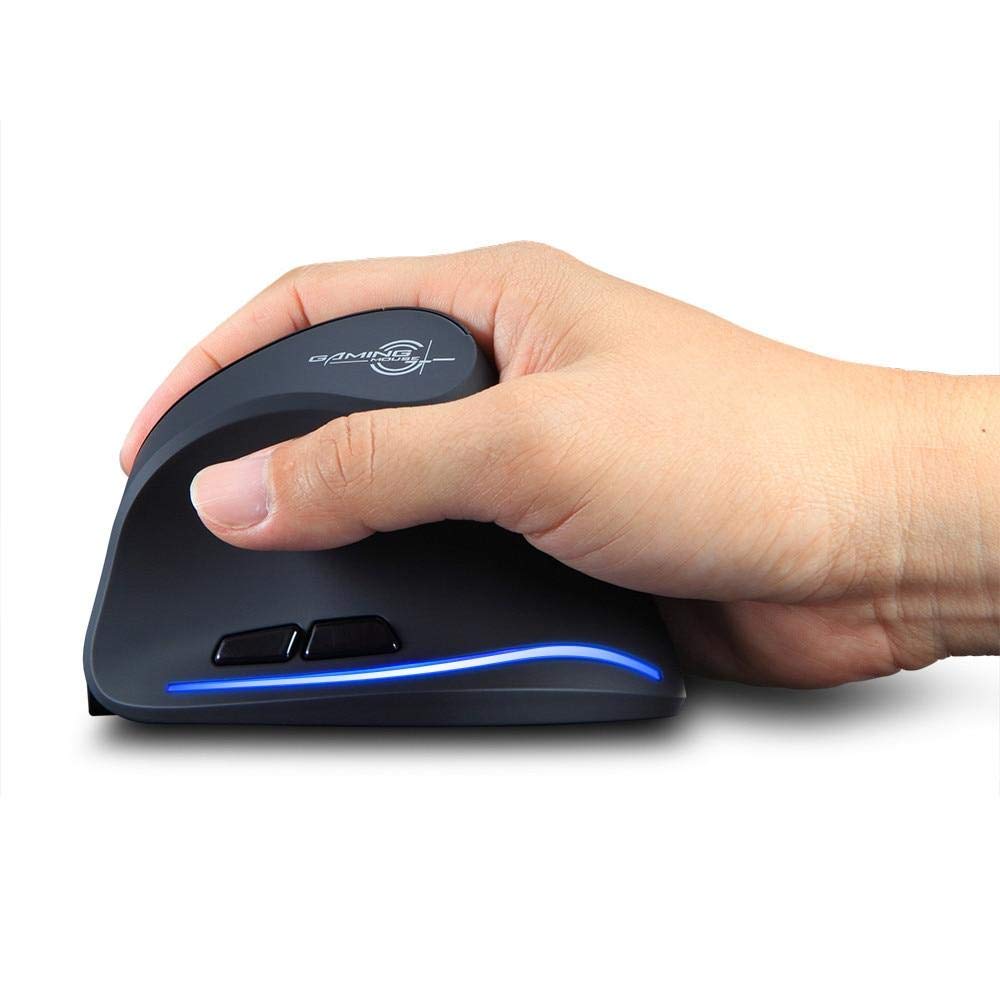
Image: The Zelotes F-35 Vertical Wireless Gaming Mouse, showcasing its unique ergonomic shape and illuminated accents.

Image: A visual comparison illustrating the natural hand position with a vertical mouse versus the twisted wrist position with a traditional horizontal mouse, highlighting the ergonomic benefits.
Istruzioni di installazione
- Accensione: Individuare l'interruttore ON/OFF nella parte inferiore del mouse e spostarlo in posizione "ON".
- Seleziona la modalità di connessione: The mouse supports three connection modes: 2.4GHz wireless (via USB dongle), Bluetooth 1, and Bluetooth 2. Use the 'Mode Switch' button on the bottom of the mouse to cycle through these options. The corresponding indicator light will illuminate.
- Connessione wireless a 2.4 GHz:
- Remove the USB receiver dongle from its storage slot on the bottom of the mouse.
- Collega il ricevitore USB a una porta USB disponibile sul tuo computer o laptop.
- Il mouse dovrebbe connettersi automaticamente.
- Connessione Bluetooth (BT1/BT2):
- Switch the mouse to either Bluetooth 1 or Bluetooth 2 mode using the 'Mode Switch'.
- Sul tuo computer o laptop, vai alle impostazioni Bluetooth e cerca nuovi dispositivi.
- Select 'Zelotes F-35' from the list of available devices to pair.

Image: The underside of the Zelotes F-35 mouse, highlighting the ON/OFF switch, mode switch, and the integrated storage slot for the 2.4GHz USB receiver dongle.
Istruzioni per l'uso
The Zelotes F-35 mouse features 6 buttons designed for intuitive control and enhanced productivity:
- Pulsante sinistro del mouse: Funzione standard di clic primario.
- Pulsante destro del mouse: Funzione di clic secondario standard.
- Rotella di scorrimento: Scroll up or down for navigation. Can also be pressed for a middle-click function.
- Pulsante di regolazione DPI: Located near the scroll wheel, press to cycle through different DPI settings (e.g., 800/1200/1600/2400) to adjust cursor sensitivity.
- Pulsante Avanti: Located on the thumb rest, typically navigates forward in web browser o file esploratori.
- Pulsante indietro: Located on the thumb rest, typically navigates backward in web browser o file esploratori.
Ricarica e batteria
The Zelotes F-35 mouse is equipped with a rechargeable battery for continuous use.
- Porta di ricarica: The mouse features a USB-C charging port, typically located at the front base of the mouse.
- Ricarica: Collegare il cavo USB-C in dotazione al mouse e l'altra estremità a una fonte di alimentazione USB (ad esempio, una porta USB del computer, un adattatore da parete).
- Indicatore della batteria: The mouse may have an indicator light to show charging status or low battery. Refer to the product packaging for specific indicator behavior.
- Durata della batteria: The average battery life is approximately 12 months, depending on usage.
Manutenzione
- Pulizia: Utilizzare un panno morbido e asciutto per pulire la superficie del mouse. Per lo sporco ostinato, un panno leggermenteamp è possibile utilizzare un panno, assicurandosi che non penetri umidità nei componenti interni.
- Cura del sensore: Mantenere pulito e libero da polvere o detriti il sensore ottico nella parte inferiore del mouse per garantire un tracciamento accurato.
- Magazzinaggio: When not in use for extended periods, turn off the mouse to conserve battery life. Store the USB receiver in its designated slot to prevent loss.
Risoluzione dei problemi
- Il mouse non risponde:
- Assicurarsi che il mouse sia acceso.
- Controllare il livello della batteria e caricarla se necessario.
- For 2.4GHz connection, ensure the USB receiver is securely plugged into the computer.
- For Bluetooth connection, ensure Bluetooth is enabled on your device and the mouse is correctly paired. Try re-pairing if issues persist.
- Tracciamento impreciso:
- Pulisci il sensore ottico nella parte inferiore del mouse.
- Assicurarsi di utilizzare il mouse su una superficie adatta (non riflettente, non in vetro).
- Regolare l'impostazione DPI su un livello confortevole.
- Cadute di connettività:
- Ensure the mouse is within the effective range of your device (typically up to 10 meters for wireless).
- Ridurre al minimo le interferenze provenienti da altri dispositivi wireless.
Specifiche
| Caratteristica | Dettaglio |
|---|---|
| Marca | Zeloti |
| Modello | L'F-35 |
| Tipo | Senza fili da 2.4 GHz, Bluetooth |
| Modalità di funzionamento | Opto-elettronico |
| Numero di pulsanti | 6 |
| Numero di rulli | 1 |
| Orientamento della mano | Giusto |
| Tipo di interfaccia | USB |
| DPI | 2400 |
| Caratteristica speciale | Ricaricabile, senza fili |
| Rilevamento del movimento | Ottico |
| Dispositivi compatibili | Computer portatile, personal computer |
| Sistema operativo | Linux, Windows 7 (and newer) |
| Durata media della batteria | 12 mesi |
| Fonte di alimentazione | Alimentato a batteria |
| Colore | Nero |
| Paese di origine | Cina |
Garanzia e supporto
For warranty information and technical support, please refer to the documentation included with your product or visit the official Zelotes websito. Puoi anche contattare il rivenditore presso il quale hai acquistato il prodotto per ricevere assistenza.