
1. Introduzione
This manual provides instructions for the Alltro Replacement Remote Control, designed for various Telefunken TV models. This remote control is a direct replacement and typically requires no programming. It offers full functionality for compatible Telefunken televisions, ensuring a seamless user experience.
2. Prodotto finitoview
The Alltro Replacement Remote Control is an ergonomic device designed for comfortable handling and intuitive operation of your Telefunken TV. It features a standard layout with dedicated buttons for power, channel selection, volume control, menu navigation, and other essential functions.

Figura 2.1: Davanti view of the Alltro Replacement Remote Control. This image displays the full button layout, including power, number keys, volume, channel, menu, and navigation buttons.
3. Impostazione
3.1. Installazione della batteria
Il telecomando richiede due batterie AAA per funzionare. Per installare le batterie, seguire questi passaggi:
- Individuare il coperchio del vano batterie sul retro del telecomando.
- Premere la linguetta e far scorrere il coperchio verso il basso per aprire il vano.
- Inserire due batterie AAA, assicurandosi che i terminali positivo (+) e negativo (-) siano allineati correttamente con le marcature all'interno del vano.
- Riposizionare il coperchio del vano batteria finché non scatta in posizione.
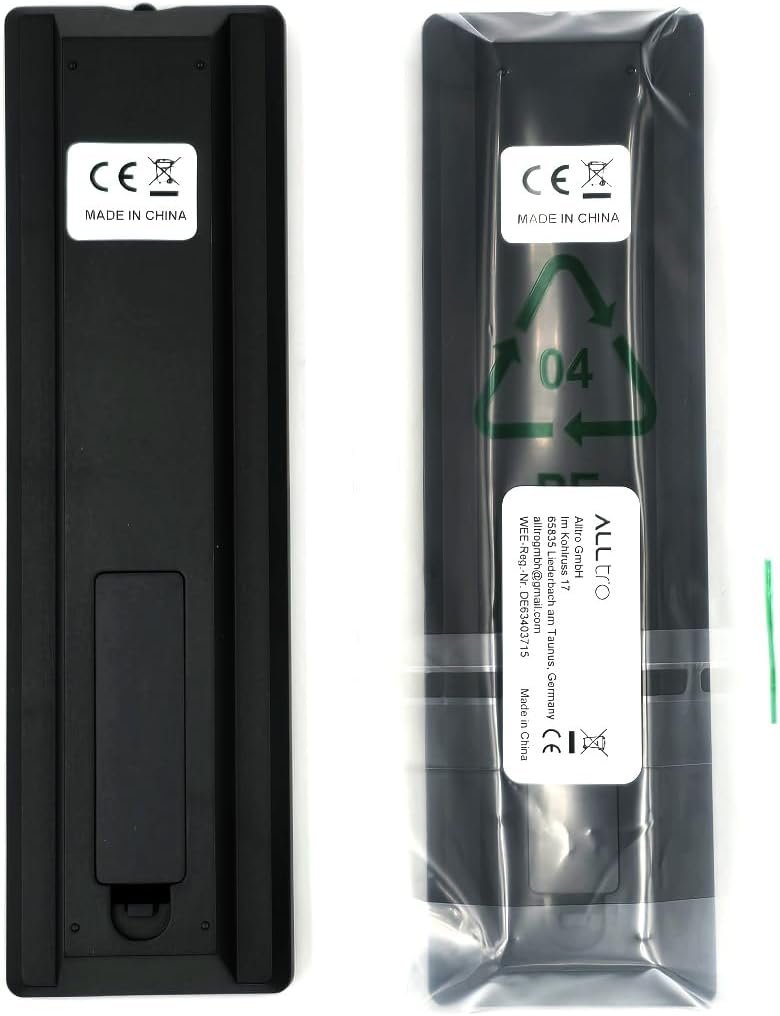
Figura 3.1: Indietro view of the Alltro Replacement Remote Control. This image shows the battery compartment cover and the overall rear design of the remote, alongside its packaging.
Nota: This remote control is designed to work immediately with compatible Telefunken TV models without any additional programming. Ensure your TV is powered on and within range (up to 10 meters) for initial testing.
4. Istruzioni per l'uso
The remote control provides standard functions for operating your Telefunken TV. Point the remote control directly at the TV's infrared sensor for optimal performance.
4.1. Funzioni di base
- Pulsante di accensione (⏻): Accende o spegne la TV.
- Tasti numerici (0-9): Seleziona direttamente i canali.
- Volume su/giù (+V / -V): Regola il volume del suono.
- Canale su/giù (+P / -P): Cambia il canale TV in sequenza.
- Pulsante muto (🔇): Disattiva o riattiva l'audio della TV.
- Pulsante MENU: Accede al menu principale del televisore.
- Pulsanti di navigazione (▲ ◀ OK ► ▼): Navigare nei menu e confermare le selezioni.
- Pulsante ESCI: Esce dal menu o dalla funzione corrente.
- Tasto indietro: Ritorna alla schermata o al canale precedente.
4.2. Funzioni avanzate
Depending on your specific Telefunken TV model, additional buttons may control features such as input selection, smart TV functions, or media playback. Refer to your TV's original manual for detailed information on these specific functions.
5. Manutenzione
5.1. Pulizia
Per pulire il telecomando, utilizzare un panno morbido e asciutto. Non utilizzare detergenti liquidi, spugnette abrasive o solventi chimici, poiché potrebbero danneggiare la superficie o i componenti interni del telecomando.
5.2. Sostituzione della batteria
Replace the batteries when the remote control's response becomes sluggish or stops working. Always replace both AAA batteries at the same time with new ones. Do not mix old and new batteries, or different types of batteries, as this can lead to leakage or malfunction.
5.3. Conservazione
If the remote control will not be used for an extended period, it is recommended to remove the batteries to prevent potential leakage and damage.
6. Risoluzione Dei Problemi
- Il telecomando non risponde:
- Assicurarsi che le batterie siano installate correttamente, rispettando la polarità corretta.
- Sostituisci le vecchie batterie con nuove batterie AAA.
- Verificare che non vi siano ostacoli tra il telecomando e il sensore a infrarossi del televisore.
- Assicurarsi di trovarsi entro il raggio operativo massimo di 10 metri.
- Verify that the remote control is compatible with your specific Telefunken TV model.
- Alcuni pulsanti non funzionano:
- This remote is a replacement and may not support all advanced functions present on some original Telefunken remotes, especially for smart TV features not common across all models.
- Clean the remote control to ensure no debris is obstructing button contacts.
7. Specifiche
| Marca | Alltro |
| Dispositivi compatibili | Telefunken Televisions (Models: L24H278N4, L24H282L4V, L24H282X4, L24H282X4V, L28H182M3, L28H272M3) |
| Tecnologia di connettività | Infrared (IR) / Radio Frequency (RF) - Note: Product data lists both, primary operation is IR. |
| Caratteristiche speciali | No Programming Required, Ergonomic Design |
| Tipo di batteria | 2 batterie AAA |
| Portata massima | 10 metri |
| Numero di pulsanti | 48 |
| Peso dell'articolo | 56 grammi |
| Dimensioni del pacco | Dimensioni: 16 x 4.5 x 1.8 cm |
8. Garanzia e supporto
Specific warranty information for this Alltro Replacement Remote Control is not provided in the product data. For warranty claims or technical support, please refer to the retailer or the manufacturer's official website if available. Keep your purchase receipt as proof of purchase.