
PROHEAR PROHEAR 036
PROHEAR Electronic Shooting Earmuffs User Manual
Modello: PROHEAR 036
Designed for optimal hearing protection and situational awareness in shooting and hunting environments.
Introduzione
The PROHEAR 036 Electronic Shooting Earmuffs are engineered to provide superior hearing protection while enhancing your ability to hear important ambient sounds. With advanced noise reduction and sound amplification technology, these earmuffs are ideal for shooting, hunting, and other noisy environments where communication and situational awareness are crucial.
Key features include a Noise Reduction Rating (NRR) of 22dB and a Signal-to-Noise Ratio (SNR) of 27dB, ultra-fast sound activated compression, 5X sound amplification, and comfortable gel ear pads designed for extended wear.
Prodotto finitoview e componenti
This diagram illustrates the main components of your PROHEAR 036 Electronic Shooting Earmuffs:
- Adjustable, Padded Headband with Metal Wire Frame: Garantisce una vestibilità sicura e confortevole per teste di diverse dimensioni.
- High-quality Rubber Paint: Provides a durable and pleasant tactile finish.
- Gel Ear Pads: Designed for enhanced comfort and a better seal, especially when wearing eyewear. Easy to clean.
- Audio Input (AUX Jack): Allows connection to external audio devices like smartphones or MP3 players.
- Ergonomic Volume Control Knobs: For easy adjustment of sound amplivelli di lificazione.
- 2 Omni-microphones: Directional microphones that help pinpoint the source of sounds.
- Luce LED: Indicates the operational status of the earmuffs.
- Cut-outs Design for Rifle Aiming: Sottile, low-profile ear cups designed to prevent interference with firearm stocks.
- Vano batteria: Located on one of the ear cups, powered by 2 AAA batteries.
Impostare
- Installazione della batteria:
Locate the battery compartment on one of the ear cups. Open the cover and insert 2 AAA batteries, ensuring correct polarity (+/-). Close the compartment securely.
Image: Detail showing the battery compartment and installation.
Nota: le batterie non sono incluse nel prodotto.
- Regolazione dell'archetto:
Extend or retract the metal wire frame on each side of the headband to achieve a snug yet comfortable fit over your head. The earmuffs should cover your ears completely without excessive pressure.
- Wearing the Earmuffs Correctly:
Position the earmuffs so that the ear cups fully enclose your ears, creating a tight seal. Ensure no hair or clothing interferes with the seal around the ear pads, as this can compromise noise reduction effectiveness. The slim profile of the ear cups is designed to allow for comfortable rifle aiming without obstruction.

Image: Proper wearing of PROHEAR earmuffs during shooting activity.
Istruzioni per l'uso
- Accensione/spegnimento e controllo del volume:
To power on the earmuffs, rotate the volume control knob clockwise. The LED indicator light will illuminate, confirming the unit is active. Continue rotating the knob clockwise to increase the amplification volume of ambient sounds. Rotate counter-clockwise to decrease volume and to power off the unit.

Image: Close-up of the volume control knob and LED indicator.
- Suono Amplificazione:
The PROHEAR 036 features 5X sound amplification, allowing you to hear low-level ambient sounds such as animal movements or conversations more clearly. The two omni-directional microphones help in accurately detecting the direction of sound sources.

Image: Illustrating the 5X sound amplification feature for improved situational awareness.
- Tecnologia di riduzione del rumore:
The earmuffs are equipped with an ultra-fast sound-activated compression system that reacts in 0.0005 seconds to suppress harmful noises above 82 dB. This protects your hearing from sudden loud impulses like gunshots while still allowing you to hear lower-level sounds.

Image: Visualizing the rapid noise suppression capability of the earmuffs.
- Using the Audio Input (AUX Jack):
Connect an external audio device (e.g., smartphone, MP3 player) to the AUX jack on the earmuffs using a 3.5mm audio cable. This allows you to listen to music or other audio content through the earmuffs while still benefiting from hearing protection.
Image: The AUX input port and its connection to an external device.
Manutenzione
- Pulizia:
Regularly wipe down the exterior of the earmuffs and the gel ear pads with a damp cloth. For the gel ear pads, use a mild soap solution if necessary, then wipe dry. Avoid using harsh chemicals or abrasive cleaners.

Image: Highlighting the easy-to-clean nature of PROHEAR gel ear pads.
- Sostituzione dei cuscinetti auricolari:
The gel ear pads are replaceable. If they become worn or damaged, gently peel them off the ear cups and replace them with new, compatible PROHEAR ear pads. Ensure the new pads are securely attached to maintain an effective seal.
- Sostituzione della batteria:
Quando il suono amplification becomes weak or the LED indicator light dims, it's time to replace the batteries. Follow the battery installation steps outlined in the "Setup" section.
- Magazzinaggio:
Store the earmuffs in a clean, dry place away from extreme temperatures and direct sunlight. Collapse the earmuffs for compact storage if applicable.
Risoluzione dei problemi
| Problema | Possibile causa | Soluzione |
|---|---|---|
| Nessun suono amplification / Unit not turning on. |
|
|
| Suono debole o distorto. |
|
|
| Scarsa riduzione del rumore. |
|
|
Specifiche
| Caratteristica | Dettaglio |
|---|---|
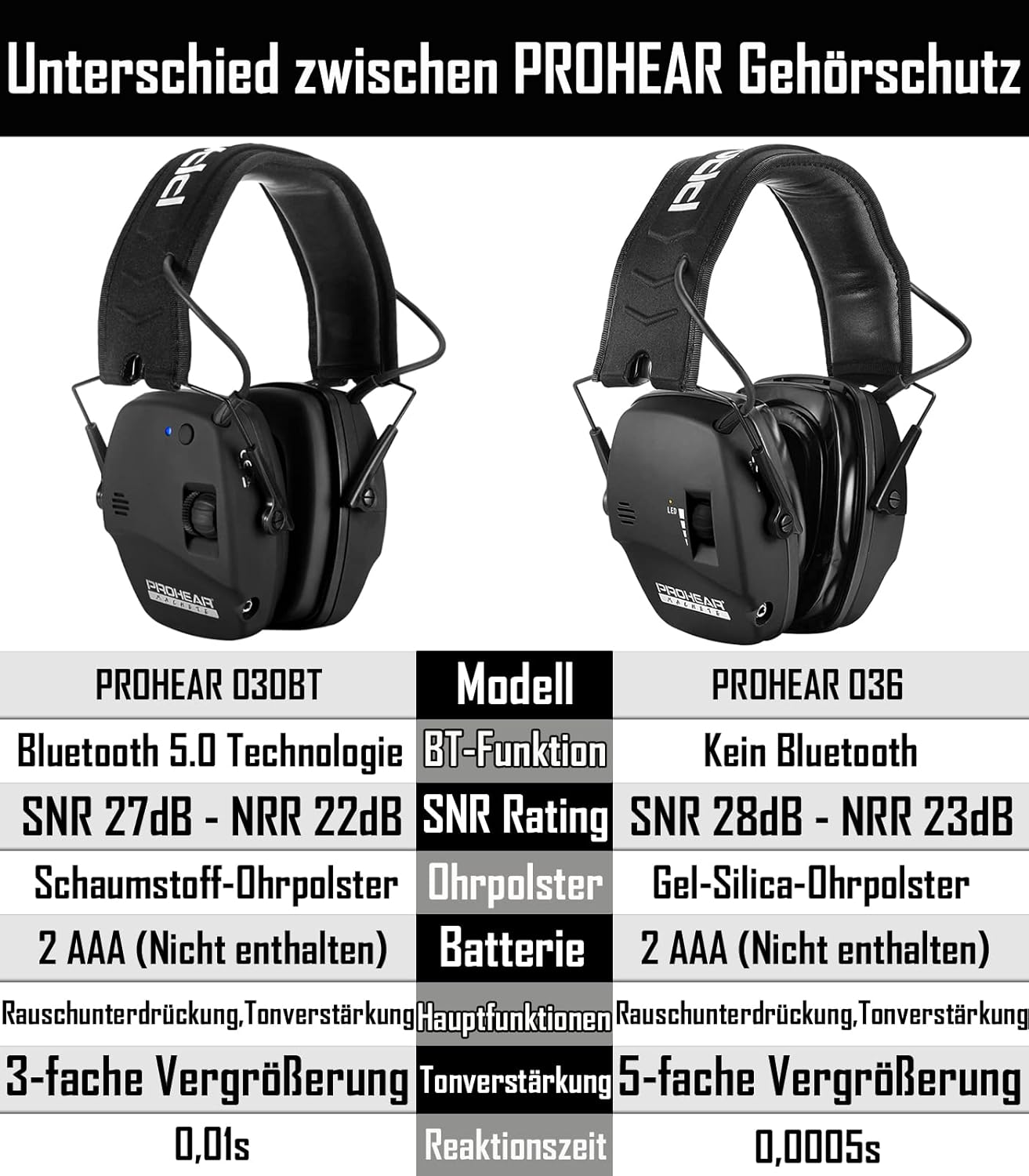
| Modello | PROHEAR 036 |
| Classificazione di riduzione del rumore (NRR) | 22 dB |
| Rapporto segnale / rumore (SNR) | 27 dB |
| Suono Amplificazione | Fino a 5X |
| Tempo di reazione | 0.0005 seconds (Sound Activated Compression) |
| Fonte di alimentazione | 2 x batterie AAA (non incluse) |
| Funzione di spegnimento automatico | 4 Hours (to conserve battery life) |
| Ear Pad Type | Gel Ear Pads (replaceable) |
| Microfoni | 2 Omni-directional Microphones |
| Ingresso audio | Jack AUX da 3.5 mm |

Image: Detailed comparison of PROHEAR 036 specifications with another model.
Garanzia e supporto
PROHEAR stands behind the quality of its products. The PROHEAR 036 Electronic Shooting Earmuffs come with a GARANZIA DI UN ANNO dalla data di acquisto.
Questa garanzia copre difetti di fabbricazione e problemi derivanti dal normale utilizzo. Non copre danni causati da uso improprio, incidenti, modifiche non autorizzate o manutenzione impropria.
For warranty claims, technical support, or any questions regarding your PROHEAR earmuffs, please contact PROHEAR customer service. Refer to the product packaging or the official PROHEAR websito per le informazioni di contatto più aggiornate.
Documenti correlati - PROHEAR 036
 |
Manuale d'uso della protezione acustica elettronica Bluetooth Prohear EM030 Manuale d'uso per la protezione acustica elettronica Bluetooth Prohear EM030, con informazioni dettagliate sulle caratteristiche, informazioni sulla sicurezza, istruzioni per l'installazione, manutenzione e garanzia. |
 |
PROHEAR EM037 Electronic Ear Muffs User Manual | Advanced Hearing Protection with Bluetooth User manual for PROHEAR EM037 Electronic Ear Muffs, detailing advanced hearing protection with Bluetooth 5.4, noise reduction (NRR 25dB, SNR 30dB), hands-free calling, wireless music, comfort features, and operation instructions. Includes manufacturer details and EU conformity information. |
 |
Manuale utente e caratteristiche delle cuffie antirumore PROHEAR EM-033 BT FM/AM Manuale d'uso dettagliato per le cuffie antirumore PROHEAR EM-033 Bluetooth, FM e AM. Illustra le caratteristiche principali, il funzionamento, la connettività Bluetooth, i dettagli del prodotto, le istruzioni per l'uso, le avvertenze di sicurezza e la manutenzione per una protezione uditiva e una riproduzione audio efficaci. |
 |
PROHEAR EM016 Passive Ear Muffs User Manual - Hearing Protection Guide Comprehensive user manual for PROHEAR EM016 passive ear muffs. Learn about fitting, noise reduction (NRR/SNR), maintenance, and safety features for effective hearing protection in loud environments. Includes technical specifications and manufacturer details. |
 |
Manuale utente delle cuffie auricolari Bluetooth FM AM PROHEAR EM-033 Manuale utente completo per le cuffie auricolari PROHEAR EM-033 Bluetooth FM AM, che descrive in dettaglio le caratteristiche, il funzionamento, la connettività Bluetooth, le informazioni sulla garanzia e la conformità FCC. |
 |
Manuale utente delle cuffie antirumore Bluetooth PROHEAR EM037 Manuale utente per le cuffie antirumore Bluetooth PROHEAR EM037, che descrive in dettaglio le caratteristiche principali, il funzionamento di base, la connettività Bluetooth, la modalità di ingresso audio e le informazioni sulla garanzia. |
Ask a question about this manual
Ask about setup, troubleshooting, compatibility, parts, safety, or missing instructions. Manuals+ will review the question and use this page’s manual context to help answer it.