
1. Introduzione
This manual provides detailed instructions for the installation, operation, and maintenance of your ESX VN715-E39-DAB In-Car Navigation and Multimedia System. Please read this manual thoroughly before using the device to ensure proper functionality and to prevent damage. Keep this manual for future reference.
2. Prodotto finitoview e Caratteristiche
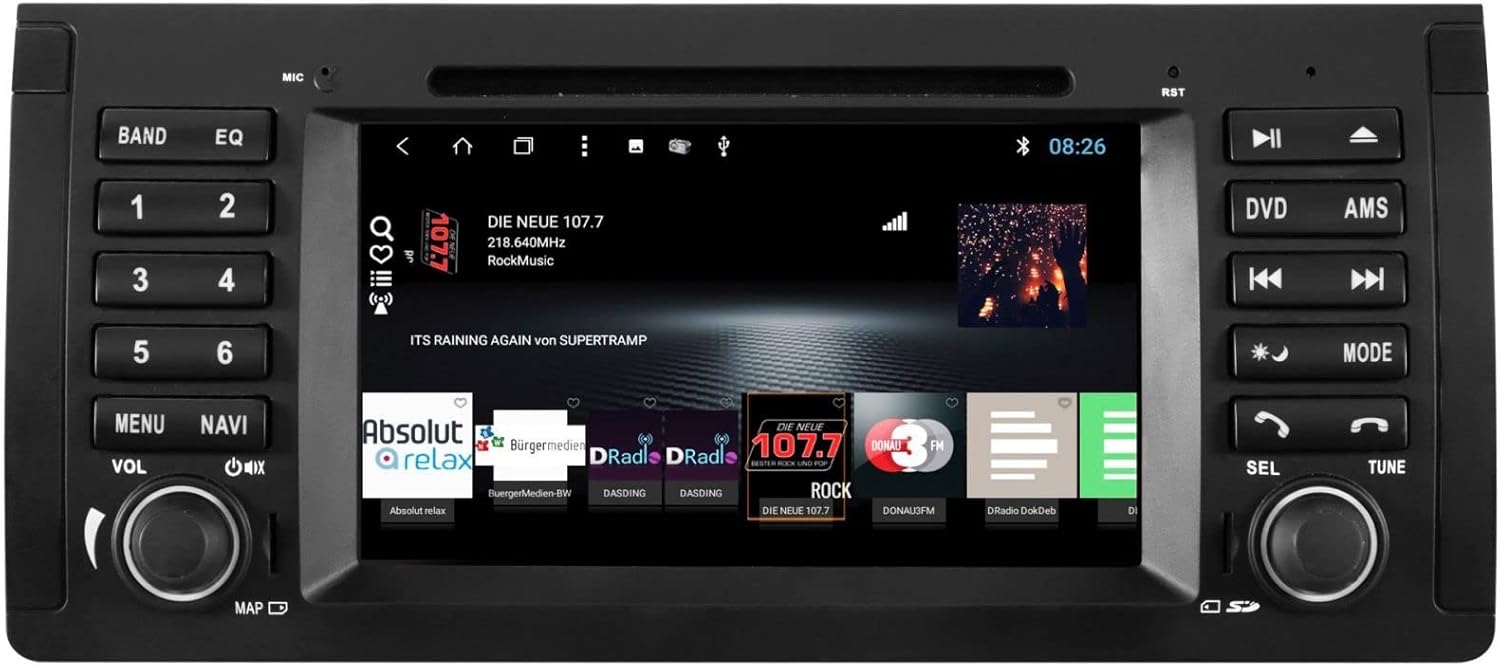
The ESX VN715-E39-DAB is an advanced in-car multimedia system designed to enhance your driving experience with navigation, entertainment, and connectivity features. It integrates seamlessly into compatible BMW vehicles.
Caratteristiche principali:
- High-Resolution 8-inch Touchscreen: Fornisce immagini chiare e controllo intuitivo.
- Advanced Android i15 Operating System: Offers a familiar and customizable user interface.
- Google Maps Navigation: Supports both online and offline navigation for reliable route guidance.
- Mobile Internet Connectivity: Connects via Wi-Fi hotspot for online services.
- Radio digitale DAB+: Includes a DAB antenna for high-quality digital radio reception with station logos.
- Radio AM/FM con RDS: Standard analog radio reception with Radio Data System functionality.
- Multi-format DVD Player: Supports DVD, DVD-R/RW, DVD+R/RW, VCD, CD, CD Text, CD-R/RW, and MP3 formats.
- Bluetooth Hands-Free Kit: Enables safe phone calls and audio streaming with an internal microphone and optional external microphone connection.
- Integrazione smartphone: Connect iPhone or Android smartphones via USB for various functions.
- Controllo vocale: Utilize voice commands through a connected smartphone.
- Uscite audio: Pre-amplifier outputs for front, rear, subwoofer, and center channels.
- Ingresso telecamera: One adjustable camera input for reverse cameras.
- Ingressi/uscite ausiliari: One AUX video input, two audio/video outputs, and one AUX audio input.
- Porte USB: Two USB ports for media and connectivity.
- Slot per scheda microSD: Dedicated slot for navigation data and media files.
- Personalizzazione: Personalize with customizable logos and wallpapers.
- Authenticity Certificate: Included with the product.
3. Configurazione e installazione
Installation of the ESX VN715-E39-DAB system requires technical knowledge and should ideally be performed by a qualified professional. Incorrect installation can lead to damage to the device or vehicle electrical system.
Compatibilità:
This unit is compatible with specific BMW models and connector types:
- BMW 5 Series E39 (1996-2001) with 17-pin system connector.
- BMW 5 Series E39 (2002-2003) with 40-pin system connector.
- BMW X5 E53 (2000-2001) with 17-pin system connector.
- BMW X5 E53 (2002-2007) with 40-pin system connector.
- BMW M5 (1996-2003) with 17/40-pin system connector.
Fasi generali di installazione (si consiglia l'installazione professionale):
- Scollegare la batteria: Prima di iniziare qualsiasi lavoro elettrico, scollegare sempre la batteria del veicolo.
- Rimuovi unità esistente: Carefully remove the factory radio or navigation system from the dashboard.
- Collegare il cablaggio: Connect the appropriate wiring harness (17-pin or 40-pin) to the vehicle's electrical system and the ESX unit. Ensure all connections are secure.
- Collegare le antenne: Connect the GPS antenna, DAB antenna, and radio antenna to their respective ports on the unit. Position the antennas for optimal reception.
- Connetti le periferiche: Connect any optional accessories such as a reverse camera, external microphone, USB devices, or auxiliary inputs/outputs.
- Montare l'unità: Securely mount the ESX unit into the dashboard opening.
- Ricollegare la batteria: Ricollegare la batteria del veicolo e testare il sistema.

4. Istruzioni per l'uso
Familiarize yourself with the touchscreen interface and physical buttons for optimal use.
4.1 Funzionamento di base
- Accensione/spegnimento: Press and hold the power button (usually the VOL knob) to turn the unit on or off. A short press typically mutes or unmutes the audio.
- Controllo del volume: Ruotare la manopola VOL per regolare il volume audio.
- Interfaccia touchscreen: È possibile navigare tra i menu e le applicazioni toccando, scorrendo e pizzicando sul touchscreen da 8 pollici.

4.2 Navigazione
Access the navigation application (e.g., Google Maps) from the home screen. Input your destination, and the system will provide turn-by-turn directions. Ensure GPS antenna is properly connected for accurate positioning.

4.3 Radio (DAB+/AM/FM)
- Seleziona modalità: Tap the 'Radio' or 'DAB+' icon on the home screen or press the 'BAND' button.
- Stazioni di scansione: Use the 'AMS' (Auto Memory Store) button or on-screen controls to scan and save available stations.
- Sintonia: Manually tune using the 'TUNE' knob or on-screen frequency controls.
- Preselezioni: Save your favorite stations to preset buttons (1-6) for quick access.

4.4 Connettività Bluetooth
- Abbinamento: Go to the Bluetooth settings on the unit and your smartphone. Cercare available devices and select 'ESX VN715-E39-DAB'. Enter the PIN if prompted (usually '0000' or '1234').
- Chiamate in vivavoce: Una volta effettuata l'associazione, è possibile effettuare e ricevere chiamate direttamente tramite l'unità.
- Streaming audio: Play music from your smartphone via Bluetooth A2DP.
4.5 Riproduzione multimediale (DVD/USB/SD)
- DVD: Insert a DVD into the disc slot. The system will automatically switch to DVD mode or prompt you to select it.
- USB/SD: Insert a USB drive into a USB port or an SD card into the Micro SD slot. Access media files through the 'Media' or 'File Explorer' application.
5. Manutenzione
Regular maintenance ensures the longevity and optimal performance of your ESX VN715-E39-DAB system.
- Pulizia dello schermo: Utilizzare un panno morbido e privo di lanugine per pulire delicatamente il touchscreen. Per le macchie ostinate, strofinare leggermenteampPulisci il panno con acqua o un detergente per schermi. Evita prodotti chimici aggressivi.
- Aggiornamenti software: Controllare periodicamente la presenza di aggiornamenti software dal sito ufficiale del produttore website or through the unit's system settings (if available) to ensure you have the latest features and bug fixes.
- Disc Drive Care: Keep the DVD slot free of dust and debris. Avoid inserting damaged or non-standard discs.
6. Risoluzione Dei Problemi
Se riscontri problemi con la tua unità, fai riferimento ai seguenti passaggi comuni per la risoluzione dei problemi:
| Problema | Possibile causa | Soluzione |
|---|---|---|
| Nessun potere | Collegamento elettrico allentato, fusibile bruciato, problema alla batteria del veicolo. | Controllare i cavi di alimentazione e il fusibile. Assicurarsi che la batteria del veicolo sia carica. Consultare un professionista se il problema persiste. |
| Nessun suono | Volume muted, speaker wires disconnected, incorrect audio source. | Check volume level and mute status. Verify speaker connections. Select the correct audio source. |
| Segnale GPS perso | GPS antenna improperly connected or obstructed, unit in an area with poor satellite reception. | Assicurarsi che l'antenna GPS sia collegata saldamente e abbia una visuale libera view del cielo. Spostatevi in un'area aperta. |
| Errore di associazione Bluetooth | Bluetooth not enabled on device, incorrect PIN, device out of range. | Ensure Bluetooth is active on both devices. Re-enter PIN. Bring devices closer. Restart both devices. |
| Touchscreen non responsivo | Il sistema si blocca, sporco sullo schermo. | Perform a soft reset (refer to device settings or power cycle). Clean the screen. |
Se questi passaggi non risolvono il problema, contattare l'assistenza clienti o un tecnico qualificato.
7. Specifiche
Detailed technical specifications for the ESX VN715-E39-DAB unit:
- Marca: ESX
- Modello: VN715-E39-DAB
- Dimensioni dello schermo: 8 pollici
- Tipo di visualizzazione: LCD
- Sistema operativo: Android i15
- Tecnologia di connettività: Bluetooth, USB, Wi-Fi (via hotspot)
- Tipo di media: DVD, DVD-R/RW, DVD+R/RW, VCD, CD, CD Text, CD-R/RW, MP3, USB, Micro SD
- Sintonizzatore radio: DAB+, AM/FM with RDS
- Navigazione: Google Maps (online/offline)
- Compatibilità: BMW 5 Series E39 (1996-2003), BMW X5 E53 (2000-2007), BMW M5 (1996-2003)
- Origine: Cina
8. Garanzia e supporto
For warranty information, please refer to the documentation provided with your purchase or contact your retailer. For technical support, please visit the official ESX website or contact their customer service department. Ensure you have your model number (VN715-E39-DAB) and proof of purchase available when seeking support.