
Liebert GXT5-2000LVRT2UXL
Manuale utente dell'UPS Vertiv Liebert GXT5
Model: GXT5-2000LVRT2UXL | Brand: Liebert
1. Introduzione
The Vertiv Liebert GXT5 UPS is an advanced Uninterruptible Power Supply designed to provide reliable power protection for critical IT infrastructure. Featuring online double conversion technology, it safeguards equipment against power outages and disturbances, ensuring continuous operation and extending battery life. This 2000VA/1800W 120V unit is Energy Star 2.0 certified, offering high efficiency in both standard and eco-modes. Its versatile design allows for both rack and tower installations, and it includes hot-swappable batteries for easy maintenance. The user-friendly colored LCD provides comprehensive status and control options.
2. Configurazione e installazione
2.1 Disimballaggio e ispezione
Carefully unpack the UPS and all accessories. Inspect for any shipping damage. Retain all packaging materials for future use.


2.2 Rack or Tower Installation
The GXT5 UPS can be installed in a standard 19-inch equipment rack or configured as a tower unit using the included base. Ensure proper ventilation around the unit.
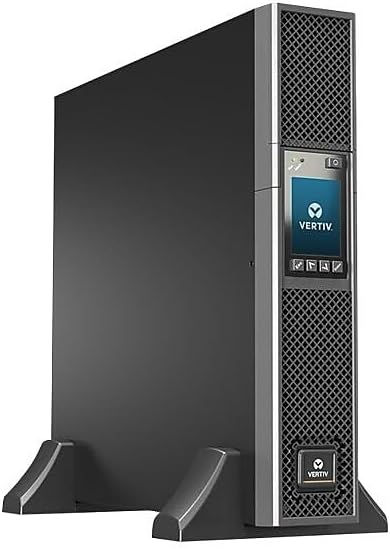
2.3 Collegamento dell'UPS
Connect the UPS to a suitable power source. The unit supports 110/115/120/125V AC power environments. Utilize the provided power cables and adapters as needed. Connect your critical equipment to the output receptacles on the rear panel.


2.4 Accensione iniziale
After all connections are secure, press the power button on the front panel to turn on the UPS. The colored LCD will guide you through the initial setup process, including language, temperature unit, and output voltage impostazioni.

2.5 Configurazione terminataview Video
For a visual guide on unpacking, physical setup, and initial configuration, please watch the official product video below.
Video 2.1: Vertiv Liebert GXT5 Product Overview and Setup. This video demonstrates the physical aspects of the UPS, including unboxing and initial interface navigation.
3. Funzionamento
3.1 Front Panel Display and Navigation
The GXT5 features a colored LCD that provides real-time status updates and allows for configuration changes. Use the navigation buttons (Esc, Up, Down, Enter) to browse menus and adjust settings. The display shows input/output voltage, livello di carica della batteria, percentuale di caricotage, and alarm status.
3.2 Programmable Output Sockets
The UPS includes four individual programmable output receptacles. These can be configured to control and manage connected devices, optimizing battery usage during power outages. Non-critical loads can be automatically shut down to extend runtime for essential equipment.
4. Manutenzione
4.1 Sostituzione della batteria
The GXT5 UPS features hot-swappable batteries, allowing for replacement without powering down connected equipment. To replace batteries, locate the battery compartment on the front of the unit. Follow the instructions in the full user guide for safe removal and installation. Always ensure the replacement batteries are compatible with the GXT5 model.

4.2 Pulizia e cura
Regularly clean the exterior of the UPS with a soft, dry cloth. Ensure ventilation openings are free from dust and debris to maintain optimal airflow and prevent overheating. Do not use liquid cleaners or solvents.
5. Risoluzione Dei Problemi
If the UPS is not functioning as expected, refer to the following common issues:
- Nessuna alimentazione/Nessun display: Check the input power connection and ensure the circuit breaker is not tripped. Verify the power cable is securely connected.
- Allarme sonoro: The alarm indicates a detected issue (e.g., battery low, overload, fault). Check the LCD for specific error messages and consult the full user guide for corresponding solutions.
- Tempo di esecuzione breve: This may indicate aging batteries. Consider replacing the battery pack if the UPS does not provide adequate backup time after a full charge.
- Avviso di sovraccarico: Disconnect non-critical loads to reduce the total power draw. Ensure the total load does not exceed the UPS's capacity.
For detailed troubleshooting steps and error code explanations, please consult the comprehensive user guide.
6. Specifiche
| Caratteristica | Dettaglio |
|---|---|
| Dimensioni del prodotto | 18.6 x 16.9 x 3.3 pollici |
| Peso dell'articolo | 58.7 libbre |
| Numero modello articolo | GXT5-2000LVRT2UXL |
| Marca | Lieberto |
| Composizione delle celle della batteria | Piombo acido sigillato |
| Voltage | 120 Volt |
| Colore | Nero |
| Materiale | Metallo |
| Produttore | Vertice |
| Paese di origine | Cina |
| Data prima disponibilità | 5 giugno 2019 |
7. Garanzia e supporto
7.1 Informazioni sulla garanzia
The Vertiv Liebert GXT5 UPS comes with a three-year factory warranty. Please retain your proof of purchase for warranty claims. For detailed terms and conditions, refer to the official warranty document included with your product or available on the manufacturer's websito.
7.2 Supporto aggiuntivo
For comprehensive information, detailed installation instructions, and advanced configuration options, please download the official User Guide (PDF): Vertiv Liebert GXT5 User Guide
For technical assistance or customer service, please contact Liebert support directly.
Ask a question about this manual
Ask about setup, troubleshooting, compatibility, parts, safety, or missing instructions. Manuals+ will review the question and use this page’s manual context to help answer it.