
1. Finitaview
The Apple iPad Mini (2019) is a compact and powerful tablet designed for portability and performance. It features a 7.9-inch Retina Display with True Tone technology, providing vibrant colors and comfortable viewing. Powered by the A12 Bionic chip, it offers fast and efficient performance for various tasks, from browsing to gaming.
Le caratteristiche principali includono:
- 7.9-inch Retina Display with True Tone and wide Color
- A12 Bionic chip with Neural Engine
- Touch ID fingerprint sensor for secure authentication
- 8MP back camera and 7MP FaceTime HD front camera
- Stereo speakers for immersive audio
- 802.11ac Wi-Fi connectivity
- Fino a 10 ore di durata della batteria
- Lightning connector for charging and accessories
- Support for Apple Pencil (1st Generation)
- iPadOS 14 for enhanced tablet experience

Image 1.1: The Apple iPad Mini (2019) in Space Gray, showcasingrazie al suo design compatto e al suo display.
2. Cosa c'è nella scatola
Upon opening your iPad Mini package, ensure all the following items are present:
- iPad mini (2019)
- Cavo da Lightning a USB
- USB Power Adapter
3. Impostazione
3.1. Carica iniziale
Before first use, it is recommended to fully charge your iPad Mini. Connect the Lightning to USB Cable to the iPad's Lightning port and the USB Power Adapter, then plug the adapter into a power outlet.
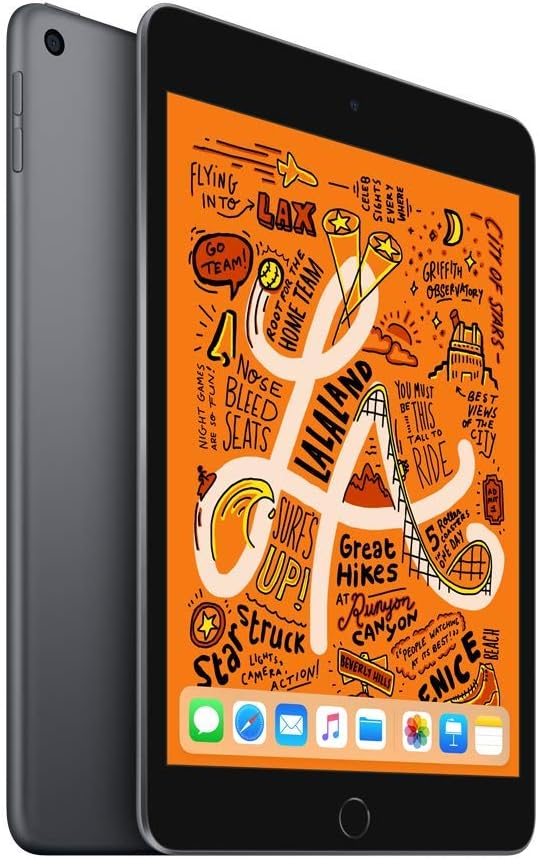
Immagine 3.1: anteriore view of the iPad Mini, ready for initial setup.
3.2. Power On and Basic Configuration
- Premere e tenere premuto il tasto Pulsante in alto finché non appare il logo Apple.
- Segui le istruzioni visualizzate sullo schermo per selezionare la lingua e la regione.
- Connettersi a una rete Wi-Fi.
- Impostare Identificazione tramite tocco by following the prompts to register your fingerprint.
- Create a passcode.
- Restore from an iCloud or computer backup, or set up as a new iPad.
- Accedi con il tuo ID Apple o creane uno nuovo.
- Enable or disable location services, Siri, and other features as desired.
4. Utilizzo dell'iPad Mini
4.1. Navigazione di base
- Pulsante Home: Press once to return to the Home screen. Double-press to open the App Switcher. Press and hold to activate Siri.
- Gesti: Swipe down from the top-right corner for Control Center. Swipe down from the middle of the screen for Search. Swipe up from the bottom to go home (if using gestures instead of Home button).

Image 4.1: The iPad Mini display showing a vibrant interface.
4.2. Connessione al Wi-Fi
- Vai a Impostazioni > Wifi.
- Attiva il Wi-Fi.
- Seleziona la rete desiderata dall'elenco.
- Inserisci la password se richiesta, quindi tocca Giuntura.
4.3. Utilizzo della fotocamera
Aprire il Telecamera app from the Home screen. Tap the shutter button to take a photo. Swipe left or right to switch between photo, video, panorama, and other modes. Tap the camera icon to switch between the front and back cameras.
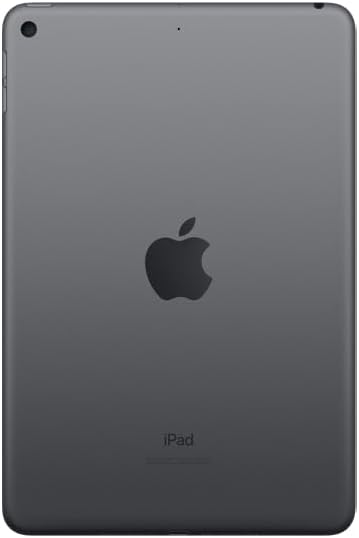
Immagine 4.2: posteriore view of the iPad Mini, highlighting the back camera.
4.4. Apple Pencil (1st Generation)
The iPad Mini (2019) supports the first-generation Apple Pencil. To pair, remove the cap from your Apple Pencil and plug it into the Lightning connector on your iPad. Tap Paio when the Bluetooth Pairing Request appears. Once paired, you can use it for drawing, note-taking, and more.
5. Manutenzione
5.1. Cleaning Your iPad Mini
To clean your iPad Mini, use a soft, lint-free cloth. Avoid abrasive cloths, towels, paper towels, or similar items that could scratch the screen. Do not use aerosol sprays, solvents, or abrasives. Unplug all cables and power off the device before cleaning.
5.2. Aggiornamenti software
Keep your iPad Mini's software up to date to ensure optimal performance and security. Go to Impostazioni > Generale > Aggiornamento software. If an update is available, follow the on-screen instructions to download and install it.
5.3. Cura della batteria
To maximize battery lifespan, avoid exposing your iPad to extreme temperatures. For long-term storage, charge the device to about 50% and power it off. Recharge it to 50% every six months.
5.4. Gestione dell'archiviazione
To check and manage your storage, go to Impostazioni > Generale > Archiviazione iPad. You can offload unused apps, delete large files, or move photos and videos to iCloud to free up space.
6. Risoluzione Dei Problemi
6.1. Il dispositivo non risponde
If your iPad Mini is unresponsive, try a force restart:
- Premere e tenere premuti entrambi i tasti Pulsante in alto e il Pulsante Home simultaneamente.
- Continue holding until you see the Apple logo.
- Release both buttons and allow the iPad to restart.
6.2. Problemi di connessione Wi-Fi
If you are experiencing Wi-Fi connectivity problems:
- Assicurati che il Wi-Fi sia abilitato in Impostazioni > Wifi.
- Riavvia il router Wi-Fi.
- Dimentica la rete e riconnettiti: Vai a Impostazioni > Wifi, tocca il icona informativa next to your network, then tap Dimentica questa rete. Rejoin the network.
- Ripristina impostazioni di rete: vai a Impostazioni > Generale > Trasferisci o ripristina iPad > Reset > Ripristina impostazioni di rete. This will reset all network settings, including Wi-Fi passwords.
6.3. Arresto anomalo o blocco dell'app
If an app is not working correctly:
- Force quit the app: Double-press the Home button to open the App Switcher, then swipe up on the app's preview to close it. Reopen the app.
- Update the app: Check the App Store for updates to the problematic app.
- Reinstall the app: Delete the app from your iPad and then download it again from the App Store.
7. Specifiche
| Nome del modello | iPad mini |
| Numero modello articolo | MUQW2LL/A |
| Display | 7.9-inch Retina display with True Tone |
| Risoluzione dello schermo | 2048 x 1536 pixel |
| Chip | A12 Bionic chip with Neural Engine |
| Capacità di archiviazione | 64 GB |
| Fotocamera posteriore | 8MP with HDR and 1080p HD video |
| Fotocamera frontale | 7MP FaceTime HD with Auto HDR |
| Durata della batteria | Up to 10 hours (Wi-Fi browsing) |
| Connettore | Fulmine |
| Dimensioni (A x L x P) | 8 x 5.3 x 0.24 pollici (203.2 x 134.8 x 6.1 mm) |
| Peso | 0.66 pound (300.5 grams) Wi-Fi model |
| Data di rilascio | 18 marzo 2019 |
8. Garanzia e supporto
8.1. Informazioni sulla garanzia
Your Apple iPad Mini (2019) is covered by Apple's standard limited warranty, which typically covers manufacturing defects for one year from the original purchase date. For detailed warranty terms and conditions, please refer to the official Apple warranty documentation included with your product or visit the Apple websito.
8.2. Assistenza clienti
For further assistance, technical support, or service, please visit the official Apple Support websito:
You can find articles, troubleshooting guides, and contact options for Apple support specialists on their websito.