
Importanti istruzioni di sicurezza
To ensure safe operation and prolong the life of your monitor, please read and follow these instructions carefully:
- Prima di pulire il monitor, scollegare sempre il cavo di alimentazione dalla presa elettrica.
- Non esporre il monitor alla pioggia o all'umidità per evitare scosse elettriche.
- Assicurare una ventilazione adeguata attorno al monitor per evitare il surriscaldamento. Non ostruire le aperture di ventilazione.
- Utilizzare solo l'adattatore di alimentazione e i cavi forniti dal produttore.
- Evitare di posizionare oggetti pesanti sul cavo di alimentazione o sul monitor.
- If the monitor is damaged or malfunctions, do not attempt to repair it yourself. Contact qualified service personnel.
Contenuto della confezione
Before proceeding with the setup, please check the contents of your package to ensure all items are present:
- Acer CB272U smiiprx LED Monitor
- Supporto per monitor (base e braccio)
- Cavo di alimentazione
- Cavo HDMI
- Guida rapida / Scheda di garanzia
Impostare
1. Assemblaggio del supporto del monitor
- Carefully remove the monitor from its packaging. Place the monitor face down on a soft, clean cloth or surface to prevent scratches to the screen.
- Attach the stand arm to the back of the monitor panel. Ensure it is securely fastened, typically by sliding it into place until it clicks or by tightening screws.
- Connect the stand base to the bottom of the stand arm. Secure the base by tightening the captive screw located underneath the base.

Figura 1: Posteriore view of the Acer CB272U smiiprx monitor with the stand attached, illustrating the assembly points.
2. Connecting the Monitor to Your Computer
- Connect one end of the provided HDMI cable to the HDMI port on the monitor.
- Connect the other end of the HDMI cable to the HDMI output port on your computer or graphics card.
- Plug the power cord into the monitor's power input, then plug the other end into a grounded electrical outlet.

Figura 2: Parte posteriore angolata view showing the input ports of the monitor, including HDMI and power connections.
Funzionamento del monitor
Accensione e spegnimento
Locate the power button on the monitor's bezel. Press it once to turn the monitor on. The power indicator light will illuminate. Press it again to turn the monitor off.
Adjusting Display Settings (OSD Menu)
The On-Screen Display (OSD) menu allows you to customize various monitor settings. Use the control buttons (usually located on the back or bottom right of the monitor) to navigate the OSD menu. Common adjustments include:
- Luminosità/Contrasto: Regola la luminosità complessiva e la differenza tra aree chiare e scure.
- Impostazioni colore: Modifica la temperatura del colore, la gamma e i singoli livelli RGB.
- Sorgente di input: Manually select the video input (e.g., HDMI).
- Audio: Control volume for the built-in speakers.
Regolazioni ergonomiche
The Acer CB272U smiiprx monitor stand offers multiple ergonomic adjustments to optimize your viewcomfort:
- Regolazione dell'altezza: Sollevare o abbassare il monitor all'altezza degli occhi.
- Inclinazione: Adjust the screen angle forward or backward to reduce glare.
- Girevole: Rotate the monitor horizontally to share your screen or adjust viewangolo di ing.
- Perno: Rotate the screen to a portrait orientation for document viewing o codifica.
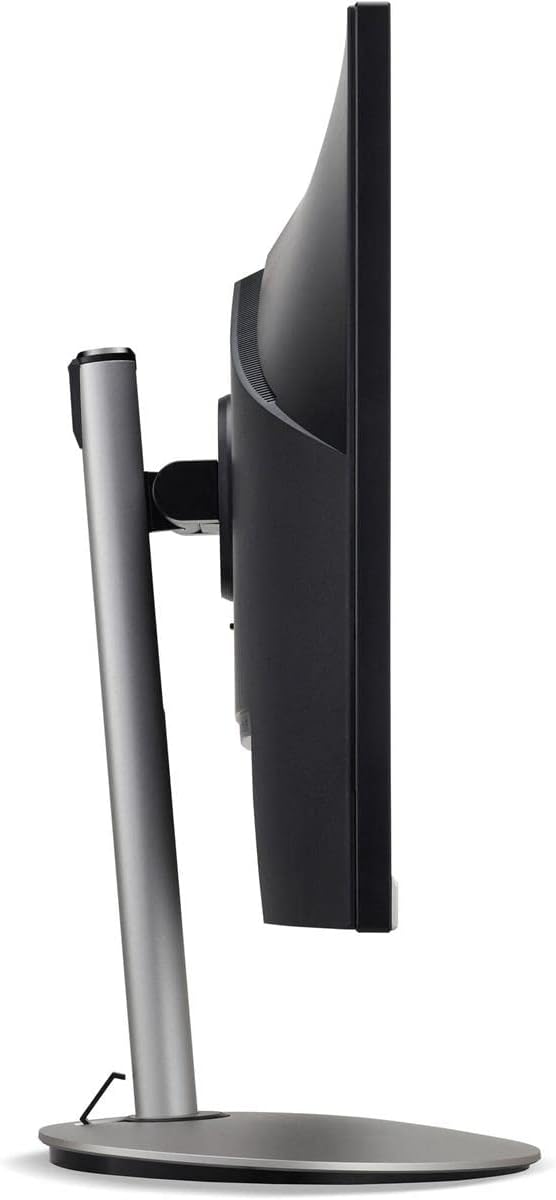
Figura 3: Prospettiva lateralefile of the monitor, illustrating its adjustable stand for ergonomic positioning.
Manutenzione
Cleaning the Monitor Screen and Casing
To clean your monitor, first ensure it is turned off and unplugged from the power outlet. Use a soft, lint-free cloth. For stubborn marks, lightly dampen the cloth with water or a specialized non-abrasive screen cleaner. Do not spray liquid directly onto the screen or casing. Evitare l'uso di prodotti chimici aggressivi, detergenti abrasivi o solventi.
Linee guida per l'archiviazione
If you need to store the monitor for an extended period, it is recommended to use its original packaging to protect it from dust, moisture, and physical damage. Store in a cool, dry environment away from direct sunlight and extreme temperatures.
Risoluzione dei problemi
Per i problemi più comuni e le relative soluzioni, fare riferimento alla tabella sottostante:
| Problema | Possibile causa | Soluzione |
|---|---|---|
| Nessuna immagine sullo schermo | Cavo di alimentazione scollegato; Cavo video scollegato; Sorgente di ingresso selezionata non corretta. | Check power and video cable connections; Ensure the monitor is powered on; Select the correct input source via the OSD menu. |
| L'immagine è sfocata o distorta | Incorrect resolution setting; Faulty video cable. | Set the display resolution to 2560 x 1440 at 75 Hz; Try a different HDMI cable. |
| Nessun suono dagli altoparlanti | Monitor volume too low or muted; Incorrect audio output selected on computer. | Adjust monitor volume via OSD; Unmute audio; Select the monitor as the audio output device in your computer's sound settings. |
| Il monitor sfarfalla | Refresh rate mismatch; Interference; Faulty cable. | Ensure refresh rate is set to 75 Hz; Check for nearby electronic devices causing interference; Replace video cable. |
Specifiche
Key technical specifications for the Acer CB272U smiiprx LED Monitor:
| Caratteristica | Dettaglio |
|---|---|
| Nome del modello | CB272U smiiprx |
| Dimensioni dello schermo | 24.1 pollici |
| Risoluzione nativa | 2560x1440 (WQHD) |
| Frequenza di aggiornamento | Frequenza 75 Hz |
| Tempo di risposta | 1 Millisecond (VRB) |
| Proporzioni | 16:9 |
| Tipo di visualizzazione | LED-backlit LCD / TFT active matrix (IPS) |
| Luminosità | 350 cd/m² |
| Rapporto di contrasto | 1000:1 (statico) |
| Connettività | Cavo HDMI |
| Sincronizzazione adattiva | Sincronizzazione gratuita |
| Altoparlanti incorporati | SÌ |
| Dimensions (WxDxH with stand) | 24.1 pollici x 9.2 pollici x 20.5 pollici |
| Peso (con supporto) | 18.1 libbre |

Figure 4: Monitor dimensions with stand, indicating width, depth, and height.
Informazioni sulla garanzia
The Acer CB272U smiiprx LED Monitor comes with a Garanzia limitata del produttore di 3 anno. This warranty covers defects in materials and workmanship under normal use. For complete details regarding warranty coverage, limitations, and how to make a claim, please refer to the warranty documentation included with your product or visit the official Acer support websito.
Conservare la prova d'acquisto (scontrino o fattura) poiché sarà necessaria per qualsiasi intervento di garanzia.
Assistenza clienti
Should you require further assistance, technical support, or wish to download the latest drivers and firmware updates for your monitor, please visit the official Acer support websito:
You can also find contact information for Acer customer service in your region on the support websito per assistenza personalizzata.