
1. Introduzione
Thank you for choosing the Protmex PT2800U Weather Station. This device provides accurate indoor and outdoor temperature and humidity readings, barometric pressure, and a weather forecast. It features a colorful LCD display for easy readability. Please read this manual carefully before operating the device to ensure proper use and to maximize its lifespan.
2. Contenuto della confezione
- Protmex PT2800U Main Unit (Receiver)
- Wireless Outdoor Sensor (Transmitter)
- Adattatore di alimentazione (CC 5V)
- Manuale d'uso
3. Prodotto finitoview
3.1 Main Unit and Wireless Sensor
The Protmex PT2800U Weather Station consists of a main display unit and a wireless outdoor sensor. The main unit displays all weather data, time, and forecast, while the sensor collects outdoor temperature and humidity data and transmits it wirelessly to the main unit.
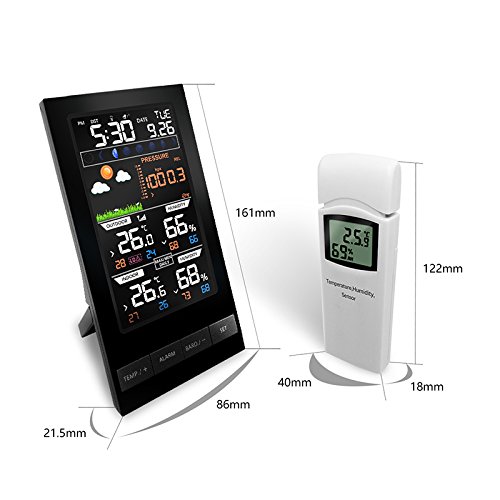
Figura 1: Protmex PT2800U Weather Station main unit and wireless sensor with dimensions. The main unit measures approximately 161mm in height and 86mm in width. The sensor measures approximately 122mm in height and 40mm in width.
3.2 Main Unit Features (Rear View)
The rear of the main unit includes essential ports and features for operation and placement.
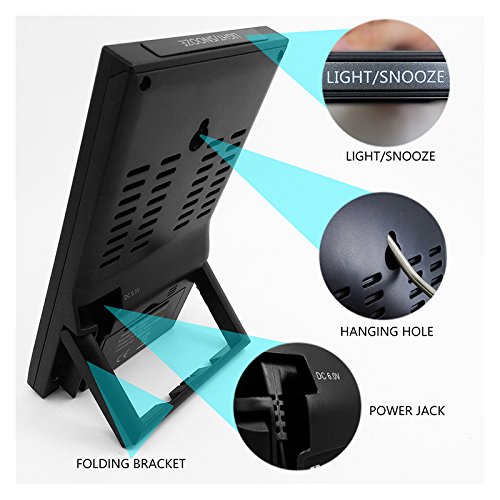
Figura 2: Posteriore view of the main unit. Key features include the DC 5V power jack, a folding bracket for tabletop placement, and the LIGHT/SNOOZE button located on the top edge. A hanging hole is also visible for wall mounting.
3.3 Battery Compartments and Hanging Holes
Both the main unit and the wireless sensor require batteries for operation and feature hanging holes for flexible placement.
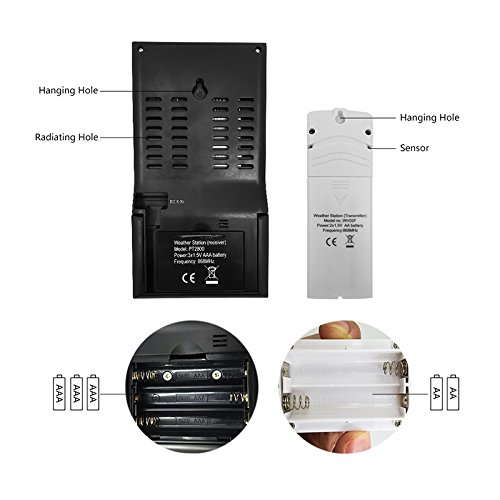
Figura 3: Indietro view of the main unit and wireless sensor. The main unit requires 3x AAA batteries, and the sensor requires 2x AA batteries. Both units have hanging holes for wall mounting.
3.4 LCD Display Layout
The colorful LCD display provides a comprehensive overview of all weather data and time information.
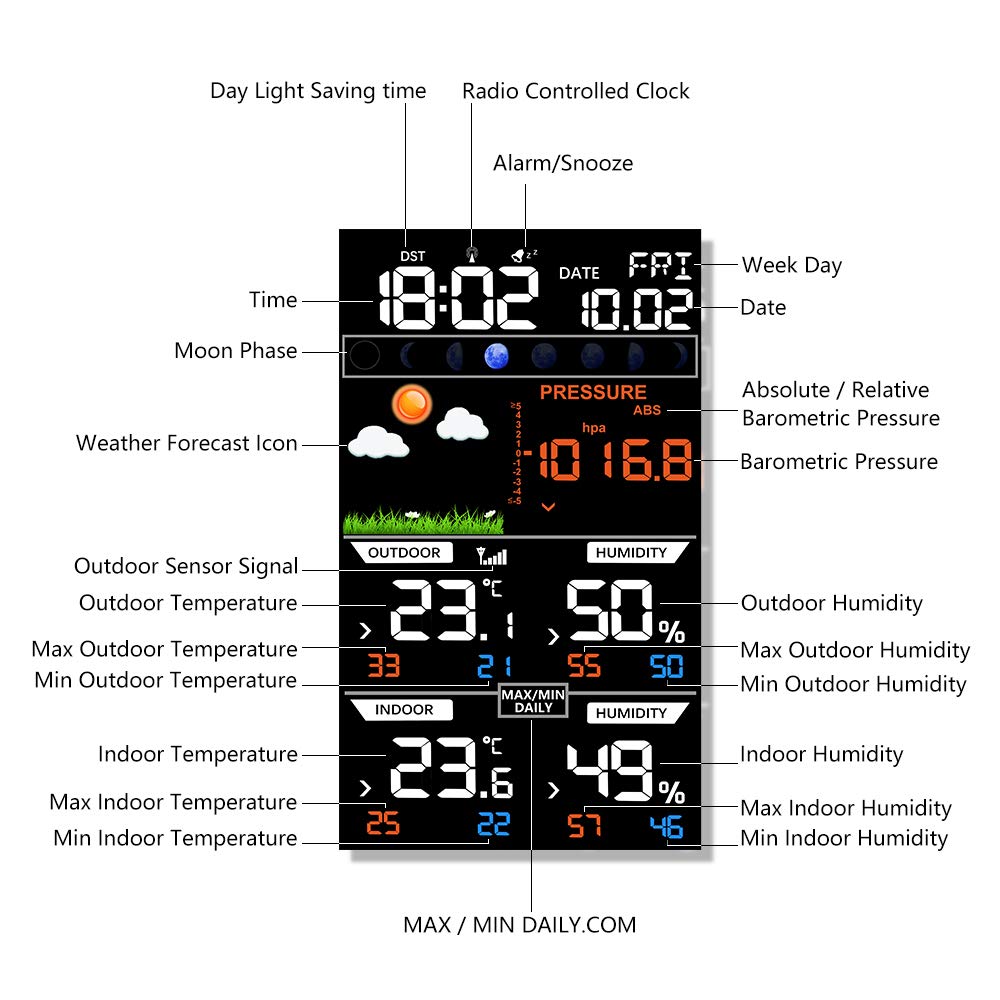
Figura 4: Detailed LCD display layout. Sections include Day Light Saving time (DST), Radio Controlled Clock (RCC), Time, Moon Phase, Weather Forecast Icon, Absolute/Relative Barometric Pressure, Barometric Pressure value, Outdoor Sensor Signal, Outdoor Temperature, Max/Min Outdoor Temperature, Outdoor Humidity, Max/Min Outdoor Humidity, Indoor Temperature, Max/Min Indoor Temperature, Indoor Humidity, Max/Min Indoor Humidity, Alarm/Snooze indicator, Date, and Week Day.
4. Impostazione
4.1 Alimentazione delle unità
- Sensore esterno senza fili: Open the battery compartment on the back of the sensor. Insert 2x AA batteries, observing the correct polarity (+/-). Close the compartment.
- Unità principale: Open the battery compartment on the back of the main unit. Insert 3x AAA batteries, observing the correct polarity (+/-). Close the compartment. For continuous display and backlight, connect the provided DC 5V power adapter to the power jack on the back of the main unit and plug it into a wall outlet.
4.2 Posizionamento del sensore
Place the wireless outdoor sensor in a shaded, dry location away from direct sunlight and precipitation to ensure accurate readings. Ensure it is within the transmission range of the main unit (typically up to 60 meters in open air). Avoid placing it near large metal objects or electronic devices that could interfere with the signal.
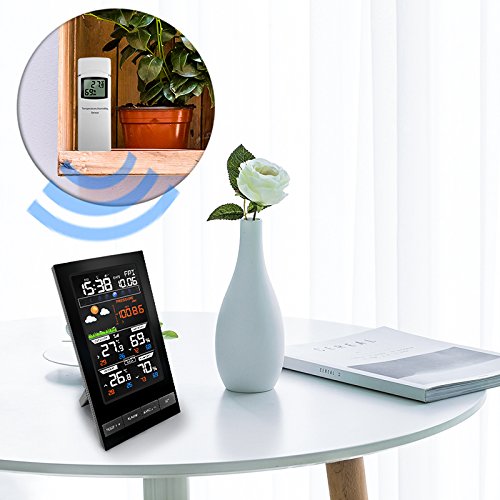
Figura 5: Example placement of the main unit indoors and the wireless sensor outdoors (or in a suitable location like a balcony or window sill) to ensure optimal signal reception.
4.3 Sincronizzazione iniziale
Once both units are powered on, the main unit will automatically search for and connect to the outdoor sensor. This may take a few minutes. The outdoor temperature and humidity readings will appear on the main unit's display once connected. If synchronization fails, ensure both units are within range and try re-inserting batteries in both units.
4.4 Impostazione di data e ora
Refer to the 'Operating Instructions' section for details on how to manually set the time, date, and other preferences using the control buttons.
5. Istruzioni per l'uso
The main unit features several buttons for configuration and display adjustments:
- TEMP/+ Button: Used to switch between Celsius (°C) and Fahrenheit (°F) temperature units. In setting mode, it increases values.
- Pulsante ALLARME: Abituato a view oppure impostare l'ora della sveglia.
- BAND/- Button: Used to switch between absolute and relative barometric pressure. In setting mode, it decreases values.
- Pulsante IMPOSTA: Used to enter and confirm settings for time, date, and other parameters.
- LIGHT/SNOOZE Button: Activates the backlight temporarily. When an alarm sounds, press to activate snooze function.
5.1 Impostazioni di ora e data
- Premere e tenere premuto il tasto IMPOSTATO button for 3 seconds to enter time setting mode. The hour digit will flash.
- Utilizzare il TEMP/+ or BAND/- pulsanti per regolare l'ora.
- Premere IMPOSTATO to confirm and move to the next setting (minute, year, month, day, 12/24 hour format, DST, RCC).
- Repeat steps 2 and 3 until all settings are configured. Press IMPOSTATO per uscire dalla modalità di impostazione.
5.2 Impostazioni di allarme
- Premere il tasto ALLARME pulsante una volta per view l'ora della sveglia.
- Premere e tenere premuto il tasto ALLARME button for 3 seconds to enter alarm setting mode. The hour digit will flash.
- Utilizzare il TEMP/+ or BAND/- pulsanti per regolare l'ora e i minuti.
- Premere ALLARME per confermare e uscire.
- Per attivare/disattivare l'allarme, premere il tasto ALLARME button repeatedly until the alarm icon appears/disappears on the display.
5.3 Visualizzazione della temperatura e dell'umidità
- The display shows current indoor and outdoor temperature and humidity.
- Premere il tasto TEMP/+ pulsante per passare da Celsius (°C) a Fahrenheit (°F).
- The display also shows maximum and minimum recorded values for indoor and outdoor temperature and humidity. These values typically reset daily.
5.4 Barometric Pressure and Weather Forecast
- The weather station displays current barometric pressure.
- Premere il tasto BAND/- button to switch between absolute and relative barometric pressure.
- The weather forecast icons (e.g., sunny, cloudy, rainy) are based on changes in barometric pressure over time. These are predictions and may not always perfectly match actual weather conditions.
6. Manutenzione
- Sostituzione della batteria: Replace batteries in both the main unit and the sensor when the low battery indicator appears on the display. Always replace all batteries at the same time.
- Pulizia: Pulire le superfici del display e dell'unità con un panno morbido eamp panno. Non usare detergenti abrasivi o solventi.
- Cura del sensore: Ensure the outdoor sensor remains protected from extreme weather conditions. Regularly check for any obstructions around the sensor that might affect readings.
- Magazzinaggio: Se si conserva il dispositivo per un periodo prolungato, rimuovere tutte le batterie per evitare perdite.
7. Risoluzione Dei Problemi
| Problema | Possibile causa | Soluzione |
|---|---|---|
| Nessun display sull'unità principale | Le batterie sono scariche o inserite in modo errato; l'adattatore di alimentazione non è collegato o è difettoso. | Controllare la polarità della batteria e sostituirla se necessario. Assicurarsi che l'adattatore di alimentazione sia collegato saldamente e funzionante. |
| Temperatura/umidità esterna non visualizzata o imprecisa | Sensor out of range; Low sensor battery; Interference; Sensor exposed to direct elements. | Move sensor closer to the main unit. Replace sensor batteries. Relocate sensor away from electronic interference. Place sensor in a shaded, dry area. |
| Previsioni meteo imprecise | Forecast is a prediction based on barometric pressure changes, not real-time observation. | Understand that the forecast is an estimation. Allow 24-48 hours for the station to calibrate after initial setup. |
| Ora/data errate | Manual setting error; RCC signal not received. | Manually set time and date as per instructions. Ensure the unit is placed where it can receive RCC signal (if applicable). |
8. Specifiche
- Marca: Protmex
- Modello: PT2800U
- Tipo di visualizzazione: Digital, Colorful LCD
- Fonte di alimentazione (unità principale): DC 5V Power Adapter (included) or 3x AAA Batteries (not included)
- Fonte di alimentazione (sensore): 2x batterie AA (non incluse)
- Stile: Moderno
- Forma: Rettangolare
- Funzioni: Indoor/Outdoor Temperature, Indoor/Outdoor Humidity, Barometric Pressure, Weather Forecast, Time, Date, Alarm, Snooze, Moon Phase, DST, RCC.
9. Garanzia e supporto
Protmex products are designed for reliability and performance. This product comes with a standard manufacturer's warranty against defects in materials and workmanship. For specific warranty details, please refer to the warranty card included in your package or contact Protmex customer support.
If you encounter any issues or have questions regarding the operation of your PT2800U Weather Station, please contact Protmex customer support through the retailer where the product was purchased or visit the official Protmex websito per assistenza.