1. Introduzione
This manual provides detailed instructions for the installation, operation, and maintenance of your Everycom EC801B 80mm Thermal Printer. Please read this manual thoroughly before using the printer to ensure proper function and longevity of the device. The EC801B is a high-speed thermal receipt printer equipped with an auto-cutter and versatile connectivity options including USB and LAN.
2. Informazioni sulla sicurezza
- DO NOT DISASSEMBLE THE PRINTER PERSONALLY. For any service-related queries, please contact Everycom support.
- The printer should be installed on a flat and solid surface to avoid vibration or impact damage.
- Ensure the power supply matches the printer's requirements to prevent electrical damage.
- Tenere la stampante lontana da acqua, polvere e luce solare diretta.
3. Contenuto della confezione
Si prega di verificare che tutti gli articoli elencati di seguito siano inclusi nel pacchetto:
- 1 x Everycom EC801B Thermal Receipt Printer
- 1 x adattatore di alimentazione
- 1 cavo dati USB di x
- 1 x Paper Roll (Sample)
- 1 x Manuale utente
- 1 CD driver di x

Image: Contents of the Everycom EC801B printer package, including the printer unit, power adapter, USB cable, sample paper roll, user manual, and driver CD.
4. Prodotto finitoview
Familiarize yourself with the various parts of your Everycom EC801B thermal printer.
4.1 Anteriore e superiore View

Immagine: Frontale view of the Everycom EC801B thermal printer, showing the paper output slot and control panel.

Immagine: in alto view of the Everycom EC801B thermal printer, highlighting the control panel with POWER, ERROR, PAPER indicators, and the FEED button.
4.2 Pannello di controllo
- Indicatore di energia: Si illumina quando la stampante è accesa.
- Indicatore di ERRORE: Flashes or illuminates to indicate an error (e.g., paper out, cover open).
- PAPER Indicator: Illuminates when paper is present, flashes when paper is low.
- Pulsante ALIMENTAZIONE: Press to advance paper. Hold to print a self-test page.
4.3 Rear Panel (Connectivity Ports)

Immagine: Posteriore view of the Everycom EC801B thermal printer, showing the power port, cash drawer port, Ethernet (LAN) port, and USB port.
- Porta ALIMENTAZIONE: Si collega all'alimentatore.
- CASH Drawer Port: Connects to a compatible cash drawer.
- Porta LAN (Ethernet): Connects to a network for network printing.
- Porta USB: Connects to a computer via USB cable.
5. Impostazione
5.1 Posizionamento fisico
Place the printer on a stable, flat surface. Ensure there is adequate space around the printer for ventilation and easy access to ports and paper loading.
5.2 Cavi di collegamento
- Collegamento elettrico: Connect the power adapter to the printer's POWER port and then plug the adapter into a power outlet.
- Connessione dati (scegline una):
- USB: Connect the USB data cable from the printer's USB port to an available USB port on your computer.
- LAN: Collegare un cavo Ethernet dalla porta LAN della stampante al router o allo switch di rete.
- Cassetto contanti (facoltativo): If using a cash drawer, connect its cable to the printer's CASH Drawer port.
5.3 Caricamento della carta
- Open the printer cover by pushing the cover open lever (if present) or lifting the top cover.
- Insert the 80mm thermal paper roll into the compartment, ensuring the paper feeds from the bottom and the leading edge extends out of the printer.
- Close the printer cover firmly until it clicks into place. Ensure there is no slack in the paper.

Immagine: in alto view of the Everycom EC801B printer with the cover open, revealing the paper roll compartment.
5.4 Installazione del driver
For the printer to communicate with your computer, drivers must be installed.
- Inserire il CD dei driver fornito nell'unità CD-ROM del computer.
- Follow the on-screen instructions to install the printer drivers. If your computer does not have a CD drive, drivers can typically be downloaded from the Everycom official websito.
- After installation, configure the printer settings through your operating system's printer management tools.
6. Istruzioni per l'uso
6.1 Accensione/Spegnimento
To power on the printer, ensure the power adapter is connected and press the power switch located on the side or rear of the printer. The POWER indicator light will illuminate. To power off, press the power switch again.
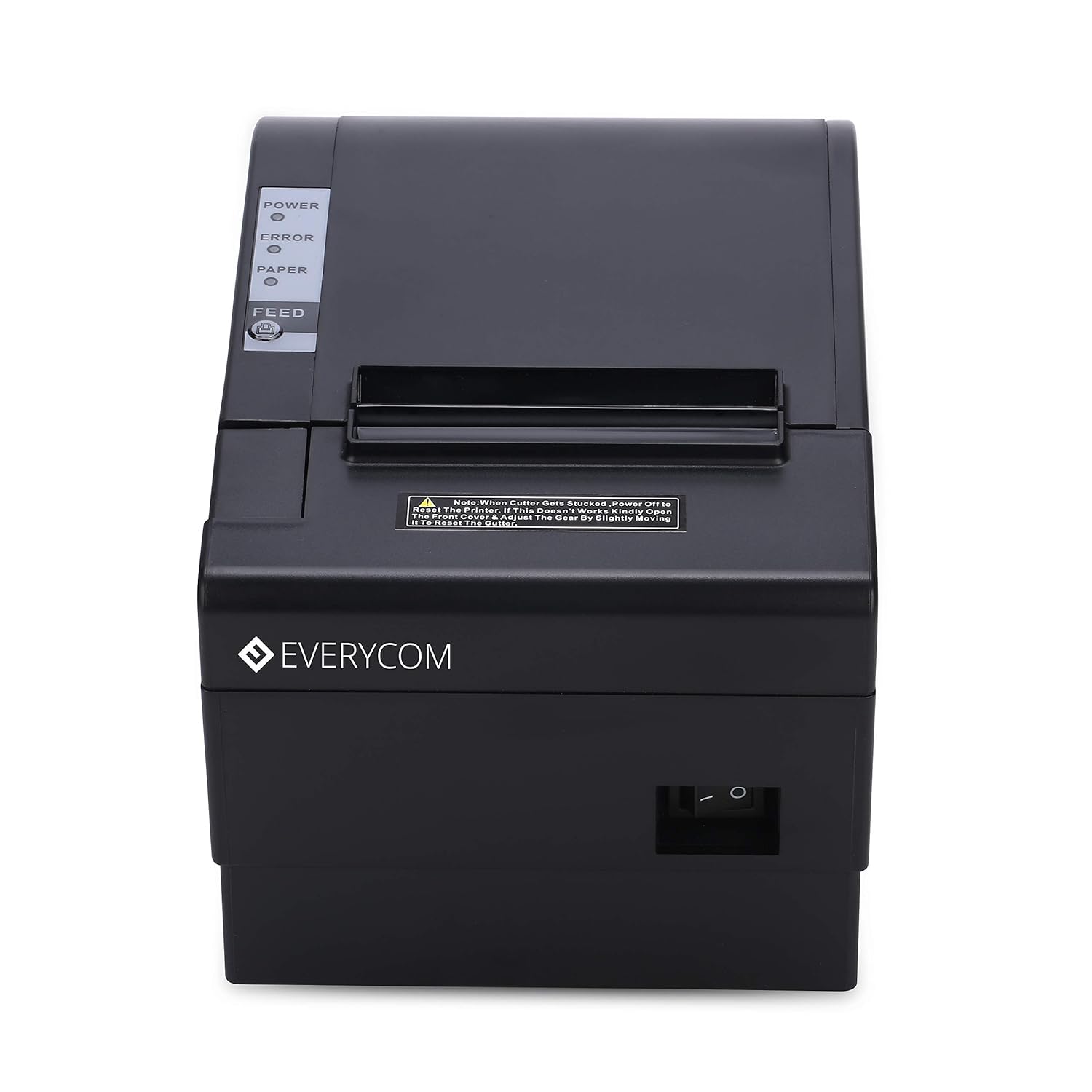
Immagine: Frontale view of the Everycom EC801B printer, showing the location of the power switch on the side.
6.2 Stampa di una pagina di autotest
A self-test page can confirm basic printer functionality and print quality without requiring a computer connection.
- Assicurarsi che la stampante sia spenta e che la carta sia caricata.
- Premere e tenere premuto il tasto FORAGGIO pulsante.
- Mentre si tiene premuto il FORAGGIO pulsante, accendere la stampante.
- Rilasciare il FORAGGIO button once the printer starts printing. A self-test page will print, showing printer information and a sampla stampa.

Image: Everycom EC801B printer actively printing a self-test receipt with a QR code and text.
6.3 Basic Printing Operation
Once drivers are installed and the printer is connected, you can print from any application that supports printing. Select the Everycom EC801B from your list of available printers and initiate the print command.
6.4 Funzione di taglio automatico
The EC801B features an automatic cutter that will cut the receipt paper after each print job, or as configured in your printer settings/software.
7. Manutenzione
7.1 Pulizia della stampante
Una pulizia regolare aiuta a mantenere la qualità di stampa e prolunga la durata della stampante.
- Testina di stampa: Utilizzare un batuffolo di cotone leggermenteampimbevuta di alcol isopropilico per pulire delicatamente la testina di stampa termica. Lasciarla asciugare completamente prima dell'uso.
- Percorso carta: Use a soft, dry cloth to remove any paper dust or debris from the paper path.
- Esterno: Pulisci l'esterno con un panno morbido eamp stoffa. Non utilizzare prodotti chimici aggressivi o detergenti abrasivi.
7.2 Sostituzione del rotolo di carta
When the PAPER indicator flashes or printing becomes faint, it's time to replace the paper roll. Follow the steps in Section 5.3 to load a new 80mm thermal paper roll.
8. Risoluzione Dei Problemi
If you encounter issues with your printer, refer to the following common problems and solutions:
| Problema | Possibile causa | Soluzione |
|---|---|---|
| La stampante non si accende | Nessuna alimentazione, adattatore difettoso | Check power cable connection, ensure outlet is working, try another adapter if available. |
| Nessuna stampa / Output vuoto | Paper loaded incorrectly, no paper, print head issue, driver issue | Reload paper correctly (thermal side facing print head), replace paper roll, clean print head, reinstall drivers. |
| ERROR indicator on/flashing | Paper out, cover open, print head overheat | Check paper, close cover firmly, allow printer to cool down. |
| Qualità di stampa scadente | Dirty print head, low quality paper, old paper roll | Clean print head, use high-quality thermal paper, replace old paper. |
| Stampante non riconosciuta dal computer | Driver not installed, incorrect cable, port issue | Install/reinstall drivers, check USB/LAN cable connection, try a different port. |
If the problem persists after attempting these solutions, please contact Everycom customer support.
9. Specifiche
Key technical specifications for the Everycom EC801B Thermal Printer:
| Caratteristica | Dettaglio |
|---|---|
| Modello | EC801B |
| Tecnologia di stampa | Stampa termica |
| Velocità di stampa | 220 mm/secondo |
| Larghezza della carta | 80mm |
| Connettività | USB, LAN (Ethernet) |
| Taglierina automatica | SÌ |
| Uscita della stampante | Monocromo |
| Dimensioni (LxWxH) | Dimensioni: 18.6 x 14.5 x 13.3 cm |
| Peso dell'articolo | 1.2 kg |
| Produttore | Everycom Electronics (Made in India) |
10. Garanzia e supporto
The Everycom EC801B Thermal Printer comes with a Garanzia di 1 anno dalla data di acquisto. La presente garanzia copre difetti di fabbricazione e malfunzionamenti in normali condizioni d'uso.
For technical assistance, troubleshooting, or warranty claims, please contact Everycom Customer Support:
- Numero verde: 1800 121 4480
- Customer Support Working Hours: Monday - Saturday, 10:00 AM - 6:30 PM (Except on Public Holidays)

Image: Everycom customer service contact details, including the toll-free number and working hours.