
FTVOGUE B07NPNTQJR
FTVOGUE Anti-Static Mat and Wrist Strap Kit User Manual
Model: B07NPNTQJR
1. Introduzione
This user manual provides essential information for the proper setup, operation, and maintenance of your FTVOGUE Anti-Static Mat and Wrist Strap Kit. This kit is designed to protect sensitive electronic components from electrostatic discharge (ESD) during assembly, repair, or handling. By following these instructions, you can ensure a safe working environment and prolong the life of your electronic devices.

Figure 1.1: Complete Anti-Static Mat and Wrist Strap Kit.
2. Informazioni sulla sicurezza
Always adhere to the following safety guidelines when using the anti-static kit:
- Ensure the anti-static mat is placed on a clean, dry, and stable surface.
- Always wear the wrist strap directly against your skin to ensure proper grounding.
- Verify that all grounding connections are secure before handling sensitive electronics.
- Do not use the anti-static mat or wrist strap in environments with high voltage or where electrical shock hazards are present, as these products are designed for ESD protection, not electrical insulation.
- Keep the mat away from sharp objects or excessive heat sources to prevent damage.
3. componenti
Your FTVOGUE Anti-Static Kit includes the following components:
- Anti-Static Mat: A large, conductive mat designed to dissipate static electricity from your workspace.
- Cinturino da polso antistatico: A band worn on the wrist to safely ground the user, preventing static buildup on the body.
- Grounding Wire (for Mat): A coiled wire with a ground clip on one end and a four-claw grounding plug on the other, used to connect the mat to an earth ground.
- Grounding Wire (for Wrist Strap): A coiled wire with a ground clip on one end, used to connect the wrist strap to an earth ground or the mat.

Figure 3.1: Key components of the anti-static kit with labels.

Figura 3.2: dettagliata view of the wrist strap, ground clip, and grounding plug.
4. Istruzioni per l'installazione
Follow these steps to properly set up your anti-static workstation:
- Preparare la superficie di lavoro: Place the anti-static mat flat on your worktable or desktop. Ensure the surface is clean and free of debris.
- Install Grounding Point (if not already present): If your worktable does not have a dedicated anti-static ground socket, you may need to install one. This socket provides a reliable earth ground connection.
- Connect the Mat to Ground:
- Carefully cut a small opening (approximately 1-2 cm) in the anti-static mat where you intend to connect the grounding wire.
- Insert the four-claw grounding plug of the mat's grounding wire into this opening, ensuring the claws penetrate the mat for good contact.
- Connect the other end of this grounding wire (the ground clip) to your anti-static ground socket or a reliable earth ground point.
- Connect the Wrist Strap:
- Wear the anti-static wrist strap snugly around your wrist, ensuring the conductive inner surface makes direct contact with your skin.
- Connect the coiled grounding wire from the wrist strap to the snap connector on the wrist strap.
- Connect the other end of the wrist strap's grounding wire (the ground clip) to the anti-static ground socket or to the anti-static mat itself (if the mat is already grounded).

Figure 4.1: Proper connection of the wrist strap to the mat and user.
5. Istruzioni per l'uso
Once the anti-static kit is properly set up, you can begin working with sensitive electronic components:
- Always ensure your wrist strap is worn correctly and connected to ground.
- Place all electronic components and tools that will come into contact with sensitive parts directly on the anti-static mat.
- The mat and wrist strap work together to safely dissipate any static charge from your body and the components, preventing damage.
- Avoid wearing clothing that generates significant static electricity (e.g., wool, synthetic fabrics) when working with sensitive electronics.
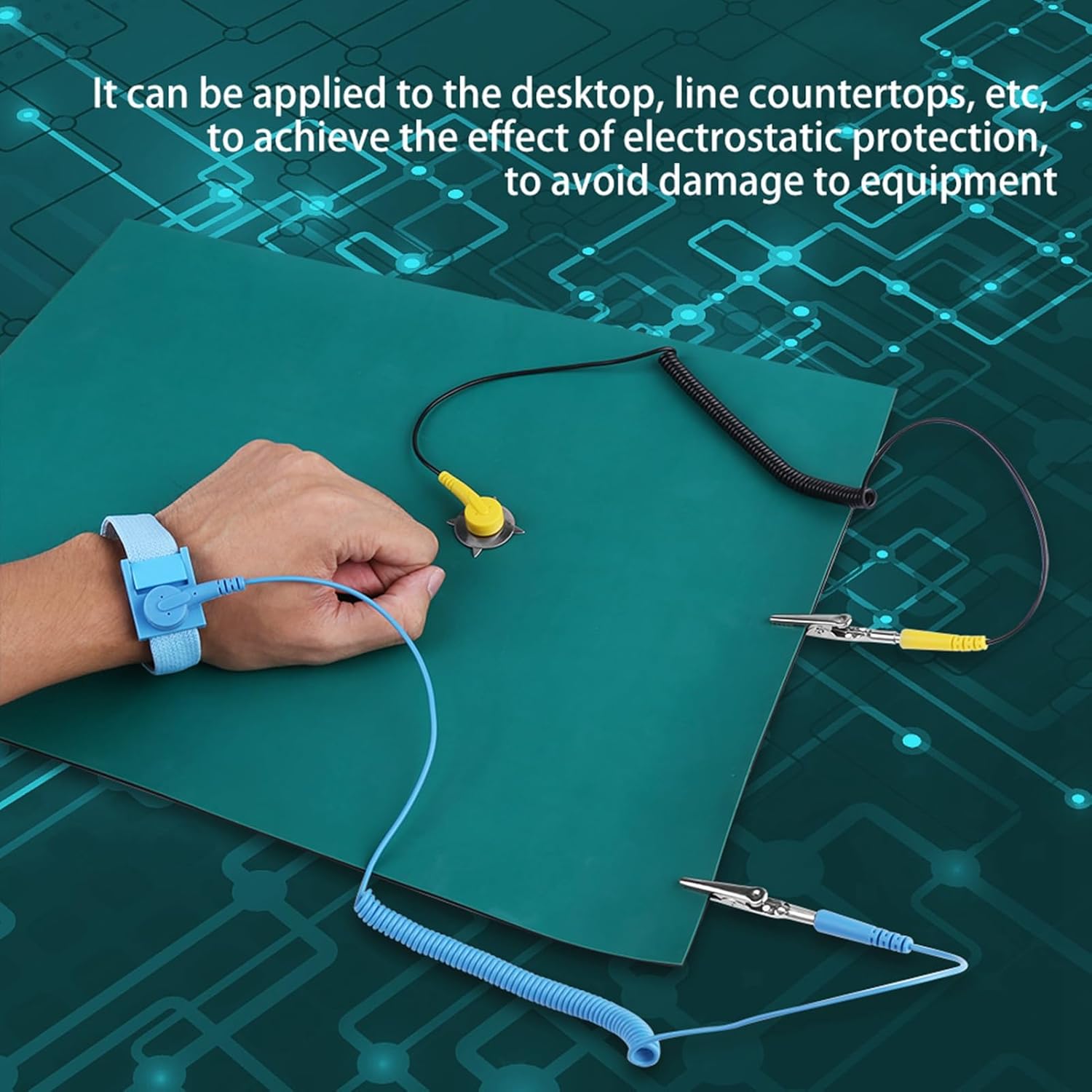
Figure 5.1: The anti-static mat provides electrostatic protection for equipment on a desktop.
6. Manutenzione
Proper maintenance will extend the life and effectiveness of your anti-static kit:
- Pulizia del tappetino: The anti-static mat is resistant to acid, alkali, and chemical soldering flux. Clean the mat regularly with a mild soap and water solution or an approved ESD mat cleaner. Avoid harsh chemicals or abrasive cleaners that could damage the surface.
- Magazzinaggio: When not in use, store the mat flat or rolled loosely to prevent creases. Avoid folding the mat tightly, as this can create permanent creases that affect its flatness and effectiveness.
- Ispezionare le connessioni: Periodically check the grounding wires and clips for any signs of wear, corrosion, or damage. Ensure all connections are secure and provide good electrical contact.
- Wrist Strap Care: The wrist strap can be gently cleaned with a damp panno. Assicurarsi che sia completamente asciutto prima di riutilizzarlo.

Figure 6.1: The anti-static mat is designed to be resistant to acid, alkali, and chemical soldering flux.

Figure 6.2: The mat's surface is wear-resisting and designed for easy cleaning.
7. Risoluzione Dei Problemi
If you encounter issues with your anti-static kit, consider the following:
| Problema | Possibile causa | Soluzione |
|---|---|---|
| Il tappetino non è piatto. | Mat was folded during shipping or storage. | Place heavy, flat objects on the mat for a period to help flatten it. Store rolled, not folded. |
| Uncertain if grounding is effective. | Loose connections or faulty ground point. | Ensure wrist strap is snug against skin. Verify all clips are securely attached to the mat and ground. Test ground point with a multimeter if possible. |
| Static shocks still occur. | Improper grounding or non-conductive clothing. | Recheck all connections. Ensure wrist strap is making direct skin contact. Avoid static-generating clothing. |
8. Specifiche
- Nome del prodotto: Anti Static Mat Electrostatic Discharge Anti-Static Wrist Strap + Grounding Wire + Mat Set
- Marca: FTVOGUE
- Modello: B07NPNTQJR
- Dimensioni del tappetino: Circa 40 cm x 30 cm (15.75 pollici x 11.8 pollici)
- Mat Thickness: Circa 2 mm (0.08 pollici)
- Materiale: Conductive rubber (mat)
- Componenti: 1x Anti-Static Mat, 1x Anti-Static Wrist Strap, 2x Grounding Wires
- Prima data disponibile: 13 febbraio 2019

Figure 8.1: Approximate dimensions and thickness of the anti-static mat.
9. Garanzia e supporto
For product support, warranty information, or inquiries, please contact FTVOGUE customer service through the retailer where the product was purchased or visit the official FTVOGUE brand store online.
FTVOGUE is committed to providing high-quality industrial products. Your satisfaction is our priority.
Negozio ufficiale del marchio: FTVOGUE Store on Amazon
Ask a question about this manual
Ask about setup, troubleshooting, compatibility, parts, safety, or missing instructions. Manuals+ will review the question and use this page’s manual context to help answer it.