
MEE audio EP-X5G2-GM
MEE audio X5-G2-2019 Wireless In-Ear Sport Headphones
Manuale d'uso
Model: EP-X5G2-GM
1. Impostazione
1.1 Contenuto della confezione
Verifica che tutti gli articoli siano presenti nella confezione del prodotto:
- X5 Wireless In-Ear Headset
- Cavo di ricarica micro-USB
- Eartips (4 sizes)
- Pinne auricolari
- Manuale d'uso

Image: Retail packaging of the MEE audio X5-G2-2019 headphones, showing the product and accessories.
1.2 Ricarica delle cuffie
Before first use, fully charge the headphones. Connect the supplied Micro-USB charging cable to the charging port on the control module and plug the other end into a USB power source (e.g., computer USB port or wall adapter). The LED indicator will show charging status.
1.3 Indossare le cuffie
The X5-G2-2019 headphones are designed for a secure and comfortable fit. Experiment with the different sizes of eartips and ear fins to find the best seal and stability for your ears. The ergonomic design ensures they stay in place during physical activity.
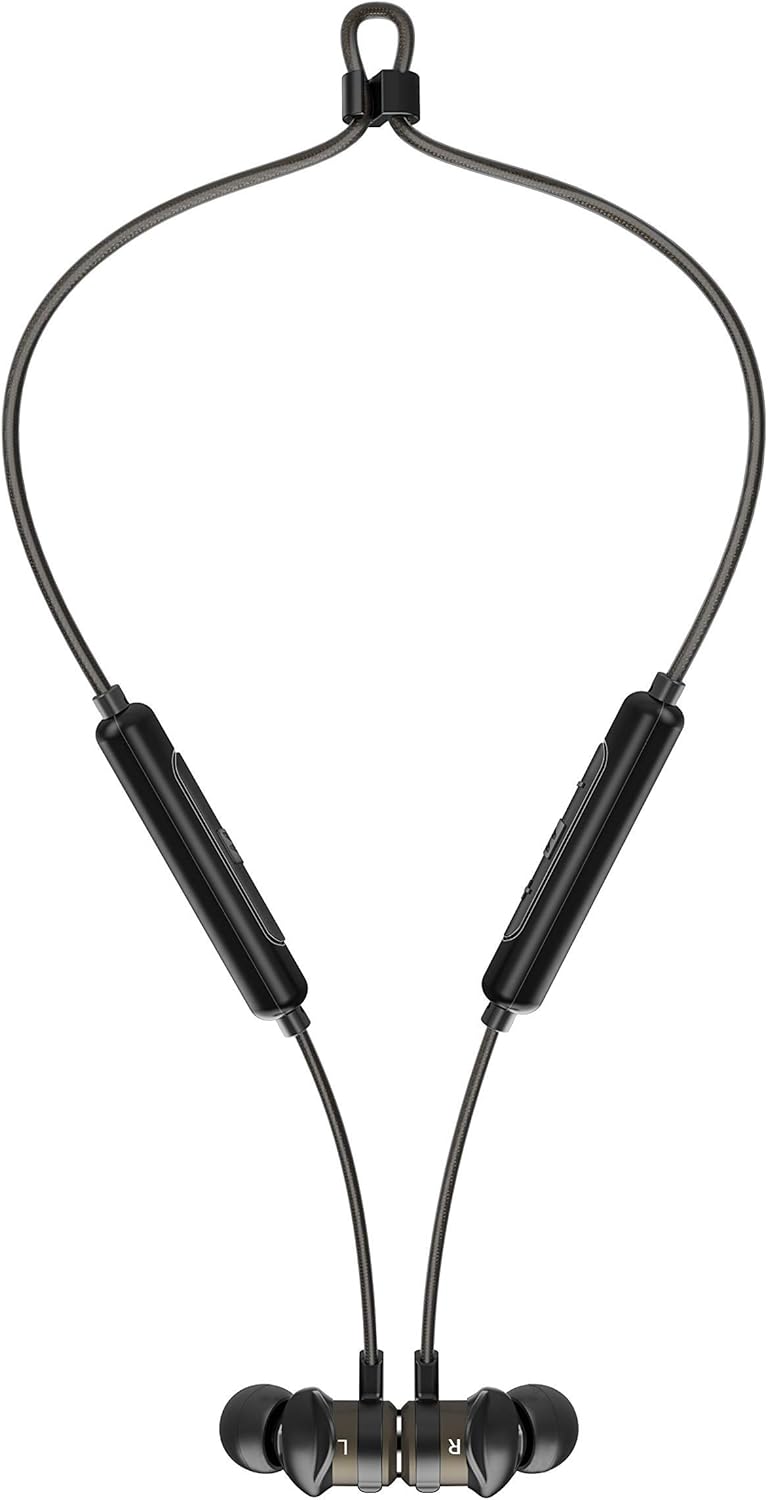

Image: The headphones shown worn around the neck and with earpieces magnetically connected for secure storage.
1.4 Associazione Bluetooth
- Assicurarsi che le cuffie siano cariche e spente.
- Tenere premuto il pulsante multifunzione sul modulo di controllo finché l'indicatore LED non lampeggia in blu e rosso, indicando la modalità di associazione.
- Sul tuo dispositivo (smartphone, tablet, ecc.), attiva il Bluetooth e cerca nuovi dispositivi.
- Select "MEE audio X5-G2-2019" from the list of available devices.
- Una volta effettuata la connessione, l'indicatore LED lampeggerà periodicamente in blu.
2. Utilizzo delle cuffie
2.1 controlli oltreview
The X5-G2-2019 features an integrated remote and microphone for convenient control of calls and music playback.

Image: Close-up of the MEE audio X5-G2-2019 headphones showing the inline control module with volume and multi-function buttons.
- Pulsante multifunzione: Accensione/spegnimento, riproduzione/pausa, risposta/fine chiamata.
- Volume su (+): Aumenta il volume, traccia successiva (pressione lunga).
- Volume basso (-): Diminuisci il volume, traccia precedente (pressione lunga).
2.2 Accensione/spegnimento
- Accensione: Tenere premuto il pulsante multifunzione finché il LED non lampeggia in blu.
- Spegni: Press and hold the multi-function button until the LED flashes red and turns off.
2.3 Riproduzione di musica
- Riproduci/Pausa: Premi una volta il pulsante multifunzione.
- Traccia successiva: Premere a lungo il pulsante Volume su (+).
- Traccia precedente: Premere a lungo il pulsante Volume giù (-).
2.4 Gestione delle chiamate
- Rispondi/Termina chiamata: Premi una volta il pulsante multifunzione.
- Rifiuta chiamata: Premere e tenere premuto il pulsante multifunzione.
3. Manutenzione
3.1 Pulizia
Clean the headphones regularly with a soft, damp cloth. Do not use harsh chemicals or abrasive materials. Remove eartips and clean them separately with mild soap and water if necessary, ensuring they are completely dry before reattaching.
3.2 Conservazione
When not in use, store the headphones in a cool, dry place away from direct sunlight and extreme temperatures. The magnetic earpieces allow for tangle-free storage around your neck or in a pouch.
3.3 Resistenza all'acqua e al sudore
The MEE audio X5-G2-2019 headphones feature an IPX5 sweat and weather-resistant design, protecting them from splashes and sweat. Do not submerge the headphones in water or expose them to running water.
4. Risoluzione Dei Problemi
4.1 Problemi comuni e soluzioni
- Nessun potere: Assicurarsi che le cuffie siano completamente cariche. Collegare a una fonte di alimentazione e controllare l'indicatore di carica.
- Impossibile associare: Ensure the headphones are in pairing mode (flashing blue and red). Turn off and on your device's Bluetooth. Try forgetting the device on your phone and re-pairing.
- Nessun suono: Check the volume level on both the headphones and your connected device. Ensure the headphones are properly paired and connected.
- Scarsa qualità del suono: Ensure the eartips provide a good seal in your ear. Move closer to your connected device to avoid interference.
5. Specifiche
| Marca | MEE audio |
| Nome del modello | EP-X5G2-GM |
| Numero di modello | EP-X5G2-GM |
| Tecnologia di connettività | Cablato, senza fili |
| Tecnologia di comunicazione wireless | Bluetooth |
| Posizionamento dell'orecchio | In-ear (auricolare) |
| Fattore di forma | In-ear (auricolare) |
| Presa per cuffie | Micro USB |
| Colore | canna di fucile |
| Dimensioni del prodotto | 2 x 2 x 2 cm; 50 grammi |
| Batterie | 1 Lithium-Polymer Battery required (included) |
| Durata della batteria (riproduzione musicale) | Fino a 8.5 ore |
| Durata della batteria (tempo di conversazione) | Fino a 9 ore |
| Valutazione della resistenza all'acqua | IPX5 (Sweat and Weather Resistant) |
| Componenti inclusi | X5 Wireless In-Ear Headset, Micro-USB charging cable, Eartips (4 sizes), Ear fins, User Manual |
6. Garanzia e supporto
6.1 Informazioni sulla garanzia
MEE audio products are covered by a manufacturer's warranty. Please refer to the warranty card included in your product packaging or visit the official MEE audio websito per termini e condizioni di garanzia dettagliati specifici per la tua regione.
6.2 Assistenza clienti
For technical assistance, troubleshooting, or warranty claims, please contact MEE audio customer support through their official website. Have your product model number (EP-X5G2-GM) and purchase information ready when contacting support.
Ask a question about this manual
Ask about setup, troubleshooting, compatibility, parts, safety, or missing instructions. Manuals+ will review the question and use this page’s manual context to help answer it.