
1. Introduzione
This manual provides detailed instructions for the SDRD Wireless Bluetooth Speaker with 2 Microphones, Portable Karaoke Machine. Please read this manual thoroughly before operating the device to ensure proper use and to maximize its performance and lifespan. This device is designed for use with music players, smartphones, tablets, and can be integrated into surround sound systems for an enhanced audio experience.
2. Contenuto della confezione
Verificare che tutti gli articoli siano presenti nel pacco:
- SDRD Wireless Bluetooth Speaker Unit
- 2 microfoni wireless
- Cavo di ricarica USB
- Manuale d'uso
3. Prodotto finitoview
The SDRD Portable Karaoke Machine combines a Bluetooth speaker with two wireless microphones, offering a versatile audio and entertainment solution. It features a compact design and intuitive controls.
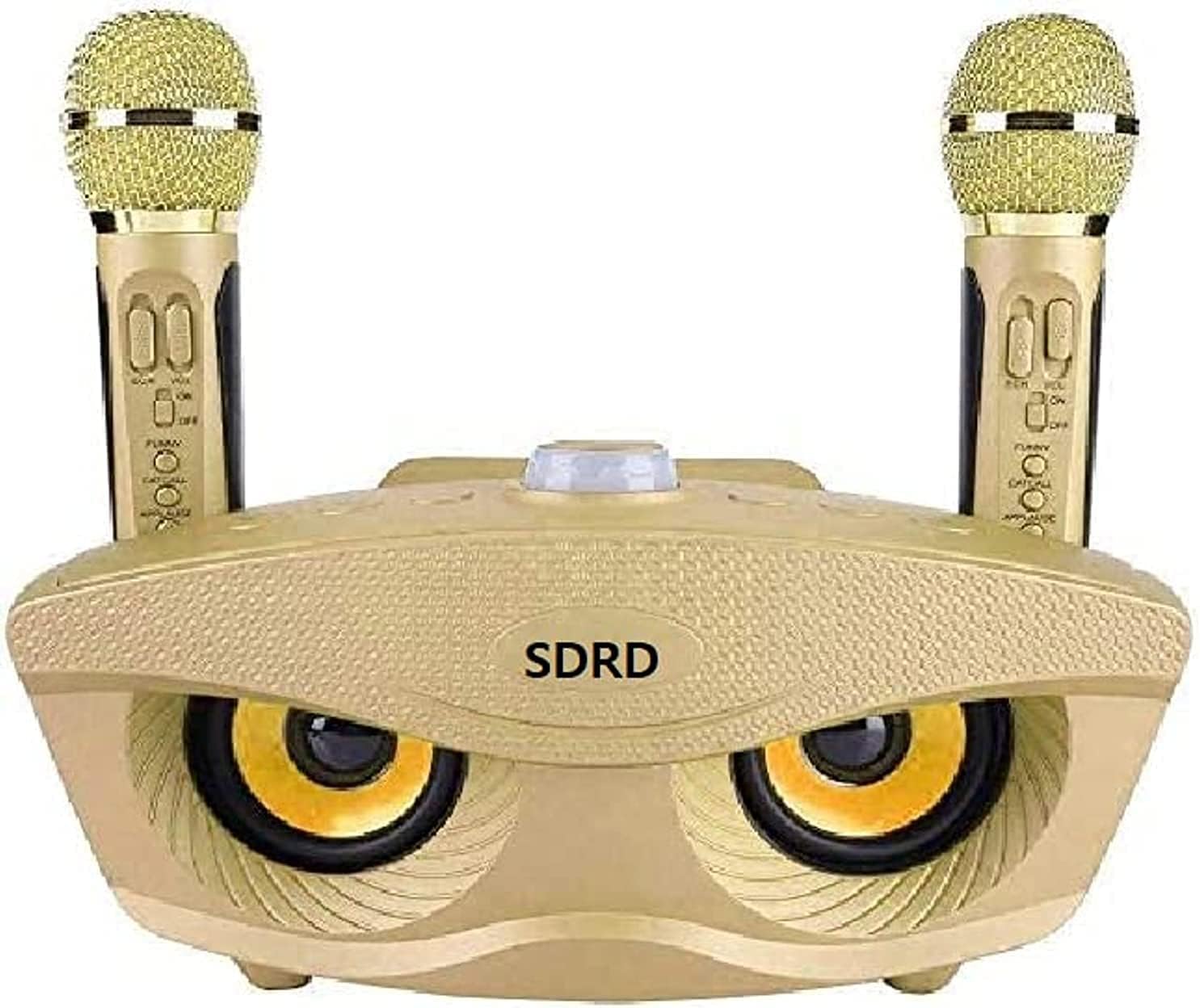
Figura 3.1: Davanti view of the SDRD Wireless Bluetooth Speaker with two wireless microphones docked.
The main unit houses the speaker components and control interface. The two wireless microphones are designed for vocal input and include individual controls for volume and effects.

Figura 3.2: Superiore view of the SDRD Wireless Bluetooth Speaker showing a smartphone placed in the integrated slot for convenient viewdurante l'uso.
A dedicated slot on the top surface allows for secure placement of a smartphone or tablet, enhancing the user experience for viewing lyrics or controlling music playback.
4. Impostazione
4.1. Carica del dispositivo
Before first use, fully charge the speaker unit and both microphones. Connect the provided USB charging cable to the charging port on the speaker and to a standard USB power adapter (not included). A charging indicator light will typically illuminate during charging and turn off or change color when fully charged. Repeat this process for each microphone.
4.2. Accensione/Spegnimento
- Oratore: Locate the power button on the main speaker unit. Press and hold for a few seconds to power on or off.
- Microfoni: Each microphone has an individual power switch. Slide the switch to the 'ON' position to power on and 'OFF' to power off.
5. Istruzioni per l'uso
5.1. Accoppiamento Bluetooth
- Ensure the SDRD speaker is powered on and in Bluetooth pairing mode (indicated by a flashing LED, if present).
- Sul tuo smartphone, tablet o altro dispositivo abilitato Bluetooth, vai alle impostazioni Bluetooth.
- Cercare available devices and select "SDRD SD306" (or a similar name) from the list.
- Once connected, a confirmation tone may sound, and the LED indicator on the speaker will typically become solid.
5.2. Utilizzo dei microfoni
- Power on both wireless microphones using their respective power switches. They should automatically connect to the speaker unit.
- Adjust the microphone volume and echo effects using the controls located on each microphone.
- Per una qualità audio ottimale, tenere il microfono a circa 2-5 cm dalla bocca.
5.3. Funzione Karaoke
After successfully pairing your device via Bluetooth and powering on the microphones:
- Play your desired music or karaoke tracks from your connected device.
- The music will play through the SDRD speaker.
- Sing into the microphones, and your vocals will be mixed with the music output from the speaker.
5.4. Riproduzione USB
The speaker supports USB playback. Insert a USB flash drive containing MP3 audio files into the designated USB port on the speaker. The speaker should automatically detect the drive and begin playing the audio files. Use the speaker's controls to navigate tracks.
6. Manutenzione
6.1. Pulizia
Wipe the speaker and microphones with a soft, dry cloth. Do not use liquid cleaners, solvents, or abrasive materials, as these can damage the device's finish and internal components.
6.2. Conservazione
When not in use, store the device in a cool, dry place away from direct sunlight and extreme temperatures. Keep it away from dust and moisture.
6.3. Cura della batteria
To prolong battery life, avoid completely discharging the batteries. Charge the device regularly, even if not in frequent use. Do not expose batteries to excessive heat.
7. Risoluzione Dei Problemi
| Problema | Possibile causa | Soluzione |
|---|---|---|
| Il dispositivo non si accende | Batteria scarica; pulsante di accensione non premuto correttamente | Charge the device fully; Press and hold the power button for several seconds |
| Nessun suono dall'altoparlante | Volume too low; Device not connected; Incorrect input source | Increase volume on speaker and connected device; Re-establish Bluetooth connection; Ensure correct input mode (Bluetooth/USB) |
| Il microfono non funziona | Microphone not powered on; Low microphone battery; Microphone volume too low | Ensure microphone is switched ON; Charge microphone; Increase microphone volume |
| Connessione Bluetooth instabile o non funzionante | Device too far from speaker; Interference; Speaker not in pairing mode | Move device closer to speaker; Avoid obstacles; Ensure speaker is in pairing mode and re-pair |
| La riproduzione USB non funziona | Unità USB non formattata correttamente; Incompatibile file types; USB drive not inserted properly | Assicurarsi che l'unità USB sia formattata in FAT32; utilizzare MP3 files; Re-insert USB drive firmly |
8. Specifiche
| Caratteristica | Dettaglio |
|---|---|
| Marca | SDRD |
| Numero di modello | SD306 |
| Dimensioni del prodotto | Dimensioni: 26 x 33 x 10.5 cm |
| Peso | 1.63 kg |
| Caratteristiche speciali | Bass Boost, Hi-Res Audio support, USB Port |
| Connettività | Bluetooth, USB |
| Componenti inclusi | Speaker, 2 Microphones |
9. Garanzia e supporto
This product is covered by a standard manufacturer's warranty. For specific warranty terms and conditions, please refer to the documentation provided at the time of purchase or contact your retailer. For technical support or service inquiries, please contact the SDRD customer service department through the contact information provided on the product packaging or the official SDRD websito.