
EPEVER VS3024AU
EPEVER 30A 12V/24V Solar Charge Controller
Model: VS3024AU Instruction Manual
1. Introduzione
The EPEVER VS-AU series controller is a common positive, PWM charge controller featuring a built-in LCD display and dual USB ports. Its multiple load control modes make it suitable for a wide range of applications, including solar home systems, traffic signals, solar street lights, and solar garden lamps. This manual provides detailed instructions for the safe and efficient operation of your VS3024AU solar charge controller.
2. Precauzioni di sicurezza
Please read all instructions and precautions in the manual before installation. Failure to do so may result in damage to the controller, battery, or other components, and may void the warranty.
- Assicurarsi che la batteria abbia una carica sufficientetage affinché il controller riconosca il tipo di batteria prima della prima installazione.
- The charge controller is only suitable for regulating solar modules. Never connect another charging source to the charge controller.
- The controller will generate heat during operation. Please install it in a well-ventilated area.
- The controller is designed for indoor use. Avoid exposure to moisture, dust, or direct sunlight.
- Collegare prima la batteria, poi il pannello solare e infine il carico. Scollegare in ordine inverso.
- Ensure all wiring is secure and connections are tight to prevent loose connections and overheating.
- Utilizzare interruttori automatici o fusibili appropriati per i circuiti del pannello solare, della batteria e del carico.
3. Prodotto finitoview
3.1 Caratteristiche principali
- 30A 12V/24V Auto Work, Dual USB design with Max. output 2.4A.
- LCD display for dynamically showing device’s operating data and working condition.
- Tre-stage intelligent PWM charging: Equalize, Boost, and Float.
- Supports Sealed, Gel, and Flooded battery types.
- Various electronic protections: PV reverse polarity, Battery reverse polarity, Battery over voltage, Battery over discharge, Battery overheating, Controller overheating, Load short circuit, Load overload.
- Humanized button settings for comfortable and convenient operation.
- UL and VDE certified Nickel plated copper terminals for safe and solid connection.
3.2 Componenti e interfaccia

Figura 3.2.1: Fronte view of the EPEVER VS3024AU Solar Charge Controller, showing the LCD display, Menu and Set buttons, dual USB ports, and terminal connections for solar panel, battery, and load.

Figura 3.2.2: Angolato view of the controller, highlighting the heat sink fins on the bottom for efficient heat dissipation.

Figure 3.2.3: A different angled perspective of the controller, providing a clearer view of the terminal block layout and the overall compact design.

Figura 3.2.4: In basso view of the controller, showing the product label with model number (VS3024AU), voltage (12/24V), and current (30A) information.
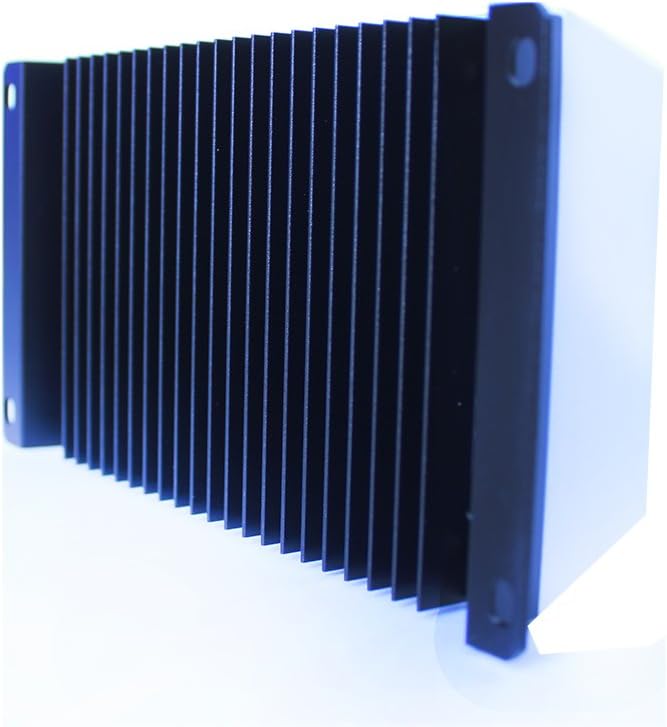
Figura 3.2.5: lato view of the controller, emphasizing the robust heat sink design for effective thermal management during operation.
4. Configurazione e installazione
4.1 Montaggio
- Scegliete un luogo asciutto e ben ventilato, lontano dalla luce solare diretta, dalle alte temperature e dall'acqua.
- Ensure there is sufficient air circulation around the controller for heat dissipation.
- Mount the controller vertically on a wall or flat surface using appropriate screws.
4.2 Ordine di collegamento dei cavi
Follow the connection order strictly to ensure proper and safe operation. Incorrect wiring may damage the controller or other components.
- Collegare la batteria: Connect the battery to the controller's battery terminals (+ and -). The LCD will light up.
- Collegare il pannello solare: Collegare il pannello solare ai terminali del pannello solare del controller (+ e -).
- Collegare il carico: Connect the load to the controller's load terminals (+ and -).
Ordine di disconnessione: Disconnect the load first, then the solar panel, and finally the battery.
5. Istruzioni per l'uso
Display LCD 5.1
The LCD display shows various parameters and operating statuses. Use the 'Menu' button to cycle through different display screens.
5.2 Funzioni dei pulsanti
- Pulsante MENU: Short press to browse different screens. Long press to enter or exit setting mode.
- Pulsante IMPOSTA: Short press to increase values or switch options in setting mode. Long press to reset accumulated data.
5.3 Selezione del tipo di batteria
The controller supports Sealed (default), Gel, and Flooded battery types. To change the battery type:
- Long press the 'MENU' button until the battery type icon flashes.
- Short press the 'SET' button to select the desired battery type.
- Long press the 'MENU' button again to confirm and exit.
5.4 Modalità di controllo del carico
The controller offers multiple load control modes for various applications. Refer to the detailed manual for specific settings and configurations.
6. Manutenzione
Una manutenzione regolare garantisce prestazioni ottimali e longevità del regolatore di carica solare.
- Controllare periodicamente tutti i collegamenti elettrici per verificarne la tenuta e la corrosione.
- Clean the controller's casing with a dry cloth. Do not use solvents or abrasive cleaners.
- Ensure the area around the controller is free from dust and debris to maintain proper ventilation.
- Controllare i terminali della batteria per individuare eventuali segni di corrosione e pulirli se necessario.
7. Risoluzione Dei Problemi
Questa sezione fornisce soluzioni ai problemi più comuni che potresti riscontrare.
| Problema | Possibile causa | Soluzione |
|---|---|---|
| Nessuna visualizzazione sul display LCD | Batteria non collegata o bassa tensionetage; polarità inversa. | Controllare i collegamenti della batteria e il voltage. Assicurarsi che la polarità sia corretta. |
| Il carico non funziona | Load short circuit; overload; battery low voltage; load control mode setting. | Check load wiring and current. Verify battery voltage. Adjust load control mode. |
| Il fotovoltaico non carica la batteria | PV reverse polarity; open circuit; insufficient sunlight. | Check PV connections and polarity. Ensure adequate sunlight. |
| Surriscaldamento del controller | Poor ventilation; excessive load/PV current. | Improve ventilation. Reduce load or PV input if consistently high. |
8. Specifiche tecniche
| Parametro | Valore |
|---|---|
| Modello | VS3024AU |
| Sistema nominale Voltage | Lavoro automatico 12V/24V |
| Vol. ingresso batteriatage Gamma | 9~32 V |
| Corrente di carica/scarica nominale | 30A |
| Massimo Circuito aperto fotovoltaico voltage | 50V |
| Opzioni tipo batteria | Sigillato (predefinito) / Gel / Allagato |
| Basso volumetage Riconnetti Voltage | Sigillato/Gel/Allagato: 12.6V |
| Basso volumetage Disconnetti Voltage | Sigillato/Gel/Allagato: 11.1V |
| Autoconsumo | ≤10mA |
| Coefficiente di compensazione della temperatura | -3 mV/℃/2 V (25 ℃) |
| Messa a terra | Positivo comune |
| Uscita USB | 5 V CC/2.4 A |
| Dimensione complessiva | 181 x 100.9 x 59.8 mm |
| Terminali | 6 AWG (16 mm²) |
| Peso netto | 0.55 kg |
| Allegato | Grado di protezione IP30 |
| Temperatura dell'ambiente di lavoro | -25℃ ~ +55℃ |
| Umidità ambiente | ≤95% (NC) |
8.1 Extensive Electronic Protections
- Protezione da inversione di polarità fotovoltaica
- Protezione dall'inversione di polarità della batteria
- Batteria oltre il volumetage Protezione
- Protezione da sovraccarico della batteria
- Protezione da surriscaldamento della batteria
- Protezione contro il surriscaldamento del controller
- Protezione da cortocircuito del carico
- Protezione da sovraccarico di carico
9. Garanzia e assistenza clienti
EPEVER products are manufactured to high-quality standards. For warranty information, technical support, or service inquiries, please contact your authorized EPEVER dealer or visit the official EPEVER website. Please have your product model number (VS3024AU) and purchase details ready when contacting support.
Documenti correlati - VS3024AU
 |
Manuale dell'utente del regolatore di carica solare ECO-WORTHY EW1906-30A 12V/24V 30A Manuale utente completo per il regolatore di carica solare ECO-WORTHY EW1906-30A 12V/24V 30A, che comprende istruzioni di sicurezza, caratteristiche del prodotto, collegamento del sistema, funzioni chiave, display, codici di errore, FAQ e parametri tecnici. |
 |
Manuale utente del regolatore di carica solare PWM ECO-WORTHY 12V/24V 30A Questo documento fornisce istruzioni di sicurezza, funzioni chiave, informazioni sul display, codici di errore e parametri tecnici per il regolatore di carica solare PWM ECO-WORTHY 12V/24V 30A. ... |
 |
Manuale utente del regolatore di carica solare PWM AIMS Power SCC30AFM 30A Questo manuale fornisce istruzioni dettagliate e specifiche per il regolatore di carica solare AIMS Power SCC30AFM 30A PWM, coprendo installazione, funzionamento, caratteristiche e risoluzione dei problemi per sistemi di alimentazione solare in camper, barche e veicoli. |
 |
Manuale utente del regolatore di carica solare User manual for the 10A-100A Solar Charge Controller, covering installation, operation, troubleshooting, and technical specifications. |
 |
BougeRV 30A PWM Negative Ground Solar Charge Controller User Manual Comprehensive user manual for the BougeRV 30A PWM Negative Ground Solar Charge Controller. Learn about features, safety, system wiring, specifications, and troubleshooting for your solar power system. |
 |
Manuale del regolatore di carica solare ECO-WORTHY 12V/24V 30A Questo manuale fornisce istruzioni dettagliate e specifiche per il regolatore di carica solare ECO-WORTHY 12V/24V 30A, che riguardano l'installazione, il funzionamento, la risoluzione dei problemi e l'assistenza tecnica. |
Ask a question about this manual
Ask about setup, troubleshooting, compatibility, parts, safety, or missing instructions. Manuals+ will review the question and use this page’s manual context to help answer it.