
1. Introduzione
This manual provides essential information for setting up, operating, and maintaining your Insignia 24-inch 720p HD Smart LED TV - Fire TV Edition. This television integrates the Fire TV experience, offering access to a wide range of streaming content and smart features, including voice control with Alexa.
The Insignia Fire TV Edition delivers 720p picture quality with deep blacks and rich colors. With the Fire TV experience built-in, you can enjoy thousands of channels, apps, and Alexa skills. Watch your favorite content from services like Netflix, Crave, CTV, and Prime Video. The Fire TV Edition seamlessly integrates live over-the-air TV and streaming channels on a unified home screen (HD antenna required).

Figure 1.1: Insignia 24-inch Fire TV Edition Smart TV with Fire TV interface.
2. Informazioni importanti sulla sicurezza
Please read all instructions before operating your TV and retain them for future reference. Follow all warnings and instructions marked on the product.
- Fonte di energia: Utilizzare il televisore solo con il tipo di alimentazione indicato sull'etichetta di marcatura.
- Ventilazione: Le fessure e le aperture presenti nel mobile servono per la ventilazione. Non ostruire o coprire queste aperture.
- Acqua e umidità: Do not use this product near water, such as a bathtub, washbowl, kitchen sink, or laundry tub.
- Pulizia: Scollegare il prodotto dalla presa a muro prima di pulirlo. Utilizzare un adamp panno per la pulizia. Non usare detergenti liquidi o spray.
- Allegati: Non utilizzare accessori non consigliati dal produttore del prodotto poiché potrebbero causare pericoli.
- Fulmine: For added protection during a lightning storm, or when it is left unattended and unused for long periods, unplug it from the wall outlet and disconnect the antenna or cable system.
- Manutenzione: Non tentare di riparare questo prodotto da soli poiché l'apertura o la rimozione delle coperture potrebbe esporvi a pericolitage o altri pericoli. Affidare tutti gli interventi di assistenza a personale qualificato.
3. Contenuto della confezione
Assicurarsi che tutti gli articoli siano presenti nel pacco:
- Insignia 24-inch 720p HD Smart LED TV
- Telecomando vocale con Alexa
- Supporto TV (2 pezzi)
- Viti per supporto TV
- Cavo di alimentazione
- Guida di installazione rapida (questo manuale)
- Batterie AAA (2) per telecomando

Figure 3.1: Insignia Voice Remote with Alexa.
4. Impostazione
4.1 Fissaggio del supporto TV
- Carefully place your TV face-down on a clean, cushioned surface to prevent damage.
- Align the TV stand pieces with the screw holes on the bottom of the TV.
- Fissare ciascun elemento del supporto con le viti fornite. Assicurarsi che siano ben serrate.
Alternatively, you can wall-mount your TV. Refer to your wall mount's instructions for proper installation. The TV has a VESA configuration of 200 x 100 mm.
4.2 Creare connessioni
Before connecting any cables, ensure your TV and all connected devices are powered off and unplugged from the wall outlet.
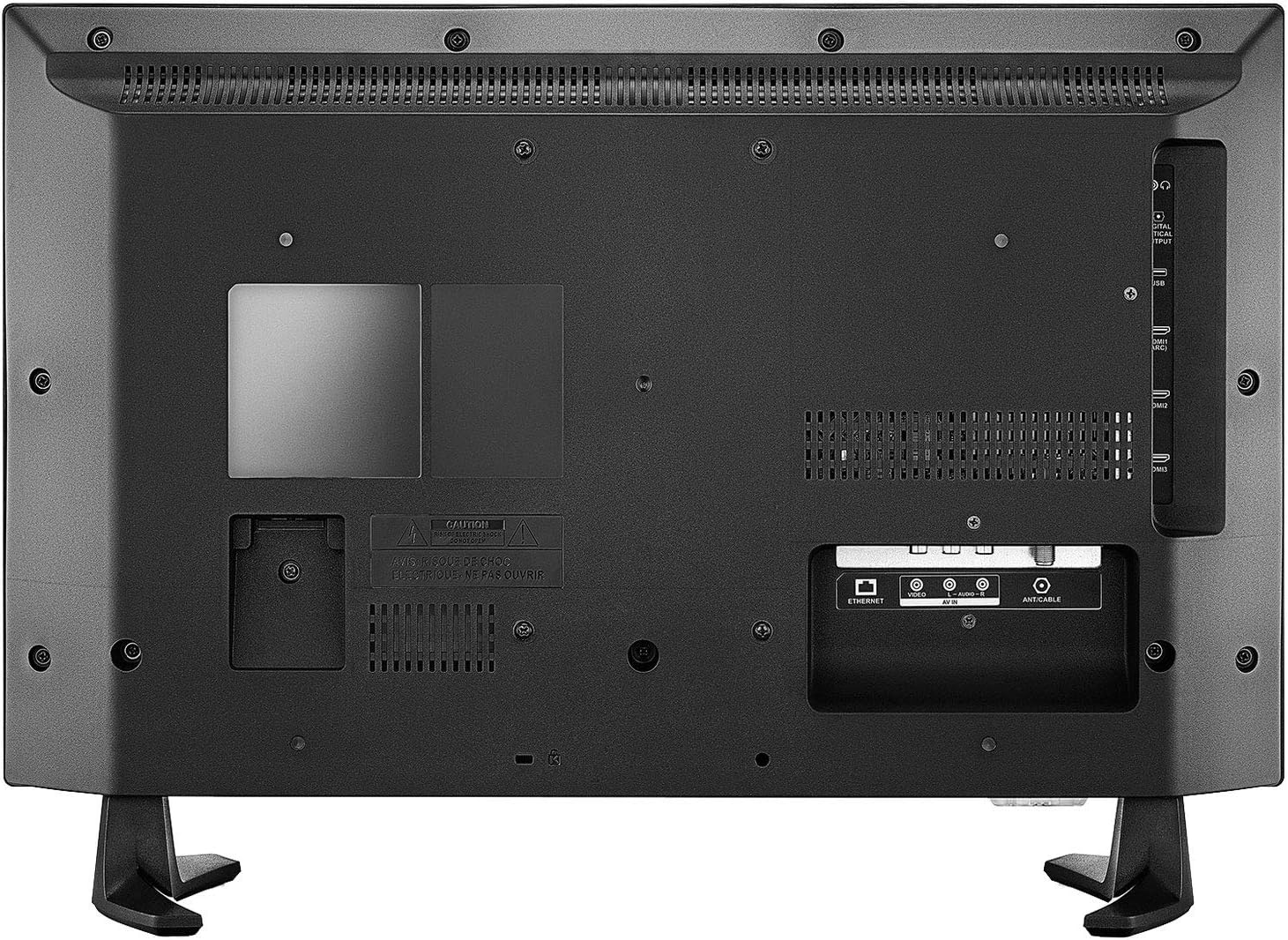
Figura 4.1: Porte di connettività del pannello posteriore.

Figure 4.2: Side and back connectivity ports detail.
- HDMI (3 ports, including 1 with ARC): Connect Blu-ray players, game consoles, cable/satellite boxes, or other HDMI devices. HDMI 1 supports Audio Return Channel (ARC) for simplified audio connections to compatible sound systems.
- USB (1 porta): Collegare dispositivi di archiviazione USB per la riproduzione di contenuti multimediali.
- Ingresso composito (AV): Collegare i dispositivi più vecchi utilizzando cavi RCA (giallo per il video, rosso/bianco per l'audio).
- Ingresso antenna/cavo: Connect an HD antenna for over-the-air broadcasts or a coaxial cable for cable TV.
- Uscita audio ottica digitale: Collegalo a una soundbar o a un sistema home theater per l'audio digitale.
- Uscita audio (3.5 mm): Collega cuffie o altoparlanti esterni.
- Collegamento Ethernet: Collegare un cavo Ethernet per una connessione Internet cablata.
4.3 Accensione iniziale e configurazione di rete
- After making all necessary connections, plug the TV's power cord into a wall outlet.
- Insert the two AAA batteries into the Voice Remote with Alexa.
- Premere il pulsante di accensione sul telecomando per accendere la TV.
- Follow the on-screen instructions to complete the initial setup, including selecting your language, connecting to a Wi-Fi network (or using Ethernet), and signing in to your Amazon account.
- La TV ti guiderà nell'associazione del telecomando vocale con Alexa.
5. Utilizzo del televisore
5.1 Telecomando vocale con Alexa
The included Voice Remote with Alexa allows you to control your TV using voice commands. Press and hold the Microphone button and speak your command. You can launch apps, search for titles, play music, switch inputs, and control smart home devices.
5.2 Interfaccia Fire TV
The Fire TV interface provides a unified home screen for all your content. It features:
- Casa: Accedi alle tue app preferite, ai contenuti guardati di recente e ai consigli personalizzati.
- Vivere: View live over-the-air TV channels (with an antenna) and integrated streaming channels.
- Your Videos: Access your purchased or rented content from Amazon Prime Video.
- Movies/TV Shows: Browse a vast library of movies and TV shows from various streaming services.
- Applicazioni: Download and manage your streaming applications.
- Impostazioni: Adjust TV settings, network connections, and account information.

Figure 5.1: Fire TV interface on the Insignia Smart TV.
5.3 Applicazioni di streaming
Your TV comes with popular streaming apps pre-installed, such as Netflix, Prime Video, YouTube, and Disney+. You can download additional apps from the Amazon Appstore.
5.4 Live TV (Antenna)
To watch live over-the-air broadcasts, connect an HD antenna to the ANT/CABLE input. Use the 'Live' section of the Fire TV interface to scan for channels and access the program guide.
5.5 Selezione dell'ingresso
To switch between connected devices (e.g., game console, Blu-ray player), navigate to the 'Inputs' section on the Fire TV home screen or use the dedicated input button on your remote.
6. Manutenzione
6.1 Pulizia del televisore
- Scollegare sempre la TV prima di pulirla.
- Utilizzare un panno morbido e asciutto per pulire lo schermo e il telaio.
- Per i segni ostinati sullo schermo, strofinare leggermenteampen a microfiber cloth with water or a specialized screen cleaner (ensure it's safe for LED screens) and gently wipe.
- Never use abrasive cleaners, waxes, or solvents.
6.2 Aggiornamenti software
Your Insignia Fire TV Edition Smart TV will periodically receive software updates to improve performance and add new features. Ensure your TV is connected to the internet for automatic updates. You can also manually check for updates in the Settings menu.
7. Risoluzione Dei Problemi
Se riscontri problemi con la tua TV, fai riferimento alle seguenti soluzioni comuni:
| Problema | Possibile soluzione |
|---|---|
| Nessun potere | Assicurati che il cavo di alimentazione sia collegato saldamente al televisore e a una presa elettrica funzionante. Prova una presa diversa. |
| Nessuna immagine, ma l'audio è presente | Check input source. Ensure all video cables are securely connected. Try a different HDMI port. |
| Nessun suono, ma l'immagine è presente | Check volume level and mute status. Ensure audio cables are connected correctly. If using external audio, check its power and input. |
| Il telecomando non funziona | Replace batteries. Ensure there are no obstructions between the remote and the TV. Re-pair the remote if necessary (hold Home button for 10 seconds). |
| Impossibile connettersi al Wi-Fi | Ensure your Wi-Fi router is on and working. Re-enter the Wi-Fi password carefully. Try restarting your router and TV. |
| Le app sono lente o si bloccano | Restart the TV. Check your internet connection speed. Clear app cache in Settings. |
8. Specifiche
| Caratteristica | Dettaglio |
|---|---|
| Modello | NS-24DF310CA19 |
| Dimensioni dello schermo | 24 pollici |
| Tecnologia di visualizzazione | GUIDATO |
| Risoluzione | 720p (1366x768) |
| Sistema operativo | FireOS |
| Proporzioni | 16:9 |
| Rapporto di contrasto dell'immagine | 1000:1 |
| Connettività | Ethernet, HDMI (3, 1x ARC), USB (1), Composite, Antenna/Cable, Digital Optical Audio Out, 3.5mm Audio Out |
| standard wireless | Wifi bluetooth |
| Tecnologia di controllo remoto | Bluetooth (Voice Remote with Alexa) |
| Tipo di montaggio | Table Mount (VESA 200x100mm compatible) |
| Dimensioni del prodotto (senza supporto) | 55 x 34 x 7 cm (L x A x P) |
| Dimensioni del prodotto (con supporto) | 55 x 38 x 17 cm (L x A x P) |
| Peso | 5.06 kg |
| Fonte di alimentazione | AC |
| Batterie (telecomando) | 2 batterie AAA (incluse) |
9. Garanzia e supporto
For warranty information, please refer to the warranty card included with your product or visit the official Insignia website. For technical support, troubleshooting assistance beyond this manual, or service inquiries, please contact Insignia customer support.
You can typically find support contact details on the Insignia official website or within the TV's 'Help' or 'Support' section in the Settings menu.