
Introduzione
This manual provides instructions for the setup, operation, and maintenance of your Zelotes T20 Ergonomic Vertical Mouse. Please read this manual thoroughly before using the product to ensure proper function and longevity.
Prodotto finitoview
The Zelotes T20 is an ergonomic vertical mouse designed to promote a natural hand and wrist posture, reducing strain during extended use. It features adjustable DPI settings and multiple programmable buttons for enhanced control.

Figure 1: Zelotes T20 Ergonomic Vertical Mouse. This image displays the overall design of the mouse, highlighting its vertical orientation and LED lighting.
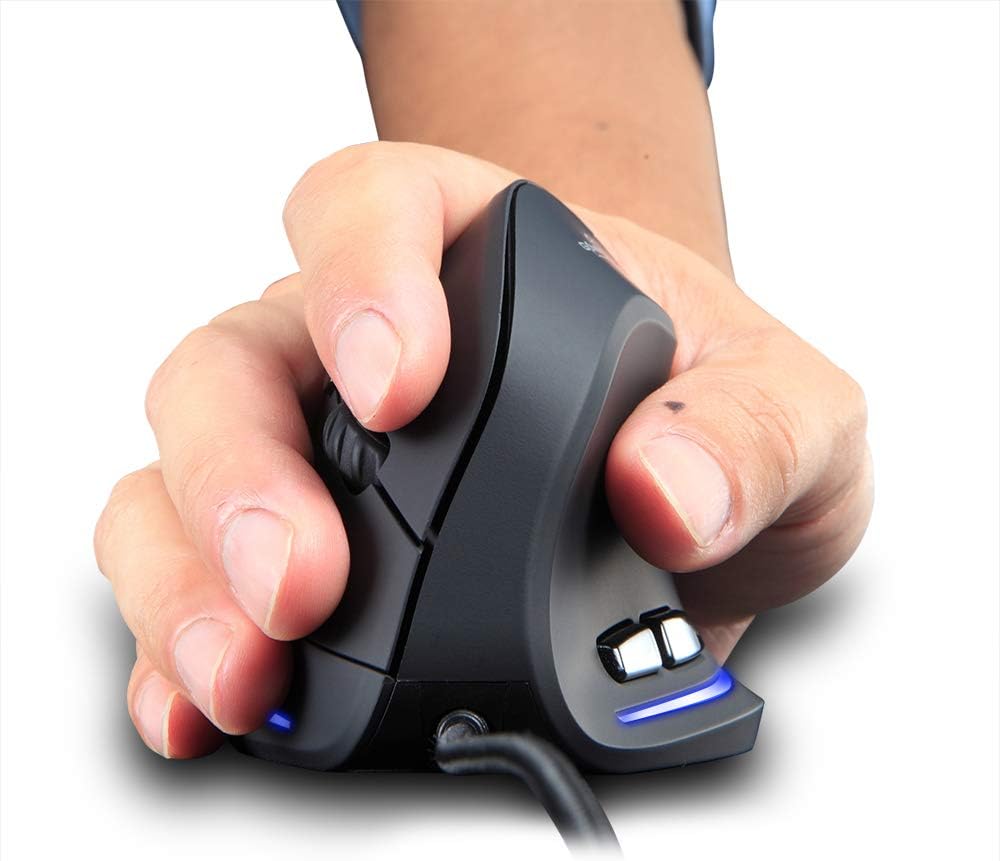
Figure 2: Proper hand placement on the Zelotes T20 mouse. This image illustrates how the vertical design allows for a natural handshake grip, intended to reduce wrist strain.

Figure 3: Ergonomic comparison. This diagram contrasts the natural wrist posture with a vertical mouse against the twisted posture often associated with traditional horizontal mice, emphasizing fatigue reduction.
Contenuto della confezione
Verificare che tutti gli articoli siano presenti nel pacco:
- 1 x Zelotes Ergonomic Vertical Mouse
- 1 x Manuale di istruzioni (questo documento)
Impostare
- Collega il mouse: Plug the USB cable of the Zelotes T20 mouse into an available USB port on your computer.
- Installazione del driver: The mouse is plug-and-play. Your operating system should automatically detect and install the necessary drivers. No additional software installation is typically required.
- Rimuovere la pellicola protettiva: Before use, locate and remove the protective film from the "Bigfoot pads" on the underside of the mouse for optimal gliding performance.

Figure 4: Underside of the mouse. This image shows the Teflon material pads and indicates the location of the protective film that should be removed before initial use.
Istruzioni per l'uso
Funzioni dei pulsanti
The Zelotes T20 mouse features 6 buttons for various functions:
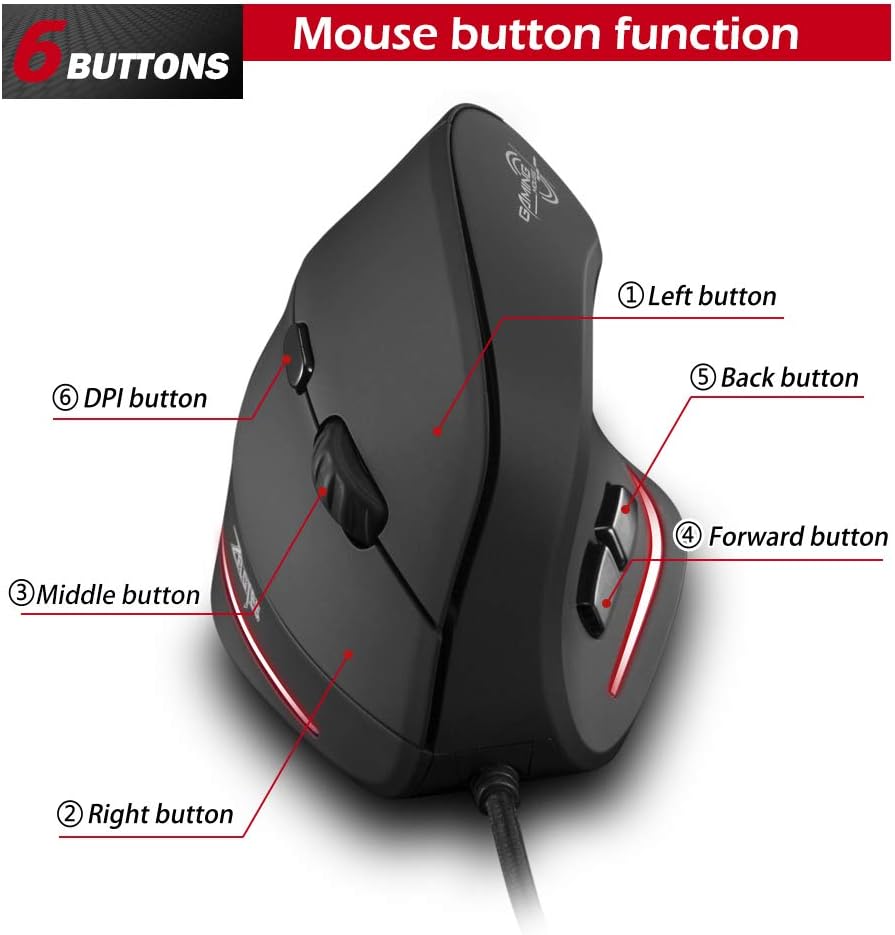
Figure 5: Mouse button layout. This diagram labels each of the six buttons: Left, Right, Middle (scroll wheel click), Forward, Back, and DPI adjustment button.
- Pulsante sinistro: Funzione standard del clic sinistro.
- Pulsante destro: Funzione standard del clic destro.
- Pulsante centrale (rotellina di scorrimento): Rotellina di scorrimento cliccabile per le funzioni del clic centrale.
- Pulsante Avanti: Naviga in avanti in web browser o file esploratori.
- Pulsante Indietro: Naviga indietro in web browser o file esploratori.
- Pulsante DPI: Regola la sensibilità del mouse (DPI).
Regolazione DPI (sensibilità)
The mouse offers four adjustable DPI settings to suit different tasks and preferences. Press the DPI button (Button 6 in Figure 5) to cycle through the settings. Each DPI level is indicated by a specific LED light color:
- 1200 DPI: Blue light hint
- 1600 DPI: Dark purple light hint
- 2400 DPI: Red light hint
- 3200 DPI: Light purple light hint
The light will stay on for approximately 3 seconds when switching DPI settings to indicate the current level.

Figure 6: DPI adjustment and LED indicators. This image illustrates the DPI button and the color coding for each of the four sensitivity settings.
Using Forward/Back Keys
The dedicated Forward and Back buttons (Buttons 4 and 5 in Figure 5) provide quick navigation. These buttons are designed to streamline browsing through web pages or folders, reducing the need for on-screen clicks.

Figure 7: Forward and Back navigation buttons. This image highlights the placement of the forward and back buttons, designed for convenient web E file navigazione.
Manutenzione
- Pulizia: Utilizzare un panno morbido e asciutto per pulire la superficie del mouse. Per lo sporco ostinato, un panno leggermenteamp è possibile utilizzare un panno, assicurandosi che nessun liquido entri nel mouse.
- Manutenzione del sensore: Mantenere pulito e libero da polvere o detriti il sensore ottico sul lato inferiore del mouse per garantire un tracciamento accurato.
- Cura del cavo: Per evitare danni, evitare di piegare bruscamente o tirare eccessivamente il cavo USB.

Figure 8: Mouse surface texture. This image provides a close-up view of the mouse's surface, described as smooth for comfortable handling.
Risoluzione dei problemi
- Il mouse non risponde:
- Assicurati che il cavo USB sia collegato saldamente a una porta USB funzionante del tuo computer.
- Prova a collegare il mouse a una porta USB diversa.
- Riavvia il computer.
- Tracciamento impreciso:
- Pulisci il sensore ottico sul lato inferiore del mouse.
- Ensure you are using the mouse on a suitable surface (e.g., a mouse pad). Highly reflective or transparent surfaces may cause issues.
- Regolare l'impostazione DPI utilizzando il pulsante DPI.
- Pulsanti non funzionanti correttamente:
- Verify that the mouse is properly connected.
- Test the mouse on another computer to determine if the issue is with the mouse or the computer's settings.
Specifiche
| Caratteristica | Dettaglio |
|---|---|
| Modello | T20 |
| Numero del pulsante | 6 pulsanti |
| Sistema di tracciamento | Ottico |
| Lunghezza del cavo USB | 1.8 metri |
| Volume di lavorotage/corrente | 5V/100mA |
| Pulsante Vita | 5 milioni di volte |
| Vita del rullo | 1.2 million turns |
| Dimensioni del prodotto (L x P x A) | 110 x 72 x 75 mm (4.33 x 2.83 x 2.95 pollici) |
| Peso del prodotto | 160 ± 5 g (5.6 once) |
| Risoluzione (DPI) | Numero di parte 1200-1600-2400-3200 |
| Tasso di ritorno (tasso di polling) | 125 Hz |
| Compatibilità | Windows 2000/ME/XP (x64)/Vista/7/8/10, Mac OS X (over V10.4), Linux |

Figure 9: Product dimensions. This image provides detailed measurements of the mouse from various angles.
Garanzia e supporto
Per informazioni sulla garanzia o supporto tecnico, fare riferimento al sito ufficiale del produttore websito o contattare il servizio clienti. Conservare la ricevuta d'acquisto come prova d'acquisto.