
1. Introduzione
This manual provides essential instructions for the proper setup, operation, and maintenance of your Brondi Adara Cordless Phone. Please read this guide thoroughly before using the device to ensure optimal performance and safety. The Brondi Adara is a DECT GAP compatible cordless telephone featuring a large backlit alphanumeric display, high-sensitivity hands-free function, and caller ID.
2. Informazioni sulla sicurezza
- Do not expose the phone or base unit to water or moisture.
- Evitare temperature estreme, luce solare diretta o ambienti polverosi.
- Use only the provided power adapter and batteries. Using unauthorized accessories may damage the device and void the warranty.
- Non tentare di aprire o riparare il dispositivo da soli. Per qualsiasi intervento di assistenza, rivolgersi a personale qualificato.
- Keep the phone away from medical devices such as pacemakers, as it may cause interference.
- Smaltire le batterie in modo responsabile, nel rispetto delle normative locali.
3. Contenuto della confezione
Verificare che tutti gli articoli siano presenti nel pacco:
- Brondi Adara Handset
- Brondi Adara Base Unit
- Adattatore di alimentazione per unità base
- Cavo della linea telefonica
- Batterie ricaricabili (NiMH)
- Manuale dell'utente (questo documento)
4. Prodotto finitoview
Familiarize yourself with the main components of your Brondi Adara cordless phone.
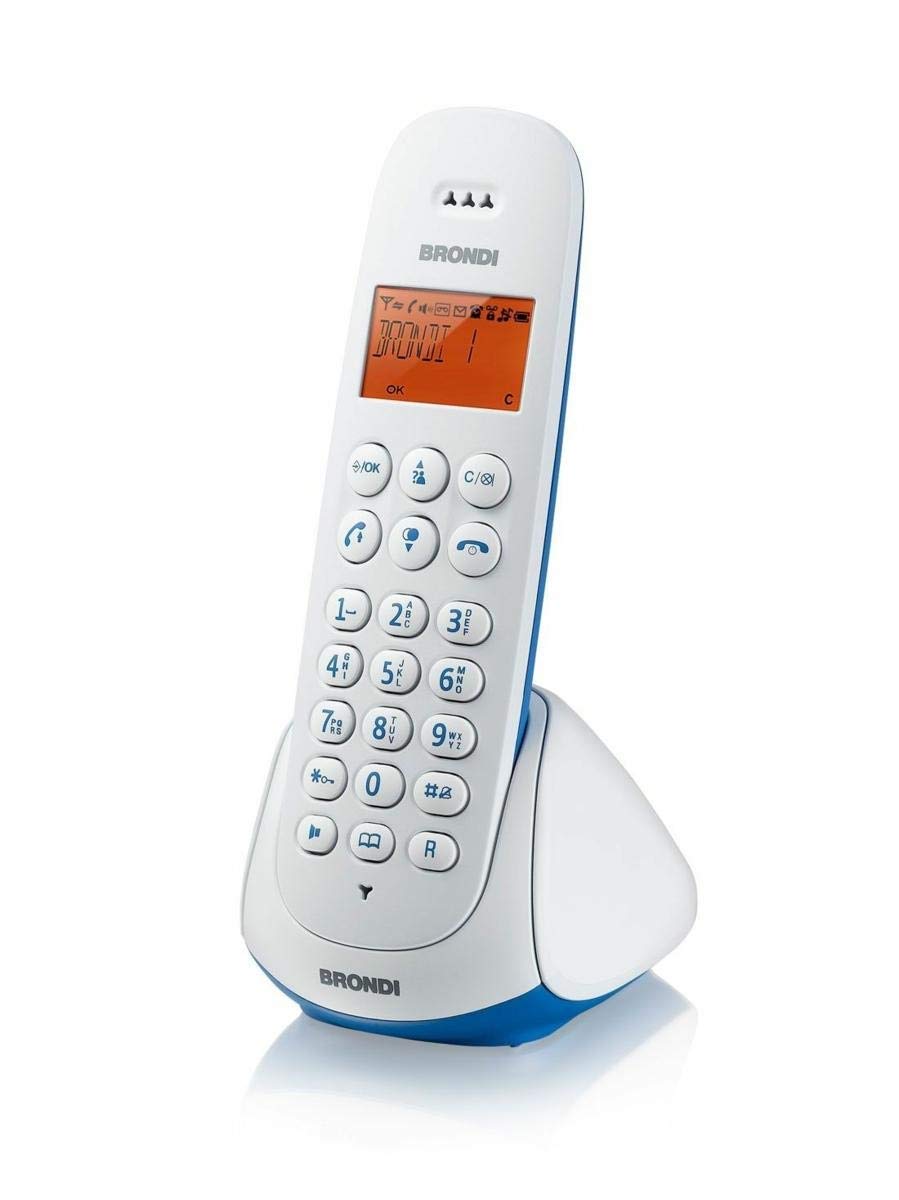
Image 1: Brondi Adara Cordless Phone, showing the handset and base unit.
4.1 portatile
- Display: Large alphanumeric backlit screen for menu navigation and call information.
- tastiera: Tasti numerici standard (0-9), *, # e tasti funzione.
- Pulsante di chiamata (verde): Per effettuare o rispondere a una chiamata.
- Pulsante di fine chiamata (rosso): Per terminare una chiamata o tornare in standby.
- Tasti di navigazione: For scrolling through menus and options.
- Pulsante vivavoce: To activate or deactivate the speakerphone during a call.
- Tasti del volume: To adjust earpiece or speaker volume.
4.2 Unità di base
- Base di ricarica: For charging the handset batteries.
- Pulsante PAGINA: Per localizzare un telefono smarrito.
- Presa di alimentazione: Per collegare l'adattatore di alimentazione.
- Telephone Line Socket: Per il collegamento alla presa telefonica a muro.

Image 2: Brondi Adara Cordless Phone, illustrating key features and components.
5. Impostazione
Follow these steps to set up your Brondi Adara cordless phone:
- Installa le batterie: Open the battery compartment on the back of the handset. Insert the supplied rechargeable batteries, ensuring correct polarity. Close the compartment.
- Collegare l'alimentazione dell'unità base: Plug the small end of the power adapter into the 'DC IN' socket on the base unit. Plug the other end into a standard electrical wall outlet.
- Collegare la linea telefonica: Plug one end of the telephone line cord into the 'LINE' socket on the base unit. Plug the other end into your telephone wall outlet.
- Caricare il portatile: Place the handset on the base unit's charging cradle. The display will indicate charging. Allow the handset to charge for at least 12-15 hours before initial use, even if the display shows a full battery. This ensures optimal battery performance.
- Registrazione del portatile (se necessario): Your handset is usually pre-registered to the base. If not, or if you are adding additional handsets (up to 5 total), refer to the 'DECT GAP Pairing' section in Operating Instructions.
6. Istruzioni per l'uso
6.1 Effettuare una chiamata
- Sollevare il ricevitore dalla base o premere il tasto Chiamata pulsante.
- Comporre il numero di telefono desiderato utilizzando la tastiera.
- Premere il tasto Chiamata button again if you dialed before picking up, or wait for the call to connect.
6.2 Ricezione di una chiamata
Quando il telefono squilla:
- Premere il tasto Chiamata pulsante per rispondere.
- Alternatively, if the auto-answer feature is enabled, simply lift the handset from the base.
6.3 Funzione vivavoce
Durante una chiamata, premere il tasto Mani libere pulsante per attivare il vivavoce. Premerlo nuovamente per tornare alla modalità auricolare.
6.4 ID chiamante
If you subscribe to Caller ID service from your telephone provider, the caller's number (and name, if available) will be displayed on the handset screen before you answer the call. You can review past calls in the call log menu.
6.5 DECT GAP Pairing (Registering Additional Handsets)
Your Brondi Adara base unit supports up to 5 DECT GAP compatible handsets. To register a new handset:
- Sull'unità base, tenere premuto il tasto PAGINA button for approximately 5 seconds until the registration indicator on the base starts flashing.
- On the handset you wish to register, navigate to the 'Registration' or 'Add Handset' option in the menu.
- Follow the on-screen prompts to enter the PIN (usually '0000' by default).
- Once registered, the handset display will confirm successful pairing.
7. Manutenzione
7.1 Pulizia
Wipe the handset and base unit with a soft, dry, lint-free cloth. Do not use cleaning sprays, waxes, or solvents.
7.2 Cura della batteria
- Utilizzare sempre le batterie ricaricabili specificate.
- For optimal battery life, fully charge the handset for 12-15 hours before first use.
- Se il telefono non verrà utilizzato per un periodo prolungato, rimuovere le batterie per evitare perdite.
- Replace batteries when their performance significantly degrades (e.g., shorter talk time).
8. Risoluzione Dei Problemi
If you encounter issues with your Brondi Adara phone, refer to the following common problems and solutions:
| Problema | Possibile causa | Soluzione |
|---|---|---|
| Nessun tono di linea | Base unit not powered or telephone line disconnected. | Check power adapter connection to base and wall outlet. Ensure telephone line cord is securely connected to base and wall jack. |
| Non è possibile effettuare/ricevere chiamate | Handset out of range, low battery, or line issue. | Move closer to the base unit. Place handset on base to charge. Check if other phones on the same line are working. |
| Scarsa qualità del suono / Statico | Interference from other electronic devices, handset too far from base. | Move base unit away from other electrical appliances (TVs, computers). Move handset closer to the base. |
| Il portatile non si carica | Handset not properly seated, dirty charging contacts, or faulty batteries. | Ensure handset is correctly placed on the base. Clean charging contacts on both handset and base with a dry cloth. Replace old batteries. |
| ID chiamante non visualizzato | No Caller ID subscription or service issue. | Contatta il tuo fornitore di servizi telefonici per assicurarti che il servizio ID chiamante sia attivo. |
9. Specifiche
| Caratteristica | Dettaglio |
|---|---|
| Marca | BRONDY |
| Numero di modello | 10273841 |
| Tipo di telefono | Senza fili |
| Colore | Azzurro / Bianco |
| Materiale | Acrilonitrile Butadiene Stirene (ABS) |
| Fonte di alimentazione | Alimentato a batteria |
| Tipo di combinatore | Tastiera singola |
| Tipo di sistema di risposta | Digitale |
| Dispositivi compatibili | PSTN, ISDN |
| Funzionamento multilinea | Funzionamento a linea singola |
| ID chiamante | SÌ |
| Tempo di conversazione | 7 ore |
10. Garanzia e supporto
For warranty information, technical support, or service inquiries, please refer to the warranty card included with your product or visit the official BRONDI websito. Conservare la prova d'acquisto per eventuali reclami in garanzia.