
EVERSECU B07HT73LV1
EVERSECU 2K 4MP Light-Bulb Security Camera User Manual
Model: B07HT73LV1
1. Introduzione
This manual provides detailed instructions for the installation, operation, maintenance, and troubleshooting of your EVERSECU 2K 4MP Light-Bulb Security Camera. Please read this manual thoroughly before using the product to ensure proper functionality and safety. Keep this manual for future reference.

Image 1.1: The EVERSECU Light-Bulb Security Camera is suitable for various indoor and outdoor environments such as offices, warehouses, shops, and homes.
2. Prodotto finitoview
The EVERSECU Light-Bulb Security Camera is a versatile surveillance device designed for easy installation and comprehensive monitoring. It features high-definition video, night vision, two-way audio, and smart motion detection capabilities.
Caratteristiche principali:
- 2K 4MP Ultra HD Video Resolution: Fornisce video chiari e dettagliatitage (2560×1440).
- Installazione wireless e semplice: Screws directly into standard E26/E27 light sockets (110V~240V) without drilling or complex wiring.
- Visione notturna stellare: Equipped with 4 IR LEDs and 6 white LEDs for up to 31ft black/white and 65.6ft full-color night vision.
- 360° View (Pan/Tilt/Zoom): Offers 355° pan, 110° tilt, and 4x digital zoom, controllable via the ICSEE app.
- Audio bidirezionale: Microfono e altoparlante integrati per comunicazioni in tempo reale.
- Rilevamento del movimento e tracciamento automatico: Detects movement, tracks subjects, and sends real-time alerts.
- IP66 Weather-Proof: Plastica ABS resistente casing suitable for indoor and outdoor use (-4℉~+140℉).
- Compatibilità con Alexa: Supports voice control through Amazon Alexa.
- Opzioni di archiviazione: Supports local storage via SD card and cloud storage.

Image 2.1: The EVERSECU Light-Bulb Security Camera shown alongside its mobile application interface.

Image 2.2: Visual representation of the camera's core functionalities including motion detection, PTZ, color night vision, 2.4Ghz/5Ghz WiFi, two-way audio, sound alarm, SD card support, and cloud storage.
3. Impostazione
3.1 Contenuto della confezione
Verificare che tutti i componenti siano presenti:
- EVERSECU Light-Bulb Security Camera
- Manuale dell'utente (questo documento)
- Mounting accessories (if applicable, check packaging)
3.2 Installazione
- Prima dell'installazione, assicurarsi che la presa della luce sia spenta.
- Screw the EVERSECU Light-Bulb Security Camera into a standard E26 or E27 light socket (110V~240V). No drilling or additional wiring is required.
- Turn on the power to the light socket. The camera will power on and initiate its startup sequence.
3.3 Installazione e connessione dell'app
- Scarica il ICSEE app from the App Store (iOS), Google Play Store (Android), or the official websito per Windows.
- Registrati per un account e accedi.
- Follow the in-app instructions to add your camera. This typically involves scanning a QR code on the camera or connecting to the camera's temporary Wi-Fi hotspot.
- Connect the camera to your 2.4Ghz Wi-Fi network. Ensure your Wi-Fi password is correct.
- Once connected, you can access the live feed and control the camera remotely.

Image 3.1: The ICSEE application is available for Android, iOS, and Windows platforms, allowing remote access and control of the camera.
4. Istruzioni per l'uso
4.1 Vivere View e controllo PTZ
Open the ICSEE app to view il feed live dalla tua telecamera. Usa i controlli sullo schermo per:
- Pan: Ruotare la telecamera orizzontalmente fino a 355°.
- Inclinazione: Regolare la telecamera verticalmente fino a 110°.
- Ingrandisci: Use 4x digital zoom to magnify areas of interest.

Image 4.1: The camera offers extensive pan and tilt functionality for comprehensive area coverage.
4.2 Modalità di visione notturna
La telecamera supporta due modalità di visione notturna:
- Visione notturna a infrarossi: Utilizes IR LEDs for clear black and white video in low-light conditions (up to 31ft).
- Visione notturna a colori: Activates white LEDs to provide full-color video even in darkness (up to 65.6ft). This mode can also deter intruders.
You can switch between these modes or set them to automatic activation within the app settings.
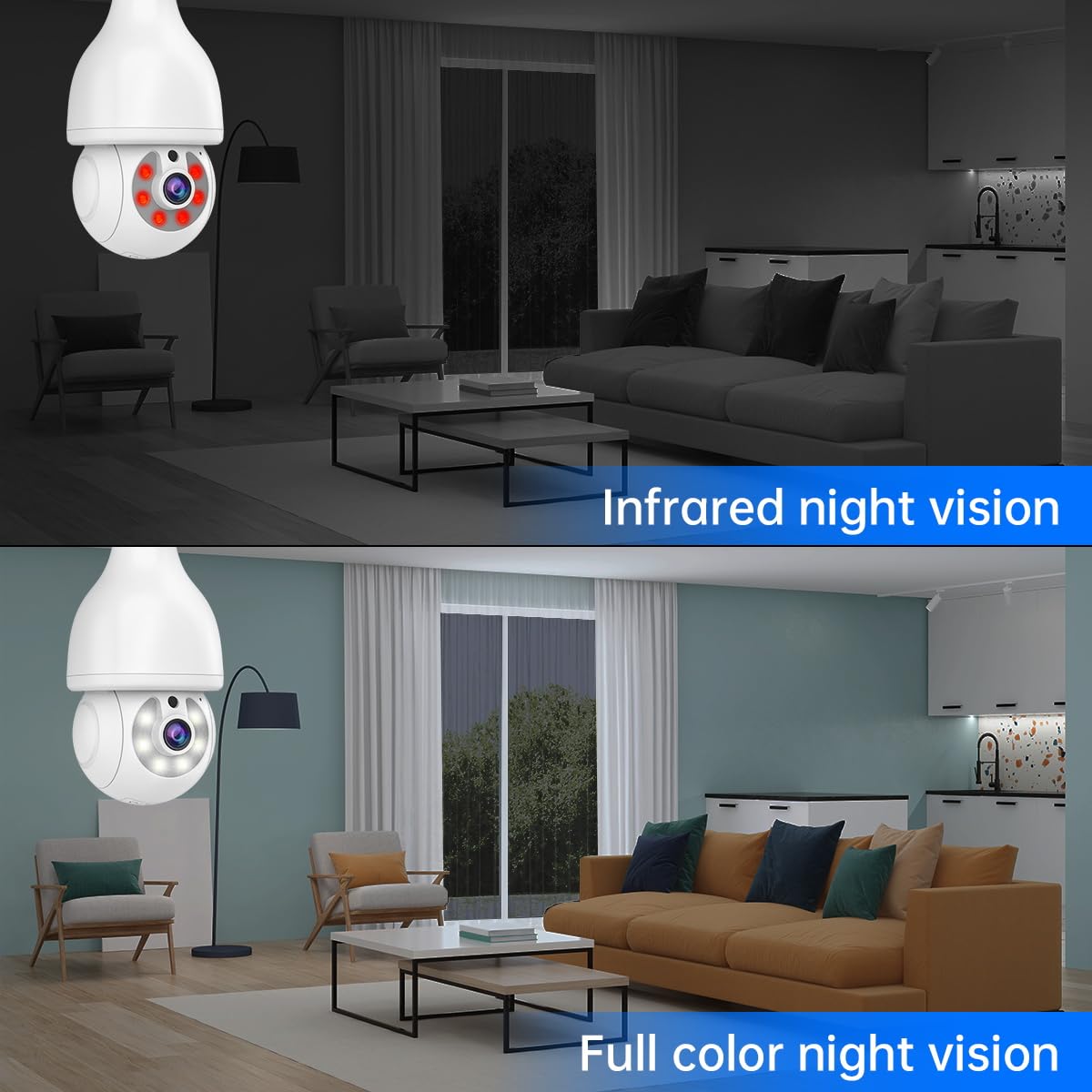
Image 4.2: A visual comparison demonstrating the clarity and detail provided by both infrared and full-color night vision capabilities.
4.3 Audio bidirezionale
Use the two-way audio feature to communicate through the camera. Tap the microphone icon in the app to speak, and the camera's built-in speaker will broadcast your voice. You can also hear audio from the camera's location.

Image 4.3: The two-way audio function allows for interactive communication between the camera's location and the user's mobile device.
4.4 Rilevamento del movimento e tracciamento automatico
Enable motion detection in the app to receive real-time alerts on your phone when movement is detected. The camera can automatically track the detected subject, ensuring continuous monitoring of suspicious activity. A sound alarm can also be configured to deter intruders.

Image 4.4: The camera's motion detection system triggers real-time alerts and automatically tracks moving objects, enhancing security.
4.5 Integrazione Alexa
The camera is compatible with Amazon Alexa. Follow the instructions in the ICSEE app or your Alexa app to link your camera and enable voice commands for viewing the camera feed on compatible Alexa devices.
5. Manutenzione
5.1 Pulizia
Per mantenere prestazioni ottimali, pulire periodicamente l'obiettivo della fotocamera e la parte esternaasing with a soft, dry cloth. Avoid using harsh chemicals or abrasive materials that could damage the camera.
5.2 Aggiornamenti firmware
Regularly check for and apply firmware updates through the ICSEE app. Firmware updates often include performance improvements, new features, and security enhancements. Ensure a stable internet connection during updates to prevent interruption.
5.3 Protezione dagli agenti atmosferici
While the camera is IP66 weather-proof, it is important to protect the light screw connector from direct water exposure, especially in outdoor installations, to prevent damage.
6. Risoluzione Dei Problemi
Se riscontri problemi con la tua fotocamera, fai riferimento ai seguenti problemi comuni e alle relative soluzioni:
| Problema | Possibile causa | Soluzione |
|---|---|---|
| Camera fails to connect to Wi-Fi or frequently disconnects. | Weak Wi-Fi signal, incorrect Wi-Fi password, 5Ghz Wi-Fi network used. | Ensure the camera is within range of a 2.4Ghz Wi-Fi network. Verify the Wi-Fi password. Try resetting the camera and re-pairing it with the app. |
| L'aggiornamento del firmware non riesce. | Unstable internet connection, corrupted download. | Ensure a strong and stable internet connection. Restart the app and camera, then attempt the update again. |
| Nessun feed video nell'app. | Camera offline, app issue, network problem. | Check if the camera is powered on and connected to Wi-Fi. Restart the ICSEE app. Verify your internet connection. |
| Non vengono ricevuti avvisi di rilevamento del movimento. | Motion detection disabled, app notifications turned off, incorrect sensitivity settings. | Enable motion detection and push notifications in the ICSEE app. Adjust motion sensitivity settings. Check phone notification settings. |
| L'audio bidirezionale non funziona. | Microfono/altoparlante disabilitati nell'app, volume troppo basso, latenza di rete. | Ensure microphone and speaker functions are enabled and volume is adjusted in the app. Check network stability. |
For further assistance, please contact EVERSECU customer support.
7. Specifiche
- Modello: B07HT73LV1
- Risoluzione video: 2560×1440 (4 Megapixel Ultra HD)
- Connettività: Wireless 2.4Ghz WiFi
- Visione notturna: 4 IR LEDs + 6 white LEDs; 31ft B/W, 65.6ft Full-Color
- Gamma di panoramica/inclinazione: Panoramica 355°, inclinazione 110°
- Zoom digitale: 4x
- Audio: Audio bidirezionale (microfono e altoparlante integrati)
- Resistenza alle intemperie: Grado di protezione IP66
- Alimentazione elettrica: E26 / E27 light socket (110V~240V)
- Dimensioni: 4 x 4 x 8.7 pollici
- Peso: 1.48 libbre
- Compatibilità: ICSEE App (Android, iOS, Windows), Amazon Alexa
- Magazzinaggio: SD Card (not included), Cloud Storage (subscription may be required)
- Caratteristiche speciali: Motion Detection, Auto Tracking, RTSP Stream, ONVIF-conformant
8. Garanzia e supporto
For warranty information, please refer to the documentation provided at the time of purchase or visit the official EVERSECU website. For technical support or further inquiries, please contact EVERSECU customer service through their official channels.