
1. Introduzione
Thank you for choosing the Bearware Wireless Weather Station with Projection and Outdoor Sensor. This device provides accurate time via DCF radio signal, indoor and outdoor temperature readings, weather forecasts, and a convenient alarm function with projection. Please read this manual carefully to ensure proper use and optimal performance of your weather station.
2. Istruzioni di sicurezza
- Non esporre l'unità principale o il sensore esterno a temperature estreme, alla luce solare diretta o a umidità eccessiva.
- Evitare di far cadere il dispositivo o di sottoporlo a forti impatti.
- Non tentare di smontare o riparare l'unità da soli. Per qualsiasi intervento di assistenza, rivolgersi a personale qualificato.
- Tenere le batterie fuori dalla portata dei bambini. Smaltire le batterie usate in modo responsabile, nel rispetto delle normative locali.
- Use only the provided power adapter or specified battery types.
3. Contenuto della confezione
Si prega di controllare la confezione per verificare la presenza dei seguenti elementi:
- Bearware Wireless Weather Station (Main Unit)
- Sensore esterno wireless
- Adattatore di alimentazione CC 5 V 1.2 A
- User Manual (Italian version available online)

Image: Contents of the Bearware Weather Station package, including the main unit, outdoor sensor, and power adapter.
4. Prodotto finitoview
4.1 Main Unit (Front View)
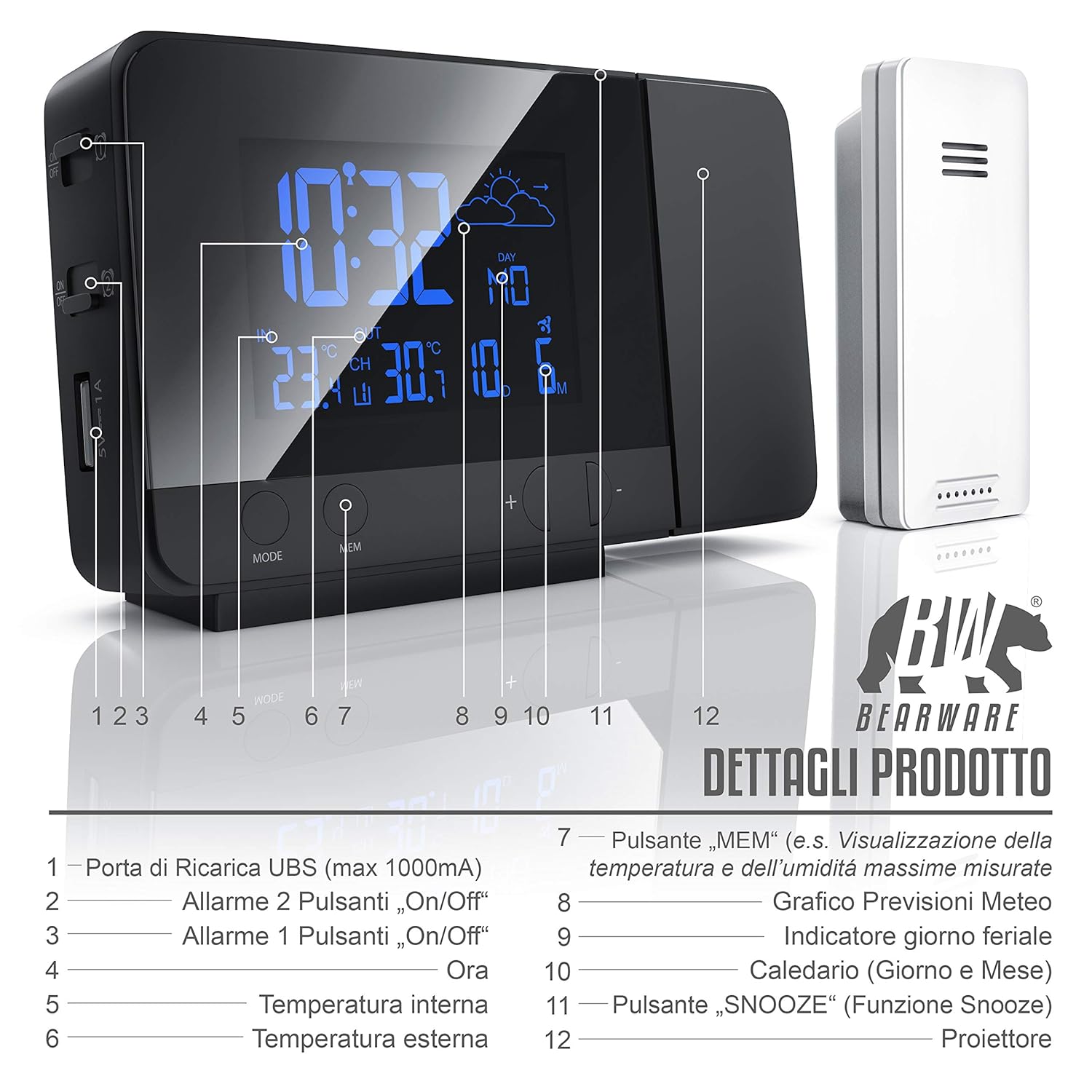
Immagine: Frontale view of the weather station display and control buttons. Key elements include the time, indoor/outdoor temperature, weather forecast icon, day, and date. Buttons for MODE, MEM, and +/- are visible below the display.
- USB Charging Port (max 1000mA)
- Alarm 2 On/Off Button
- Alarm 1 On/Off Button
- Visualizzazione del tempo
- Temperatura interna
- Temperatura esterna
- "MEM" Button (e.g., Display Max/Min Temperature and Humidity)
- Weather Forecast Graph
- Indicatore dei giorni feriali
- Calendar (Day and Month)
- "SNOOZE" Button (Snooze Function)
- Proiettore
4.2 Main Unit (Side/Rear View)

Immagine: laterale e posteriore view of the weather station, highlighting the control buttons and ports. This includes the snooze button, color change settings, alarm switches, battery compartment, and DC power input.
- SNOOZE Button (Stops and postpones alarm)
- Set Color Change in "Loop" (Automatic color cycle)
- Set Color Change in "Rainbow" (Specific color selection)
- Alarm 1 On/Off Switch
- Alarm 2 On/Off Switch
- Battery Compartment (2x 1.5V AAA Batteries)
- DC 5V 1.2A Power Adapter Input
4.3 Sensore esterno wireless
The outdoor sensor measures external temperature and transmits data wirelessly to the main unit. It is protected against splashes (IPX4) and operates on 2x AAA 1.5V batteries.
5. Impostazione
5.1 Alimentazione dell'unità principale
- Potenza della batteria: Open the battery compartment on the rear of the main unit and insert 2 x 1.5V AAA batteries, observing polarity (+/-). This provides backup power in case of a power outage.
- Alimentazione CA: Connect the included DC 5V 1.2A power adapter to the DC input port on the rear of the main unit, then plug it into a wall outlet. The display will light up.
5.2 Alimentazione del sensore esterno
- Open the battery compartment on the outdoor sensor and insert 2 x 1.5V AAA batteries, observing polarity (+/-).
- Place the outdoor sensor in a sheltered location, away from direct sunlight and rain, to ensure accurate readings. The maximum wireless range is approximately 10 meters.
5.3 Initial Synchronization (DCF Time & Sensor)
Upon initial power-up, the weather station will automatically attempt to synchronize with the DCF radio signal for accurate time and date. It will also search for the outdoor sensor.
- Place the main unit near a window for better DCF signal reception.
- The synchronization process may take several minutes or up to 6 hours.
- Once synchronized, the DCF icon will appear on the display.
- If the outdoor temperature does not appear, ensure the sensor batteries are correctly installed and it is within range. You may need to manually initiate a sensor search (refer to Operating Instructions).
6. Istruzioni per l'uso
6.1 Impostazione di data e ora
- In normal time display mode, press and hold the "MODE" button to enter time setting mode.
- Use the "+/-" buttons to adjust values. Press "MODE" to confirm and move to the next setting (e.g., 12/24 hour format, hour, minute, year, month, day, weekday language).
- The weekday display supports 7 different languages.
6.2 Impostazioni di allarme
The weather station features two independent alarms.
- Press the "MODE" button repeatedly to cycle through time, Alarm 1, and Alarm 2 display modes.
- To set an alarm, select Alarm 1 or Alarm 2 display, then press and hold the "MODE" button. Use "+/-" to adjust the hour and minute. Press "MODE" to confirm.
- Use the dedicated Alarm 1 On/Off and Alarm 2 On/Off switches on the side/rear of the unit to activate or deactivate each alarm.
- When an alarm sounds, press the "SNOOZE" button to activate the snooze function. The alarm will sound again after a few minutes. To stop the alarm completely, press any other button.
6.3 Display Settings (Backlight & Brightness)

Image: The weather station display showcasing its 8-color RGB backlight feature, with different colors like green, blue, red, and yellow.
- The display features an 8-color RGB backlight (green, turquoise, blue, purple, white, red, orange, yellow).
- Use the "Set Color Change in 'Loop'" switch on the side/rear to enable automatic color cycling.
- Use the "Set Color Change in 'Rainbow'" switch to manually select a specific color.
- Brightness can be adjusted (details not specified, typically via a dedicated button or holding a button).
6.4 Temperature Display & Min/Max Values
- Il display mostra sia la temperatura interna che quella esterna.
- Premere il pulsante "MEM" per view the minimum and maximum recorded temperatures. Press again to cycle through min/max indoor and outdoor temperatures.
- To switch between Celsius (°C) and Fahrenheit (°F), locate the °C/°F switch (often on the back or via a button combination).
6.5 Previsioni del tempo
The weather station provides a weather forecast for approximately the next 12 hours based on changes in atmospheric pressure. Icons on the display will indicate sunny, partly cloudy, cloudy, rainy, or snowy conditions.
6.6 Funzione di ricarica USB

Image: A smartphone connected to the USB charging port on the side of the Bearware Weather Station, illustrating its charging capability.
The main unit includes a USB Type A female port (max 1000mA output) for charging external devices like smartphones. Connect your device's USB charging cable to this port.
6.7 Funzione di proiezione
The integrated projector can display the time and temperature onto a wall or ceiling. The projection angle can be adjusted. The projection is typically red for clear visibility in low light conditions.
7. Manutenzione
- Pulizia: Wipe the unit and sensor with a soft, dry cloth. Do not use abrasive cleaners or solvents.
- Sostituzione della batteria: Replace batteries in both the main unit and outdoor sensor when the low battery indicator appears on the display or when performance degrades. Ensure correct battery type (AAA) and polarity.
- Magazzinaggio: Se si conserva il dispositivo per un periodo prolungato, rimuovere tutte le batterie per evitare perdite.
8. Risoluzione Dei Problemi
| Problema | Possibile causa | Soluzione |
|---|---|---|
| Nessun display / Unità non accesa | No power from adapter; dead batteries; incorrect battery polarity. | Check power adapter connection; replace batteries; ensure correct battery orientation. |
| Temperatura esterna non visualizzata | Outdoor sensor out of range; dead sensor batteries; interference. | Move sensor closer to main unit; replace sensor batteries; try repositioning both units. |
| L'ora DCF non si sincronizza | Scarsa ricezione del segnale; interferenza. | Move unit near a window; avoid electronic devices that may cause interference; allow more time for synchronization. |
| Letture della temperatura imprecise | Sensor exposed to direct sunlight or heat sources; poor ventilation. | Spostare il sensore in un'area ombreggiata e ben ventilata. |
| La proiezione è sfocata o poco chiara | Incorrect focus; projection surface too far or uneven. | Adjust the projector's focus (if available); ensure projection surface is flat and within optimal distance. |
9. Specifiche

Immagine: parte superiore e frontale view of the Bearware Weather Station with key dimensions: 137mm length, 85mm height, and 33mm depth.
- Numero modello: 302688
- Dimensioni (unità principale): 13.7 x 3.3 x 8.5 cm (L x P x A)
- Peso (unità principale): 168 grammi
- Colore: Nero (opaco)
- Materiale: Plastica
- Alimentazione (unità principale): 2 x 1.5V AAA batteries or DC 5V 1.2A power adapter (included)
- Alimentazione (sensore esterno): 2 batterie AAA da 1.5 V
- Intervallo di temperatura interna: Da -9.9 °C (14 °F) a 50 °C (122 °F)
- Intervallo di temperatura esterna: Da -40 °C (-40 °F) a 70 °C (158 °F)
- Precisione della temperatura: 1 °C
- Tecnologia dei sensori: Senza fili
- Uscita di ricarica USB: Max. 1000 mA (USB Type A female)
- Retroilluminazione del display: 8-color RGB (green, turquoise, blue, purple, white, red, orange, yellow)
- Formato ora: 12/24 ore
- Caratteristiche speciali: DCF radio-controlled time, 2 adjustable alarms, Snooze function, Min/Max temperature display, Weather trend function, USB charging port, Time projection on ceiling/wall.
10. Garanzia e supporto
This Bearware product comes with a 24-month warranty from the date of purchase. In case of any issues or for technical support, please contact Bearware customer service. Please refer to the contact information provided with your purchase or on the official Bearware websito.