
AstroAI 250PSI-M
AstroAI Digital Tire Pressure Gauge with Inflator
Model: 250PSI-M
Introduzione
Thank you for choosing the AstroAI Digital Tire Pressure Gauge with Inflator. This device is designed to provide accurate tire pressure readings and facilitate efficient tire inflation and deflation. Proper tire pressure is crucial for vehicle safety, fuel efficiency, and tire longevity. This manual will guide you through the setup, operation, and maintenance of your new tire inflator gauge.

Image: The AstroAI Digital Tire Pressure Gauge with Inflator, including the digital display, flexible hose, air chuck, and various accessories like valve caps and a valve core tool.
Why Proper Tire Pressure Matters
Maintaining correct tire pressure is vital for several reasons:
- Maggiore sicurezza: Properly inflated tires offer better handling, braking, and overall vehicle stability, reducing the risk of accidents.
- Efficienza del carburante migliorata: Underinflated tires increase rolling resistance, leading to higher fuel consumption.
- Extended Tire Lifespan: Correct pressure ensures even tire wear, prolonging the life of your tires.
- Reduced Risk of Blowouts: Over or underinflation can lead to tire damage and sudden blowouts.

Image: Visual representation of the consequences of incorrect tire pressure, including increased fuel consumption, accelerated tire wear, and elevated accident risk.
Configurazione e componenti
Before first use, familiarize yourself with the components and ensure proper setup.
Contenuto della confezione:
- AstroAI Digital Tire Pressure Gauge with Inflator
- 4 x cappucci per valvole
- 1 strumento per nucleo valvola
- 1 x rotolo di nastro sigillante per filettature
- 2 batterie AAA (preinstallate o incluse)
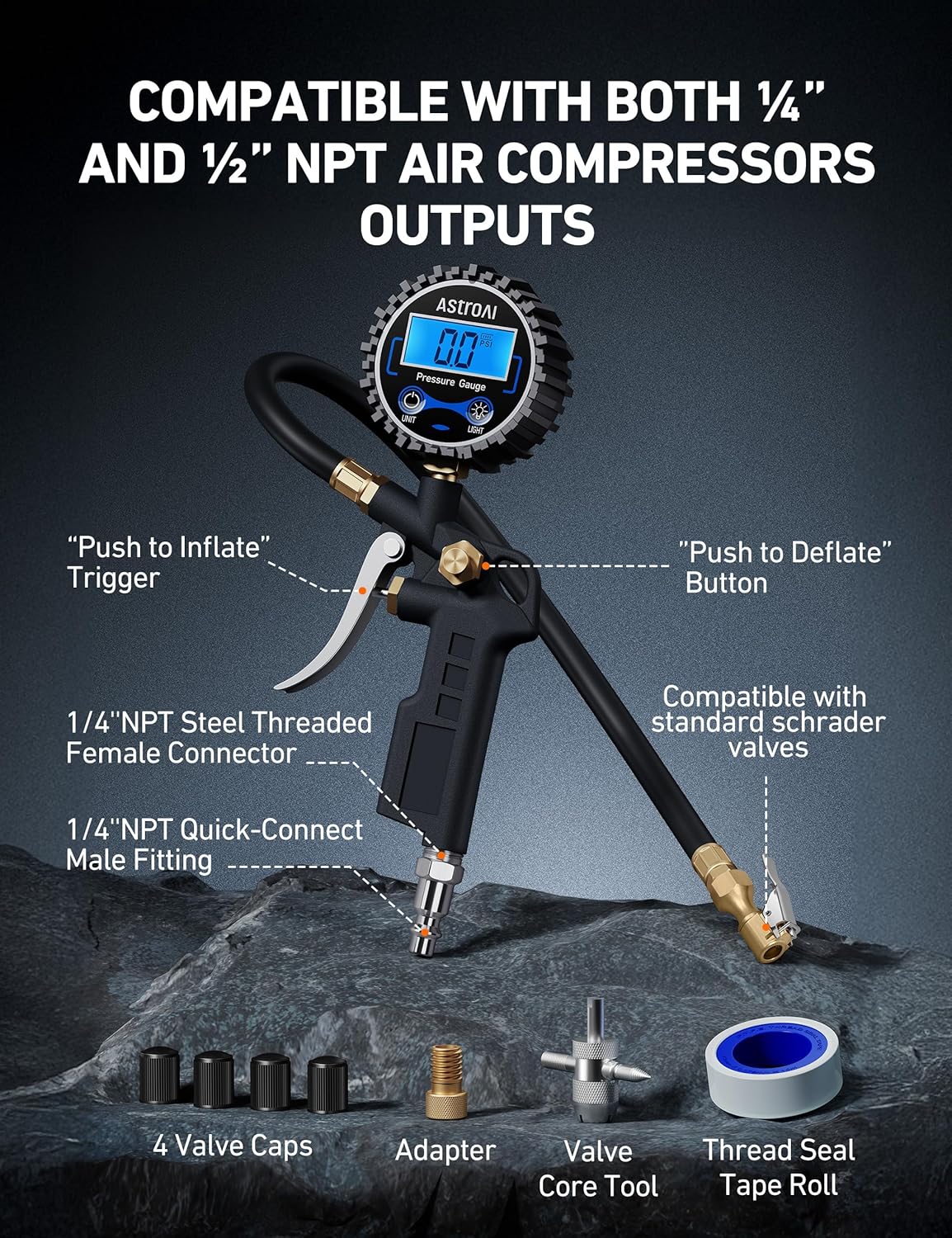
Image: Labeled diagram illustrating the main parts of the tire inflator gauge and included accessories, such as the inflation trigger, deflation button, various connectors, valve caps, and tools.
Installazione della batteria (se non preinstallata):
- Locate the battery compartment on the back of the digital gauge.
- Far scorrere per aprire il coperchio della batteria.
- Inserire 2 batterie AAA, assicurandosi della corretta polarità (+/-).
- Chiudere bene il coperchio della batteria.

Immagine: Un dettaglio view of the battery compartment, showing the placement of two AAA batteries within the gauge unit.
Collegamento a un compressore d'aria:
The inflator is compatible with both ¼” and ½” NPT air compressor outputs. Ensure your air compressor is equipped with a quick-connect coupler.
- Attach the 1/4" NPT Quick-Connect Male Fitting of the inflator to your air compressor's quick-connect coupler.
- Ensure the connection is secure to prevent air leaks.
Istruzioni per l'uso
This section details how to use your AstroAI Digital Tire Pressure Gauge for checking, inflating, and deflating tires.
Power On/Off and Unit Selection:
- The gauge automatically turns on when pressurized air is detected.
- Premere il tasto "UNITÀ" button to cycle through measurement units: PSI, BAR, KPA, and KG/CM².
- The gauge automatically turns off after 20 seconds of inactivity to conserve battery.
- Premere il tasto "LEGGERO" button to activate the backlight for improved visibility in low-light conditions.
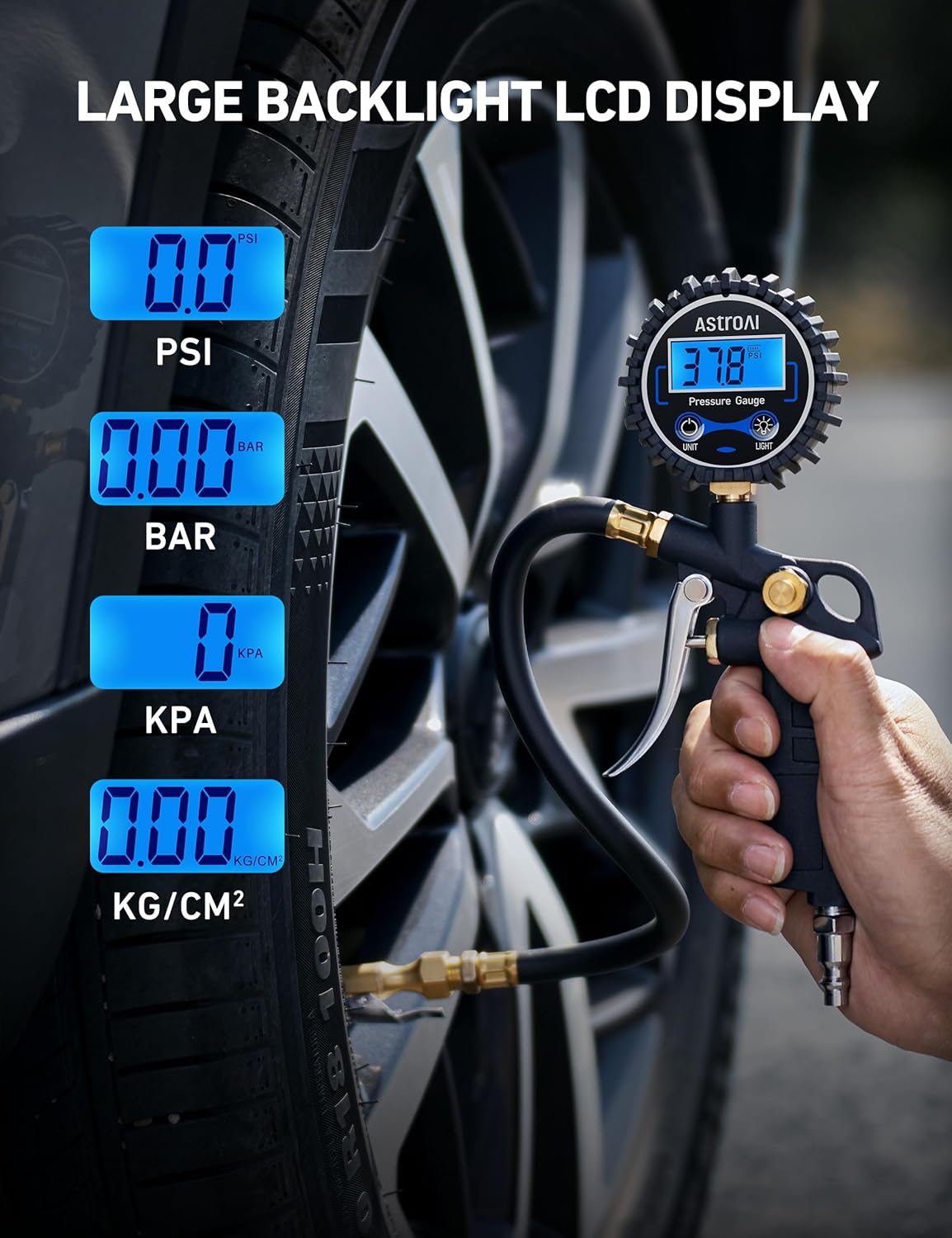
Image: The digital display of the gauge showing various pressure units (PSI, BAR, KPA, KG/CM²) and its clear backlight for easy reading.
The gauge provides accurate readings with 0.1 display resolution, allowing for precise monitoring.
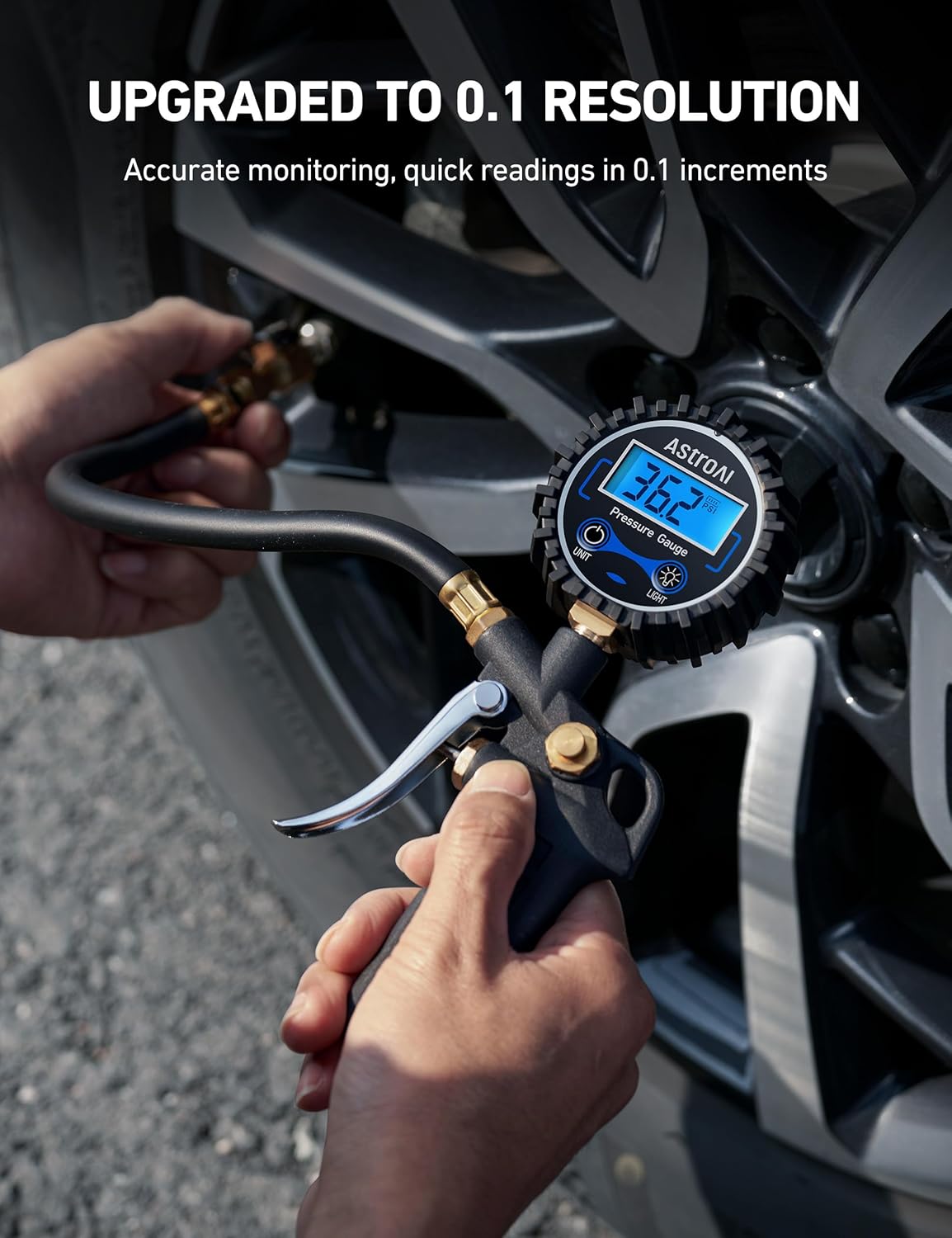
Image: A close-up of the digital display showing a reading of 36.2 PSI, emphasizing the gauge's high resolution for precise measurements.
Controllo della pressione dei pneumatici:
- Ensure the tire is cold (driven less than a mile).
- Remove the valve cap from the tire stem.
- Firmly press the brass air chuck onto the tire valve stem. You may hear a slight hiss; this is normal.
- Il display digitale mostrerà la pressione attuale dei pneumatici.
- Remove the chuck from the valve stem.
- Sostituire il tappo della valvola.

Image: A user demonstrating how to check tire pressure by connecting the gauge to a vehicle's tire valve, with the digital display showing the reading.
Gonfiaggio dei pneumatici:
- Connect the inflator to your air compressor as described in the Setup section.
- Attach the brass air chuck to the tire valve stem.
- Press the "Push to Inflate" trigger (thumb trigger) to begin inflating the tire. The display will show the pressure increasing.
- Release the trigger periodically to check the current pressure reading.
- Inflate to the recommended PSI for your vehicle (found in your vehicle's owner's manual or on a sticker inside the driver's side door jamb).
- Once the desired pressure is reached, release the trigger and remove the chuck.
- Sostituire il tappo della valvola.

Image: A user inflating a car tire with the AstroAI gauge, demonstrating the connection to an air compressor and the process of inflation.
Sgonfiaggio degli pneumatici:
- Attach the brass air chuck to the tire valve stem.
- Press the "Push to Deflate" button (bleed valve) to release air from the tire. The display will show the pressure decreasing.
- Release the button periodically to check the current pressure reading.
- Once the desired pressure is reached, release the button and remove the chuck.
- Sostituire il tappo della valvola.

Image: A user deflating a car tire using the AstroAI gauge, illustrating the use of the deflate button to release air.
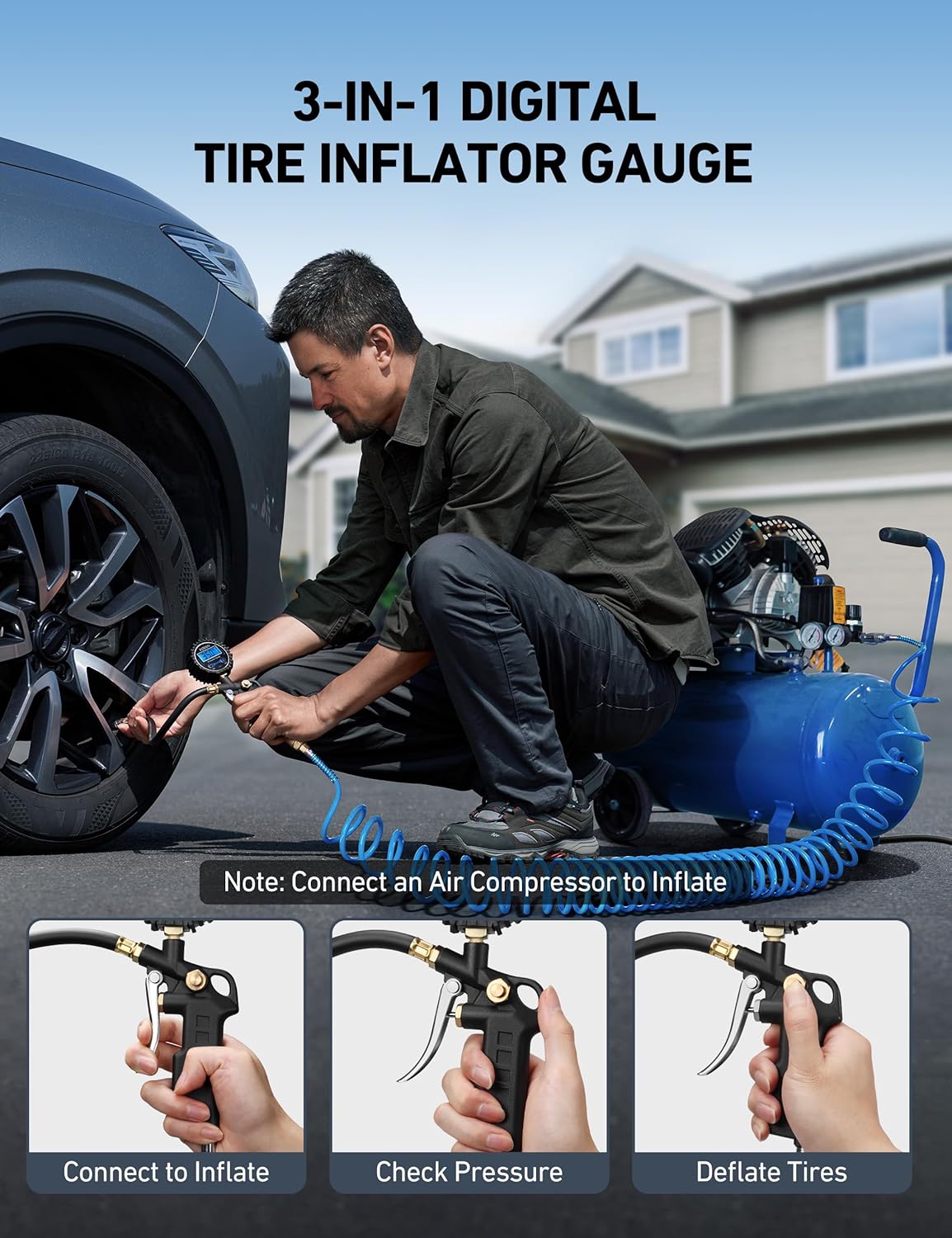
Image: A composite image demonstrating the three primary functions of the gauge: connecting for inflation, checking pressure, and deflating tires.
Utilizzo versatile:
The AstroAI Digital Tire Pressure Gauge is suitable for a wide range of vehicles, including cars, trucks, motorcycles, SUVs, off-road vehicles, RVs, and trailers.

Image: An illustration highlighting the broad compatibility of the gauge with different vehicle types, from motorcycles to large trucks.
Manutenzione
Proper maintenance will ensure the longevity and accuracy of your AstroAI Digital Tire Pressure Gauge.
- Pulizia: Wipe the gauge with a soft, dry cloth. Do not use abrasive cleaners or immerse the unit in water.
- Magazzinaggio: Store the gauge in a cool, dry place away from direct sunlight and extreme temperatures.
- Sostituzione della batteria: If the display becomes dim or unresponsive, replace the AAA batteries. Always replace both batteries at the same time.
- Controllare le connessioni: Periodically inspect the hose and connections for any signs of wear or damage. Ensure the quick-connect coupler and air chuck are clean and free of debris.
Risoluzione dei problemi
If you encounter issues with your AstroAI Digital Tire Pressure Gauge, refer to the following common problems and solutions:
| Problema | Possibile causa | Soluzione |
|---|---|---|
| Gauge does not turn on. | Batterie scariche o installate in modo errato. | Sostituire le batterie assicurandosi che la polarità sia corretta. |
| Letture imprecise. | Gauge not properly seated on valve stem; valve stem leak; gauge malfunction. | Ensure firm, straight connection to valve stem. Check valve stem for damage. If problem persists, contact support. |
| Air leaks during inflation/deflation. | Loose connections; damaged O-rings/seals; improper chuck attachment. | Tighten all connections. Inspect and replace any damaged seals. Ensure the chuck is fully and squarely seated on the valve stem. |
| Il display è scuro o tremolante. | Batteria scarica. | Sostituire le batterie. |
If you experience issues not listed here or if the problem persists after attempting the solutions, please contact AstroAI customer support.
Specifiche
| Caratteristica | Dettaglio |
|---|---|
| Marca | AstroAI |
| Modello | Pressione di esercizio: 250 PSI |
| Materiale | Ottone, acciaio inossidabile |
| Campo di misura | 3-250 PSI (0.2-17.2 Bar; 20-1724 Kpa; 0.2-17.5 kg/cm²) |
| Risoluzione dello schermo | 0.1 bar |
| Precisione | ±1% |
| Fonte di alimentazione | 2 batterie AAA |
| Auto-Off | 20 secondi di inattività |
| Dimensioni (L x P x A) | 4.96 x 1.06 x 1.5 pollici |
| Peso dell'articolo | 0.66 libbre (circa 10.6 once) |
| Compatible Air Compressor Outputs | ¼” and ½” NPT |
| Compatibilità della valvola | Standard Schrader Valves |
Informazioni sulla garanzia
AstroAI products come with a 1-year limited warranty from the date of purchase. This warranty covers defects in materials and workmanship under normal use. It does not cover damage resulting from misuse, accident, alteration, neglect, or unauthorized repair.
For warranty claims or further details, please retain your proof of purchase and contact AstroAI customer support.
Assistenza clienti
If you have any questions, concerns, or require assistance with your AstroAI Digital Tire Pressure Gauge, please do not hesitate to contact our dedicated customer support team.
AstroAI Customer Service:
- Websito: www.astroai.com
- E-mail: support@astroai.com
- Telefono: (Refer to AstroAI websito per i numeri di contatto regionali)
Please have your product model number (250PSI-M) and purchase details ready when contacting support.
Ask a question about this manual
Ask about setup, troubleshooting, compatibility, parts, safety, or missing instructions. Manuals+ will review the question and use this page’s manual context to help answer it.