
Introduzione
This manual provides detailed instructions for the Sony BRAVIA KJ-43X8500F 43-inch 4K Android LCD TV. This high-quality television features a vibrant 4K display, a double-speed drive panel for smooth motion, and integrated Android TV functionality. It is also compatible with "Works with Alexa" for convenient voice control.
Caratteristiche principali
- Android TV(TM) functionality: Easily search for TV broadcasts, recorded programs, and online video content by speaking into the remote control. Enjoy desired content effortlessly.
- Funziona con Alexa: Link with Amazon Echo series for hands-free BRAVIA operation. Voice commands include "TV power on/off," "channel and input switching," and "playback/rewind/stop of recorded content."
- PS4 software "Kingdom Hearts III" certified image quality: High-definition processing ensures optimal image representation. Colors are faithfully reproduced (when game mode is set).
- Smooth motion display: Sports scenes and other fast-moving images are displayed smoothly. The TV predicts image movement and inserts new frames between existing ones, reducing afterimages by rendering 120 frames per second.
- 4K high-definition processor "HDR X1": Enhances the three major image quality elements: detail, color vibrancy, and contrast. Each high-quality function is precisely controlled.
- Supports 4K streaming services: Compatible with services like "Prime Video" and "Netflix," allowing you to enjoy desired content from a wide range of services.
- External HDD recording: Connect a separately sold USB hard disk (HDD) to BRAVIA to record programs while watching another, enabling "external HDD simultaneous recording."
- High-contrast 4K image quality: Enhances contrast for each subject in the image, enabling HDR-equivalent bright and dark rendering. All images, including terrestrial digital broadcasts, Blu-ray software, and online videos, are transformed into high-contrast, high-definition 4K quality.
- HDR (High Dynamic Range) signal compatible: Utilizes maximum image information closer to reality, reproducing brightness and vibrant colors that could not be expressed by previous TVs.
- "Voice Zoom" function: Adjusts the volume of voices without changing the overall sound volume.
Impostare
Configurazione iniziale
Follow these steps for the initial setup of your Sony BRAVIA KJ-43X8500F television.
- Unpack the TV and accessories carefully.
- Attach the stand securely to the television. Refer to the diagram below for proper attachment.
- Collegare il cavo di alimentazione al televisore e poi a una presa di corrente.
- Connect your antenna or cable to the appropriate input on the TV.
- Connect any external devices (e.g., Blu-ray player, game console) to the HDMI ports.
- Accendere la TV utilizzando il telecomando.
- Follow the on-screen instructions to complete the initial setup, including network connection and channel scanning.
Collegamento del supporto TV
The TV stand provides stable support. Ensure it is correctly attached before placing the TV on a flat surface.
This image shows the rear of the television with the stand attached. Ensure all screws are tightened to prevent instability.
Collegamento di dispositivi esterni
Your BRAVIA TV offers multiple connectivity options.
- Porte HDMI: 4 ports available for high-definition devices.
- Porte USB: 3 ports for connecting USB storage devices.
- Ingresso composito: 1 porta per dispositivi più vecchi.
- Wireless LAN: IEEE802.11ac/a/b/g/n for network connectivity.

This image illustrates the various input and output ports located on the back of the television.
Istruzioni per l'uso
Utilizzo del telecomando
The remote control provides access to all TV functions, including smart features and voice control.

This image displays the remote control, highlighting buttons for power, volume, channel, and direct access to streaming services like Netflix and YouTube.
Controllo vocale con Alexa
Your BRAVIA TV supports "Works with Alexa" for convenient voice commands.
- "Alexa, accendi la TV."
- "Alexa, switch to Channel 1."
- "Alexa, play [content name] on the TV."
- "Alexa, rewind/fast forward/stop the recording."

This image demonstrates how to use Alexa voice commands to control your television, such as turning it on or changing channels.
Integrazione dei media
Streaming Services and Content
The Android TV platform provides access to a wide array of streaming services.
- Video Prime di Amazon
- Netflix
- YouTube
- Film in streaming
- AbemaTV
- U-NEXT
- VideoMarket
- Google Play Film e TV
- Spottizzare
- Niconico
- DAZN
- E molti altri ancora.

This image illustrates the variety of streaming applications available on your BRAVIA TV, allowing you to enjoy movies, music, and games.
External HDD Recording
Connect a USB hard disk (sold separately) to enable recording of TV programs. You can record one program while watching another.
Manutenzione
Cleaning the TV Screen and Cabinet
- Scollegare sempre la TV prima di pulirla.
- For the screen, gently wipe with a soft, dry, lint-free cloth. For stubborn marks, lightly dampPulire il panno con acqua o con un detergente per schermi delicato e non abrasivo. Non spruzzare il liquido direttamente sullo schermo.
- For the cabinet, use a soft, dry cloth. Avoid using abrasive pads, harsh chemicals, or solvents as they can damage the finish.
Assistenza generale
- Evitare di posizionare il televisore alla luce diretta del sole o vicino a fonti di calore.
- Assicurare un'adeguata ventilazione attorno al televisore per evitare il surriscaldamento.
- Do not block the ventilation openings on the back or sides of the TV.
Risoluzione dei problemi
Nessun potere
- Assicurarsi che il cavo di alimentazione sia collegato saldamente sia al televisore sia alla presa di corrente.
- Verificare che la presa di corrente funzioni collegandovi un altro dispositivo.
- Per escludere problemi con il telecomando, premere il pulsante di accensione sul televisore stesso, non solo sul telecomando.
Nessuna immagine/suono
- Verify that the correct input source is selected. Press the "Input" button on your remote.
- Controllare tutti i collegamenti dei cavi (HDMI, antenna) per accertarsi che siano saldi.
- If using external devices, ensure they are powered on and functioning correctly.
- Adjust volume levels on both the TV and any connected audio systems.
Il telecomando non funziona
- Sostituire le batterie del telecomando.
- Assicurarsi che non vi siano ostacoli tra il telecomando e il sensore IR del televisore.
- Puntare il telecomando direttamente verso la TV.
Problemi di connessione di rete
- Riavvia il router e il modem.
- Vai alle impostazioni di rete del televisore e prova a riconnetterti alla rete Wi-Fi.
- Assicurati di aver inserito correttamente la password Wi-Fi.
- If the issue persists, try connecting the TV directly to your router via an Ethernet cable.
Specifiche
| Dimensioni dello schermo | 43 pollici |
| Marca | Sony |
| Tecnologia di visualizzazione | LCD |
| Risoluzione | 4K |
| Caratteristiche | Android TV, Works with Alexa, Double Speed Drive, 4K HDR, External HDD Recording, Wi-Fi Wireless LAN |
| Tecnologia di connettività | IEEE802.11ac/a/b/g/n |
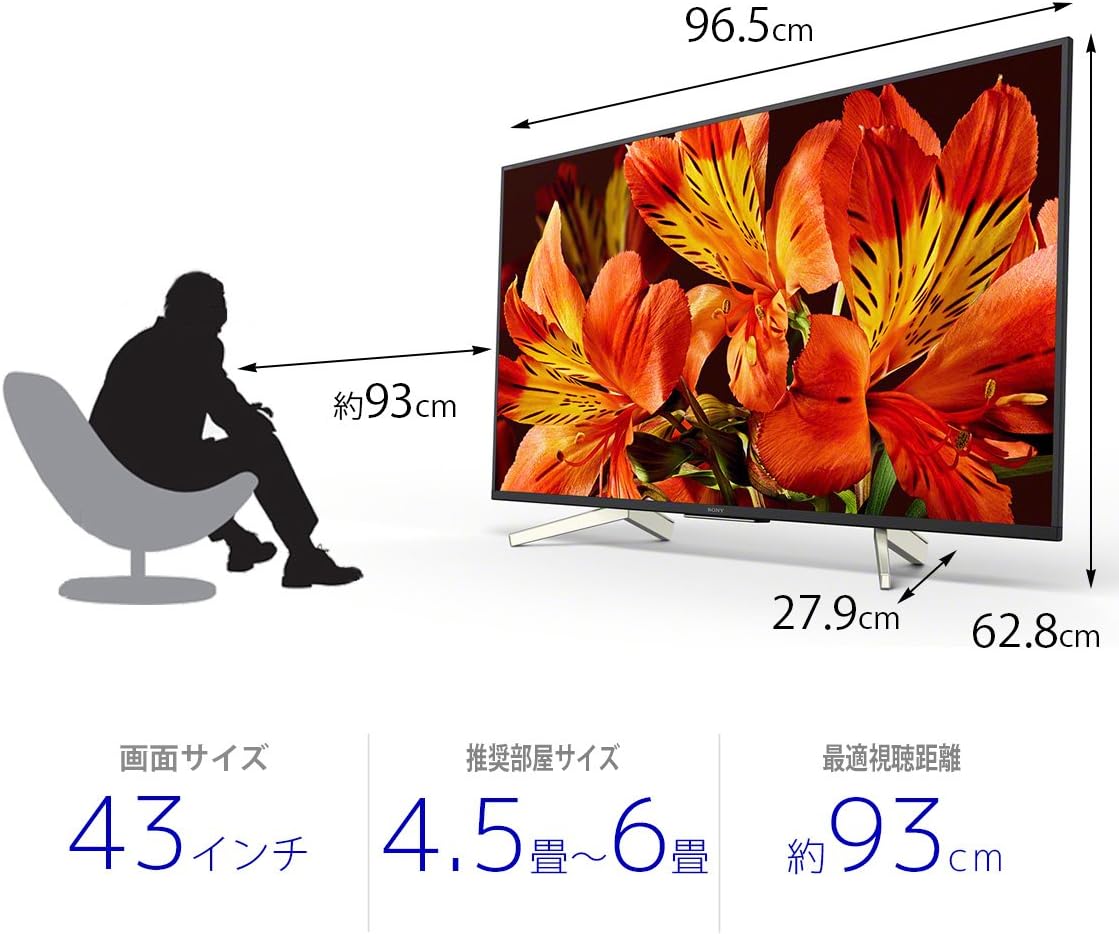
| Dimensioni del prodotto (P x L x A) | Dimensioni: 27.9 x 96.5 x 62.8 cm |
| Servizi Internet supportati | Amazon Prime Video, Netflix |
| Nome del modello | KJ-43X8500F |
| Colore | Nero |
| Peso dell'articolo | 11.3 chilogrammi |
| Porte HDMI | 4 |
| Interfaccia Hardware | USB |
| Composite Input Count | 1 |
| Numero di porte USB | 3 |
| Tipo di montaggio | Montaggio da tavolo |
| Tipo di sintonizzatore | Terrestrial Digital, BS Digital, 110-degree CS Digital |
| Sistema operativo | Android |
| Metodo di controllo | Remoto, Voce |
Garanzia e supporto
Per informazioni dettagliate sulla garanzia, fare riferimento alla scheda di garanzia inclusa con il prodotto o visitare il sito ufficiale di supporto Sony websito.
For technical assistance or customer support, please contact Sony customer service or visit their online support portal.