
1. Introduzione e oltreview
The ZWO ASI174MM is a high-performance monochrome astronomy camera designed for capturing detailed images of celestial objects. It features an advanced 11.3mm x 7.1mm CMOS sensor with 2.35 megapixels, providing excellent signal-to-noise ratio for various astronomical applications, including lunar, solar (with appropriate safety filters), planetary, and deep-sky imaging.
This manual provides essential information for setting up, operating, maintaining, and troubleshooting your ASI174MM camera to ensure optimal performance and longevity.
2. Caratteristiche del prodotto
- High-Resolution Monochrome Imaging: Equipped with an 11.3mm x 7.1mm CMOS sensor (1936x1216 resolution, 2.35 megapixels) for capturing fine details.
- Fast USB 3.0 Transfer: Achieves up to 164 frames per second at maximum resolution, with even higher rates at lower resolutions, ideal for planetary and lunar imaging.
- Applicazione versatile: Suitable for imaging the Moon, Sun (with a safe solar filter, not included), planets, and some deep-sky objects when used with a telescope on a motorized equatorial mount.
- Color Imaging Capability: Can produce color images when used with an astronomical LRGB color filter set (not included) and standard image processing techniques.
- Costruzione durevole: Features a compact, lightweight, and attractive red anodized CNC aluminum body designed for heavy field use.
- Connettività facile: Connects to 1.25" focusers using the included T-threaded 1.25" nosepiece.
- Alimentato tramite USB: Camera electronics draw power directly from your computer's USB 3.0 interface, eliminating the need for an external power supply.
- Ampia compatibilità: Compatible with Mac OS X and Windows (32-bit and 64-bit) XP and later. All necessary software and drivers are available from the manufacturer's websito.
3. Cosa c'è nella scatola
Upon unboxing your ZWO ASI174MM camera, please verify that all components are present:
- Camera Body with T-threaded 1.25" Nosepiece
- Cavo USB 3.0
- Cavo guida ST4
- CD driver (o istruzioni per il download)
Note: Additional accessories such as an autoguider, focal reducer, or Barlow lens may be required for specific imaging setups and are not included.
4. Guida all'installazione
4.1 Installazione di driver e software
- Visita il sito ufficiale ZWO webposto (www.zwoastro.com) to download the latest drivers and imaging software for your operating system (Windows, macOS).
- Follow the on-screen instructions to install the drivers. It is recommended to install drivers Prima connecting the camera to your computer for the first time.
- Install your preferred astronomy imaging software (e.g., SharpCap, FireCapture, Astro Photography Tool, etc.). Many of these support ZWO cameras directly.
4.2 Collegamento della telecamera
The ASI174MM camera features a USB 3.0 port for data transfer and power, and an ST4 guide port for autoguiding.

Figure 1: Diagram illustrating the ZWO ASI174MM camera, highlighting its USB3.0 port, 1/4" tripod thread, T-thread M42x0.75, AR Window, and ST4 Guide Port.
- Connessione al computer: Use the provided USB 3.0 cable to connect the camera's USB 3.0 port to a USB 3.0 port on your computer. The camera will draw power directly from this connection.
- Connect to Telescope:
- For direct connection to a 1.25" focuser, attach the included T-threaded 1.25" nosepiece to the camera's front T-thread (M42x0.75). Insert the nosepiece into your telescope's 1.25" focuser and secure it.
- For direct connection to a telescope with M42x0.75 threads (e.g., some field flatteners or reducers), simply thread the camera directly onto the accessory.
- Connect for Autoguiding (Optional): If using the camera for autoguiding, connect the ST4 guide port on the camera to the ST4 port on your equatorial mount using the ST4 guiding cable.
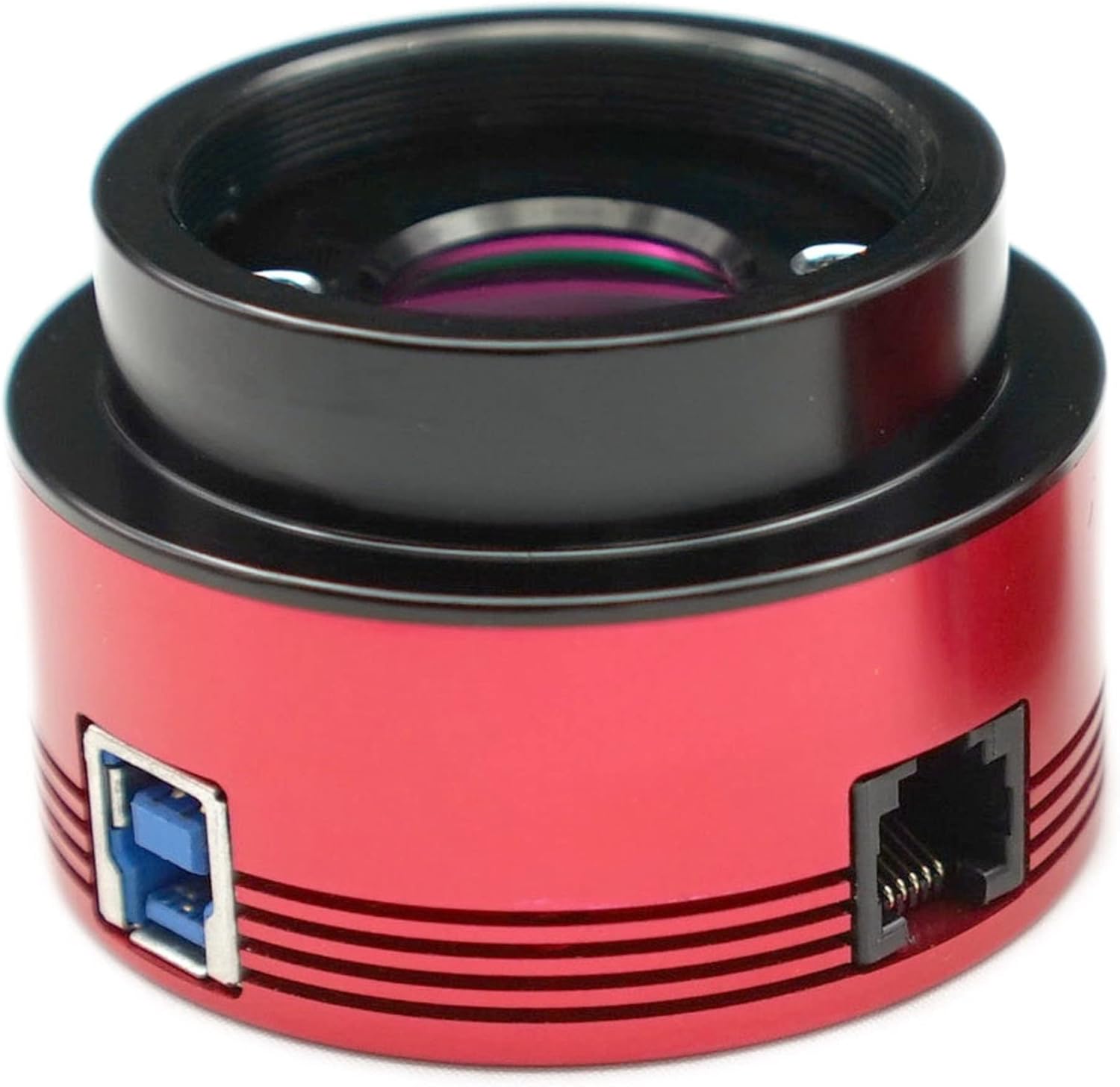
Figura 2: Fronte view of the ZWO ASI174MM camera, showcasing its red anodized aluminum body, the front optical window, and the USB 3.0 and ST4 guide ports on the side.
5. Utilizzo della fotocamera
5.1 Basic Imaging Workflow
- Ensure your telescope is properly set up and aligned, preferably on a motorized equatorial mount for tracking celestial objects.
- Connect the ASI174MM camera to your telescope and computer as described in the Setup Guide.
- Launch your chosen astronomy imaging software. The camera should be detected as a ZWO ASI camera.
- Select the ASI174MM as your active camera within the software.
- Adjust camera settings such as exposure time, gain, and frame rate according to your target object and sky conditions. For lunar and planetary imaging, short exposures and high frame rates are common. For deep-sky, longer exposures may be needed.
- Begin capturing video frames (for lunar/planetary) or still images (for deep-sky). Save your captured data in a suitable format (e.g., SER for video, FITS for stills).
- Process your captured data using specialized astronomy image processing software (e.g., AutoStakkert!, Registax, PixInsight, Photoshop) to stack frames, sharpen details, and enhance the final image.
5.2 Monochrome vs. Color Imaging
The ASI174MM is a monochrome camera, meaning it captures images in grayscale. This offers higher sensitivity and resolution compared to color cameras, as each pixel is dedicated to capturing light intensity without a Bayer filter array.
To produce color images with a monochrome camera, you will need an astronomical LRGB (Luminance, Red, Green, Blue) filter set and a filter wheel. The process involves capturing separate monochrome images through each filter (Red, Green, Blue) and a luminance filter (clear), then combining these channels in post-processing software to create a full-color image.

Figure 3: Visual comparison highlighting the larger sensor size of the IMX174 (used in ASI174MM) compared to the ASI120, indicating a diagonal of 13.4mm (Type 1/1.2") for the IMX174.
6. Manutenzione
- Pulizia della finestra del sensore: The camera's optical window (AR Window for mono version) may accumulate dust over time. Use a specialized optical cleaning kit (blower, lens brush, optical cleaning solution with wipes) to gently clean the window. Non toccare mai direttamente il sensore.
- Pulizia del corpo: Pulisci il corpo della fotocamera con un panno morbido e asciutto. Evita di utilizzare prodotti chimici aggressivi o materiali abrasivi.
- Magazzinaggio: When not in use, store the camera in a dry, dust-free environment, preferably in its original packaging or a padded case. Use the included dust cap to protect the optical window.
- Cura del cavo: Maneggiare con cura i cavi USB e ST4. Evitare piegature o attorcigliamenti bruschi che potrebbero danneggiare i fili interni.
7. Risoluzione Dei Problemi
- Telecamera non rilevata:
- Ensure drivers are correctly installed. Try reinstalling them.
- Verify the USB 3.0 cable is securely connected to both the camera and a USB 3.0 port on your computer.
- Prova una porta USB 3.0 o un cavo diverso.
- Riavvia il computer.
- Nessuna immagine/schermo nero:
- Check exposure settings in your software. Ensure exposure time is not too short.
- Verify the camera is properly focused with your telescope.
- Ensure the telescope's dust caps are removed.
- Poor Image Quality/Noise:
- Adjust gain settings. High gain can introduce noise.
- Ensure proper focus.
- Check for light pollution or stray light entering the telescope.
- Consider using dark frames and bias frames during post-processing to reduce noise.
- Arresti anomali del software:
- Ensure your imaging software is up-to-date.
- Verificare la presenza di conflitti con altri software installati.
- Ensure your computer meets the minimum system requirements for the software and camera.
8. Specifiche
| Caratteristica | Dettaglio |
|---|---|
| Nome del modello | ASI174MM |
| Sensore | 1/1.2" CMOS IMX174 (Monochrome) |
| Dimensioni del sensore | 11.3 mm x 7.1 mm |
| Risoluzione | 1936 x 1216 (2.35 MP) |
| Dimensione pixel | 5.86 micron |
| FPS massimo (risoluzione completa) | 164 fps (at 10-bit ADC) |
| ADC | 10bit / 12bit |
| Interfaccia | USB 3.0 |
| Porto di guida | ST4 |
| Supporti compatibili | M42x0.75 mm, 1.25" (with nosepiece) |
| Dimensioni del prodotto | 6 x 6 x 6 pollici |
| Peso dell'articolo | 1.13 libbre |
| Supportato File Formato | JPEG, GREZZO |
| Produttore | ZWO Optical |
9. Garanzia e supporto
ZWO products typically come with a manufacturer's warranty. For specific warranty terms and conditions, please refer to the documentation included with your camera or visit the official ZWO websito.
For technical support, driver updates, software downloads, and frequently asked questions, please visit the ZWO Optical official websito:
You may also find helpful resources and community support through various astronomy forums and online communities dedicated to ZWO cameras.