
1. Introduzione
The Fracarro 287406 Mod-HDTV Mini is a high-quality digital modulator designed to convert an HDMI source into a DVB-T digital RF output channel. This device enables the distribution of high-definition (HD) content from various sources, such as PC players, laptops, or CCTV surveillance systems with HD output, across a domestic coaxial distribution network using DVB-T technology. It supports resolutions up to Full HD (1920x1080-30p) and offers a typical modulation quality (MER) of 35dB, providing an efficient solution for integrating HD signals into existing TV systems.
2. Informazioni sulla sicurezza
- Leggere attentamente tutte le istruzioni prima di utilizzare il dispositivo.
- Tenere il dispositivo lontano da acqua, umidità e temperature estreme.
- Non tentare di aprire o riparare il dispositivo da soli. Per qualsiasi intervento di assistenza, rivolgersi a personale qualificato.
- Garantire una ventilazione adeguata per evitare il surriscaldamento.
- Utilizzare solo l'alimentatore fornito con il dispositivo.
3. Contenuto della confezione
Si prega di controllare la confezione per verificare la presenza dei seguenti elementi:
- Fracarro 287406 Mod-HDTV Mini Modulator
- Adattatore di alimentazione
- Manuale dell'utente (questo documento)
4. Prodotto finitoview
The Fracarro Mod-HDTV Mini features essential ports for HDMI input, RF output, and a USB port for advanced configuration. Its compact design allows for easy integration into various setups.
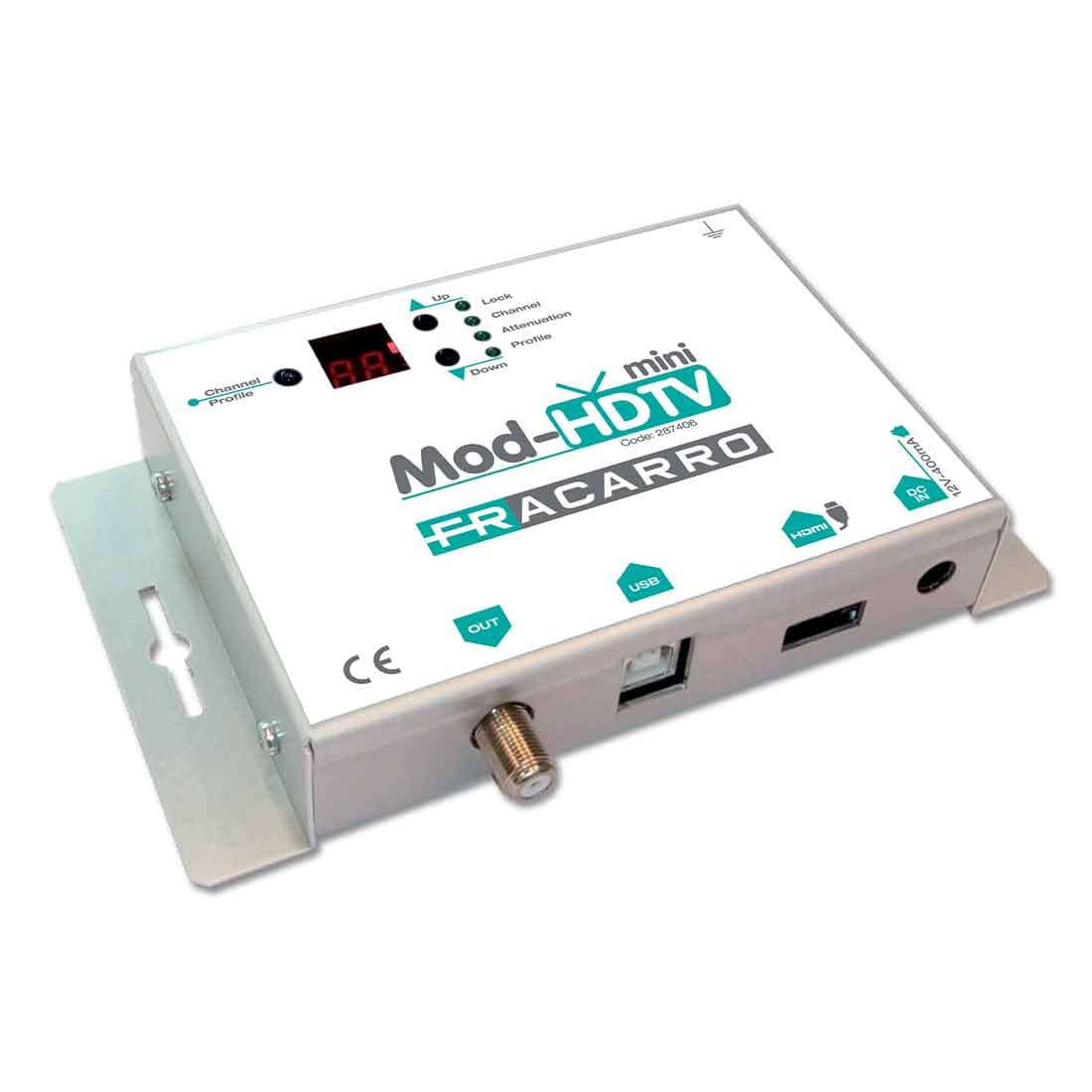
Figura 1: Frontale e laterale view of the Fracarro 287406 Mod-HDTV Mini Modulator, showing input/output ports and indicators.
Caratteristiche principali:
- Converts HDMI source to DVB-T digital RF channel.
- Supports high resolution up to 1920x1080-30p for HDMI input.
- Integrated USB port for advanced parameter configuration.
5. Impostazione
Follow these steps to set up your Fracarro Mod-HDTV Mini:
- Collegare la sorgente HDMI: Connect an HDMI cable from your video source (e.g., PC, laptop, CCTV system) to the HDMI input port on the Mod-HDTV Mini.
- Collegare l'uscita RF: Connect a coaxial cable from the RF output port of the Mod-HDTV Mini to the antenna input of your TV or distribution amppiù vivace.
- Connetti alimentazione: Plug the supplied power adapter into the Mod-HDTV Mini's power input and then into a wall outlet.
- Accensione: The device will power on automatically or via a power button if present (refer to device for specific power controls).
- Configurazione avanzata (opzionale): For advanced settings, connect the device to a computer via the USB port and use the dedicated Fracarro software (not included, typically downloadable from manufacturer's website) to configure parameters such as channel number, frequency, and modulation settings.
6. Istruzioni per l'uso
Once the setup is complete, operate the device as follows:
- Turn on Source Device: Ensure your HDMI source device is powered on and outputting a signal.
- Cerca i canali: On your television, perform a channel scan (digital terrestrial or DVB-T scan). The Mod-HDTV Mini will broadcast the HDMI signal as a new digital TV channel.
- Seleziona canale: Once the scan is complete, select the newly found channel on your TV to view the HDMI source content.
- Regola impostazioni: If necessary, use the advanced configuration via USB to fine-tune the output channel parameters for optimal reception and compatibility with your TV system.
7. Manutenzione
To ensure the longevity and optimal performance of your Mod-HDTV Mini:
- Pulizia: Utilizzare un panno morbido e asciutto per pulire l'esterno del dispositivo. Non utilizzare detergenti liquidi o spray.
- Ventilazione: Assicurarsi che le aperture di ventilazione non siano ostruite.
- Magazzinaggio: Quando non viene utilizzato per lunghi periodi, conservare il dispositivo in un luogo fresco e asciutto, lontano dalla luce solare diretta.
8. Risoluzione Dei Problemi
| Problema | Possibile causa | Soluzione |
|---|---|---|
| Nessun segnale sulla TV |
|
|
| Poor picture quality / pixelation |
|
|
| Il dispositivo non si accende |
|
|
9. Specifiche
| Caratteristica | Dettaglio |
|---|---|
| Numero di modello | 287406 |
| Produttore | FRACARRO |
| Ingresso | Cavo HDMI |
| Produzione | DVB-T RF |
| Risoluzione massima | 1920x1080-30p (Full HD) |
| Modulation Quality (MER) | Tipico 35dB |
| Porta di configurazione | USB |
| Peso del prodotto | 610 grammi |
| ASIN | B075ZCB7QC |
| Prima data disponibile | 3 ottobre 2017 |
10. Informazioni sulla garanzia
Warranty terms and conditions for the Fracarro 287406 Mod-HDTV Mini are provided separately with your purchase or can be found on the official Fracarro websito. Conservare la prova d'acquisto per eventuali reclami in garanzia.
11. Supporto
For technical support, troubleshooting assistance beyond this manual, or inquiries about advanced configuration software, please visit the official Fracarro websito o contattare il servizio clienti. I dettagli di contatto sono in genere disponibili sul sito web del produttore websito o nella confezione del prodotto.