Introduzione
This manual provides detailed instructions for the installation, operation, and maintenance of your Sricam SP012 720P Pan/Tilt Indoor Wireless IP Camera. This device is designed for home security monitoring, offering features such as 720P HD video, pan/tilt control, night vision, two-way audio, and motion detection. Please read this manual thoroughly before using the product to ensure proper setup and functionality.
Prodotto finitoview
The Sricam SP012 is a versatile indoor IP camera equipped with various components for comprehensive surveillance.
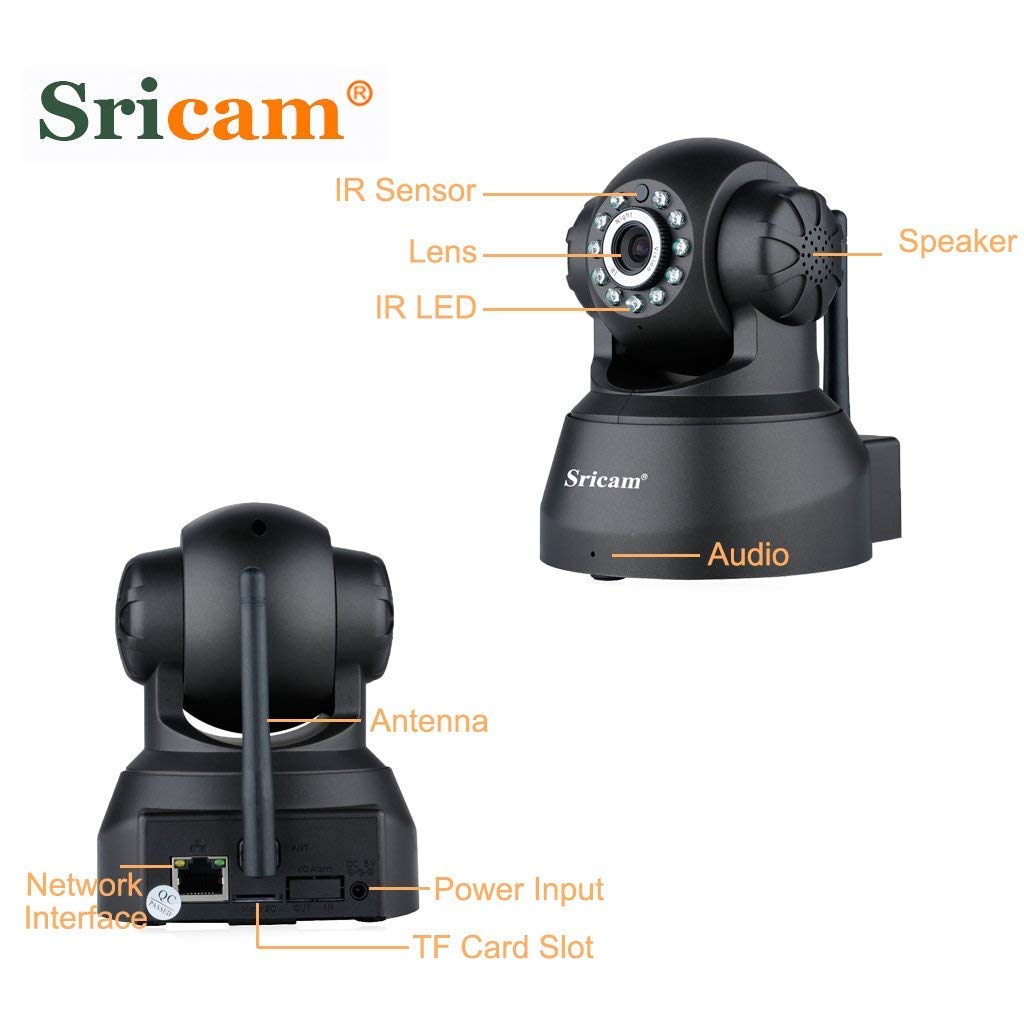
Immagine: Anteriore e posteriore view of the Sricam SP012 camera with labels pointing to its components including IR Sensor, Lens, IR LED, Speaker, Audio port, Antenna, Network Interface, Power Input, and TF Card Slot.
Caratteristiche principali:
- Video HD 720P: Provides clear 1280 x 720 high-definition video.
- Funzionalità Pan/Tilt: Remotely control horizontal angle 355° and vertical angle 90° via smartphone.
- Visione notturna: Equipped with IR LEDs for clear surveillance up to 20 meters in low light or darkness.
- Audio bidirezionale: Il microfono e l'altoparlante integrati consentono la comunicazione in tempo reale.
- Rilevamento del movimento: Configurable function to trigger instant alerts and recording upon detecting movement.
- Archiviazione locale: Supports MicroSD card up to 128GB for video and picture storage.
- Connettività wireless: Connects to 2.4GHz Wi-Fi networks.
- Protocollo ONVIF: Compatible with third-party ONVIF platform software and NVRs (above Onvif version 2.4.2).
Contenuto della confezione
Si prega di verificare che tutti gli articoli elencati di seguito siano inclusi nel pacchetto:
- 1 x Sricam SP012 720P Wireless Wifi WLAN IP Camera
- 1 x adattatore di alimentazione (spina USA)
- 1 antenna Wi-Fi
- Supporto 1 x
- 1 x Manuale utente
- 1 viti di montaggio
Istruzioni di installazione
1. Configurazione hardware iniziale
- Collegare l'antenna: Screw the Wi-Fi antenna securely into the designated port on the back of the camera.
- Inserire la scheda MicroSD (facoltativo): If you plan to use local storage, gently insert a MicroSD card (up to 128GB) into the TF Card Slot. Ensure the camera is powered off before inserting or removing the card.
- Accensione: Connect the power adapter to the camera's power input port and then plug it into an electrical outlet. The camera will initiate its startup sequence.
- Opzioni di connessione di rete:
- Senza fili (Wi-Fi): The camera supports 2.4GHz Wi-Fi networks only. Ensure your router is configured for 2.4GHz.
- Cablato (Ethernet): For initial setup or a more stable connection, you can connect an Ethernet cable from your router to the camera's network interface port.

Immagine: Diagram illustrating two connection methods: Wired connection from camera to router to computer, and Wireless connection from camera to router to phone/tablet/notebook.
2. Installazione dell'app e associazione del dispositivo
- Scarica l'App: Cercare the "Sricam" app on the Apple App Store (for iOS devices) or Google Play Store (for Android devices) and install it.
- Registrati/Accedi: Open the Sricam app and follow the on-screen instructions to register a new account or log in if you already have one.
- Aggiungi dispositivo:
- Tocca l'icona "+" o l'opzione "Aggiungi dispositivo" nell'app.
- Seleziona l'opzione per aggiungere una nuova telecamera.
- Follow the in-app wizard to connect the camera to your Wi-Fi network. This typically involves scanning a QR code on the camera or entering your Wi-Fi credentials.
- Ensure your smartphone is connected to the same 2.4GHz Wi-Fi network as the camera during the setup process.
- Configurazione completa: Once the camera is successfully added, you should see it listed in your app and be able to view il feed dal vivo.
Istruzioni per l'uso
1. Vivere View Monitoraggio
Open the Sricam app and select your camera from the device list to access the live video feed. You can view the feed from anywhere in the world with an internet connection.
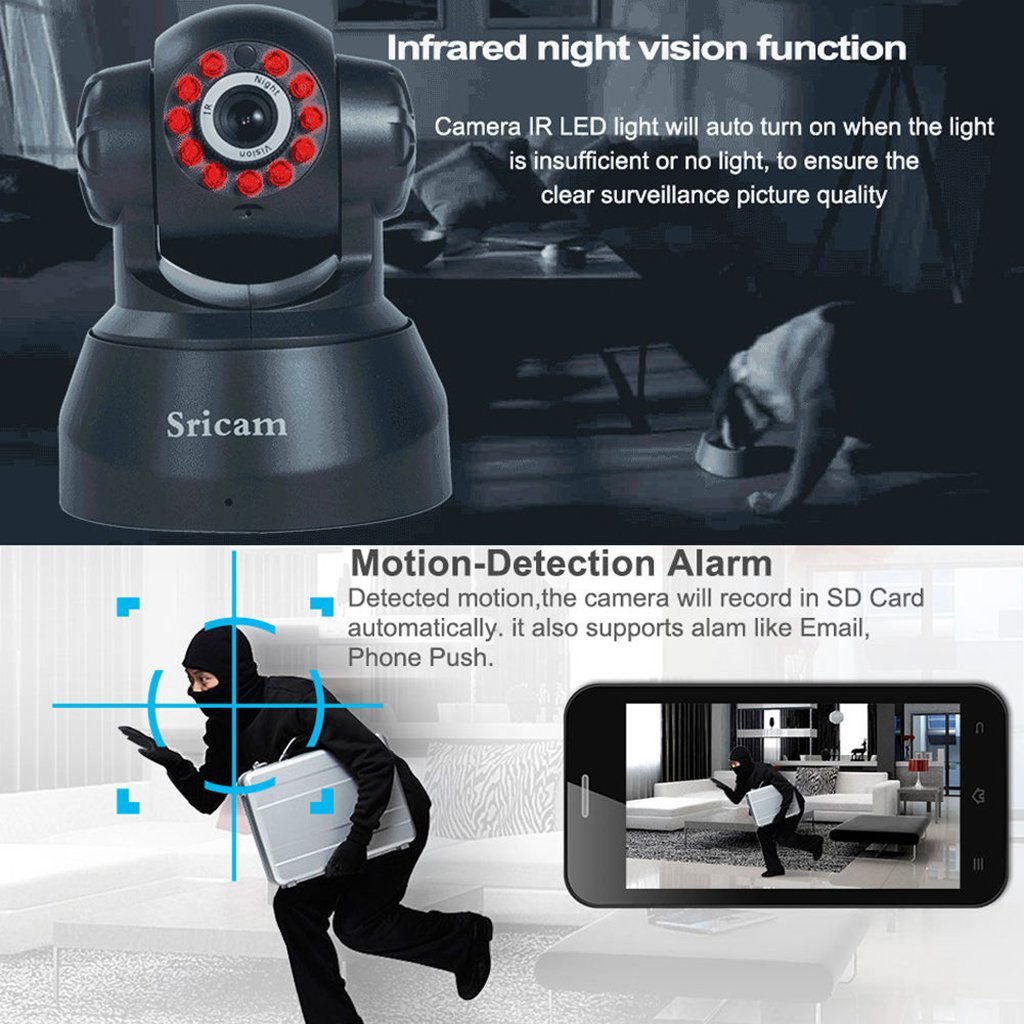
Immagine: A smartphone screen showing a live video feed from the Sricam SP012 camera, demonstrating remote monitoring capabilities.
2. Controllo panoramica e inclinazione
All'interno della diretta view interface of the app, use the on-screen controls to remotely adjust the camera's viewangolo di ripresa. La telecamera supporta una panoramica orizzontale di 355° e un'inclinazione verticale di 90°.

Immagine: The Sricam SP012 camera illustrating its 355° pan and 90° tilt capabilities, with an inset showing a smartphone displaying the camera's view.
3. Audio bidirezionale
Per utilizzare la funzione audio bidirezionale, tocca l'icona del microfono nella schermata live dell'app view. You can speak into your phone, and your voice will be transmitted through the camera's speaker. Similarly, the camera's built-in microphone will pick up sounds from the monitored area.
Immagine: A child communicating with a parent via the camera's two-way audio function, with a smartphone displaying the microphone icon.
4. Visione notturna
The camera automatically activates its infrared (IR) LEDs when ambient light is insufficient, providing clear black-and-white video in dark conditions. This ensures continuous surveillance day and night.

Immagine: The Sricam SP012 camera with its IR LEDs illuminated, indicating active night vision functionality.
5. Rilevamento del movimento e registrazione
Configure motion detection settings within the app. When motion is detected, the camera can automatically record video to the inserted MicroSD card and send instant alerts (e.g., email, push notifications) to your smartphone.
6. Accesso remoto
The Sricam app allows you to access your camera's live feed and recorded footage from any location with an internet connection, using your smartphone, tablet, or PC.

Immagine: Various devices including smartphones, tablets, and desktop computers displaying live feeds from multiple Sricam cameras, illustrating remote access capabilities.
Manutenzione
- Pulizia: Utilizzare un panno morbido e asciutto per pulire l'obiettivo e il corpo della fotocamera. Evitare l'uso di prodotti chimici aggressivi o materiali abrasivi.
- Aggiornamenti del firmware: Periodically check the Sricam app for available firmware updates to ensure optimal performance and security.
- Posizionamento: Ensure the camera is placed in a stable, dry indoor environment, away from direct sunlight, extreme temperatures, and strong electromagnetic fields.
- Sicurezza della rete: Regularly update your Wi-Fi password and ensure your network is secure to prevent unauthorized access.
Risoluzione dei problemi
| Problema | Possibile soluzione |
|---|---|
| La fotocamera non riesce a connettersi al Wi-Fi. |
|
| Nessun feed video in diretta. |
|
| L'audio bidirezionale non funziona. |
|
| Avvisi di rilevamento del movimento non ricevuti. |
|
Specifiche
| Caratteristica | Dettaglio |
|---|---|
| Numero di modello | SP012 |
| Risoluzione | Risoluzione 720P (1280 x 720) |
| Angolo di panoramica / inclinazione | Orizzontale 355°, Verticale 90° |
| Lente | Obiettivo grandangolare da 3.6 mm |
| Distanza di visione notturna | Fino a 20 metri (LED IR) |
| Audio | Microfono e altoparlante integrati (audio bidirezionale) |
| Magazzinaggio | MicroSD Card Slot (Max. 128GB) |
| Connettività | Wireless (2.4GHz Wi-Fi), Wired (Ethernet) |
| Protocollo di connettività | ONVIF, Wi-Fi |
| Uso interno/esterno | Al chiuso |
| Fonte di alimentazione | Adattatore di alimentazione CA. |
| Dimensioni del prodotto | Dimensioni: 19.56 x 11.18 x 16.76 cm |
| Peso dell'articolo | 567 grammi |
Garanzia e supporto
For information regarding warranty coverage and customer support, please refer to the warranty policy provided with your purchase or visit the official Sricam websito. Conservare la ricevuta d'acquisto come prova d'acquisto per eventuali reclami in garanzia.
For technical assistance or further inquiries, please contact Sricam customer support.