
1. Introduzione
This manual provides essential instructions for the proper setup, operation, and maintenance of your Welch Allyn Braun Thermoscan Pro 6000 Ear Thermometer Charging Station (Model 06000-100). This device is designed to provide a convenient and secure charging and storage solution for the Braun Thermoscan Pro 6000 ear thermometer. Please read this manual thoroughly before using the charging station to ensure safe and efficient operation.
2. Informazioni sulla sicurezza
Per evitare lesioni o danni al dispositivo, osservare sempre le seguenti precauzioni di sicurezza:
- Use only the power adapter supplied with the charging station.
- Do not immerse the charging station in water or other liquids.
- Keep the charging station away from direct sunlight, heat sources, and moisture.
- Do not attempt to open or repair the charging station yourself. Refer all servicing to qualified personnel.
- Ensure the charging station is placed on a stable, flat surface.
- This charging station is intended for use with the Braun Thermoscan Pro 6000 ear thermometer only.
3. Prodotto finitoview
The Welch Allyn Braun Thermoscan Pro 6000 Ear Thermometer Charging Station provides a dedicated space for charging and storing your thermometer, along with an integrated storage compartment for probe covers.
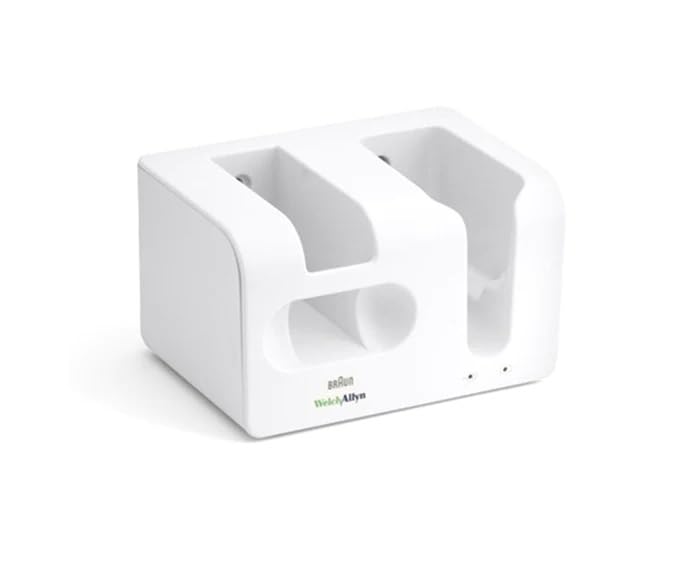
Figure 1: Welch Allyn Braun Thermoscan Pro 6000 Ear Thermometer Charging Station. The image displays the white charging station with a Braun Thermoscan Pro 6000 ear thermometer securely docked in its charging slot. The station also features a compartment for storing probe covers.
Componenti chiave:
- Slot di ricarica: Designed to hold and charge the Braun Thermoscan Pro 6000 thermometer.
- Probe Cover Storage: Integrated compartment for storing up to 200 probe covers.
- Potenza in ingresso: Porta per il collegamento dell'adattatore di alimentazione.
- Indicatore di carica: (If applicable) Indicates charging status.
4. Impostazione
- Disimballare la stazione di ricarica: Rimuovere con attenzione tutti i componenti dall'imballaggio. Assicurarsi che tutti i pezzi siano presenti e integri.
- Posizionare la stazione di ricarica: Place the charging station on a stable, flat, and dry surface, away from direct heat or moisture.
- Connetti alimentazione: Insert the small end of the power adapter into the power input port on the charging station. Plug the other end of the power adapter into a suitable electrical outlet.
- Load Probe Covers (Optional): If desired, load up to 200 compatible probe covers into the designated storage compartment.
- Carica iniziale: Place your Braun Thermoscan Pro 6000 ear thermometer into the charging slot. Ensure it is seated correctly. The thermometer should begin charging. Allow for an initial full charge before first use, as per the thermometer's own instruction manual.
5. Funzionamento della stazione di ricarica
Charging the Thermometer:
- To charge the Braun Thermoscan Pro 6000 thermometer, simply place it into the charging slot of the station.
- Ensure the thermometer makes proper contact with the charging pins.
- The charging indicator light on the thermometer (refer to the thermometer's manual) will typically illuminate to confirm charging.
- Remove the thermometer from the station when fully charged or when needed for use.
Storing the Thermometer and Probe Covers:
- When not in use, store the thermometer in the charging slot to keep it charged and readily accessible.
- The integrated compartment provides convenient storage for a supply of clean probe covers.
6. Manutenzione
Cleaning the Charging Station:
- Before cleaning, always unplug the charging station from the power outlet.
- Wipe the exterior surfaces of the charging station with a soft, damp stoffa.
- Non utilizzare detergenti abrasivi, solventi o prodotti chimici aggressivi, poiché potrebbero danneggiare la superficie.
- Ensure no liquid enters the charging slot or power input port.
- Allow the station to dry completely before reconnecting power.
Magazzinaggio:
When not in regular use, store the charging station in a clean, dry place at room temperature.
7. Risoluzione Dei Problemi
| Problema | Possibile causa | Soluzione |
|---|---|---|
| Thermometer not charging. |
|
|
| Charging station appears damaged. | Impatto fisico o manipolazione impropria. | Discontinue use immediately. Contact customer support for assistance. Do not attempt to repair. |
If you encounter problems not listed here, or if the suggested solutions do not resolve the issue, please contact Welch Allyn customer support.
8. Specifiche
- Numero modello: 06000-100
- Compatibilità: Braun Thermoscan Pro 6000 Ear Thermometer
- Potenza in ingresso: Refer to power adapter label for specific voltage/ampera.
- Probe Cover Capacity: Up to 200 probe covers
- Dimensioni della confezione: 10 x 10 x 10 pollici
- Peso dell'articolo: 1.35 libbre
- Produttore: Forniture odontoiatriche affidabili -
- Data prima disponibilità: 27 giugno 2017
9. Garanzia e supporto
For warranty information and customer support, please refer to the documentation included with your original purchase or contact Welch Allyn directly. Keep your proof of purchase for warranty claims.
Assistenza clienti Welch Allyn: Visita il sito ufficiale di Welch Allyn website or consult your local distributor for contact details and support resources.