
BEVA F5
BEVA F5 Cable USB Laser Barcode Scanner User Manual
Modello: F5
Introduzione
This manual provides comprehensive instructions for the BEVA F5 Cable USB Laser Barcode Scanner. It covers product features, setup, operation, maintenance, and troubleshooting to ensure optimal performance and longevity of your device. The BEVA F5 is a handheld, wired 1D laser barcode scanner designed for various applications including POS systems, supermarkets, logistics, libraries, and banking.
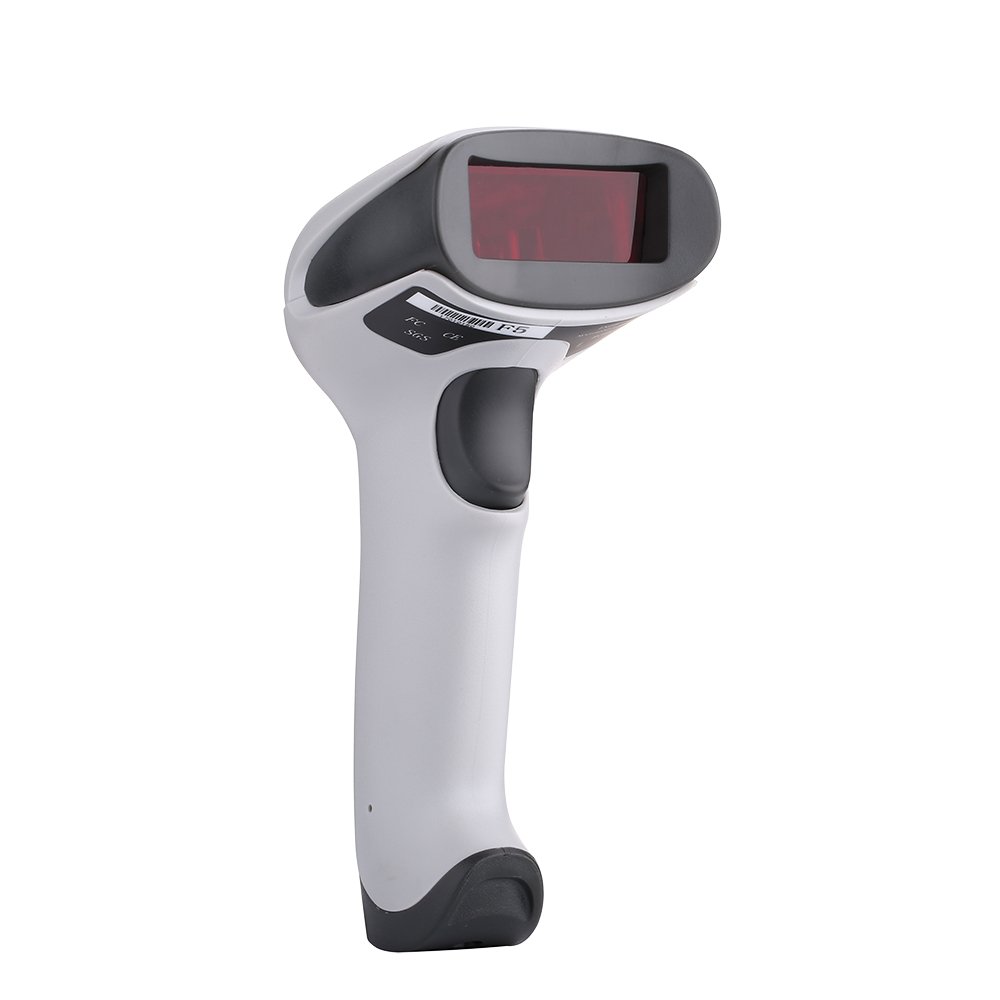
Figure 1: BEVA F5 Cable USB Laser Barcode Scanner. This image shows the overall design of the scanner, highlighting its ergonomic shape.
Contenuto della confezione
Dopo aver disimballato, verificare che tutti gli articoli siano presenti e in buone condizioni:
- BEVA F5 Laser Barcode Scanner
- Cavo USB integrato
- Manuale dell'utente (questo documento)
Prodotto finitoview
The BEVA F5 scanner features a robust design and high-quality components for reliable performance. Familiarize yourself with the key parts of the device:

Figure 2: Labeled components of the BEVA F5 scanner. This image points out the scan window, buzzer, indicator light, anti-drop silicone, and USB port.
- Finestra di scansione: Emits the laser beam for reading barcodes.
- Buzzer & Indicator Light: Provides audible and visual feedback for successful scans and operational status.
- Anti-drop Silicone: Integrated into the design for enhanced durability and shock resistance.
- Porta USB: Connects the scanner to your computer or POS system.
Le caratteristiche principali includono:
- Collega e usa: No software or driver installation required.
- Scansione di codici a barre 1D: Capable of reading linear (1D) barcodes.
- Design robusto: Engineered to withstand drops from 1.5 meters and features IP41 water and dust resistance.
- Scansione ad alta velocità: Equipped with a high-quality laser head for fast and sensitive scanning.
- Durable Window: Features a high-quality quartz window for good reflection and wear resistance.
Impostare
The BEVA F5 scanner is designed for simple, plug-and-play operation. Follow these steps to set up your scanner:
- Locate an available USB port on your computer or POS system.
- Connect the USB cable from the BEVA F5 scanner into the USB port.
- The system will automatically detect and install the necessary drivers. This process usually takes a few seconds.
- Once installed, the scanner is ready for use. You may hear a beep or see an indicator light flash to confirm readiness.

Figure 3: Connecting the BEVA F5 scanner via USB. This image illustrates the simple plug-and-play connection of the scanner to a device.
Istruzioni per l'uso
The BEVA F5 scanner supports various scanning modes for different operational needs.
Scansione di base
- Assicurarsi che lo scanner sia collegato e acceso.
- Point the scan window towards the barcode you wish to read.
- Press and hold the trigger button. A red laser line will appear.
- Allineare la linea laser lungo l'intero codice a barre.
- Upon a successful scan, the scanner will emit a beep and the indicator light will flash. The barcode data will be transmitted to your connected device as if typed.

Figure 4: Demonstrating the BEVA F5 scanner in operation. A hand holds the scanner, aiming its laser at a barcode on a package in a warehouse setting.
Modalità di scansione
The BEVA F5 supports the following scanning modes:
- Modalità di attivazione manuale: Press the trigger button to activate the laser and scan a barcode. Release the button after a successful scan.
- Modalità di scansione continua: The laser remains active, continuously scanning for barcodes. This mode is suitable for high-volume scanning. (Refer to advanced configuration guide for activation, if applicable).
- Modalità di scansione automatica: Lo scanner rileva automaticamente un codice a barre nel suo campo di view and scans it without needing to press the trigger. (Refer to advanced configuration guide for activation, if applicable).
For specific configuration of scanning modes or other advanced settings, please refer to the detailed programming guide, which typically involves scanning specific configuration barcodes.
Manutenzione
Proper maintenance ensures the longevity and optimal performance of your BEVA F5 scanner.
Pulizia
- Prima di procedere alla pulizia, assicurarsi che lo scanner sia scollegato dalla fonte di alimentazione.
- Utilizzare un panno morbido, pulito, damp panno per pulire l'esterno dello scanner.
- For the scan window, use a lint-free cloth and a mild, non-abrasive cleaner (e.g., lens cleaner) to avoid scratching.
- Non utilizzare prodotti chimici aggressivi, solventi o materiali abrasivi, poiché potrebbero danneggiare la superficie o i componenti interni dello scanner.
Magazzinaggio
- Conservare lo scanner in un luogo fresco e asciutto, lontano dalla luce solare diretta e da temperature estreme.
- Avoid storing in environments with high humidity or excessive dust.
Durata
The BEVA F5 is designed with robust features, including anti-drop silicone and IP41 rating for water and dust resistance. While durable, avoid intentional drops or exposure to excessive moisture to prevent damage.
Risoluzione dei problemi
If you encounter issues with your BEVA F5 scanner, refer to the following common problems and solutions:
| Problema | Possibile causa | Soluzione |
|---|---|---|
| Lo scanner non si accende o non risponde. | Loose USB connection, faulty USB port, or cable damage. |
|
| Lo scanner non legge i codici a barre. | Barcode damage, incorrect scanning angle, dirty scan window, or unsupported barcode type. |
|
| I dati scansionati sono errati o incompleti. | Partial scan, incorrect keyboard layout settings on the computer. |
|
Se il problema persiste dopo aver provato queste soluzioni, contattare l'assistenza clienti.
Specifiche
Detailed technical specifications for the BEVA F5 Cable USB Laser Barcode Scanner:
| Numero di modello | F5 |
| Marca | Bevanda |
| Modalità di scansione | Laser |
| Pixel | 2500 |
| Precisione di lettura | ≥ 5mil |
| Interfaccia dati | USB |
| Tecnologia di connettività | Cablato (cavo USB) |
| Lunghezza del cavo | 175 centimetri |
| Dimensioni (L*W*H) | 160 x 65 x 90 mm (circa 6.3 x 2.56 x 3.54 pollici) |
| Peso | 0.2 kg (circa 0.44 libbre) |
| Resistenza all'acqua e alla polvere | Grado di protezione IP41 |
| Sicurezza elettrica | EN60950-1 |
| Batterie incluse | NO |
| Batterie richieste | NO |
| Codice UPC | 759981325618 |

Figura 5: Dimensionale view of the BEVA F5 scanner. This image provides measurements for the scanner's length, width, and height.
Garanzia e supporto
For warranty information and technical support, please refer to the documentation provided at the time of purchase or contact BEVA customer service through their official webo rivenditori autorizzati. Conservare la ricevuta d'acquisto come prova d'acquisto per eventuali reclami in garanzia.
Ask a question about this manual
Ask about setup, troubleshooting, compatibility, parts, safety, or missing instructions. Manuals+ will review the question and use this page’s manual context to help answer it.