1. Introduzione
Thank you for choosing the HTC USB Type-C Hi-Res Earphones, Model 99H20317-00. These earphones are designed to provide a high-quality audio experience with their advanced features and ergonomic design. This manual provides essential information for the proper setup, operation, maintenance, and troubleshooting of your new earphones.
Le caratteristiche principali includono:
- Concert hall design for unparalleled sound.
- Larger 13mm speakers for a fuller sound profile.
- Enhanced port optimization for improved bass reproduction.
- Lighter and thinner aerospace polymer diaphragm to increase sound frequency response.
- Ergonomic design for maximum comfort during extended use.
2. Informazioni sulla sicurezza
Please read and follow these safety guidelines to ensure safe and optimal use of your earphones:
- Protezione dell'udito: Evitare di ascoltare musica ad alto volume per periodi prolungati per prevenire danni all'udito.
- Consapevolezza ambientale: Non utilizzare gli auricolari in situazioni in cui l'impossibilità di sentire i suoni ambientali potrebbe essere pericolosa, ad esempio mentre si guida, si va in bicicletta o si cammina nel traffico.
- Pulizia: Clean the earphones regularly with a soft, dry cloth. Do not use liquid cleaners or solvents.
- Esposizione all'acqua: These earphones are not waterproof. Avoid exposure to water or excessive moisture.
- Bambini: Tenere fuori dalla portata dei bambini piccoli perché contiene piccole parti che potrebbero rappresentare un rischio di soffocamento.
3. Contenuto della confezione
Verifica che tutti gli articoli siano presenti nel tuo pacco:
- HTC USB Type-C Hi-Res Earphones (Model: 99H20317-00)
- Additional ear tips (if included)
- Manuale dell'utente (questo documento)
4. Impostazione
These earphones are designed for simple plug-and-play operation.
- Collegare: Insert the USB Type-C connector of the earphones into the USB Type-C port of your compatible device (Smartphone, Laptop, Tablet).
- Riconoscimento del dispositivo: Your device should automatically recognize the earphones. If prompted, select the earphones as the audio output device.
- Regola volume: Begin playback at a low volume and gradually increase to a comfortable listening level.
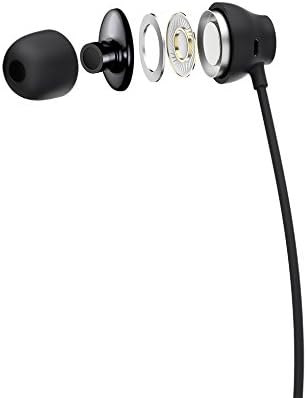
Figure 1: HTC USB Type-C Hi-Res Earphones connected to a device.
5. Istruzioni per l'uso
Once connected, your earphones are ready for use.
- Riproduzione audio: Play audio from your connected device. The sound will be routed through the earphones.
- Gestione delle chiamate: For devices supporting call functions, you can typically answer/end calls using the device's interface.
- Controllo app: This model supports control via an application. Refer to your device's app store for any official HTC audio control applications that may offer additional features or sound customization.
6. Manutenzione e cura
Proper care extends the lifespan of your earphones:
- Pulizia degli inserti auricolari: Gently remove ear tips and clean them with a mild soap solution and water. Ensure they are completely dry before reattaching.
- Pulizia del corpo degli auricolari: Wipe the earphone body and cable with a soft, dry, lint-free cloth. Do not use abrasive materials or harsh chemicals.
- Magazzinaggio: Quando non vengono utilizzati, conservare gli auricolari in un luogo pulito e asciutto, preferibilmente in una custodia protettiva per evitare che si aggroviglino e si danneggino.
- Gestione dei cavi: Avoid tightly winding the cable or subjecting it to sharp bends, which can damage internal wires.
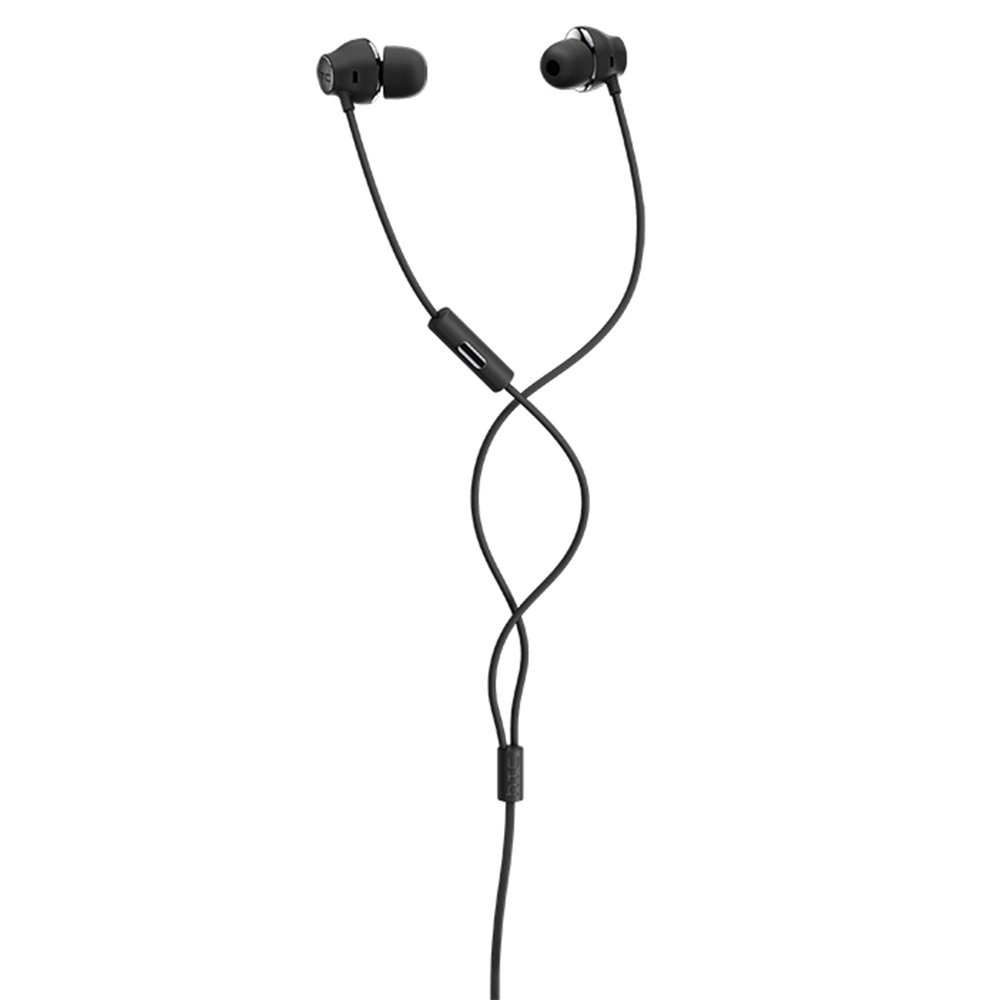
Figura 2: Esploso view of earphone components, highlighting the 13mm speaker and aerospace polymer diaphragm.
7. Risoluzione Dei Problemi
In caso di problemi, fare riferimento ai seguenti problemi comuni e alle relative soluzioni:
| Problema | Possibile causa | Soluzione |
|---|---|---|
| Nessun suono | Earphones not properly connected; device volume too low; incorrect audio output selected on device. | Ensure the USB Type-C connector is fully inserted. Increase device volume. Check device audio settings to confirm earphones are selected as output. |
| Scarsa qualità del suono | Dirty ear tips; damaged cable; low-quality audio source. | Clean ear tips. Inspect the cable for visible damage. Try a different audio source or file. |
| Earphones uncomfortable or fall out | Misura errata del gommino auricolare. | Try different sized ear tips (if provided) to find the best fit for your ears. |
8. Specifiche
| Caratteristica | Dettaglio |
|---|---|
| Marca | HTC |
| Numero di modello | 99H20317-00 |
| Tecnologia di connettività | Cablato (USB tipo C) |
| Dimensioni dell'altoparlante | 13 millimetri |
| Materiale | Synthetic leather (ear tips/housing accents) |
| Peso | 50 grammi |
| Dimensioni del prodotto | 0.1 x 0.1 x 0.1 cm (packaging/shipping dimensions, actual earphone size is compact) |
| Metodo di controllo | Applicazione |
| Supporto Bluetooth | NO |
| Batterie richieste | NO |
| Dispositivi compatibili | Smartphone, Laptop, Tablet with USB Type-C audio output |
| Colore | Grigio scuro |
| Posizionamento dell'orecchio | In-ear |
9. Garanzia e supporto
For warranty information and technical support, please refer to the documentation provided with your purchase or visit the official HTC support websito. Conservare la prova d'acquisto per eventuali reclami in garanzia.