
Buildalot P5411 (Grinder), 1222 (Brushes)
Buildalot Carbon Brushes for Black & Decker P5411 Grinder
Model: P5411 (Grinder), 1222 (Brushes)
Introduzione
This manual provides essential information for the installation, maintenance, and troubleshooting of Buildalot carbon brushes designed for the Black & Decker P5411 Grinder. Carbon brushes are critical components in electric motors, facilitating the transfer of electrical current to the rotating armature. Regular inspection and timely replacement ensure optimal performance and longevity of your power tool.
Informazioni sulla sicurezza
WARNING: Always disconnect the power tool from the electrical supply before performing any maintenance, adjustments, or parts replacement. Failure to do so can result in serious injury or electric shock.
- Indossare adeguati dispositivi di protezione individuale (DPI), come occhiali e guanti di sicurezza.
- Assicuratevi che l'area di lavoro sia pulita, ben illuminata e libera da ostacoli.
- In caso di dubbi su qualche passaggio, consultare un tecnico qualificato.
- Tenere i bambini e gli astanti lontani dall'area di lavoro.
Compatibilità
These Buildalot carbon brushes are specifically designed as replacement parts for the Black & Decker P5411 Grinder. They feature an automatic stop function to protect the motor when brushes are worn.
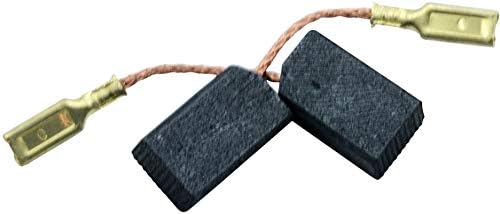
Image: Two carbon brushes, showing their rectangular shape, attached copper wires, and brass spade terminals. These brushes are designed for electrical current transfer in motors.
Configurazione e installazione
Follow these steps to safely replace the carbon brushes in your Black & Decker P5411 Grinder:
- Scollegare l'alimentazione: Assicurarsi che il macinacaffè sia scollegato dalla presa di corrente.
- Individuare i cappucci delle spazzole: Identify the brush caps on the motor housing. These are typically small, round, or slotted caps that can be unscrewed.
- Rimuovere i vecchi pennelli:
- Use a screwdriver (flathead or Phillips, depending on the cap type) to carefully unscrew the brush caps.
- Gently pull out the old carbon brushes and their springs. Note their orientation.
- Disconnect the electrical terminals of the old brushes from the grinder's internal wiring.
- Pulisci i portaspazzole: Ispezionare i portaspazzole per verificare la presenza di polvere di carbone o detriti. Pulirli accuratamente per garantire il corretto contatto e movimento delle nuove spazzole.
- Installa nuovi pennelli:
- Connect the electrical terminals of the new Buildalot carbon brushes to the grinder's internal wiring. Ensure a secure connection.
- Insert the new carbon brushes into the brush holders, ensuring the carbon block slides freely and the spring applies pressure to the brush. The automatic stop feature means the brush will stop making contact when worn down.
- Carefully screw the brush caps back into place. Do not overtighten.
- Test Grinder: Plug the grinder back into the power outlet and perform a brief test run to ensure proper operation. Listen for unusual noises or excessive sparking.

Image: A simplified diagram illustrating the process of inserting a carbon brush into its housing using a screwdriver, indicating the direction of installation.
Operativo
Once the new carbon brushes are correctly installed, your Black & Decker P5411 Grinder should operate as intended. Allow the grinder to run for a few minutes without load after brush replacement to allow the brushes to seat properly against the commutator. This "seating" process helps ensure optimal contact and performance.
Manutenzione
Carbon brushes are wear-and-tear components and require periodic inspection and replacement. The lifespan of carbon brushes varies depending on usage intensity and environmental conditions.
- Ispezione: Periodically inspect the carbon brushes for wear. Signs of wear include reduced length, chipping, or uneven wear patterns.
- Sostituzione: Replace carbon brushes when they are significantly worn down, typically when they are about one-third of their original length. The automatic stop feature of these brushes will prevent the motor from operating when they are critically worn, indicating it's time for replacement.
- Pulizia: Keep the motor's ventilation openings clean and free from dust and debris to prevent overheating, which can accelerate brush wear.
Risoluzione dei problemi
If your Black & Decker P5411 Grinder exhibits issues after carbon brush replacement, consider the following:
| Sintomo | Possibile causa | Soluzione |
|---|---|---|
| Grinder does not start or runs intermittently. | Brushes not properly seated, worn out brushes (automatic stop activated), or incorrect installation. | Re-check brush installation. Ensure brushes slide freely and make proper contact. Replace if critically worn. |
| Eccessiva formazione di scintille sul commutatore. | Brushes not seated, dirty commutator, or incorrect brush type. | Allow brushes to seat. Clean commutator if necessary (consult grinder manual). Ensure correct brushes are used. |
| Potenza o velocità ridotte. | Worn brushes, or poor contact. | Inspect and replace brushes if worn. Ensure proper installation. |
Specifiche
- Marca: Costruisci molto
- Compatible Grinder Model: Black & Decker P5411
- Brush Part Number: 1222_Black & Decker_P5411
- Caratteristica: Arresto automatico
- Quantità confezione articolo: 2 pennelli
- Approximate Brush Dimensions: Not explicitly provided in input, refer to product listing for exact measurements (e.g., ?x?x?mm).
- Peso dell'articolo (per confezione): 20 grammi
Garanzia e supporto
For warranty information, returns, or technical support regarding your Buildalot carbon brushes, please refer to the original purchase documentation or contact the seller directly. Keep your proof of purchase for any warranty claims.
For specific operational or repair instructions related to the Black & Decker P5411 Grinder itself, please consult the official Black & Decker user manual for that tool.
Ask a question about this manual
Ask about setup, troubleshooting, compatibility, parts, safety, or missing instructions. Manuals+ will review the question and use this page’s manual context to help answer it.