
Casio HR-200RCE-W-EC
Manuale utente della calcolatrice da tavolo stampabile Casio HR-200RCE-W-EC
Model: HR-200RCE-W-EC
Introduzione
The Casio HR-200RCE-W-EC is a versatile and portable printing desktop calculator designed for efficient numerical operations. It features a large 12-digit LC display and offers functions such as tax calculations, cost-sell-margin analysis, and currency conversions. This manual provides essential information for setting up, operating, maintaining, and troubleshooting your calculator to ensure optimal performance.
Impostare
Disimballaggio
Rimuovere con cautela tutti i componenti dalla confezione. La scatola dovrebbe contenere:
- Casio HR-200RCE-W-EC Printing Desktop Calculator
- 4 batterie AA
- Small paper roll for initial use
Note: The power adapter (AD-A60024) is not included and must be purchased separately if mains power is desired.
Installazione della fonte di alimentazione
Your calculator can be powered by batteries or an optional AC adapter.
- Installazione della batteria: Open the battery compartment cover on the underside of the calculator. Insert the four (4) AA batteries, ensuring correct polarity (+/-). Close the cover securely.
- Adattatore CA (opzionale): If using the AD-A60024 AC adapter, plug it into the DC IN jack on the side of the calculator and then into a standard electrical outlet.
Installazione del rotolo di carta
The calculator uses 58mm wide paper rolls for printing. Follow these steps to install a new roll:
- Open the paper roll cover at the top rear of the calculator.
- Place the new paper roll into the compartment, ensuring the paper feeds from the bottom of the roll.
- Inserire il bordo anteriore della carta nella fessura della stampante finché non fuoriesce dalla parte superiore.
- Chiudere il coperchio del rotolo di carta.

Image: The Casio HR-200RCE-W-EC calculator showing the paper roll installed and a printed receipt.
Istruzioni per l'uso
This section covers the basic and advanced functions of your Casio HR-200RCE-W-EC calculator.
Calcoli di base
Perform standard arithmetic operations using the numeric keypad and function keys:
- Aggiunta (+): Inserisci il primo numero, premi +, inserisci il secondo numero, premi =.
- Sottrazione (-): Inserisci il primo numero, premi -, inserisci il secondo numero, premi =.
- Moltiplicazione (x): Inserisci il primo numero, premi x, inserisci il secondo numero, premi =.
- Division (•): Inserisci il primo numero, premi •, inserisci il secondo numero, premi =.
- Clear (C): Cancella l'ultimo numero immesso.
- Tutto chiaro (AC): Cancella tutte le voci e reimposta la calcolatrice.
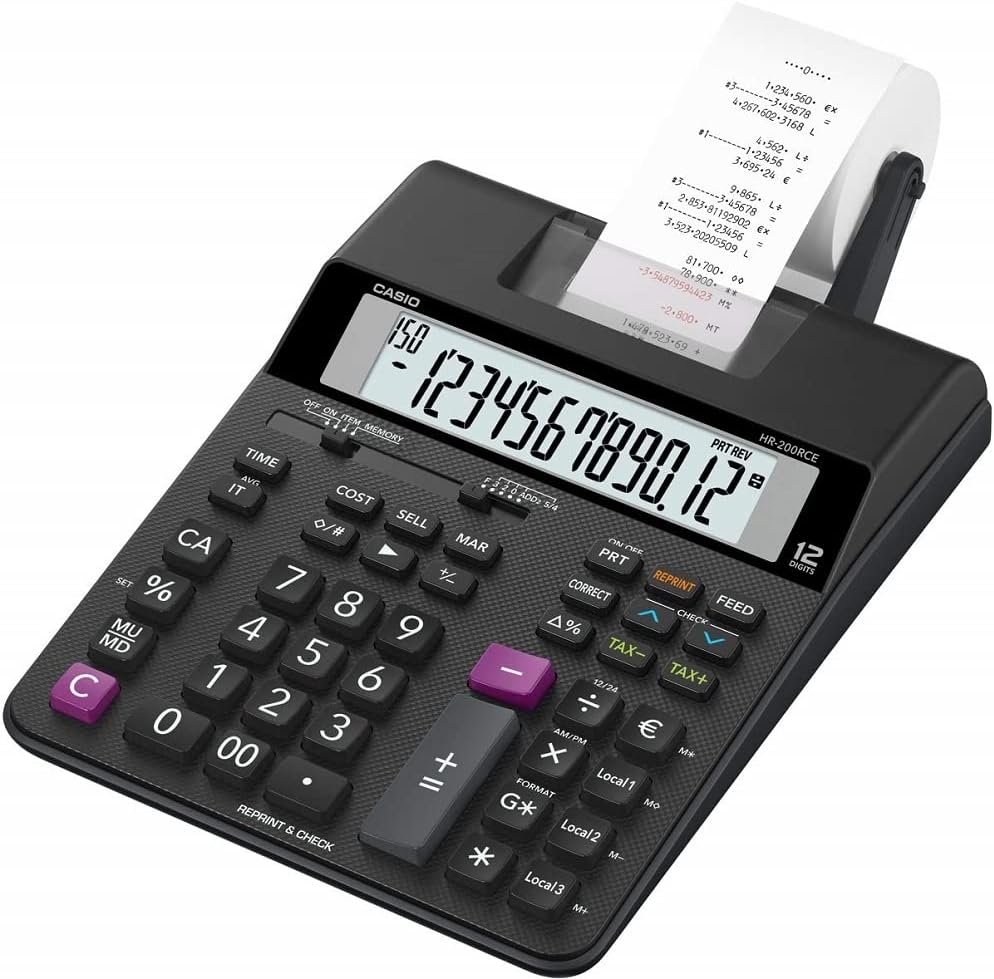
Immagine: Angolata view of the Casio HR-200RCE-W-EC calculator, highlighting the full keyboard layout.
Funzioni speciali
The HR-200RCE-W-EC includes several advanced functions for business and financial calculations:
- Calcoli delle imposte (TASSA+, TASSAZIONE-): Use these keys to add or subtract a pre-set tax rate. Refer to the full manual for setting the tax rate.
- Cost, Sell, Margin (COST, SELL, MAR): These keys allow for quick calculation of cost, selling price, or profit margin when two of the three values are known.
- Currency Conversions (Local 1, Local 2, Local 3): Configure up to three local currency exchange rates for quick conversions.
- 2-Color Print (IR-40T): The calculator supports two-color printing (black and red) for clear differentiation of positive and negative values on the paper roll.
- Check & Correct (CHECK, CORRECT): Questa funzione ti consente di riview and correct previous entries on the printout.

Immagine: Primo piano view of the 'CHECK' and 'CORRECT' buttons on the Casio HR-200RCE-W-EC calculator.
Manutenzione
Proper maintenance ensures the longevity and reliable operation of your calculator.
Pulizia
- Pulire la parte esterna della calcolatrice con un panno morbido e asciutto.
- Per sporco ostinato, leggermente dampInumidire il panno con acqua e un detergente delicato, quindi asciugarlo immediatamente.
- Non utilizzare detergenti abrasivi, solventi o spray direttamente sulla calcolatrice.
Ink Roller Replacement (IR-40T)
When printouts become faint or incomplete, it's time to replace the ink roller.
- Assicurarsi che la calcolatrice sia spenta.
- Aprire il coperchio della stampante.
- Rimuovere con cautela il vecchio rullo inchiostratore.
- Insert a new Casio IR-40T ink roller, ensuring it clicks into place.
- Chiudere il coperchio della stampante.
Sostituzione del rotolo di carta
Replace the paper roll when it runs out, following the instructions in the "Paper Roll Installation" section under Setup.
Risoluzione dei problemi
If you encounter issues with your calculator, refer to the table below for common problems and their solutions.
| Problema | Possibile causa | Soluzione |
|---|---|---|
| Nessun display o display debole | Batterie scariche o esaurite; adattatore CA non collegato o difettoso. | Replace batteries; Check AC adapter connection or try new adapter. |
| No printing or faint printing | Paper roll empty or incorrectly installed; Ink roller dry or incorrectly installed. | Install new paper roll correctly; Replace ink roller (IR-40T). |
| Risultati di calcolo errati | Incorrect data entry; Incorrect mode setting. | Re-enter calculation carefully; Check mode settings (e.g., decimal selector). |
| Calculator freezes or becomes unresponsive | Temporary system error. | Remove batteries for a few minutes, then reinsert. If using AC adapter, unplug and replug. |
Specifiche
| Caratteristica | Dettaglio |
|---|---|
| Modello | HR-200RCE-W-EC |
| Display | 12-Digits LC-Display |
| Velocità di stampa | 2.0 Lines/Sec |
| Stampa a colori | 2-Colour Print (Black/Red) |
| Rullo inchiostratore | IR-40T |
| Formato della carta | 58 mm (Outer Roll “Roll 57mm”) |
| Fonte di alimentazione | Batteries (4 x AA Included) or Optional AC Adapter (AD-A60024) |
| Composizione delle celle della batteria | Alcalino |
| Dimensioni (L x P x A) | Dimensioni: 31.3 x 19.5 x 6.5 cm |
| Peso | 670 grammi |
| Tipo di materiale | Plastica |
| Caratteristiche speciali | Simple algebraic logic, Two-tone print, Tax calculations, Cost Sell Margin, Currency Conversions |
Garanzia e supporto
Garanzia del produttore
The Casio HR-200RCE-W-EC Printing Desktop Calculator comes with a Garanzia del produttore di 2 anni dalla data di acquisto. La presente garanzia copre i difetti di materiali e fabbricazione in condizioni di normale utilizzo. Si prega di conservare la prova d'acquisto per eventuali reclami in garanzia.
Assistenza clienti
For further assistance, technical support, or warranty inquiries, please visit the official Casio website or contact their customer service department. Refer to your product packaging or the Casio website for the most current contact information in your region.
Ask a question about this manual
Ask about setup, troubleshooting, compatibility, parts, safety, or missing instructions. Manuals+ will review the question and use this page’s manual context to help answer it.