
Introduzione
This manual provides essential information for the safe and effective use of your Arrowmax AMCM9008-1600-D Ni-MH battery pack. This battery is designed as a replacement for Motorola HNN9011, HNN9012, HNN9009, and HNN9008 batteries, compatible with various Motorola two-way radio models including HT750, HT1225, HT1250, GP328, and GP338. Please read this manual thoroughly before initial use and retain it for future reference.
Informazioni importanti sulla sicurezza
Observe the following safety precautions to prevent damage to the battery, radio, or personal injury:
- Disposizione: Never dispose of batteries in a fire, as they may explode. Always follow local regulations for proper battery recycling and disposal. Recycling facilities may not be available in all areas.
- Non aprire: Non tentare di aprire il pacco batteria. Al suo interno non sono presenti parti riparabili dall'utente.
- Temperatura: Do not expose the battery to temperatures above 60°C (140°F). High temperatures can damage the battery and pose a fire risk.
- Corto circuito: Do not short-circuit the battery terminals. This can cause severe damage to the battery and potentially lead to fire or burns.
- Compatibilità: Use this battery only with specified and compatible radio models and chargers. Using incompatible accessories may cause damage.
Carica iniziale: Upon delivery, the battery is not fully charged. It is important to recharge the battery overnight (approximately 12-16 hours) before its first use to ensure optimal performance and battery life.

Figura 1: Fronte view of the Arrowmax AMCM9008-1600-D Ni-MH battery pack, showing the product label and safety warnings.
Prodotto finitoview
The Arrowmax AMCM9008-1600-D is a high-quality Ni-MH (Nickel-Metal Hydride) battery pack designed for reliable power to your compatible Motorola two-way radios. It features a robust construction and includes a heavy-duty spring belt clip for convenient carrying.
Caratteristiche principali:
- Voltage: 7.2 Volt
- Capacità: 2500 mAh (Milliampprima di un'ora)
- Chimica: Ni-MH (nichel-metallo idruro)
- Costruzione: Densely constructed with a thick shell casing per durevolezza.
- Accessorio incluso: Heavy-duty spring belt clip.
Compatibilità:
This battery pack is compatible with the following Motorola two-way radio models and replaces the following OEM battery part numbers:
- Motorola Radio Models: HT750, HT1225, HT1250, GP328, GP338, and other models with similar battery sockets.
- Sostituisce i numeri di parte OEM: HNN9011, HNN9012, HNN9009, HNN9008.
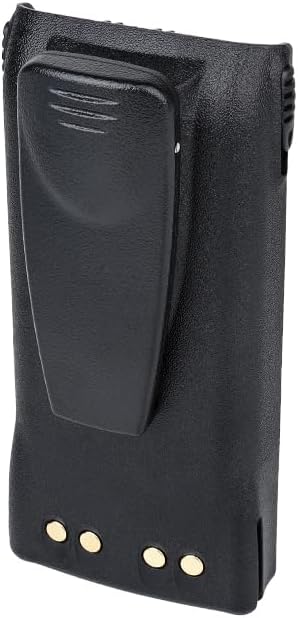
Figura 2: Posteriore view of the Arrowmax battery pack, illustrating the integrated heavy-duty spring belt clip.
Configurazione e installazione
- Disimballare: Estrarre con cautela la batteria dalla confezione.
- Carica iniziale: Before first use, place the battery in a compatible charger and charge it overnight (12-16 hours). Refer to the "Charging the Battery" section for details.
- Collega alla radio: Align the battery pack with the battery compartment on the back of your Motorola two-way radio. Slide the battery into place until it clicks securely. Ensure the battery is fully seated to maintain proper contact.
- Remove from Radio: To remove the battery, locate the battery release latch (usually at the bottom or side of the battery compartment on the radio). Press the latch and slide the battery pack downwards or outwards to detach it from the radio.
- Belt Clip Attachment (if separate): If the belt clip is not pre-attached, align the clip with the designated slots on the back of the battery and slide it into place until it locks. To remove, follow the reverse procedure, often involving a small tab or release mechanism on the clip itself.
Istruzioni per l'uso
Carica della batteria:
Use only a charger specifically designed for Ni-MH batteries and compatible with your Motorola radio battery type. Incompatible chargers can damage the battery or pose a safety risk.
- Collegare il caricabatterie: Plug the charger's power adapter into an appropriate electrical outlet.
- Inserire la batteria: Place the battery pack into the charging slot of the charger. Ensure the battery contacts align correctly with the charger terminals.
- Osservare l'indicatore: The charger typically has an LED indicator that shows the charging status (e.g., red for charging, green for fully charged). Refer to your charger's manual for specific indicator meanings.
- Tempo di ricarica: For initial use, charge the battery overnight (12-16 hours). Subsequent charges typically take 8-12 hours for a full charge, depending on the charger and battery depletion level.
- Rimuovere la batteria: Once fully charged, remove the battery from the charger. Avoid leaving batteries on charge indefinitely after they are full, as this can reduce battery life over time.

Figure 3: An Arrowmax battery pack placed in a compatible charging dock, indicating the charging process.
Using the Battery with Your Radio:
Once the battery is installed and fully charged, your radio is ready for use. Refer to your radio's instruction manual for specific operating procedures.
Manutenzione e stoccaggio
- Pulizia: Clean the battery contacts periodically with a clean, dry cloth to ensure good electrical connection. Do not use harsh chemicals or abrasive materials.
- Magazzinaggio: If storing the battery for an extended period, charge it to approximately 50% capacity. Store in a cool, dry place away from direct sunlight and extreme temperatures. Avoid storing fully charged or fully discharged batteries for long periods.
- Ciclo di vita: Ni-MH batteries benefit from occasional full discharge/recharge cycles to maintain capacity. However, modern chargers often manage this automatically.
- Evitare l'impatto: Protect the battery from physical impact or dropping, which can damage internal components.
Risoluzione dei problemi
| Problema | Possibile causa | Soluzione |
|---|---|---|
| La batteria non si carica. |
|
|
| Breve tempo di funzionamento dopo la carica completa. |
|
|
| Battery does not fit radio. |
|
|
Specifiche
| Numero di modello | AMCM9008-1600-D |
| Chimica della batteria | Ni-MH (nichel-metallo idruro) |
| Voltage | 7.2 Volt |
| Capacità | 2500 mAh |
| Radio compatibili | Motorola HT750, HT1225, HT1250, GP328, GP338 |
| Replaces OEM | HNN9011, HNN9012, HNN9009, HNN9008 |
| Approx. Weight (per battery) | ~0.51 lbs (based on 2.05 lbs for 4-pack) |
| Produttore | Arrowmax |
Garanzia e supporto
For warranty information or technical support regarding your Arrowmax battery pack, please refer to the seller's policies or contact Arrowmax Communications, INC directly. Contact details are typically available on the product packaging or the seller's websito.
Risorse online: Per ulteriori informazioni o per view other products, visit the Arrowmax Store on Amazon.