
TP-Link URC1745
Total Control URC1745 Universal Remote Control
Manuale d'uso
Introduzione
The Total Control URC1745 is a versatile universal remote control designed to simplify your home entertainment experience. This single remote can control up to four different devices, including your TV, Set Top Box, DVD/Blu-ray player, and VCR. Its intuitive design and comprehensive functionality allow for seamless operation of your connected devices.
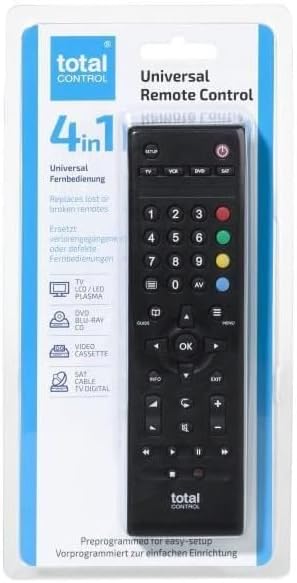
Image: The Total Control URC1745 Universal Remote Control displayed in its retail packaging, highlighting its 4-in-1 capability.
Impostare
Before using your Total Control URC1745 remote, you will need to install batteries and program it to control your specific devices.
1. Installazione della batteria
- Individuare il vano batterie sul retro del telecomando.
- Far scorrere per aprire il coperchio della batteria.
- Inserire due (2) batterie AAA, assicurandosi della corretta polarità (+ e -) come indicato all'interno del vano.
- Chiudere bene il coperchio della batteria.
2. Programmazione del dispositivo
The URC1745 remote can be programmed using a direct code entry method or an automatic search function. Refer to the comprehensive instructions included in your product packaging for specific codes and detailed programming steps for your TV, Set Top Box, DVD/Blu-ray player, and VCR.
- Inserimento codice: If you know the specific code for your device's brand, you can enter it directly to program the remote.
- Ricerca automatica: If you do not know the code, the remote can perform an automatic search to find the correct code for your device.

Immagine: Primo piano view of the Total Control URC1745 remote control, displaying its various buttons for device selection, navigation, and playback.
Utilizzo del telecomando
Once programmed, operating your devices with the URC1745 is straightforward.
Selezione del dispositivo
To control a specific device, press the corresponding device button at the top of the remote (TV, VCR, DVD, SAT). The remote will then send commands to the selected device.
Funzioni di base
- Pulsante di accensione: Accende o spegne il dispositivo selezionato.
- Tasti numerici (0-9): Per l'inserimento diretto dei canali o la navigazione nei menu.
- Volume su/giù: Adjusts the volume of the selected audio device (typically TV).
- Canale su/giù: Changes channels on the selected TV or Set Top Box.
- Tastierino di navigazione (Su/Giù/Sinistra/Destra/OK): Utilizzato per la navigazione e la selezione del menu.
- Controlli di riproduzione (Riproduzione, Pausa, Arresto, Riavvolgimento, Avanzamento rapido): Controls playback on DVD/Blu-ray players or VCRs.
- Menu/Guide/Info/Exit: Accesses device menus, program guides, information displays, and exits current screens.
Manutenzione
Proper care will ensure the longevity of your universal remote control.
Sostituzione della batteria
Replace batteries when the remote's performance diminishes or if the indicator light (if present) signals low power. Always replace both batteries simultaneously with new AAA batteries.
Pulizia
To clean the remote, gently wipe it with a soft, dry cloth. Do not use abrasive cleaners, solvents, or wet cloths, as these can damage the remote's surface or internal components.
Magazzinaggio
Store the remote in a cool, dry place away from direct sunlight and extreme temperatures. If storing for an extended period, it is advisable to remove the batteries to prevent leakage.
Risoluzione dei problemi
If you encounter issues with your Total Control URC1745 remote, try the following solutions:
- Il telecomando non risponde:
- Controllare che le batterie siano inserite correttamente e siano sufficientemente cariche. Sostituirle se necessario.
- Ensure there are no obstructions between the remote's infrared emitter and the device's receiver.
- Il dispositivo non risponde ai comandi:
- Verify that the correct device button (TV, VCR, DVD, SAT) is selected.
- Re-program the remote for the specific device. The original packaging contains detailed instructions and codes.
- Ensure the device you are trying to control is powered on.
- Alcuni pulsanti non funzionano:
- This could indicate a programming issue or a specific button malfunction. Try re-programming the remote.
Specifiche
| Caratteristica | Dettaglio |
|---|---|
| Numero di modello | URC1745 |
| Produttore | Controllo totale |
| Numero massimo di dispositivi supportati | 4 |
| Dispositivi compatibili | TV, Set Top Box, DVD/Blu-ray Player, VCR |
| Tecnologia di connettività | Infrarossi |
| Fonte di alimentazione | 2 batterie AAA (necessarie) |
| Portata massima | 10 metri |
| Colore | Nero |
| Dimensioni del prodotto | Dimensioni: 4.8 x 2.4 x 17.5 cm |
| Peso del prodotto | 74 grammi |
Supporto e garanzia
For detailed support information, including frequently asked questions, additional manuals, and troubleshooting videos, please visit the Uno per tutti websito. One For All provides comprehensive customer service to assist with setting up and using your universal remote control.
Information regarding product warranty is typically provided within the product packaging or can be found on the manufacturer's official websito. Conservare la prova d'acquisto per eventuali reclami in garanzia.
Ask a question about this manual
Ask about setup, troubleshooting, compatibility, parts, safety, or missing instructions. Manuals+ will review the question and use this page’s manual context to help answer it.