1. Introduzione
This manual provides detailed instructions for the installation, operation, and maintenance of your Alcatel T56 corded phone. Please read this manual thoroughly before using the device to ensure proper functionality and to prevent damage.
2. Informazioni sulla sicurezza
- Non esporre il telefono all'acqua o all'umidità.
- Evitare di posizionare il telefono vicino a fonti di calore o alla luce solare diretta.
- Utilizzare solo i cavi e gli accessori forniti.
- Non tentare di aprire o riparare il telefono da soli. Rivolgersi a personale qualificato.
- Tenere il telefono lontano da forti campi elettromagnetici.
3. Contenuto della confezione
Verifica che il pacco contenga i seguenti articoli:
- Alcatel T56 Corded Phone Base Unit
- Cornetta
- Cavo a spirale del microtelefono
- Cavo della linea telefonica
- Manuale d'uso
4. Configurazione e installazione
4.1 Collegamento del portatile
Collegare un'estremità del cavo spiralato del ricevitore al ricevitore stesso e l'altra estremità alla presa del ricevitore sul lato sinistro dell'unità base del telefono.
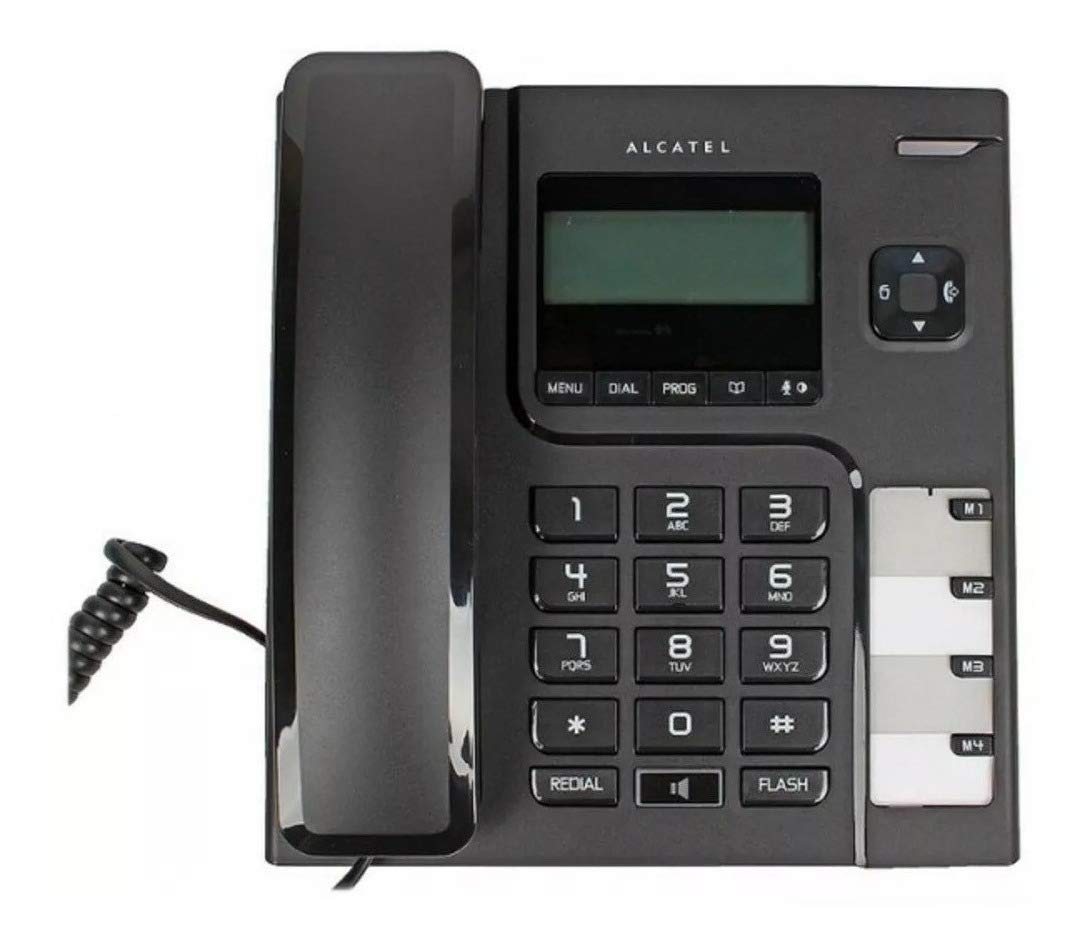
Image: Alcatel T56 corded phone with the handset connected to the base unit. This shows the overall appearance of the phone ready for use.
4.2 Collegamento della linea telefonica
Connect one end of the telephone line cord to the LINE jack on the back of the phone base unit and the other end to your wall telephone jack.

Immagine: Lato view of the Alcatel T56 phone, illustrating the connection point for the coiled handset cord and the telephone line cord.
4.3 Montaggio a parete (opzionale)
The Alcatel T56 can be wall-mounted. Use the provided wall mount bracket (if included) and follow the instructions to secure it to a wall. Ensure the handset cradle is reversed to hold the handset securely when wall-mounted.
5. Istruzioni per l'uso
5.1 Effettuare una chiamata
- Sollevate il microtelefono.
- Comporre il numero di telefono desiderato utilizzando la tastiera.
- Attendi che la chiamata si connetta.
- Per terminare la chiamata, riposizionare il ricevitore sull'unità base.
5.2 Rispondere a una chiamata
Quando squilla il telefono, basta sollevare la cornetta per rispondere alla chiamata.
5.3 Funzione di ricomposizione
Per ricomporre l'ultimo numero chiamato, sollevare la cornetta e premere il tasto RICOMPOSIZIONE pulsante.
5.4 Funzione Flash
IL FLASH button is used for network services such as call waiting or transferring calls. Consult your telephone service provider for specific instructions on using this feature.
5.5 Funzione Mute
Durante una chiamata, premere il tasto MUTE button to temporarily disable your microphone. The other party will not hear you. Press it again to resume the conversation.
5.6 Vivavoce
Per utilizzare la funzione vivavoce, premere il tasto ORATORE button during a call or before dialing. Adjust the volume using the volume control buttons.
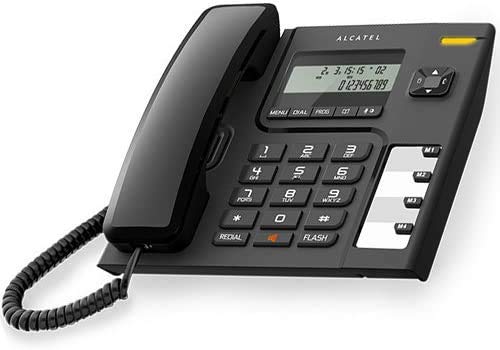
Image: Alcatel T56 corded phone displaying time and a dialed number on its LCD screen, highlighting the user interface.
5.7 Funzione ID chiamante
If you subscribe to Caller ID service, the phone's display will show the incoming caller's number and name (if available) before you answer. You can scroll through the call log using the navigation buttons.
5.8 Phonebook / Memory Dialing
The Alcatel T56 features memory buttons (M1, M2, M3, M4) for one-touch dialing and a phonebook for storing frequently used numbers. Refer to the programming section for instructions on storing numbers.
6. Caratteristiche di programmazione
6.1 Storing Numbers in One-Touch Memory (M1-M4)
- Sollevate il microtelefono.
- Premere il tasto PROG pulsante.
- Comporre il numero di telefono che si desidera memorizzare.
- Premere il tasto PROG di nuovo il pulsante.
- Press the desired memory button (M1, M2, M3, or M4).
- Replace the handset. The number is now stored.
6.2 Utilizzo della memoria One-Touch
Lift the handset and press the desired memory button (M1-M4) to automatically dial the stored number.
6.3 Impostazione di data e ora
To set the date and time, press the MENU button, navigate to the 'Set Date/Time' option using the navigation keys, and follow the on-screen prompts to enter the correct information. Press MENU per confermare e uscire.
7. Manutenzione e cura
- Pulisci il telefono con un panno morbido eamp panno. Non usare detergenti abrasivi o solventi.
- Mantenere il telefono libero da polvere e detriti.
- Ensure all cords are securely connected and not tangled.
8. Risoluzione Dei Problemi
| Problema | Possibile causa | Soluzione |
|---|---|---|
| Nessun tono di linea | Il cavo della linea telefonica è scollegato o difettoso. | Check the telephone line cord connections. Try a different line cord if available. Contact your service provider. |
| Non è possibile effettuare o ricevere chiamate | Line cord issue, service outage, or phone malfunction. | Verify line cord connection. Check with your service provider for outages. Test with another phone if possible. |
| ID chiamante non visualizzato | Servizio identificativo del chiamante non sottoscritto o non attivo. | Contatta il tuo fornitore di servizi telefonici per assicurarti che il servizio di identificazione del chiamante sia attivo sulla tua linea. |
| Il display è vuoto o scuro | No power (if applicable) or display settings. | The Alcatel T56 is line-powered. Ensure the telephone line is connected. Check display contrast settings if available in the menu. |
9. Specifiche
- Modello: Alcatel T56
- Tipo: Telefono fisso con filo
- Display: LCD (Numerical Display)
- ID chiamante: Sì (richiede l'abbonamento)
- Vivavoce: SÌ
- Ricomposizione: Ripetizione dell'ultimo numero
- Memoria: One-touch memory buttons (M1-M4), Phonebook
- Montaggio: Montaggio su scrivania o a parete
- Fonte di energia: Line Powered (No batteries required for basic operation)
- Dimensioni: Circa 23.7 x 20.2 x 5.4 cm
- Peso: Circa 376 g
- Paese di origine: Cina
10. Garanzia e supporto
Per informazioni sulla garanzia e supporto tecnico, fare riferimento alla scheda di garanzia inclusa con il prodotto o visitare il sito ufficiale Alcatel websito. Conservare la ricevuta d'acquisto come prova d'acquisto per eventuali reclami in garanzia.
Please note: The product information provided in the source data indicates a "no return policy" as a legal disclaimer. This manual focuses on product usage and does not override specific retailer return policies.