
1. Introduzione
Grazie per l'acquistoasing the Forever BS600 Bluetooth Speaker. This portable wireless speaker combines powerful audio with versatile playback options, including Bluetooth, FM radio, USB, and SD card support. It also features a built-in microphone for hands-free calling. Please read this manual carefully to ensure proper use and maintenance of your device.
Componenti inclusi:
- Forever BS600 Bluetooth Speaker
- Cavo jack da 3.5 mm
- Cavo di ricarica USB
- Lithium Battery (pre-installed)

Image 1.1: Forever BS600 speaker with its accompanying 3.5mm audio cable and USB charging cable.
2. Informazioni sulla sicurezza
To ensure safe and optimal operation, please observe the following precautions:
- Non esporre il dispositivo a temperature estreme, alla luce solare diretta o a elevata umidità.
- Evitare di far cadere o di sottoporre l'altoparlante a forti urti.
- Non smontare, riparare o modificare il dispositivo autonomamente. Per qualsiasi intervento di assistenza, rivolgersi a personale qualificato.
- Tenere l'altoparlante lontano da acqua e altri liquidi. Non è impermeabile.
- Use only the provided or approved charging cables.
- Dispose of batteries according to local regulations. Do not expose batteries to excessive heat.
3. Prodotto finitoview
Familiarizza con i controlli e le porte dell'altoparlante:
Pulsanti di controllo:
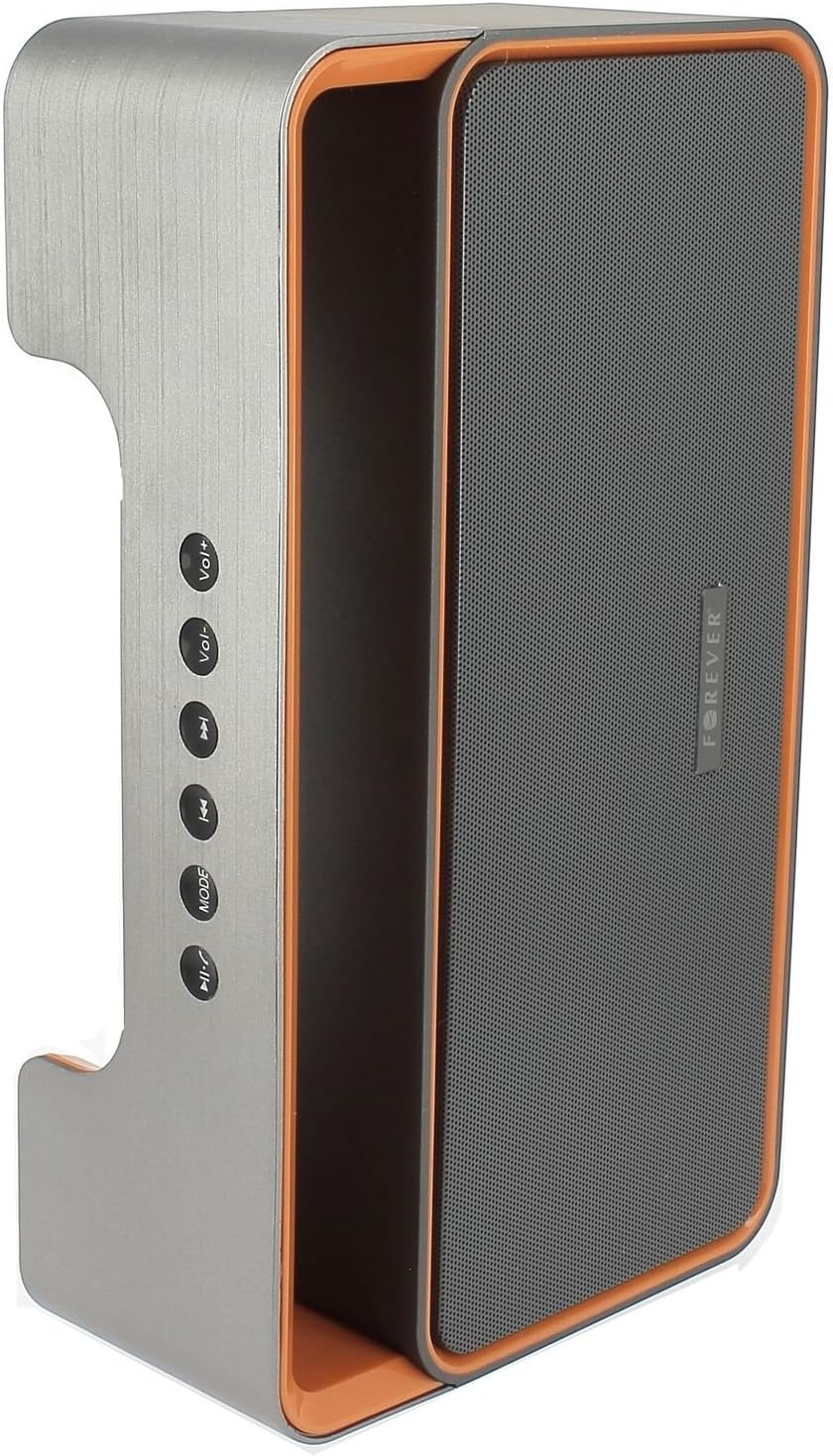
Image 3.1: Side panel with control buttons.
- Vol+ / Vol-: Regola il volume.
- Traccia precedente / Traccia successiva: Navigate between tracks in playback modes or stations in FM mode.
- MODALITÀ: Switch between Bluetooth, FM Radio, USB, SD Card, and AUX modes.
- Riproduci/Pausa: Play or pause audio. Answer or end calls.
Porte e connettori:

Image 3.2: Rear panel with ports and power switch.
- Ingresso AUX: For connecting external audio devices via 3.5mm cable.
- Slot per scheda Micro SD: For playing music from a Micro SD card.
- Porta USB: For playing music from a USB flash drive.
- Porta di ricarica micro USB: Per caricare la batteria interna dell'altoparlante.
- Interruttore ON/OFF: To power the speaker on or off.
4. Impostazione
4.1 Ricarica dell'altoparlante
- Connect the small end of the USB charging cable to the Micro USB port on the back of the speaker.
- Collegare l'estremità più grande del cavo USB a un adattatore di alimentazione USB (non incluso) o alla porta USB di un computer.
- La spia di carica si illuminerà (il colore può variare) per indicare che l'altoparlante è in carica.
- Una volta completata la carica, la spia cambierà colore o si spegnerà. Scollegare il cavo di ricarica.
Note: For first-time use, fully charge the speaker for approximately 3-4 hours.
4.2 Accensione/Spegnimento
- To power on, slide the ON/OFF switch on the rear panel to the 'ON' position. You will hear an audible prompt.
- Per spegnere, far scorrere l'interruttore ON/OFF in posizione 'OFF'.
5. Istruzioni per l'uso
5.1 Selezione della modalità
Premere il tasto MODALITÀ button repeatedly to cycle through the available modes: Bluetooth, FM Radio, USB, SD Card, and AUX.
5.2 Associazione Bluetooth
- Accendi l'altoparlante. Entrerà automaticamente in modalità di associazione Bluetooth, indicata da una luce LED lampeggiante e da un segnale acustico.
- Abilita il Bluetooth sul tuo dispositivo mobile (smartphone, tablet, computer).
- Cercare available Bluetooth devices. You should find "BS600" in the list.
- Select "BS600" to connect. Once paired, the LED light will stop flashing, and you will hear a confirmation sound.
- Ora puoi riprodurre l'audio dal tuo dispositivo tramite l'altoparlante.
5.3 Modalità radio FM
- Passare l'altoparlante alla modalità Radio FM utilizzando il MODALITÀ pulsante.
- Premere e tenere premuto il tasto Riproduci/Pausa pulsante per avviare una scansione automatica delle stazioni FM. L'altoparlante salverà tutte le stazioni trovate.
- Utilizzare il Traccia precedente E Traccia successiva pulsanti per navigare tra le stazioni salvate.
5.4 Riproduzione da scheda USB/SD
- Inserire una chiavetta USB o una scheda Micro SD (con audio MP3 files) nella porta corrispondente sul pannello posteriore.
- The speaker will automatically switch to USB or SD card mode and begin playing music. If not, press the MODALITÀ pulsante per selezionare la modalità corretta.
- Utilizzare il Traccia precedente, Traccia successiva, E Riproduci/Pausa pulsanti per controllare la riproduzione.
5.5 Modalità ausiliaria
- Collegare un'estremità del cavo audio da 3.5 mm alla porta di ingresso AUX dell'altoparlante.
- Connect the other end of the cable to the headphone jack of your external audio device.
- Passare l'altoparlante alla modalità AUX utilizzando il MODALITÀ pulsante.
- Controlla la riproduzione dal tuo dispositivo audio esterno.
5.6 Gestione delle chiamate (modalità Bluetooth)
- Rispondi alla chiamata: When a call comes in during Bluetooth mode, press the Riproduci/Pausa premere il pulsante una volta per rispondere.
- Termina chiamata: During a call, press the Riproduci/Pausa premere una volta il pulsante per terminare la chiamata.
- Rifiuta chiamata: When a call comes in, press and hold the Riproduci/Pausa pulsante per rifiutare la chiamata.
5.7 Controllo del volume
Premere il tasto Volume+ pulsante per aumentare il volume e il Vol- pulsante per diminuire il volume.
6. Manutenzione
6.1 Pulizia
- Prima di pulirlo, assicurarsi che l'altoparlante sia spento e scollegato da qualsiasi fonte di alimentazione.
- Use a soft, dry, lint-free cloth to wipe the exterior surfaces of the speaker.
- Non utilizzare detergenti abrasivi, solventi o spray chimici, poiché potrebbero danneggiare la finitura o i componenti interni.
6.2 Conservazione
- Quando non viene utilizzato per lunghi periodi, conservare l'altoparlante in un luogo fresco e asciutto, lontano dalla luce solare diretta e da temperature estreme.
- It is recommended to charge the battery at least once every three months to maintain its lifespan.
7. Risoluzione Dei Problemi
| Problema | Possibile causa | Soluzione |
|---|---|---|
| L'altoparlante non si accende. | La batteria è scarica. | Caricare l'altoparlante tramite il cavo USB. |
| Nessun suono. | Il volume è troppo basso; è stata selezionata la modalità errata; il dispositivo non è connesso. | Increase volume; press MODE button to select correct source; ensure Bluetooth/AUX connection is active. |
| L'associazione Bluetooth non riesce. | Speaker not in pairing mode; device too far; Bluetooth not enabled on source. | Ensure speaker is in Bluetooth mode and flashing; move device closer; enable Bluetooth on your device. |
| Scarsa ricezione radio FM. | Segnale debole; interferenza ambientale. | Spostare l'altoparlante in una zona con una ricezione migliore. |
| La scheda USB/SD non funziona. | Non corretto file formato; scheda/unità non inserita correttamente; supporto danneggiato. | Garantire files are MP3 format; reinsert media; try a different USB drive/SD card. |
8. Specifiche
| Nome del modello | BS600 |
| Marca | Per sempre |
| Tecnologia di connettività | Bluetooth, Ausiliario, USB |
| Tipo di altoparlante | Altoparlante Bluetooth portatile |
| Caratteristiche speciali | FM Radio, USB Reader, SD Card Reader |
| Potenza massima in uscita | 10 Watt (2 x 5 W) |
| Modalità di uscita audio | Mono |
| Fonte di alimentazione | Alimentato a batteria (ioni di litio) |
| Metodo di controllo | Pulsanti tattili |
| Dimensioni (circa) | Altezza: 13 cm, Larghezza: 24 cm |
| Colore | Grey / Orange |
| Impermeabile | NO |
9. Informazioni sulla garanzia
The Forever BS600 Bluetooth Speaker comes with a limited warranty. Please refer to the warranty card included with your purchase or contact your retailer for specific terms and conditions. This warranty typically covers manufacturing defects but does not cover damage caused by misuse, accidents, unauthorized modifications, or normal wear and tear.
10. Supporto
If you encounter any issues not covered in the troubleshooting section or require further assistance, please contact the retailer where you purchased the product or visit the official Forever website for support resources. Please have your product model (BS600) and purchase details ready when seeking support.