
1. Introduzione
This manual provides essential information for the proper installation, use, and maintenance of your HP 65 Black Ink Cartridge. Designed for consistent quality and reliable performance, this original HP ink cartridge ensures clear, fade-resistant documents and brilliant images.
1.1. Prodotto finitoview
The HP 65 Black Ink Cartridge is an original HP product engineered to work seamlessly with compatible HP printers. It delivers precision output for various printing needs, from everyday documents to important school projects.
1.2. Compatibilità
The HP 65 Black Ink Cartridge (N9K02AN) is compatible with the following HP printer models:
- HP AMP series: 100, 105, 120, 125, 130
- HP DeskJet series: 2622, 2624, 2625, 2628, 2635, 2636, 2640, 2652, 2655, 2680, 3720, 3722, 3752, 3755, 3758, 3772
- HP ENVY series: 5010, 5012, 5014, 5020, 5030, 5032, 5034, 5052, 5055, 5070
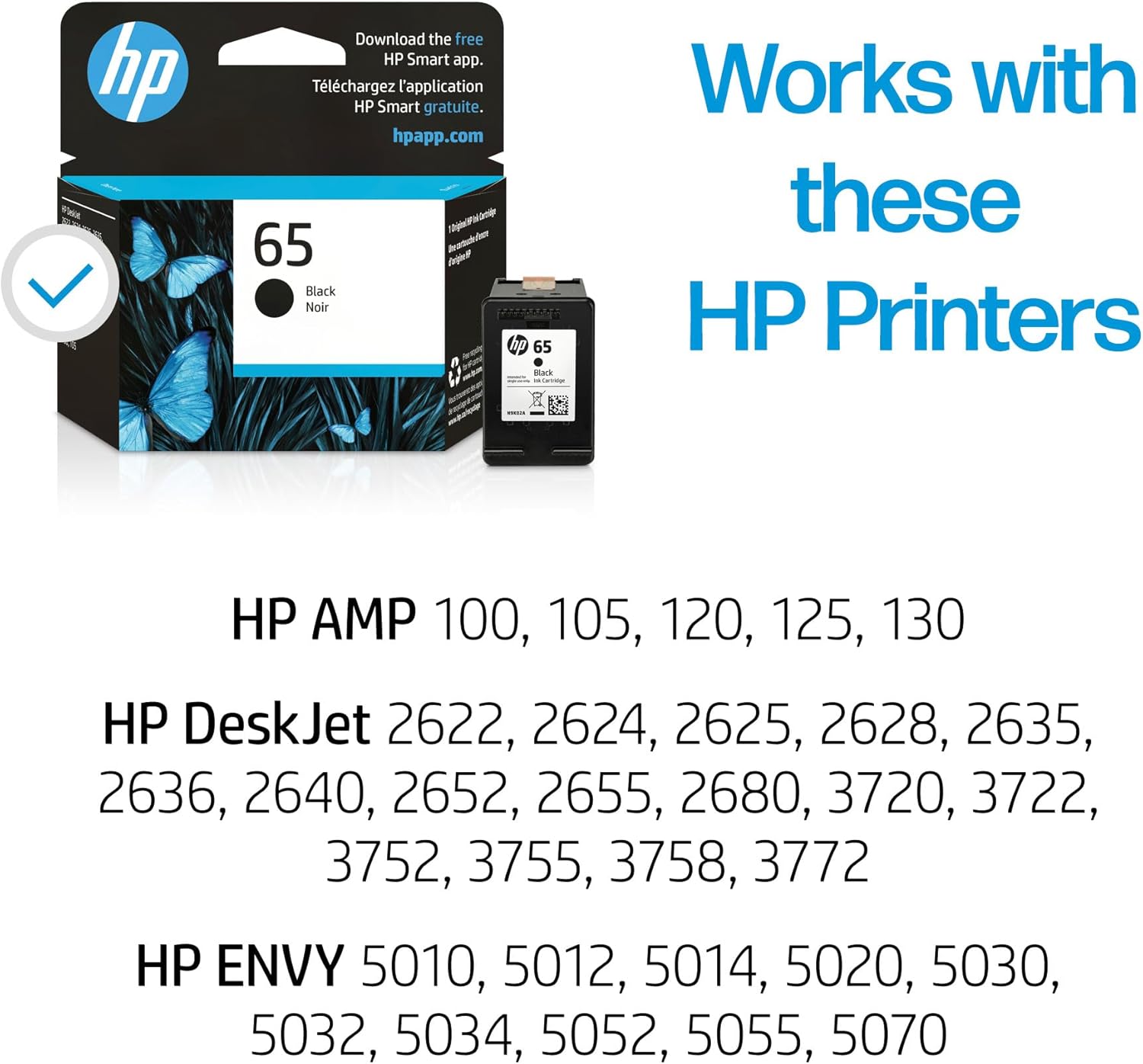
Image: HP 65 Black Ink Cartridge packaging highlighting compatible HP printer models.
2. Configurazione e installazione
Follow these steps to correctly install your new HP 65 Black Ink Cartridge:
- Disimballare la cartuccia: Carefully remove the new HP 65 Black Ink Cartridge from its packaging.
- Locate the Ink Cartridge Access Door: On most compatible HP printers, the ink cartridge access door is located on the front or top of the printer. Gently lift or open this door. The print carriage will typically move to the center.
- Rimuovere la vecchia cartuccia: Once the print carriage is accessible, locate the black ink cartridge. Press down on the tab or lever to release it, then pull the old cartridge out of its slot.
- Preparare la nuova cartuccia: Remove the protective plastic film or tape from the new HP 65 Black Ink Cartridge. Be careful not to touch the copper-colored electrical contacts or ink nozzles.
- Inserire la nuova cartuccia: Slide the new cartridge into the empty slot, ensuring it clicks firmly into place. The black cartridge typically goes into the right-hand slot.
- Chiudere lo sportello di accesso: Chiudere lo sportello di accesso alle cartucce d'inchiostro. La stampante potrebbe eseguire automaticamente un processo di allineamento.

Image: The HP 65 Black Ink Cartridge in its retail packaging.

Image: HP 65 Black Ink Cartridge box, emphasizing ease of use.
3. Istruzioni per l'uso
Once installed, your HP 65 Black Ink Cartridge is ready for use. Ensure your printer is connected to your device and powered on. You can initiate print jobs from your computer or mobile device using the HP Smart app or your printer's software.
3.1. Qualità di stampa
Original HP ink cartridges are designed to deliver sharp text and vibrant images. For optimal print quality, use recommended HP paper types.

Immagine: Example of print quality with vibrant colors and rich blacks.

Image: Stacks of printed documents demonstrating brilliant colors and sharp text.
3.2. Page Yield
The approximate page yield for the HP 65 Black Ink Cartridge is 120 pages. Actual yield varies considerably based on content of printed pages and other factors.

Image: Visual comparison of page output from standard-yield versus high-yield HP cartridges.
4. Manutenzione e cura
To ensure the longevity and optimal performance of your HP 65 Black Ink Cartridge, store it in its original sealed packaging until ready for use. Avoid exposing cartridges to extreme temperatures or direct sunlight.
4.1. Riciclaggio
HP is committed to sustainability. Original HP ink cartridges are designed with recycled content, contributing to environmental efforts. You can easily recycle your used HP ink cartridges through HP's recycling programs.
- HP has upcycled over 2,300 metric tons of plastic from oceans into new HP Ink cartridges.
- Approximately 88% of Original HP Ink Cartridges contain recycled plastic.

Image: Instructions for easy recycling of HP ink cartridges.

Image: Highlighting that 88% of Original HP Ink Cartridges contain recycled plastic.

Image: Illustrating the upcycling of plastic bottles into new Original HP Ink Cartridges.
For more information on HP's recycling initiatives, visit hp.com/go/reinventimpact.
5. Risoluzione Dei Problemi
Original HP Ink Cartridges are designed for reliable performance. If you encounter printing issues such as streaky prints, faded colors, or missing lines, consider the following:
- Controllare i livelli di inchiostro: Monitor ink levels through your printer software or the HP Smart app.
- Testine di stampa pulite: Most HP printers have a utility to clean printheads, which can resolve many print quality issues. Refer to your printer's specific manual for instructions.
- Reinstallare la cartuccia: Remove and reinsert the ink cartridge to ensure it is seated correctly.
- Printer Alignment: Run a printer alignment process if prints appear misaligned.
Using genuine HP ink cartridges helps prevent common printing problems and ensures the flawless performance you expect from your HP printer.

Image: HP printer in operation, symbolizing reliable and high-quality printing.
5.1. Printer and Data Protection
HP Original Ink Cartridges include built-in security features, such as tamper-resistant chips and firmware, to help protect your printer and data from unauthorized access or counterfeit products.

Image: HP printer with a security icon, illustrating built-in protection features.
6. Specifiche
| Caratteristica | Dettaglio |
|---|---|
| Dimensioni del prodotto | 5.44 x 14.06 x 6.69 pollici |
| Peso dell'articolo | 0.8 once |
| ASIN | B01BYKUI9C |
| Numero modello articolo | N9K02AN |
| Produttore | HP |
| Marca | HP |
| Colore dell'inchiostro | Nero |
| Page Yield (approx.) | 120 pagine |
| Dispositivi compatibili | HP AMP 100, 105, 120, 125, 130; HP DeskJet 2622, 2624, 2625, 2628, 2635, 2636, 2640, 2652, 2655, 2680, 3720, 3722, 3752, 3755, 3758, 3772; HP ENVY 5010, 5012, 5014, 5020, 5030, 5032, 5034, 5052, 5055, 5070 |
| Caratteristica speciale | Up to 2x more prints (compared to remanufactured cartridges) |
| Opzioni di compatibilità | Genuino |
| Base dell'inchiostro | Acqua |
| Data prima disponibilità | 11 aprile 2016 |
7. Informazioni sulla garanzia
For specific warranty details regarding your HP 65 Black Ink Cartridge, please refer to the documentation included with your product or visit the official HP support website. General return policies may vary by retailer (e.g., Amazon offers a 30-day refund/replacement policy).
8. Supporto e risorse
For additional support, product information, or to learn more about HP's initiatives, please visit the following resources:
- Supporto HP: hp.com/support/deskjet3700 (for DeskJet 3700 series, adjust for your specific model)
- HP Learn About Supplies: hp.com/go/learnaboutsupplies
- HP Recycling Program: hp.com/go/reinventimpact
- Applicazione HP Smart: hpapp.com