
Gigaset S30852-H2501-D202
Gigaset AS405 Cordless Phone
Manuale d'uso
Introduzione
This manual provides detailed instructions for the setup, operation, and maintenance of your Gigaset AS405 cordless phone. Please read this manual carefully to ensure proper use and to take full advantage of all features. The Gigaset AS405 is designed for ease of use in daily calls, featuring a large, clear display and excellent sound quality.
Nota importante: This product is primarily compatible for use in Spain. While language settings can be changed, certain functionalities or regional services may be optimized for the Spanish market.
1. Impostazione
1.1 Contenuto della confezione
Prima di iniziare, assicurati che tutti i componenti siano presenti:
- Gigaset AS405 Handset
- Stazione base
- Adattatore di alimentazione per stazione base
- Cavo della linea telefonica
- Rechargeable Lithium-ion Battery (1 included)
- Coperchio della batteria
1.2 Installazione della batteria
- Rimuovere il coperchio della batteria sul retro del telefono.
- Insert the supplied Lithium-ion battery, ensuring the polarity is correct.
- Riposizionare il coperchio della batteria finché non scatta in posizione.
- Place the handset on the base station to charge. The display will indicate charging status. Allow at least 8 hours for the initial charge.

Image 1.1: Gigaset AS405 Handset on Base Station
1.3 Collegamento della stazione base
- Connect the telephone line cord to the 'LINE' port on the base station and to your telephone wall socket.
- Connect the power adapter to the 'POWER' port on the base station and plug it into an electrical outlet.
- Ensure the base station is placed in a central location, away from other electronic devices that may cause interference.
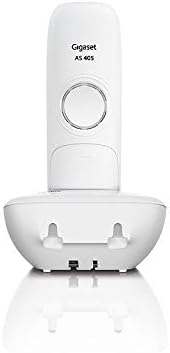
Image 1.2: Rear of Base Station with Connection Ports
1.4 Handset Registration (for additional handsets or re-registration)
If you are adding an additional handset or need to re-register your existing handset to the base:
- On the base station, press and hold the registration/paging button for approximately 3 seconds. The base will enter registration mode.
- Sul telefono, vai al menu "Impostazioni" o "Registrazione".
- Select 'Register Handset' and follow the on-screen prompts. You may be asked to enter a PIN (default is 0000).
- Once registered, the handset display will show its internal number (e.g., INT 1).
1.5 Impostazione della lingua
The phone may initially be set to Spanish. To change the language:
- Press the 'Menu' key.
- Navigate to 'Settings' (often represented by a gear icon).
- Select 'Language' or 'Idioma'.
- Scroll through the list and select 'English' or your preferred language.
2. Istruzioni per l'uso
2.1 Funzioni di chiamata di base
- Effettuare una chiamata: Enter the phone number using the keypad, then press the green call key (📞).
- Risposta a una chiamata: When the phone rings, press the green call key (📞).
- Terminare una chiamata: Premere il tasto rosso di fine chiamata (☎️).
- Chiamate in vivavoce: During a call, press the illuminated hands-free key (often with a speaker icon) to activate speakerphone mode.
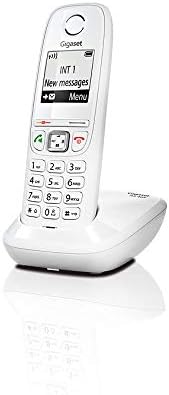
Image 2.1: Handset Keypad and Display
2.2 Rubrica
The Gigaset AS405 can store up to 100 names and numbers in its phonebook.
- Aggiungere un contatto: Navigate to the 'Phonebook' menu, select 'New Entry', enter the name and number, then save.
- Chiamata dalla rubrica: Open the 'Phonebook', scroll to the desired contact, and press the green call key (📞).
2.3 Display e navigazione
The 1.8-inch black and white backlit display offers excellent contrast for easy readability. Navigation is intuitive using the central 4-way navigation key and the soft keys below the display.
- Use the up/down arrows to scroll through lists and menus.
- Use the left/right arrows to move the cursor or access sub-menus.
- The soft keys change function depending on the context, indicated by labels on the display directly above them (e.g., 'Menu', 'Back', 'OK').
2.4 Funzioni di chiamata
- Elenco chiamate perse: The phone stores a list of up to 25 missed calls, including caller ID and time, if supported by your network provider. Access this list via the 'Menu' or a dedicated key.
- Silent Mode (Day/Night): You can program the phone to silence calls during specific times. Refer to the 'Settings' menu for 'Silent Mode' or 'Do Not Disturb' options.
- Anonymous Call Silencing: This feature allows you to silence calls from unknown or withheld numbers. Check the 'Settings' menu for 'Anonymous Call' options.
- Sveglia: The phone includes an alarm function with selectable ringtones and a snooze option. Set this up in the 'Settings' or 'Alarm' menu.
3. Manutenzione
3.1 Pulizia
Per pulire il telefono, utilizzare un panno morbido eamp panno. Non utilizzare detergenti abrasivi o solventi. Assicurarsi che nessun liquido penetri nelle aperture del telefono.
3.2 Cura della batteria
- Always use the original Gigaset battery and power adapter.
- Evitare di esporre la batteria a temperature estreme.
- Se il telefono non verrà utilizzato per un periodo prolungato, rimuovere la batteria.
4. Risoluzione Dei Problemi
| Problema | Possibile causa | Soluzione |
|---|---|---|
| Nessun tono di linea | Base station not connected or powered. | Check power adapter and telephone line cord connections. |
| Handset not registering | Handset out of range or base not in registration mode. | Move handset closer to base. Put base in registration mode (Section 1.4). |
| Il display è vuoto | La batteria è scarica o non è installata correttamente. | Place handset on base to charge. Check battery installation. |
| Cannot change language | Incorrect menu navigation. | Follow instructions in Section 1.5 carefully. |
| Scarsa qualità del suono | Interference from other devices or out of range. | Move phone away from other electronics. Move closer to base station. |
5. Specifiche
- Numero modello: S30852-H2501-D202
- Colore: Bianco
- Dimensioni dello schermo: 1.8 inches (Black and White Backlit Display)
- Capacità della rubrica: Fino a 100 contatti
- Tipo di batteria: 1 agli ioni di litio (inclusa)
- Caratteristiche speciali: Low radiation, Hands-free function, Alarm clock, Anonymous call silencing
- Materiale: Plastica
- Dimensioni (L x P x A): 34 x 34 x 34 millimeters (approximate for handset)
- Fonte di energia: Alimentato a batteria
- Tipo di sistema di risposta: Digital (if applicable, not explicitly stated for AS405 but common for Gigaset)
6. Garanzia e supporto
6.1 Informazioni sulla garanzia
Gigaset provides a warranty for this product. Spare parts availability is guaranteed for 2 years from the date of purchase. Please retain your proof of purchase for warranty claims.
6.2 Assistenza clienti
For further assistance, technical support, or warranty inquiries, please visit the official Gigaset websito o contattare il servizio clienti. Puoi trovare maggiori informazioni e risorse di supporto visitando il sito Gigaset Brand Store on Amazon.