
1. Informazioni importanti sulla sicurezza
- Ventilazione: Ensure adequate ventilation around the projector. Do not block ventilation openings. Overheating can cause damage.
- Alimentazione elettrica: Use only the specified power adapter. Disconnect power during thunderstorms or when unused for long periods.
- Umidità: Non esporre il proiettore a pioggia, umidità o liquidi.
- Pulizia: Clean the projector with a soft, dry cloth. Avoid abrasive cleaners.
- Cura delle lenti: Handle the lens with care. Clean gently with a lens cleaning cloth.
- Posizionamento: Posizionare il proiettore su una superficie stabile e piana. Evitare la luce solare diretta o fonti di calore.
- Protezione degli occhi: Non guardare direttamente nell'obiettivo del proiettore quando lamp è acceso.
2. Prodotto finitoview
2.1. Projector Dimensions
The Excelvan EHD02 projector has compact dimensions, making it portable. The approximate dimensions are 152mm (width) x 220mm (depth) x 76mm (height).
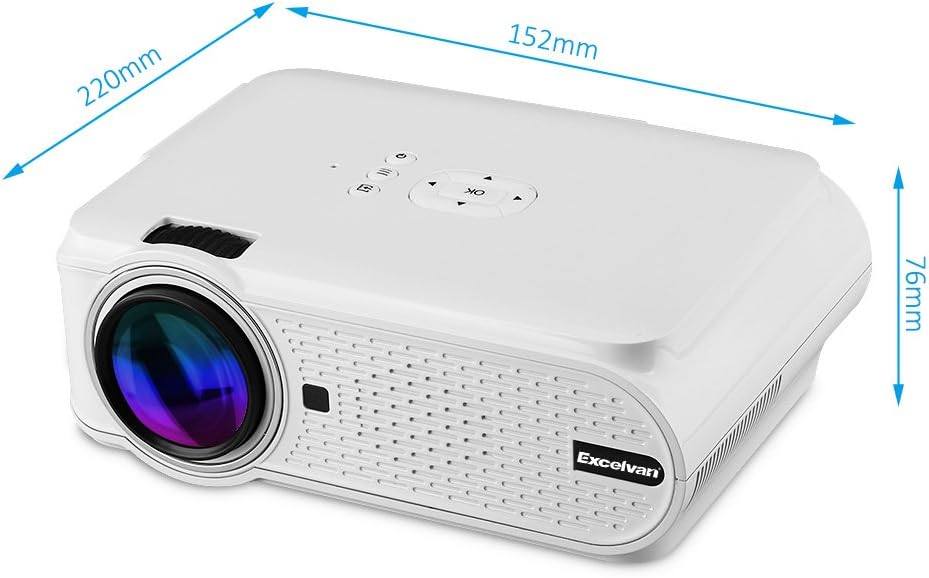
Figure 1: Excelvan EHD02 Mini Projector with labeled dimensions.
2.2. Projector Components and Interfaces
Familiarize yourself with the various ports and controls on your projector for proper setup and operation.

Figure 2: Top controls and rear panel interfaces of the Excelvan EHD02 Projector.
- Top Controls: OK button, Up/Down/Left/Right navigation, Back, Menu, Power.
- Interfacce posteriori: VGA port, USB port, Power plug, AV input, 3.5mm Audio port, IR receiver, HDMI port, Keystone adjustment, SD Card slot, TV antenna input.
3. Impostazione
3.1. Posizionamento
Position the projector on a flat, stable surface. The projection distance determines the image size. For optimal viewing, ensure the projector is centered with the screen or projection surface.
- Distanza di proiezione: 1.2 to 3.8 meters (approximately 3.9 to 12.5 feet).
- Dimensioni dell'immagine: 37 to 130 inches (diagonal).
- Metodi di proiezione: Supporta la proiezione anteriore, posteriore e a soffitto.
3.2. Collegamento elettrico
- Collegare il cavo di alimentazione all'ingresso di alimentazione del proiettore.
- Collegare l'altra estremità del cavo di alimentazione a una presa elettrica adatta.
- La spia di alimentazione si illuminerà.

Figure 3: Power cord and remote control for the projector.
3.3. Collegamento delle sorgenti di ingresso
Il proiettore supporta più sorgenti di ingresso:
- HDMI: Connect to devices like laptops, Blu-ray players, or gaming consoles using an HDMI cable.
- USB: Inserisci un'unità flash USB per riprodurre contenuti multimediali filedirettamente.
- Scheda SD: Inserisci una scheda SD per riprodurre contenuti multimediali files.
- AV: Use the provided AV cable to connect to older devices with composite video output.
- VGA: Connect to computers using a VGA cable.
- TV: Connect a TV antenna for analog TV reception.
- Audio da 3.5 mm: Collegare altoparlanti esterni o cuffie.
3.4. Messa a fuoco e correzione trapezoidale
- Regolazione della messa a fuoco: Ruotare l'anello di messa a fuoco sull'obiettivo del proiettore finché l'immagine non appare nitida e chiara.
- Correzione trapezoidale: If the projected image appears trapezoidal (wider at the top or bottom), use the keystone adjustment dial (typically on the side or rear) to correct the image shape. The projector supports ±12° vertical manual keystone correction.
4. Istruzioni per l'uso
4.1. Accensione/Spegnimento
- Accensione: Premere il pulsante di accensione sul proiettore o sul telecomando.
- Spegni: Press the Power button again. The projector will go into standby mode.
4.2. Menu Navigation and Input Selection
- Use the navigation buttons (Up, Down, Left, Right) and the OK button on the projector or remote to navigate through the on-screen menu.
- Press the "Input" or "Source" button (if available on remote, or navigate through menu) to select your desired input source (HDMI, USB, SD, AV, VGA, TV).
4.3. Connessione allo smartphone
Connecting smartphones requires specific cables:
- Per iPhone/iPad: Requires an original Apple composite AV cable.
- Telefono Android: Requires an MHL cable, and the phone must support MHL (Mobile High-Definition Link).
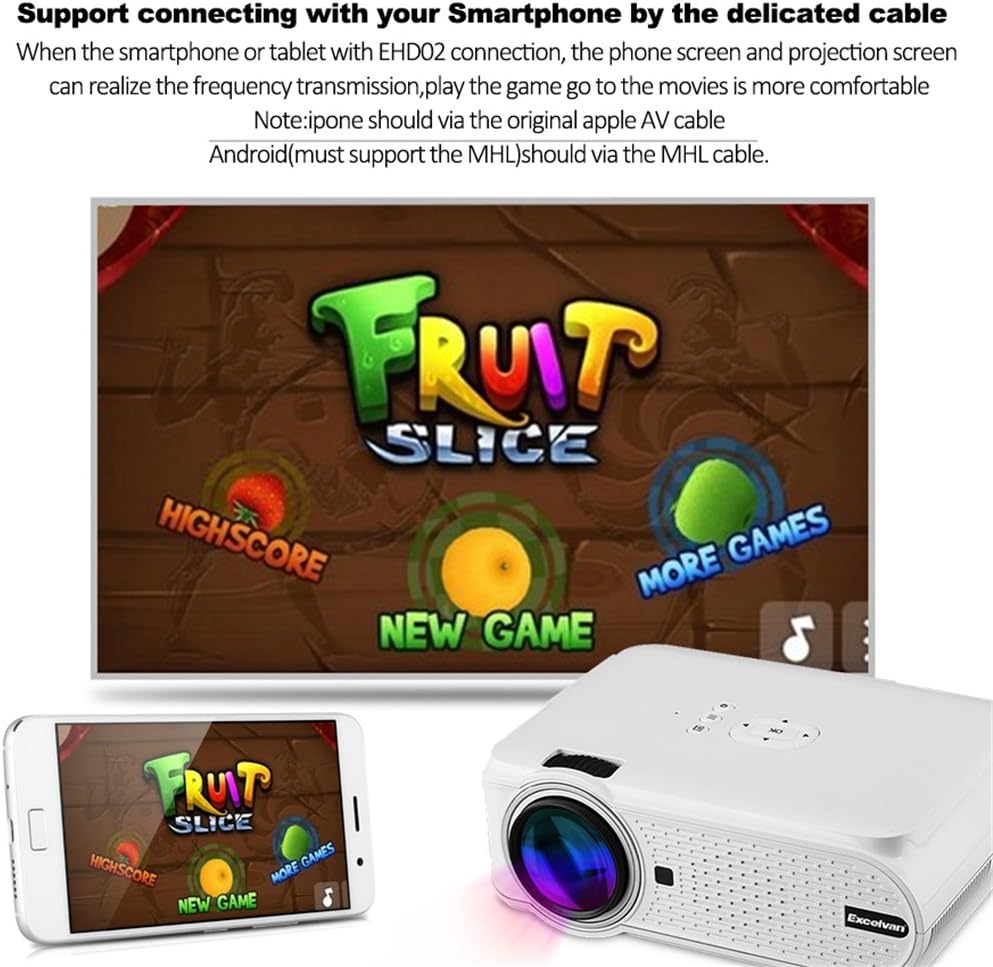
Figura 4: Esample of smartphone connection for content projection.
4.4. 3D Playback
The Excelvan EHD02 projector supports red-blue 3D content only. To view Contenuto 3D:
- Obtain red-blue 3D source content.
- Use red-blue 3D glasses for viewing.
5. Manutenzione
- Pulizia delle lenti: Utilizzare un panno morbido e privo di lanugine, specificamente progettato per lenti ottiche, per pulire delicatamente la lente del proiettore. Evitare di toccare la lente a mani nude.
- Rimozione della polvere: Periodically clean the projector's exterior with a soft, dry cloth. Ensure ventilation openings are free from dust and obstructions to prevent overheating.
- Magazzinaggio: Quando non si utilizza il proiettore per lunghi periodi, conservarlo in un luogo fresco e asciutto, al riparo dalla polvere.
6. Risoluzione Dei Problemi
| Problema | Possibile causa | Soluzione |
|---|---|---|
| Nessuna immagine proiettata |
|
|
| L'immagine è sfocata |
|
|
| L'immagine è trapezoidale |
|
|
| Nessun suono |
|
|
| Il telecomando non funziona |
|
|
| Projector is noisy or hot |
|
|
7. Specifiche
| Caratteristica | Dettaglio |
|---|---|
| Modello | Excelvan EHD02 |
| Tipo di visualizzazione | TFT- Single LCD Panel + LED Technology |
| Risoluzione nativa | 800 x 480 pixel |
| Risoluzione supportata | Up to 1080p (1920 x 1080) |
| Luminosità | 1000 lumen |
| Lente di proiezione | F=126mm, Manual Focus |
| Rapporto di contrasto | 1000:1 |
| Proporzioni | 4:3 / 16:9 |
| Altoparlante incorporato | 4Ω 2W |
| LED lamp Vita | 20,000 ore |
| Colori visualizzabili | 1.67 Million Colors (Full Color) |
| Lingue del menu | English, Spanish, French, German, Portuguese, Italian, Chinese, etc. |
| Metodi di proiezione | Anteriore, Posteriore, Soffitto |
| Interfacce | 1x VGA, 1x USB, 1x SD, 1x HDMI, 1x 3.5mm Audio, 1x AV, 1x TV |
| Dimensioni dell'immagine (diagonale) | 37 - 130 pollici |
| Distanza di proiezione | 1.2 - 3.8 metri |
| Regolazione dello schermo | Horizontal and Vertical Flip; Image Zoom |
| Correzione Keystone | ±12° Vertical (Manual) |
| Dimensioni (L x P x A) | Dimensioni: 220 mm x 152 mm x 76 mm |
| Peso | 1.44 kg |
8. Garanzia e supporto
The Excelvan EHD02 Mini Portable LED Projector comes with a Garanzia di 2 anno dalla data di acquisto.
For technical support, warranty claims, or further assistance, please contact your retailer or the Excelvan customer service department. Please have your model number (EHD02) and purchase information ready when contacting support.