
Introduzione
This manual provides comprehensive instructions for the setup, operation, and maintenance of your Zelotes T90 Professional 9200 DPI High Precision USB Wired Gaming Mouse. Please read this manual thoroughly before using the product to ensure optimal performance and longevity.

Figure 1: Zelotes T90 Professional Gaming Mouse, showcasingrazie al suo design ergonomico e all'illuminazione a LED.
Contenuto della confezione
- 1 x mouse da gioco Zelotes T90
- 1 x Manuale di istruzioni (questo documento)
Impostare
Requisiti di sistema
- Operating System: Windows 98/ 2000/ ME/ NT / XP/ win 7/ win 8/ win 10/ Mac OS and other OS
- Interfaccia: porta USB
Installazione
- Disimballare il mouse: Estrarre con cautela il mouse da gioco Zelotes T90 dalla confezione.
- Rimuovere la pellicola protettiva: Before use, please remove the foot pad protective film located on the underside of the mouse.
- Connessione al computer: Plug the USB connector of the mouse into an available USB port on your computer. The mouse is plug-and-play and does not require additional driver installation for basic functionality.
Istruzioni per l'uso
Funzioni dei pulsanti
The Zelotes T90 mouse features 8 programmable buttons designed for enhanced gaming and productivity.
- Pulsante clic sinistro
- Pulsante clic destro
- Pulsante centrale / Rotellina di scorrimento
- Pulsante Avanti: Quick forward function when browsing the web or navigating folders.
- Pulsante indietro: Quick backward function when browsing the web or navigating folders.
- Pulsante DPI: Regola la sensibilità del mouse (DPI).
- Chiave di fuoco: Configurable for rapid actions.
- Interruttore modalità luce: Controlla gli effetti di illuminazione a LED.
Regolazione DPI (sensibilità)
The mouse supports 6-speed DPI adjustment, allowing you to customize sensitivity for different tasks or games. Press the Pulsante DPI per scorrere le seguenti impostazioni:
- 1000 DPI: Indicated by red light flashing 3 times.
- 1600 DPI: Indicated by orange light.
- 2400 DPI: Indicated by green light.
- 3200 DPI: Indicated by light blue light.
- 5500 DPI: Indicated by blue light.
- 9200 DPI: Indicated by purple light.

Figure 2: Location of DPI and Fire Key buttons on the Zelotes T90 mouse.
Fire Key Function
- Pressione breve: Performs a double click.
- Pressione prolungata (più di 2 secondi): Switches to triple click mode. The light will flash 3 times to confirm the successful switch.
Interruttore modalità luce
The Zelotes T90 features various LED lighting modes:
- Pressione breve: Cycles through 7-color breathing, 6 single-color breathing, and 6 single-color constant light modes (13 modes total).
- Pressione prolungata (più di 2 secondi): Spegne le luci LED.

Figure 3: The Zelotes T90 mouse showcasing its 7-color cycle breathing and single-color lighting options.
Sistema di regolazione del peso
The mouse includes 8 removable 2.5-gram weights, allowing you to customize the mouse's weight and balance for improved stability and control, especially during fast movements.
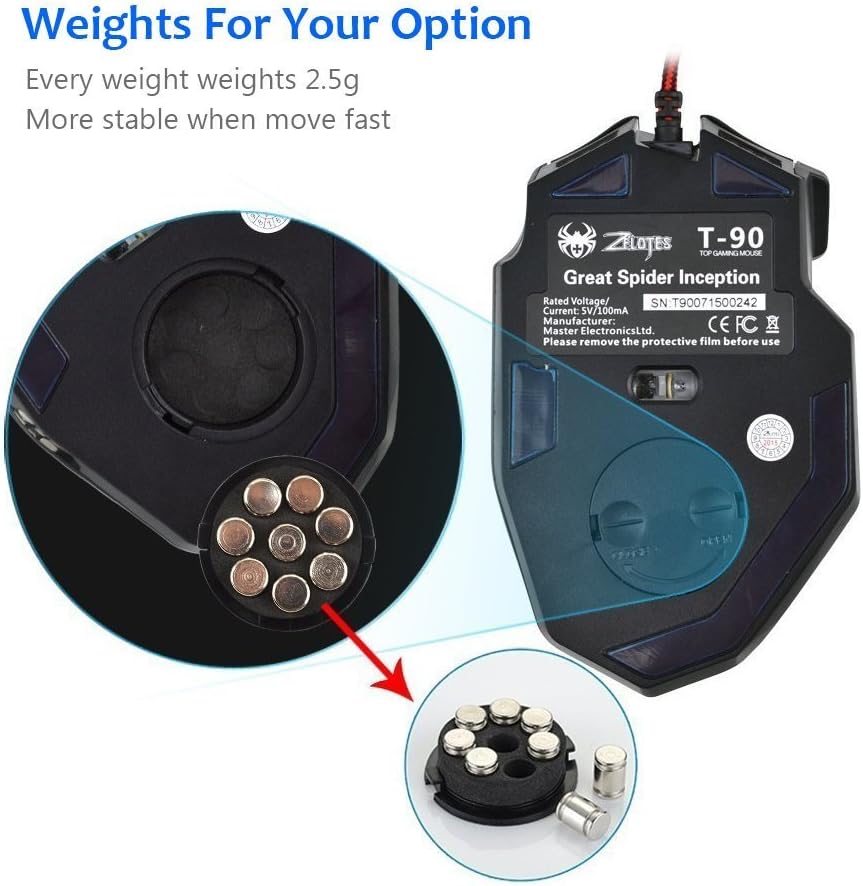
Figure 4: Location of the weight tuning system on the underside of the Zelotes T90 mouse.
Manutenzione
Pulizia
- Utilizzare un panno morbido e asciutto per pulire la superficie del mouse.
- Per sporco ostinato, leggermente dampPulisci il panno con acqua o una soluzione detergente delicata. Evita prodotti chimici aggressivi.
- Non immergere il mouse in acqua o in altri liquidi.
Magazzinaggio
Quando non viene utilizzato per lunghi periodi, conservare il mouse in un luogo fresco e asciutto, lontano dalla luce solare diretta e da temperature estreme.
Risoluzione dei problemi
| Problema | Possibile causa | Soluzione |
|---|---|---|
| Il mouse non risponde | Connessione USB allentata, porta USB difettosa, errore di sistema. | Assicurati che il cavo USB sia collegato saldamente al computer. Prova una porta USB diversa. Riavvia il computer. |
| Le luci a LED non funzionano | Lights turned off, software issue. | Short press the Light Mode Switch button to cycle through modes. Long press the Light Mode Switch button for more than 2 seconds to turn lights on if they were off. |
| L'impostazione DPI non cambia | Il pulsante DPI non è stato premuto correttamente. | Ensure you are pressing the dedicated DPI button. Observe the light flashes to confirm DPI changes. |
| Il cursore del mouse è irregolare o saltellante | Sensore ottico sporco, superficie del tappetino per mouse non adatta. | Clean the optical sensor on the underside of the mouse. Use a clean, uniform mouse pad surface. |
| Mouse settings reset | Accidental factory reset. | Press the left and right buttons simultaneously for more than 2 seconds to restore factory settings. If settings are reset, reconfigure them as desired. |
Specifiche
| Modello | T90 |
| Dimensioni (LxWxH) | 130 mm x 81 mm x 40 mm (5.12 x 3.19 x 1.57 pollici) |
| Peso | 145g ± 5g (excluding cable) |
| Contrappeso | 8 x 2.5 Gram tuning weights |
| Impostazioni DPI | 1000/1600/2400/3200/5500/9200 DPI |
| Sparatutto in prima persona | 6666 |
| Accelerazione | 23G |
| Tasso di sondaggio | 500 Hz |
| Cambia vita | 800 milioni di volte |
| Pulsanti | 8 |
| Lunghezza del cavo USB | 1.8M braided-fiber cable |
| Interfaccia | USB |
| Tipo ottico | Red wave |
| Compatibilità | Windows 98/ 2000/ ME/ NT / XP/ win 7/ win 8/ win 10/ Mac OS and other OS |
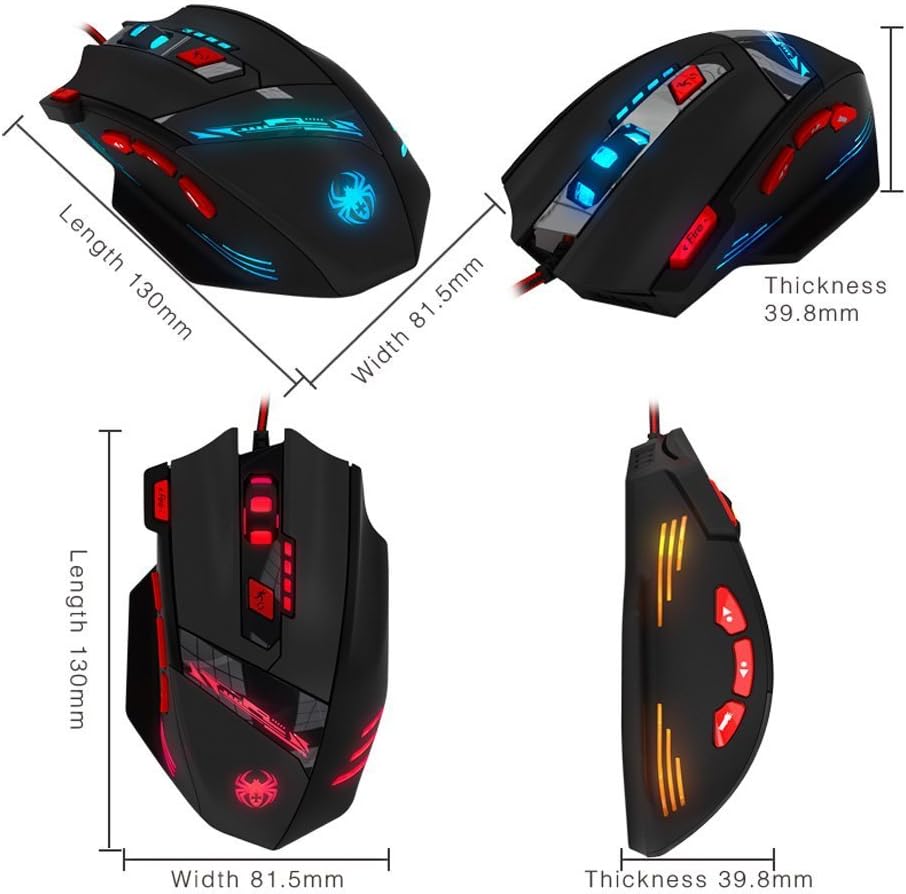
Figure 5: Detailed dimensions of the Zelotes T90 Professional Gaming Mouse.
Design ergonomico
The Zelotes T90 mouse is designed with ergonomics in mind, providing a comfortable fit for both fingertip and claw-style grips. This design aims to reduce fatigue during long periods of use.

Figure 6: Ergonomic design of the Zelotes T90 mouse, showing a comfortable hand grip.
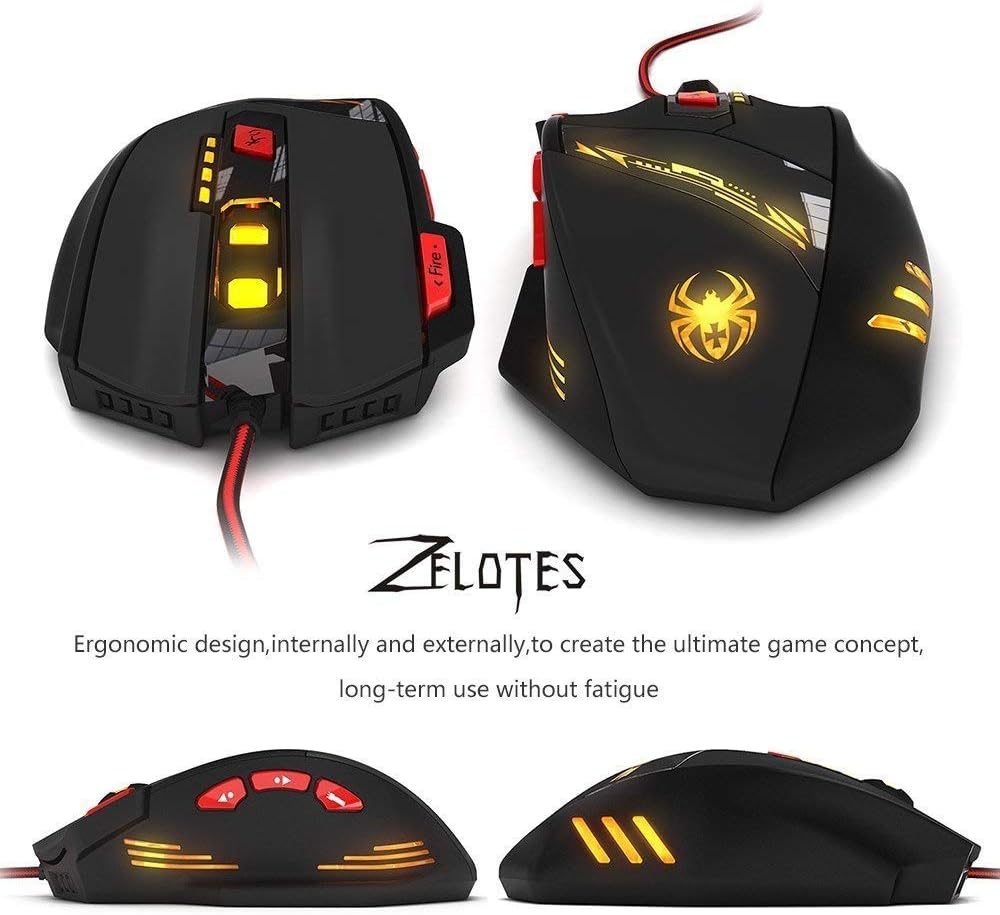
Figura 7: Vari views highlighting the ergonomic contours of the Zelotes T90 mouse.
Note importanti
- Always remove the foot pad protective film before using the mouse.
- To restore the mouse to factory settings, press and hold the left and right mouse buttons simultaneously for more than 2 seconds.