
1. Introduzione
This manual provides essential information for the safe and efficient operation of your Philips 40PFL4609/F8 40-inch Full HD LED Smart TV. Please read these instructions carefully before using your television and retain them for future reference.
2. Informazioni sulla sicurezza
Quando si utilizza questo televisore, seguire sempre le precauzioni di sicurezza di base per ridurre il rischio di incendi, scosse elettriche e lesioni.
- Non esporre il televisore alla pioggia o all'umidità.
- Non aprire l'armadio; per qualsiasi intervento di assistenza rivolgersi a personale qualificato.
- Assicurare una ventilazione adeguata attorno al televisore.
- Proteggere il cavo di alimentazione per evitare che venga calpestato o schiacciato.
- Scollegare il televisore durante i temporali o quando non viene utilizzato per lunghi periodi.
3. Contenuto della confezione
Verificare che tutti gli articoli siano presenti nella scatola:
- Philips 40PFL4609/F8 40-inch Full HD LED Smart TV
- Telecomando (richiede 2 batterie AAA, incluse)
- Cavo di alimentazione
- Tabletop Stand and Screws
- Guida rapida (non inclusa in questo manuale digitale)
- Manuale dell'utente (questo documento)
4. Impostazione
4.1 Disimballaggio e posizionamento
Carefully remove the television from its packaging. Inspect the TV for any physical damage. Place the television on a stable, flat surface or mount it on a wall using a compatible VESA 200x200mm wall mount (sold separately).
4.2 Montaggio del supporto
If using the tabletop stand:
- Posizionare il televisore a faccia in giù su una superficie morbida e pulita per evitare di danneggiare lo schermo.
- Allineare il supporto con i fori di montaggio nella parte inferiore del televisore.
- Fissare il supporto utilizzando le viti in dotazione.
4.3 Collegamento dell'alimentazione
Connect the power cord to the TV's power input, then plug the other end into a 110 VAC, 60 Hz electrical outlet.
4.4 Collegamento di dispositivi esterni
Your Philips TV offers various connection options for external devices.
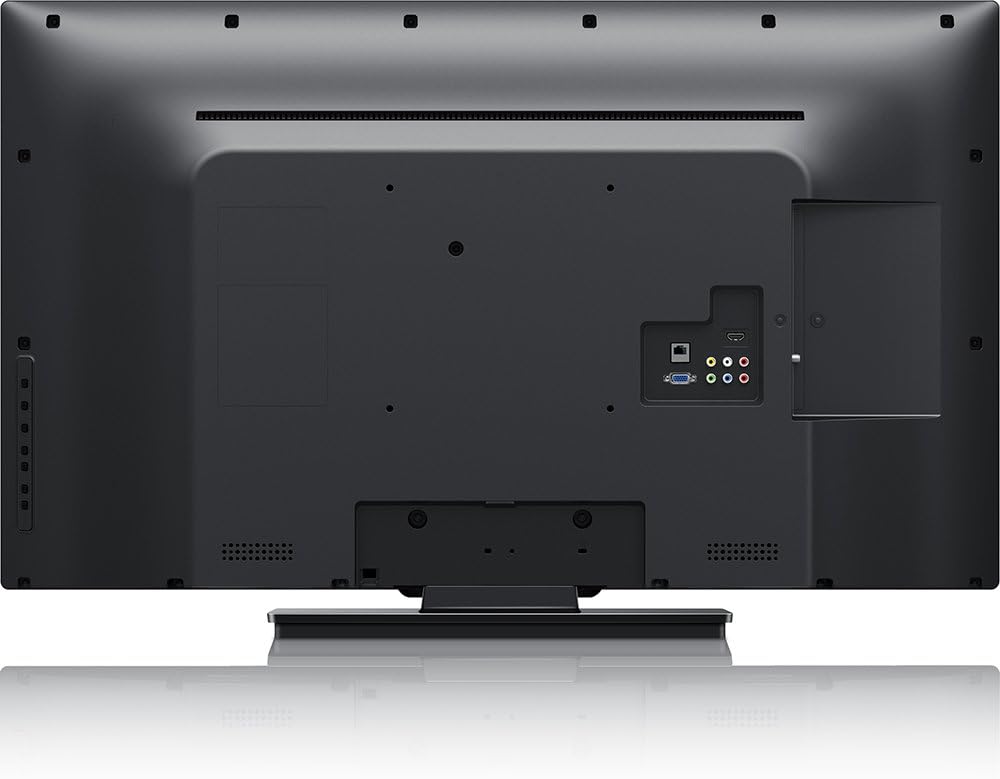
Immagine: Posteriore view of the Philips 40PFL4609/F8 television, highlighting the input ports including HDMI, DVI, and other audio/video connections.
- HDMI: Connect Blu-Ray players, game consoles, or other HDMI-enabled devices. This model has 1 HDMI port.
- Ingresso DVI: Connect computers or other DVI-enabled devices.
- USB: Connect USB storage devices for media playback. This model has 1 USB 2.0 port.
- Antenna/cavo: Collegare un'antenna o un segnale TV via cavo per i canali trasmessi.
4.5 Procedura guidata di configurazione iniziale
Alla prima accensione, il televisore ti guiderà attraverso una procedura di configurazione iniziale:
- Selezione della lingua: Scegli la tua lingua preferita.
- Connessione di rete: Connect to your home Wi-Fi network. The TV supports Wi-Fi connectivity.
- Scansione canali: Cerca i canali di trasmissione disponibili (se è collegata un'antenna o un cavo).
5. Utilizzo del televisore
5.1 Controllo remoto finitoview
The included remote control allows you to navigate menus, adjust settings, and control playback. Insert two AAA batteries into the remote control, ensuring correct polarity.
5.2 Funzioni di base
- Energia: Premere il pulsante di accensione per accendere o spegnere la TV.
- Volume: Utilizzare i pulsanti del volume per regolare il livello del suono.
- Canale: Utilizzare i pulsanti dei canali per cambiare canale TV.
- Ingresso: Press the input button to select connected devices (HDMI, DVI, etc.).
5.3 Smart TV Features (Net TV)
Your Philips TV features Net TV, providing access to online content and applications.
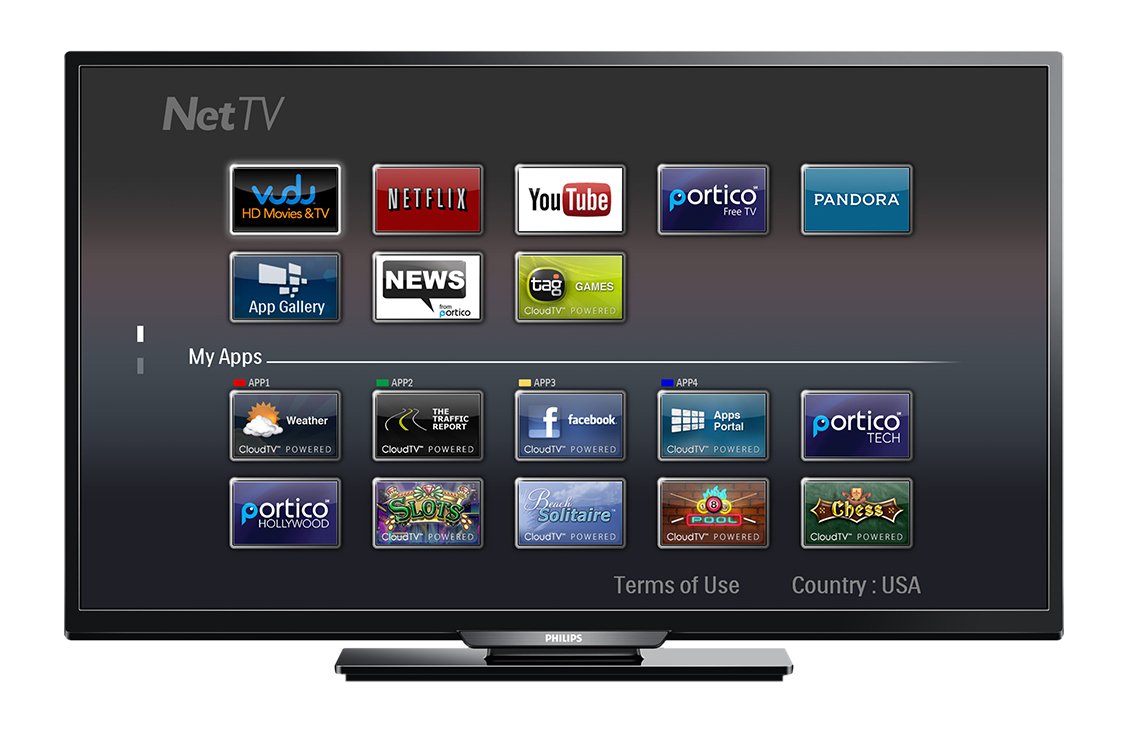
Immagine: Davanti view of the Philips 40PFL4609/F8 television, showing the Net TV interface with various application icons such as Netflix, YouTube, and other streaming services.
- Accesso alle app: Use the remote control to navigate to the Net TV menu and select applications like Netflix and YouTube.
- Connettività Wi-Fi: Ensure your TV is connected to a stable Wi-Fi network for optimal Smart TV performance.
5.4 Impostazioni immagine
Adjust picture settings to enhance your viewesperienza di ing:
- Pixel Plus HD: This video engine enhances detail, depth, and clarity.
- 120Hz PMR (Perfect Motion Rate): Provides sharp images in fast-moving scenes.
- Access the picture menu to adjust brightness, contrast, color, and sharpness.
5.5 Impostazioni audio
Optimize audio output:
- SRS TruSurround: Enjoy immersive sound with this integrated surround sound format.
- Access the audio menu to adjust bass, treble, and sound modes.
5.6 Riproduzione multimediale tramite USB
Connect a USB storage device to the TV's USB 2.0 port to view foto, riprodurre musica o guardare video.
6. Manutenzione
6.1 Pulizia dello schermo
Pulire delicatamente lo schermo con un panno morbido e privo di lanugine. Per macchie ostinate, dampImmergere il panno in una piccola quantità d'acqua o in un detergente specifico per schermi. Non spruzzare il liquido direttamente sullo schermo.
6.2 Pulizia del Casing
Pulisci la TV casincon un panno morbido e asciutto. Evitare l'uso di detergenti abrasivi o solventi.
6.3 Aggiornamenti software
This model may not support automatic software updates via the internet. Check the Philips support website for information on manual firmware updates, if available, to ensure optimal performance and access to the latest features.
7. Risoluzione Dei Problemi
Se riscontri problemi con il tuo televisore, fai riferimento alle seguenti soluzioni comuni:
- Nessun potere: Ensure the power cord is securely plugged into both the TV and the electrical outlet. Check the power outlet with another device.
- Nessuna immagine/suono: Verify the correct input source is selected. Check all cable connections (HDMI, DVI, antenna).
- Nessuna connessione di rete: Ensure your Wi-Fi router is working correctly. Re-enter your Wi-Fi password if necessary.
- Net TV Limitations: Some users have reported that the Net TV functionality on this model can be basic or limited in terms of additional app installation or software updates. If you find the built-in Smart TV features insufficient, consider connecting an external streaming device.
- Danni fisici: Upon unboxing, carefully inspect the screen and casing for any damage, especially along the edges, which could affect display quality. Contact your retailer immediately if damage is found.
- Il telecomando non funziona: Sostituisci le batterie AAA. Assicurati che non ci siano ostacoli tra il telecomando e il sensore IR del televisore.
8. Specifiche

Immagine: Lato view of the Philips 40PFL4609/F8 television, illustrating its slim profile and side-mounted connectivity options.
| Caratteristica | Descrizione |
|---|---|
| Nome del modello | Philips 40PFL4609/F8 |
| Dimensioni dello schermo | 40 pollici (100.3 centimetri) |
| Tecnologia di visualizzazione | LED, LCD |
| Risoluzione | 1080p Full HD |
| Frequenza di aggiornamento | 120 Hz (120Hz PMR) |
| Proporzioni | 16:9 |
| Tecnologia di connettività | Wifi |
| Servizi Internet compatibili | Netflix, YouTube |
| Caratteristiche speciali | Blu-Ray compatible, DVI Input, HDMI Input, Full HD, HD Compatible, Internet, Surround Sound |
| Porte HDMI | 1 |
| Porte USB 2.0 | 1 |
| Modalità di uscita audio | Stereo, suono surround |
| Integrated Surround Sound Format | SRS TruSurround |
| Descrizione dell'altoparlante | SRS TruSurround |
| Consumo energetico | 89 Watt |
| Voltage | 110 VAC 60 Hz |
| Peso dell'articolo | 8200 grammi |
| Standard di montaggio VESA | 200 x 200 millimetri |
| Colore | Nero |
| Dispositivi compatibili | Laptop, Tablet, Game Console, Headphones |
| Anno del modello | 2016 |
9. Informazioni sulla garanzia
This Philips television comes with a Garanzia limitata di 12 mesi provided by the manufacturer. Please retain your proof of purchase for warranty claims. The warranty covers manufacturing defects under normal use conditions.
10. Assistenza clienti
For further assistance, technical support, or warranty inquiries, please contact Philips customer service. Refer to the official Philips websul sito o sulla confezione del prodotto per i dettagli di contatto specifici per la tua regione.