
1. Introduzione
The SJCAM SJ5000 WiFi Novatek 96655 14MP FHD 1080p Sport Action Waterproof Camera is a versatile and robust device designed for capturing high-quality video and photos in various environments, including underwater. Featuring a Novatek 96655 processor and a Panasonic MN34110PA 14MP CMOS sensor, it delivers crisp 1080P Full HD video and 14-megapixel still images. Its compact design, 2.0-inch Ultra HD screen, and Wi-Fi capabilities make it an ideal companion for sports enthusiasts and adventurers.
2. Contenuto della confezione
Si prega di controllare il contenuto della confezione per assicurarsi che siano presenti tutti gli articoli:
- SJCAM SJ5000 Action Camera
- Impermeabile Casing
- Batteria ricaricabile agli ioni di litio
- Cavo USB
- Various Mounts and Adapters (e.g., Helmet Mount, Handlebar Mount, Tripod Adapter)
- Fibbia a sgancio rapido
- Panno per la pulizia delle lenti
- Manuale dell'utente (questo documento)
3. Prodotto finitoview
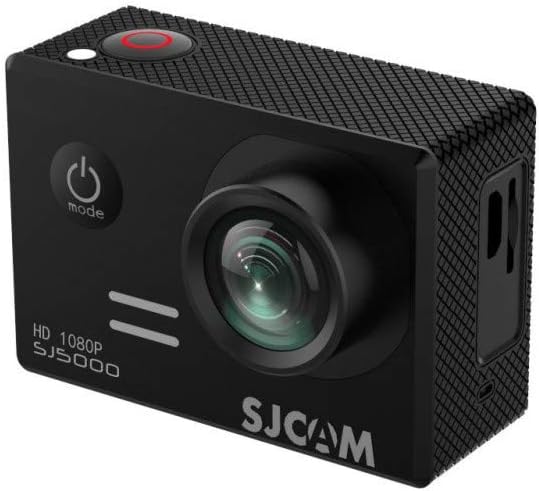
Figura 3.1: Fronte view of the SJCAM SJ5000 camera, showing the lens, power/mode button, and shutter button.
Familiarize yourself with the main components and controls of your SJCAM SJ5000 camera:
- Lente: 170° Ultra orthoscopic camera for wide-angle capture.
- Pulsante di accensione / modalità: Located on the front, used to power on/off and switch between modes (Video, Photo, Playback, Settings).
- Pulsante Otturatore/OK: Located on top, used to start/stop recording, take photos, or confirm selections.
- Pulsanti su/giù: Situato lateralmente, serve per la navigazione nei menu e per il controllo dello zoom.
- 2.0 inch Ultra HD Screen: Located on the back for live view, riproduzione e navigazione nei menu.
- Slot per scheda MicroSD: For inserting memory cards up to 32GB.
- Porta USB: For charging, data transfer, and USB-AV video output.
- Porta HDMI: For HD video output to external displays.
- Vano batteria: Houses the detachable battery.
4. Impostazione
4.1. Installazione della batteria
- Aprire il coperchio del vano batteria situato nella parte inferiore della fotocamera.
- Insert the provided Lithium-Ion battery, ensuring the contacts align correctly.
- Chiudere il coperchio del vano batteria finché non scatta saldamente in posizione.
4.2. Inserimento di una scheda MicroSD
The camera supports MicroSD cards up to 32GB. A Class 10 or higher speed rating is recommended for optimal performance.
- Individuare lo slot per la scheda MicroSD sul lato della fotocamera.
- Inserire la scheda MicroSD con i contatti dorati rivolti verso il retro della fotocamera finché non scatta in posizione.
- Per rimuoverla, spingere delicatamente la scheda verso l'interno finché non scatta fuori.
4.3. Carica della batteria
Connect the camera to a USB power source (e.g., computer, USB wall adapter) using the provided USB cable. The charging indicator light will illuminate during charging and turn off when fully charged.
5. Utilizzo della fotocamera
5.1. Accensione/Spegnimento
- Per accendere, tieni premuto il tasto Pulsante di accensione/modalità per alcuni secondi.
- Per spegnere, tenere premuto il pulsante Pulsante di accensione/modalità di nuovo finché lo schermo non si spegne.
5.2. Modalità di commutazione
Premere il tasto Pulsante di accensione/modalità repeatedly to cycle through the different operating modes: Video Recording, Photo Capture, Playback, and Settings.
5.3. Registrazione video
- Passa alla modalità Registrazione video.
- Premere il tasto Pulsante Otturatore/OK to start recording. A red indicator light will blink, and a timer will appear on the screen.
- Premere il tasto Pulsante Otturatore/OK again to stop recording. The indicator light will stop blinking.
5.4. Acquisizione foto
- Passa alla modalità Acquisizione foto.
- Premere il tasto Pulsante Otturatore/OK per scattare una foto.
- Multiple photo shooting modes are available: Single shot, Snapper, Time-lapse. Adjust these in the camera settings.
5.5. Connettività Wi-Fi
The Wi-Fi function allows you to operate and review content via an Android or iOS device using the dedicated SJCAM app.
- Download and install the official SJCAM app on your smartphone or tablet.
- On the camera, navigate to the settings menu and enable Wi-Fi. The camera's Wi-Fi network name (SSID) and password will be displayed.
- On your mobile device, go to Wi-Fi settings, find the camera's SSID, and connect using the provided password.
- Open the SJCAM app to control the camera, view cibo vivotage, e trasferimento files.
5.6. Riproduzione
In Playback mode, use the Up/Down buttons to navigate through your recorded videos and photos. Press the Pulsante Otturatore/OK per riprodurre un video o view una foto a schermo intero.
5.7. Web Funzione della fotocamera
The SJCAM SJ5000 can be used as a web camera. Connect the camera to your computer via the USB cable. Select the "PC Camera" or "Webcam" option on the camera's screen (if prompted) to enable this function.
6. Manutenzione
6.1. Assistenza generale
- Keep the camera and accessories away from dust, dirt, and sand.
- Evitare di esporre la fotocamera a temperature estreme.
- Do not drop or subject the camera to strong impacts.
- Conservare la fotocamera in un luogo fresco e asciutto quando non viene utilizzata.
6.2. Pulizia dell'obiettivo e dello schermo
Use a soft, lint-free cloth (like the one provided) to gently wipe the lens and screen. For stubborn smudges, a small amount of lens cleaning solution can be applied to the cloth, not directly to the lens/screen.
6.3. Waterproof Casing Cura
Dopo aver utilizzato il c impermeabileasing in saltwater, rinse it thoroughly with fresh water and allow it to air dry. Inspect the O-ring seal regularly for any debris or damage and ensure it is properly seated before each use.
7. Risoluzione Dei Problemi
| Problema | Possibile soluzione |
|---|---|
| La fotocamera non si accende. | Assicurarsi che la batteria sia completamente carica e inserita correttamente. Provare a caricare la fotocamera per almeno 30 minuti. |
| Non è possibile registrare video o scattare foto. | Controlla che sia inserita una scheda MicroSD e che ci sia spazio libero sufficiente. Assicurati che la scheda sia formattata correttamente (FAT32). |
| Problemi di connessione Wi-Fi. | Ensure Wi-Fi is enabled on the camera and your mobile device. Restart both devices. Verify the correct Wi-Fi password. |
| Scarsa qualità video/foto. | Clean the camera lens. Ensure adequate lighting. Check resolution settings in the camera menu. Use a high-speed MicroSD card. |
| La fotocamera si blocca o non risponde più. | Remove and reinsert the battery to perform a hard reset. Ensure firmware is up to date (check SJCAM webposto). |
8. Specifiche
| Caratteristica | Dettaglio |
|---|---|
| Modello | SJ5000 |
| Processore | Modello Novatek 96655 |
| Sensore di immagine | Panasonic MN34110PA 14MP CMOS |
| Risoluzione video | 1080P, 720P, WVGA |
| Risoluzione della foto | Fino a 14 MP |
| Angolo dell'obiettivo | 170° Ultra Orthoscopic |
| Dimensioni dello schermo | 2.0 Inches Ultra HD |
| Magazzinaggio | Micro SD (up to 32GB maximum) |
| Connettività | Wi-Fi, USB, HDMI |
| Caratteristiche speciali | Waterproof (with casing up to 30m), Vehicle-mounted recording support, Web camera function, Detachable battery |
| Dimensioni | 2.36 x 0.97 x 1.61 pollici |
| Peso | 1.88 once |
9. Garanzia e supporto
Per informazioni sulla garanzia, supporto tecnico o richieste di assistenza, fare riferimento al sito ufficiale SJCAM webo contattare il rivenditore autorizzato. Conservare la prova d'acquisto per eventuali reclami in garanzia.