
1. Introduzione
This manual provides essential instructions for setting up, operating, and maintaining your Sony ILCE-3500J digital camera with the SEL1850 lens. The ILCE-3500J features a 20.1 megapixel Exmor APS HD CMOS sensor, a BIONZ image processing engine, and the capability to record Full HD videos. It is designed for ease of use while delivering high-quality photographic results.

Figura 1: Fronte view of the Sony ILCE-3500J Digital Camera with SEL1850 Lens.
2. Per iniziare (installazione)
2.1 Disimballaggio e controllo dei contenuti
Carefully unpack your camera and ensure all components are present. The package should include the camera body and the SEL1850 lens.
2.2 Caricamento della batteria
Connect the camera to a PC or an AC outlet using the bundled micro USB cable to charge the battery. The battery can be charged while inside the camera.
2.3 Inserimento della batteria e della scheda di memoria
Open the battery/memory card cover located at the bottom of the camera. Insert the charged battery and a compatible memory card into their respective slots. Ensure they are inserted correctly until they click into place.

Figura 2: In basso view of the camera, illustrating the battery/memory card compartment and tripod mount.
2.4 Montaggio dell'obiettivo
Align the white index mark on the lens with the white index mark on the camera body. Mount the lens by turning it clockwise until it locks into place. To detach, press the lens release button and turn the lens counter-clockwise.
2.5 Accensione iniziale e impostazioni di base
Turn on the camera using the power switch. Follow the on-screen prompts to set the date, time, and language.
3. Funzionamento della fotocamera
3.1 Modalità di selezione
The mode dial on the top of the camera allows you to quickly select various shooting modes, including Program Auto (P), Aperture Priority (A), Shutter Priority (S), Manual Exposure (M), Superior Auto mode, and Scene Selection modes.

Figura 3: Posteriore view della fotocamera, che mostra lo schermo LCD, viewfinder, and control buttons including the mode dial.
3.2 Scattare foto
- Elettronico Viewcercatore: Use the built-in Tru-Finder electronic viewfinder for clear scene composition, which displays exposure and white balance effects in real-time.
- Messa a fuoco: The Peaking function highlights areas in focus, adjustable in sensitivity and color, to assist with precise manual focusing.
- Impostazioni di esposizione: The camera offers a wide ISO sensitivity range (up to 16000) for low-light conditions. Advanced features like Anti Motion Blur, Hand-held Twilight mode, and Auto HDR/D-range Optimiser (DRO) help manage challenging lighting.
- Flash incorporato: Activate the convenient built-in flash for additional illumination in dim environments or to add catch lights to portraits.
- Scatto continuo: Capture a sequence of images rapidly for moving subjects.
- Autoscatto: Set a delay before the shutter fires, useful for self-portraits or group shots.
3.3 Registrazione di video
Press the dedicated movie button to start recording Full HD videos in AVCHD format. The camera supports 60i/50i for smooth motion and 24p/25p for a cinematic look. Responsive autofocus tracks moving subjects during recording.
3.4 Funzioni speciali
- Effetto immagine: Apply 15 different in-camera effects to photos or movies, such as Toy Camera, Pop Color, or Partial Color, to enhance artistic expression. Effects can be previewed on the LCD screen.
- Inquadratura automatica degli oggetti: This function intelligently analyzes portraits, close-ups, or moving subjects and automatically crops the image for optimal composition. It includes Face Detection and Tracking Focus.
- Rilevamento del volto e Smile Shutter: The camera can detect up to eight faces and automatically capture a shot when smiles are detected.
- Panoramica panoramica: Capture wide panoramic images by simply sweeping the camera across a scene.
- Zoom immagine chiara: Extend the reach of your lens up to 2x without significant image degradation using Sony's By Pixel Super Resolution Technology. Combined with Digital Zoom and Smart Zoom, magnification can reach up to 8x.
- Effetto pelle morbida: Smooths skin tones and reduces blemishes in portraits, adjustable in three levels.
- TRILUMINOS Color: Quando viewed on a compatible TRILUMINOS Display TV, photos and movies will be displayed with rich, natural colors.
3.5 Accessories and Lens Compatibility
The camera features a Multi-Interface Shoe for attaching optional accessories like external flash units or video lights. You can also expand your lens options by using an A-mount adapter to utilize Sony A-mount lenses with your E-mount camera.
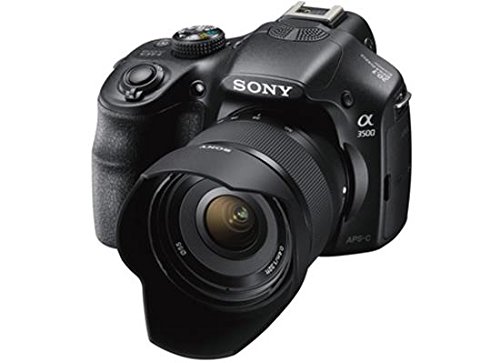
Figura 4: Fronte view of the camera with the SEL1850 lens and an attached lens hood.
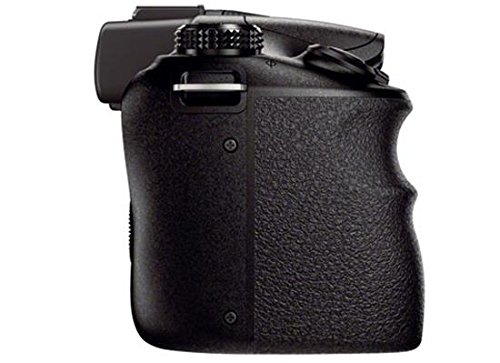
Figura 5: lato view highlighting the camera's ergonomic and secure grip design.
4. Manutenzione
4.1 Pulizia della fotocamera e dell'obiettivo
- Per pulire il corpo della fotocamera, utilizzare un panno morbido e asciutto.
- For the lens, use a lens brush to remove dust, then gently wipe with a lens cleaning cloth and lens cleaning solution if necessary. Avoid touching the lens surface with your fingers.
- Never use organic solvents such as alcohol or thinner to clean the camera.
4.2 Cura della batteria
- Conservare la batteria in un luogo fresco e asciutto quando non viene utilizzata.
- Evitare di scaricare completamente la batteria per periodi prolungati.
- Per preservarne la durata, caricare regolarmente la batteria, anche se non la si usa frequentemente.
4.3 Conservazione
When storing the camera for an extended period, remove the battery and memory card. Store the camera in a dry, well-ventilated area, preferably in a camera bag or case to protect it from dust and impacts.
5. Risoluzione Dei Problemi
If you encounter issues with your camera, consider the following basic troubleshooting steps:
- La fotocamera non si accende: Ensure the battery is fully charged and correctly inserted.
- Impossibile scattare foto: Check if a memory card is inserted and has sufficient free space. Ensure the lens cap is removed.
- Le immagini sono sfocate: Verify that the lens is clean and properly attached. Check focus settings and ensure adequate lighting.
- Il flash non si attiva: Confirm the flash mode is set correctly and the flash unit is raised (if applicable).
For more detailed troubleshooting and solutions to specific problems, please refer to the comprehensive user manual provided by Sony or visit the official Sony support websito.
6. Specifiche
| Caratteristica | Specificazione |
|---|---|
| Numero di modello | ILCE-3500J |
| Tipo di sensore | 20.1MP Exmor APS HD CMOS sensor |
| Processore di immagini | BIONZ |
| Sensibilità ISO | Fino a 16000 |
| Registrazione video | Full HD (AVCHD) |
| Viewcercatore | Tru-Finder Electronic Viewcercatore |
| Monitor LCD | 7.5 cm (3.0-type) wide TFT 230,400 dots |
| Dimensioni (LxWxH) | Dimensioni: 7.1 x 9.6 x 12.9 cm |
| Peso dell'articolo | 1.91 kg (with battery and memory card) |
| Componenti inclusi | Corpo della fotocamera e obiettivo |
7. Garanzia e supporto
For information regarding the product warranty, please refer to the warranty card included with your camera or visit the official Sony support websito. Se hai bisogno di assistenza tecnica o hai domande non trattate in questo manuale, contatta l'assistenza clienti Sony.
Puoi trovare risorse aggiuntive e informazioni di contatto su Negozio Sony su Amazon.