
1. Introduzione
The Comfast CF-WU720N is a compact 150Mbps Wireless USB Adapter designed to provide high-speed wireless connectivity for your desktop or notebook computer. It allows you to connect to a wireless network and access the internet, share files, and enjoy online gaming at speeds up to 150Mbps. This adapter is compliant with IEEE 802.11b/g/n standards and supports USB 2.0 for efficient data transfer.
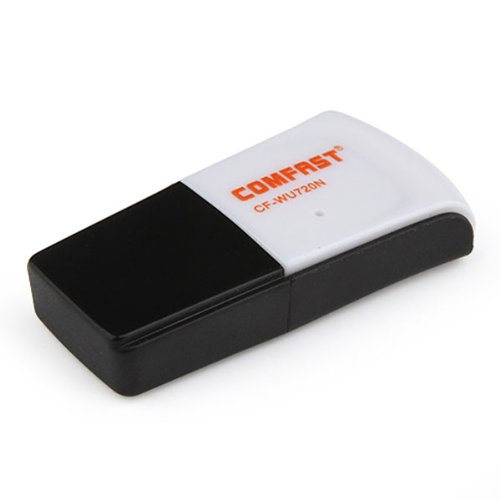
Image 1.1: The Comfast CF-WU720N Wireless USB Adapter, a compact device for wireless connectivity.
2. Caratteristiche del prodotto
- Meets IEEE 802.11b/g/n wireless standards.
- Supports USB 2.0 interface for broad compatibility.
- Utilizes Realtek 8191 SU chipset for reliable performance.
- Achieves wireless connection rates up to 150Mbps.
- Supports wireless roaming technology for seamless connectivity.
- Strong compatibility with various popular operating systems.
- Compact size: approximately 39 x 12 x 7mm (1.5 x 0.7 x 0.3 inches).
- Lightweight design: approximately 5g.
3. Contenuto della confezione
Si prega di verificare che tutti gli articoli siano presenti nel pacco:
- 1 x Comfast CF-WU720N Wireless USB Adapter
- 1 x Guida di installazione rapida
- 1 x CD-ROM Driver
- 1 x Scheda di garanzia

Image 3.1: The retail packaging for the Comfast CF-WU720N, showing the adapter inside.
4. Configurazione e installazione
4.1. Installazione del driver
Before connecting the USB adapter, it is recommended to install the necessary drivers from the provided CD-ROM. This ensures proper functionality and compatibility with your operating system.
- Insert the driver CD-ROM into your computer's optical drive.
- If the installer does not launch automatically, navigate to "My Computer" or "This PC," open the CD-ROM drive, and run the setup executable (e.g., "setup.exe" or "autorun.exe").
- Follow the on-screen instructions to complete the driver installation. You may be prompted to restart your computer after installation.
- Nota: If your computer does not have an optical drive, you may need to download the latest drivers from the manufacturer's official websito.
4.2. Collegamento dell'adattatore USB
Once the drivers are installed, you can connect the Comfast CF-WU720N Wireless USB Adapter to your computer.
- Locate an available USB 2.0 or 3.0 port on your desktop or laptop computer.
- Carefully insert the Comfast CF-WU720N adapter into the USB port. Ensure it is fully seated.
- The operating system should automatically detect the adapter and configure it using the installed drivers. A small LED indicator on the adapter may light up or blink, indicating activity.
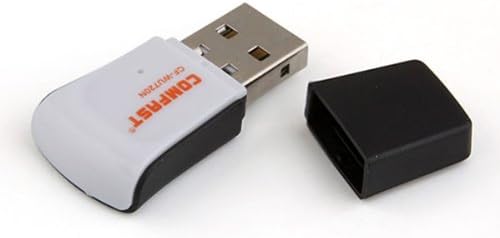
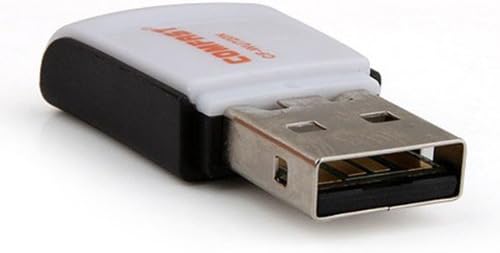
Image 4.1: The Comfast CF-WU720N adapter with its protective cap removed, revealing the USB connector. Image 4.2: A side view of the adapter, highlighting its compact design and USB interface.
5. Istruzioni per l'uso
After successful driver installation and adapter connection, you can now connect to a wireless network.
- Accedi alle impostazioni di rete:
- Finestre: Click the wireless network icon in the system tray (usually bottom-right corner).
- Mac OS: Click the Wi-Fi icon in the menu bar (usually top-right corner).
- Linux: Accedi alle impostazioni di rete tramite il gestore di rete del tuo ambiente desktop.
- Seleziona la tua rete: A list of available wireless networks (SSIDs) will appear. Select the name of your desired network.
- Collegare: Fare clic su "Connetti" o "Partecipa". Se la rete è protetta, verrà richiesto di immettere la chiave di sicurezza della rete (password).
- Conferma connessione: Once connected, the network icon will typically change to indicate a successful connection, and you should be able to access the internet.
6. Manutenzione
To ensure optimal performance and longevity of your Comfast CF-WU720N Wireless USB Adapter, follow these simple maintenance guidelines:
- Mantenere pulito: Gently wipe the adapter with a soft, dry cloth to remove dust. Avoid using liquid cleaners or solvents.
- Proteggi il connettore USB: When not in use, keep the protective cap on the USB connector to prevent dust and damage.
- Evitare condizioni estreme: Non esporre l'adattatore a temperature estreme, umidità o luce solare diretta.
- Maneggiare con attenzione: Evitare di far cadere o di sottoporre l'adattatore a forti urti.
- Aggiornamenti driver: Controllare periodicamente le istruzioni del produttore website for updated drivers to ensure the best performance and compatibility.
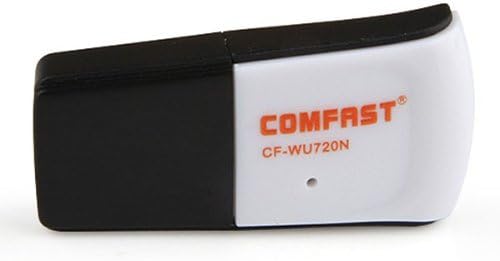
Image 6.1: The Comfast CF-WU720N adapter with its protective cap in place, ready for storage or transport.
7. Risoluzione Dei Problemi
If you encounter issues with your Comfast CF-WU720N Wireless USB Adapter, refer to the following common solutions:
| Problema | Possibile soluzione |
|---|---|
| Adattatore non rilevato / Nessuna rete Wi-Fi visibile. |
|
| Impossibile connettersi a una rete Wi-Fi specifica. |
|
| Velocità di connessione lenta o disconnessioni frequenti. |
|
8. Specifiche
| Caratteristica | Dettaglio |
|---|---|
| Modello | Modello CF-WU720N |
| Standard wireless | Standard di trasmissione dati IEEE 802.11b/g/n |
| Interfaccia | USB 2.0 |
| Chipset | Realtek 8191 SU |
| Velocità wireless | Fino a 150 Mbps |
| Gamma di frequenza | 2.4 GHz |
| Funzionalità di sicurezza | WPA/WPA2, WPA-PSK/WPA2-PSK, 64/128-bit WEP |
| Sistemi operativi | Windows XP/Vista/7/8/10, macOS, Linux (driver dependent) |
| Dimensioni (L x P x A) | Circa 39 x 12 x 7 mm (1.5 x 0.7 x 0.3 pollici) |
| Peso | Circa 5 g |
9. Garanzia e supporto
This product comes with a warranty as specified on the included Warranty Card. Please refer to the card for details regarding warranty period, terms, and conditions.
For technical support, driver updates, or further assistance, please visit the official Comfast websito web o contattare il servizio clienti. Le informazioni di contatto sono in genere reperibili sulla confezione del prodotto o sul cartellino del produttore. websito.
Si prega di conservare la ricevuta d'acquisto ai fini della garanzia.