
1. Introduzione
This manual provides essential instructions for the installation, operation, and maintenance of the BFT Elba BU Control Unit, model D113717 00002. This unit is designed for controlling gate automation systems, ensuring reliable and safe operation. Please read this manual carefully before proceeding with any installation or operation. Keep this manual for future reference.
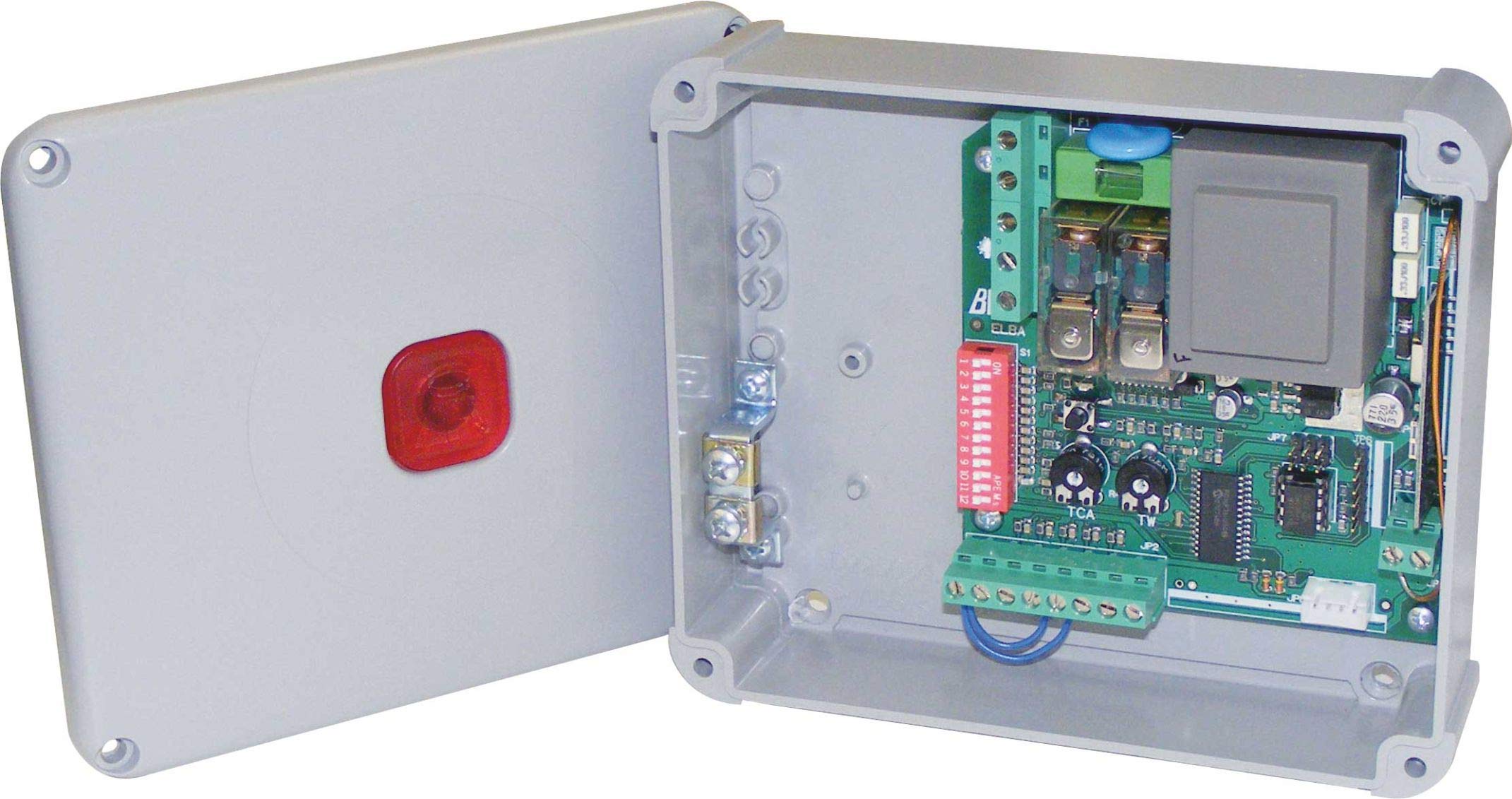
Figura 1: BFT Elba BU Control Unit D113717 00002. This image shows the main control board with various terminals and components.
2. Informazioni sulla sicurezza
AVVERTIMENTO: Incorrect installation or improper use can cause serious injury or damage.
- All installation and maintenance work must be performed by qualified personnel only.
- Scollegare l'alimentazione prima di eseguire qualsiasi intervento sulla centralina.
- Assicurarsi che tutti i collegamenti elettrici siano conformi alle normative elettriche locali e nazionali.
- Non esporre l'unità a umidità, pioggia o temperature estreme.
- Use only original BFT spare parts and accessories.
- Tenere i bambini e le persone non autorizzate lontano dal sistema di automazione del cancello durante il funzionamento.
3. Contenuto della confezione
Verificare che tutti i componenti siano presenti e integri al momento del disimballaggio:
- BFT Elba BU Control Unit (Model D113717 00002)
- Manuale di istruzioni (questo documento)
- Hardware di montaggio (viti, tasselli - possono variare)
- Wiring terminals (pre-installed or separate - may vary)
4. Configurazione e installazione
This section outlines the general steps for installing the control unit. Refer to detailed wiring diagrams provided with the product for specific connections.
- Montaggio: Securely mount the control unit in a protective enclosure, away from direct weather exposure and vibrations. Ensure adequate ventilation.
- Collegamento elettrico: Connect the main power supply (230V AC, 50 Hz) to the designated terminals. Ensure proper grounding.
- Collegamenti motore: Connect the gate motor(s) to the appropriate output terminals on the control unit.
- Collegamenti accessori: Connect safety devices (e.g., photocells, safety edges), command devices (e.g., push buttons, key switches), and other accessories (e.g., flashing lights) to their respective terminals.
- Connessione dell'antenna: If using a radio receiver, connect the antenna to improve signal reception.
- Accensione iniziale: After all connections are verified, apply power to the unit. Observe any indicator lights for initial status.
5. Istruzioni per l'uso
The BFT Elba BU Control Unit offers various functionalities for gate automation.
- Programmazione: The unit typically features a programming interface (e.g., dip switches, push buttons, or a display) to set operating parameters such as opening/closing times, force, pause times, and safety logic. Refer to the detailed programming guide for your specific gate system.
- Funzionamento manuale: In case of power failure or emergency, the gate can usually be disengaged for manual operation. Consult your gate motor's manual for instructions on manual release.
- Telecomando: If a radio receiver is connected, remote controls can be programmed to operate the gate. Follow the instructions for pairing remote controls with the receiver.
6. Manutenzione
Regular maintenance ensures the longevity and safe operation of your BFT Elba BU Control Unit and the entire gate automation system.
- Ispezione annuale: Have a qualified technician inspect the control unit and all associated components annually.
- Pulizia: Keep the control unit enclosure clean and free from dust, insects, and debris.
- Controllo del cablaggio: Controllare periodicamente tutti i collegamenti elettrici per verificarne la tenuta e l'assenza di segni di usura o corrosione.
- Dispositivi di sicurezza: Regularly test all safety devices (photocells, safety edges) to ensure they are functioning correctly.
- Disconnessione dell'alimentazione: Always disconnect the main power supply before performing any cleaning or inspection inside the control unit.
7. Risoluzione Dei Problemi
Prima di contattare il supporto tecnico, riview i seguenti problemi comuni e le loro potenziali soluzioni.
| Problema | Possibile causa | Soluzione |
|---|---|---|
| Il cancello non risponde ai comandi. | No power, remote control battery flat, safety device activated, faulty wiring. | Check power supply, replace remote battery, check safety devices for obstructions, inspect wiring connections. |
| Il cancello si apre ma non si chiude. | Safety device (e.g., photocell) obstructed or misaligned, programming error. | Clear obstruction from safety devices, clean photocell lenses, realign photocells, check programming parameters. |
| Gate operates intermittently. | Loose wiring connection, interference with remote signal, motor issue. | Check all wiring connections, ensure antenna is properly connected, consult a technician for motor diagnosis. |
If the problem persists after attempting these solutions, contact a qualified BFT service technician.
8. Specifiche
| Caratteristica | Dettaglio |
|---|---|
| Numero di modello | D113717 00002 |
| Marca | BFT |
| Ingresso volumetage | 230 V CA |
| Frequenza | Frequenza 50 Hz |
| Produttore | B.F.T. SRL |
| Dispositivi compatibili | Gate automation systems (e.g., gate motors, safety sensors) |
9. Garanzia e supporto
For detailed warranty information, please refer to the official warranty documentation provided with your product or visit the official BFT websito.
For technical support, spare parts, or service, please contact your authorized BFT dealer or a qualified service technician. Ensure you have your product model number (D113717 00002) and purchase details available when seeking support.
Importante: Any unauthorized repairs or modifications will void the product warranty.