
Datalogic QD2430-BKK1S
Manuale utente del lettore di codici a barre portatile Datalogic QuickScan QD2430 2D nero
Model: QD2430-BKK1S
Introduzione
This manual provides comprehensive instructions for the setup, operation, maintenance, and troubleshooting of your Datalogic QuickScan QD2430 2D Black Handheld Bar Code Reader. Please read this manual carefully before using the device to ensure proper functionality and to prevent damage.
The Datalogic QuickScan QD2430 is designed for fast and reliable scanning of 1D and 2D barcodes, offering omnidirectional reading capabilities and Datalogic's patented "Green Spot" technology for good-read feedback.
Contenuto della confezione
Verificare che tutti gli articoli siano presenti nel pacco:
- Datalogic QuickScan QD2430 Bar Code Reader
- Cavo USB
- Stand (if included with your model)
- Guida rapida (questo manuale è la guida completa)

Figure 1: Datalogic QuickScan QD2430 Bar Code Reader with its stand and connecting cables (USB and Ethernet-like connector).
Impostare
1. Collegamento dello scanner
- Ensure your computer or host system is powered off.
- Connect the USB cable to the port at the base of the QuickScan QD2430 reader.
- Connect the other end of the USB cable to an available USB port on your computer or host system.
- If using the stand, place the scanner securely into the stand.
- Power on your computer or host system. The scanner will typically be recognized automatically as a Human Interface Device (HID) keyboard or a virtual COM port, depending on its default configuration.

Figura 2: Fronte view of the Datalogic QuickScan QD2430 barcode reader securely placed in its adjustable stand.
2. Installazione del driver (se necessario)
For most operating systems, the QD2430 will function as a plug-and-play device. If the scanner is not recognized, you may need to install specific drivers. Refer to the Datalogic support website for the latest drivers and configuration utilities.
3. Configurazione iniziale
The QD2430 can be configured by scanning programming barcodes found in the full Datalogic programming manual (available on the Datalogic website). Common configurations include:
- Keyboard Wedge (HID) mode: Data is sent as keyboard input.
- Virtual COM Port mode: Data is sent to a serial port emulation.
- Symbology enablement/disablement.
- Prefix/Suffix addition to scanned data.
Istruzioni per l'uso
1. Scansione dei codici a barre
The QuickScan QD2430 supports both handheld and presentation scanning modes.
Modalità portatile:
- Tieni lo scanner comodamente in mano.
- Puntare la finestra di scansione verso il codice a barre.
- Press and hold the trigger button (blue button). An aiming cross will appear.
- Center the aiming cross over the barcode. The QD2430 features omnidirectional reading, allowing scanning from any angle.
- Once successfully scanned, the "Green Spot" will project onto the barcode, and an audible beep will sound (if enabled).

Figura 3: primo piano view of the Datalogic QuickScan QD2430 handheld scanner, showing its scanning window and the prominent blue trigger button.
Presentation Mode (with stand):
- Place the scanner in its stand.
- Present the barcode in front of the scanner's window. The scanner will automatically detect the barcode and perform the scan.
- The "Green Spot" and audible beep will confirm a successful read.
2. Green Spot Technology
Datalogic's patented "Green Spot" technology provides visual good-read feedback directly on the barcode, which is particularly useful in noisy environments or when audible feedback is undesirable.
3. Image Capture and Document Scanning
The QD2430 is capable of capturing images and scanning documents. This functionality typically requires specific software applications and configuration. Refer to the Datalogic programming manual for detailed instructions on enabling and utilizing image capture features.
Manutenzione
1. Pulizia dello scanner
Per garantire prestazioni ottimali, mantenere pulita la finestra di scansione. Utilizzare un panno morbido e privo di lanugine leggermenteampened with water or a mild, non-abrasive cleaner. Do not use harsh chemicals or abrasive materials, as they can damage the scanning window.
2. Conservazione
Store the scanner in a cool, dry place away from direct sunlight and extreme temperatures. The maximum recommended storage temperature is 300 Kelvin (approximately 27°C / 80°F).
3. Gestione dei cavi
Evitare di piegare o torcere eccessivamente il cavo USB. Assicurarsi che il cavo non venga schiacciato o posizionato sotto oggetti pesanti per evitare danni.
Risoluzione dei problemi
| Problema | Possibile causa | Soluzione |
|---|---|---|
| Lo scanner non si accende. | Cavo USB non collegato correttamente o porta USB difettosa. | Ensure USB cable is securely connected to both scanner and host. Try a different USB port or computer. |
| Lo scanner non legge i codici a barre. | Barcode damaged, symbology disabled, or scanner not configured correctly. | Check barcode for damage. Ensure the required symbology is enabled (refer to programming manual). Verify scanner is in the correct operating mode (e.g., HID keyboard). Clean scanning window. |
| No "Green Spot" or audible beep after scan. | Impostazioni di feedback disabilitate. | Refer to the programming manual to enable "Green Spot" and audible good-read feedback. |
| I dati scansionati vengono visualizzati in modo errato. | Layout della tastiera o impostazioni di formattazione dei dati errate. | Ensure the scanner's keyboard layout matches your system's keyboard layout. Check for any prefix/suffix settings that might be altering the data. |
Specifiche
| Caratteristica | Dettaglio |
|---|---|
| Modello | QD2430-BKK1S |
| Dimensioni (L x P x A) | 1.61 x 3.58 x 6.42 pollici (4.09 x 9.09 x 16.31 cm) |
| Peso | 5.1 once (144.6 grammi) |
| Connettività | Wired, USB Cable |
| Fonte di alimentazione | CC (tramite USB) |
| Capacità di scansione | 1D and 2D Barcodes, Omnidirectional reading |
| Feedback | Datalogic patented "Green Spot" technology, Audible Beeper |
| Sigillatura ambientale | IP51 (Water and Particulate Sealing Rating) |
| Massima temperatura di conservazione | 300 Kelvin (approx. 27°C / 80°F) |
| Dispositivi compatibili | General purpose computers, POS systems (Note: "iPhone" listed in source data may refer to compatibility with specific POS apps or systems, not direct iPhone connection for scanning.) |
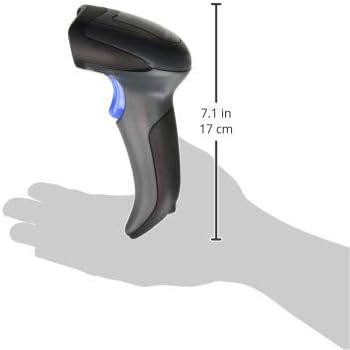
Figure 4: The Datalogic QuickScan QD2430 handheld scanner demonstrating its ergonomic size when held in a user's hand.
Garanzia e supporto
Datalogic products are covered by a standard manufacturer's warranty. For specific warranty terms and conditions, please refer to the warranty card included with your product or visit the official Datalogic websito.
For technical support, driver downloads, and additional programming manuals, please visit the Datalogic support portal:
- Funzionario Datalogic Websito: www.datalogic.com
- Sezione di supporto: Look for "Support" or "Downloads" on the websito.
When contacting support, please have your product model (QD2430-BKK1S) and serial number ready.
Ask a question about this manual
Ask about setup, troubleshooting, compatibility, parts, safety, or missing instructions. Manuals+ will review the question and use this page’s manual context to help answer it.