
Introduzione
This manual provides essential information for setting up, operating, and maintaining your Nokia 114 Dual SIM mobile phone. Please read these instructions carefully to ensure proper use and to maximize the device's performance and longevity.
Impostare
1. Installazione della scheda SIM
The Nokia 114 supports two Mini SIM cards. Follow these steps to install your SIM cards:
- Spegnere il telefono e rimuovere la cover posteriore.
- Locate the SIM card slots. The phone features an Easy Swap function for convenient SIM management.
- Insert your Mini SIM cards into the designated slots, ensuring the gold contacts face downwards and the cut corner aligns correctly.
- Riposiziona la cover posteriore.

Image: Nokia 114 with two Mini SIM cards being inserted.
2. Installazione della batteria
Per installare la batteria:
- With the back cover removed, align the Nokia BL-5C 1020 mAh Lithium-Ion battery with the battery compartment.
- Premere delicatamente la batteria in posizione finché non è saldamente inserita.
- Riposiziona la cover posteriore.
3. Carica della batteria
Before first use, fully charge the battery using the provided Nokia Charger AC-11.
- Collegare il caricabatterie alla porta di ricarica del telefono.
- Collegare il caricabatterie a una presa a muro.
- L'indicatore della batteria sullo schermo mostrerà l'avanzamento della ricarica.
- Una volta completata la carica, scollegare il caricabatterie.
Istruzioni per l'uso
1. Accensione/spegnimento
- To power on, press and hold the Power key until the phone vibrates and the screen lights up.
- To power off, press and hold the Power key, then select 'Power off' from the options.
2. Effettuare chiamate e inviare messaggi
- Use the keypad to dial a number and press the Call key to initiate a call.
- To send a message, navigate to the 'Messages' menu, select 'Create message', type your text using the keypad, and send it to the desired recipient.
3. Display e navigazione
The Nokia 114 features a 1.8-inch portrait QVGA LCD transmissive display with 128 x 160 pixels resolution. Navigation is primarily done using the physical keypad.
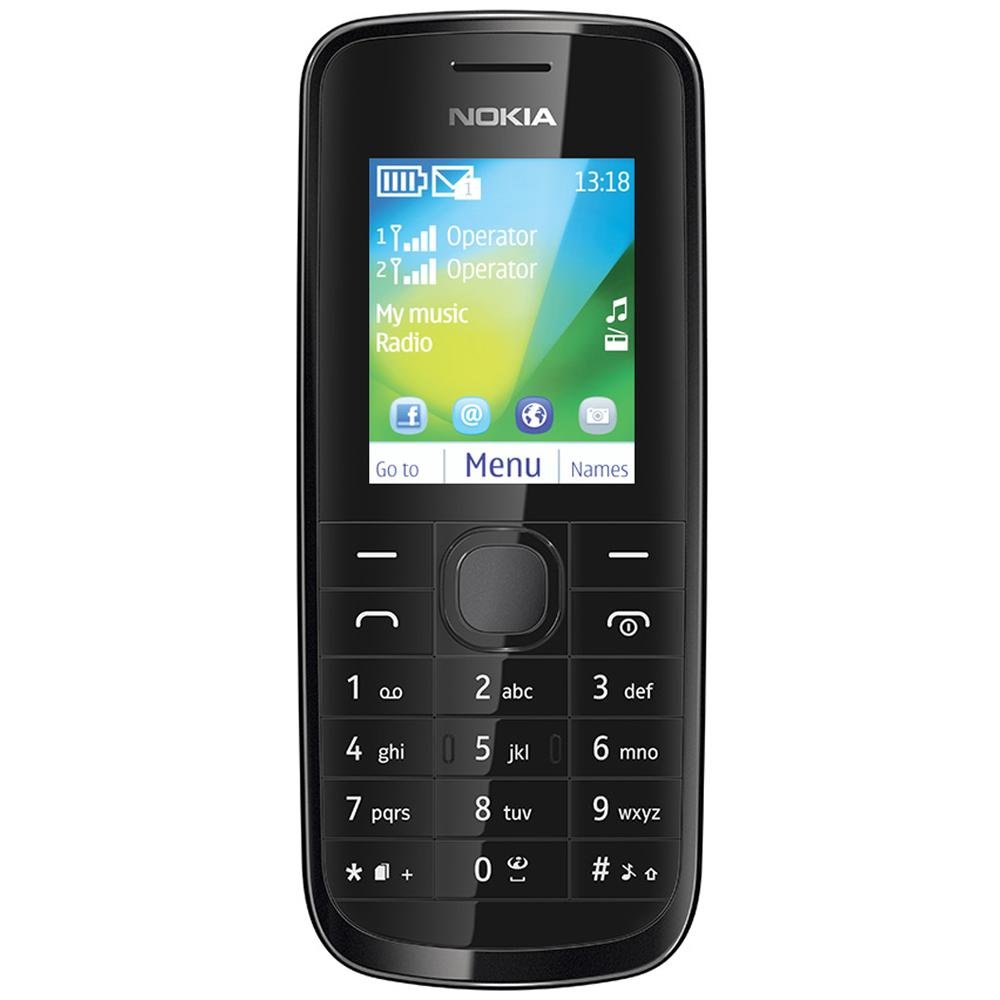
Immagine: Frontale view of the Nokia 114 mobile phone.
4. Utilizzo della fotocamera
The phone is equipped with a 0.3 MP rear camera. It supports basic photography features:
- Image Editor: Basic editing functions for captured photos.
- Zoom digitale 4x: Magnify subjects before capturing.
- Compensazione dell'esposizione: Regola i livelli di luminosità.
- Orientamento orizzontale: Capture photos in a wider format.
- The screen acts as a full-screen viewcercatore.
5. Memoria e archiviazione
The Nokia 114 has 16 MB of internal memory and supports expandable memory up to 32 GB via a microSD card (not included). This allows for storage of photos, music, and other files.
6. Connettività
The device supports 2G networks for calls and basic internet access. It does not support 3G or Wi-Fi connectivity.
7. Caratteristiche speciali
- E-mail: Access your email accounts on the go.
- FM Radio: Ascolta le tue stazioni radio preferite.
- Video Player & Music Player: Enjoy multimedia content.
- Internet & Facebook: Di base web browsing and social media access.
- Giochi: Giochi preinstallati per l'intrattenimento.
Manutenzione
1. Assistenza generale
- Mantenere il telefono asciutto. Precipitazioni, umidità e tutti i tipi di liquidi o umidità possono contenere minerali che corrodono i circuiti elettronici.
- Do not use or store the phone in dusty or dirty areas.
- Non conservare il telefono a temperature elevate. Le alte temperature possono ridurre la durata dei dispositivi elettronici, danneggiare le batterie e deformare o fondere alcuni tipi di plastica.
- Non conservare il telefono a basse temperature. Quando il telefono torna alla sua temperatura normale, al suo interno potrebbe formarsi umidità e danneggiare le schede elettroniche.
- Do not attempt to open the phone other than as instructed in this manual.
- Non far cadere, urtare o scuotere il telefono. Una manipolazione brusca può danneggiare i circuiti interni e i componenti meccanici.
- Non utilizzare prodotti chimici aggressivi, solventi o detergenti aggressivi per pulire il telefono.
2. Cura della batteria
- Only use original Nokia batteries and chargers.
- Non cortocircuitare la batteria.
- Non esporre la batteria a temperature estreme.
Risoluzione dei problemi
If you encounter issues with your Nokia 114, try the following basic troubleshooting steps:
- Il telefono non si accende: Assicurati che la batteria sia installata correttamente e carica. Prova a caricare il telefono per almeno 30 minuti prima di riprovare ad accenderlo.
- Scarsa qualità della chiamata: Check your network signal strength. Move to an area with better reception. Ensure the earpiece/speaker is not obstructed.
- Keypad auto-locks: This is a standard feature. To unlock, follow the on-screen instructions, usually by pressing a specific key combination.
- Dual SIM not functioning: Verify both SIM cards are correctly inserted and activated by your service provider. Check SIM settings in the phone menu.
- Phone freezing or unresponsive: Remove the battery, wait a few seconds, and then reinsert it and power on the phone.
For more complex issues, refer to the visual user guide included in the box or contact Nokia customer support.
Specifiche
| Caratteristica | Dettaglio |
|---|---|
| Marca | La Nokia |
| Modello | 114 |
| Display | 1.8-inch QVGA LCD (128 x 160 pixels) |
| Telecamera | Fotocamera posteriore da 0.3 MP |
| Memoria (interna) | 16 MB |
| Memoria espandibile | Fino a 32 GB (microSD) |
| Numero di slot per schede SIM | Dual SIM (Mini) |
| Tecnologia cellulare | 2G (GSM) |
| Sistema operativo | Nokia Series 40 Asha |
| Capacità della batteria | 1020 mAh agli ioni di litio |
| Tempo di conversazione | Fino a 10.5 ore (630 minuti) |
| Dimensioni (L x P x A) | Dimensioni: 11 x 4.6 x 1.5 cm |
| Peso | 80 grammi |
| Interfaccia umana | Tastiera |
| Materiale | Plastica |
Cosa c'è nella scatola
Your Nokia 114 package includes the following items:
- Telefono cellulare Nokia 114
- Nokia Charger AC-11
- Nokia Battery BL-5C 1020 mAh
- Nokia Stereo Headset WH-102
- Visual User Guide
Prodotto finitoview Video
Guarda questo video per una rapida panoramicaview of the Nokia 114's features and contents.
Video: Un breve riassuntoview of the Nokia 114 mobile phone, highlighting its display, camera, memory, connectivity, operating system, special features, and included accessories.
Garanzia e supporto
The Nokia 114 comes with a 1-year manufacturer warranty for the device and a 6-month manufacturer warranty for in-box accessories, including batteries, from the date of purchase. For warranty claims or technical support, please refer to the contact information provided in your visual user guide or visit the official Nokia support websito.