
HP M2N68-LA (462798-001)
HP M2N68-LA Motherboard User Manual
Model: M2N68-LA (Part No. 462798-001)
Introduzione
This manual provides essential information for the installation, operation, and maintenance of your HP M2N68-LA Motherboard (Part No. 462798-001). Please read this manual thoroughly before proceeding with installation to ensure proper functionality and to prevent damage to the component or other system parts.
The HP M2N68-LA is a robust motherboard designed for personal computer and server applications, supporting a range of AMD processors.
Prodotto finitoview
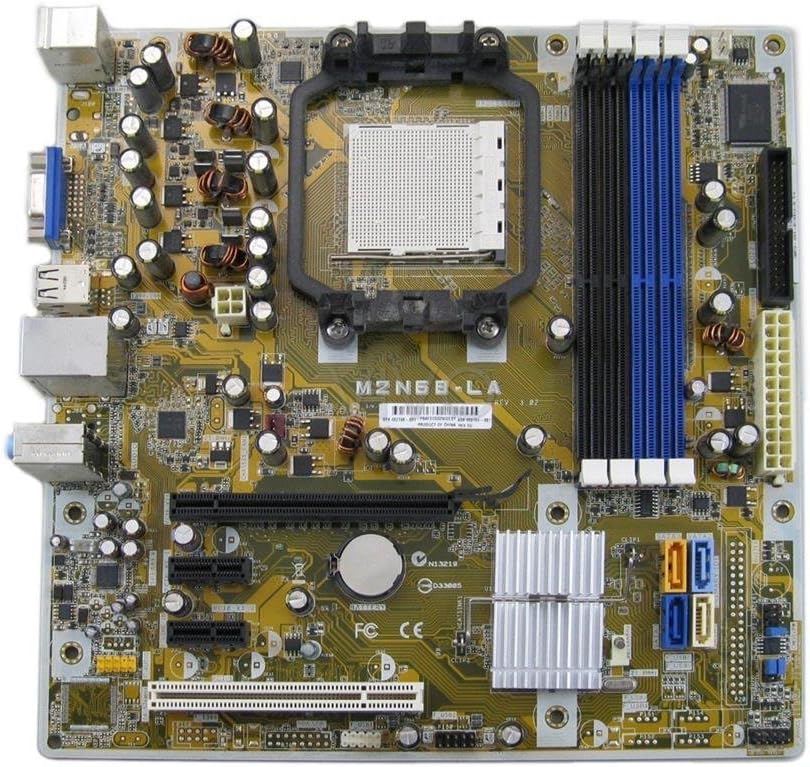
Figura 1: Top-down view of the HP M2N68-LA Motherboard. Key components visible include the CPU socket (center), four DDR2/DDR3 RAM slots (blue and black, right), PCI Express and PCI slots (bottom), SATA ports (orange/blue, bottom right), and various power connectors and headers.
The M2N68-LA motherboard features a Socket AM2 CPU socket, supporting AMD Athlon 64, Athlon 64 X2, Athlon 64 FX, Athlon II, Phenom, Phenom II, and Sempron processors. It is equipped with an AMD 785E chipset and provides 2 memory slots, supporting up to 8 GB of RAM. The board includes a 24-Pin main power connector and a PCI Express graphics card interface.
Configurazione e installazione
Before beginning installation, ensure your computer is powered off and disconnected from the main power supply. Always handle the motherboard by its edges to avoid static discharge.
1. Preparazione del telaio
Ensure your computer case is compatible with ATX form factor motherboards. Install the I/O shield provided with your chassis or the motherboard into the rear opening of the case.
2. Installazione della CPU
- Locate the CPU socket (Socket AM2) on the motherboard.
- Lift the load lever on the side of the CPU socket.
- Carefully align the CPU with the socket, ensuring the triangular marker on the CPU matches the marker on the socket. Do not force the CPU into place.
- Abbassare la leva di carico per fissare la CPU.
- Applicare uno strato sottile e uniforme di pasta termica sulla parte superiore della CPU.
- Install the CPU cooler according to its manufacturer's instructions, ensuring proper contact and secure mounting.
3. Installing Memory Modules
The motherboard has 2 memory slots. For optimal performance, refer to your system's memory configuration guidelines.
- Aprire le clip su entrambe le estremità dello slot di memoria.
- Allineare la tacca sul modulo di memoria con la chiave nello slot di memoria.
- Premere con decisione su entrambe le estremità del modulo finché le clip non scattano in posizione.
4. Montaggio della scheda madre
- Install standoffs in the chassis at the locations corresponding to the motherboard's mounting holes.
- Carefully place the motherboard into the chassis, aligning it with the standoffs and the I/O shield.
- Fissare la scheda madre con le viti, facendo attenzione a non stringerle eccessivamente.
5. Connecting Power and Peripherals
- Collegare il connettore di alimentazione principale ATX a 24 pin dell'alimentatore al connettore corrispondente sulla scheda madre.
- Connect the 4-pin or 8-pin CPU power connector (if applicable) to the motherboard.
- Connect SATA data cables from your storage drives (HDDs/SSDs) to the SATA ports on the motherboard.
- Connect front panel headers (power button, reset button, HDD LED, power LED, USB ports, audio jacks) to their respective pins on the motherboard. Refer to the motherboard's silkscreen labels for correct orientation.
- Install any expansion cards (e.g., graphics card in the PCI Express slot) and secure them.
Istruzioni per l'uso
Once all components are installed and connected, you can proceed with system startup.
1. Accensione iniziale
- Assicurarsi che tutti i cavi siano collegati saldamente.
- Connect the power cord to your power supply and a wall outlet.
- Premere il pulsante di accensione sul case del computer.
- Prestare attenzione ai segnali acustici POST (Power-On Self-Test) e all'output del display.
2. Configurazione BIOS/UEFI
Upon initial boot, you may need to enter the BIOS/UEFI setup to configure boot order, system time, and other settings. Typically, you press Del, F2, O F10 during startup to access the setup utility.
3. Installazione del sistema operativo
Install your preferred operating system (e.g., Windows, Linux) from a bootable USB drive or optical disc. Follow the on-screen prompts for installation.
4. Installazione del driver
After OS installation, install the necessary drivers for the motherboard's chipset, audio, network, and any integrated graphics. These drivers are typically available on the HP support websito o incluso nel tuo sistema operativo.
Manutenzione
Una manutenzione regolare contribuisce a garantire la longevità e il funzionamento stabile della scheda madre.
- Rimozione della polvere: Pulire periodicamente la scheda madre e i componenti dalla polvere utilizzando aria compressa. Assicurarsi che il sistema sia spento e scollegato prima di procedere alla pulizia.
- Controlli dei componenti: Ensure all cables and expansion cards are securely seated.
- Aggiornamenti del BIOS: Controlla il supporto HP website for BIOS updates. Only update the BIOS if necessary and follow the instructions carefully. Incorrect BIOS updates can render the motherboard inoperable.
- Pasta termica: If replacing the CPU cooler, reapply thermal paste to the CPU.
Risoluzione dei problemi
Questa sezione fornisce soluzioni ai problemi più comuni che potresti riscontrare.
| Problema | Possibile causa | Soluzione |
|---|---|---|
| Il sistema non si accende. | Collegamenti di alimentazione allentati, alimentatore difettoso, cablaggio errato del pannello frontale. | Check 24-pin and CPU power connectors. Verify front panel power switch wiring. Test power supply. |
| Nessun output di visualizzazione. | Loose graphics card, faulty monitor cable, incorrect display input. | Reseat graphics card. Check monitor cable and input source. Test with another monitor. |
| System beeps repeatedly. | Memory issue, graphics card issue, CPU issue. | Reseat RAM modules. Try one RAM module at a time. Reseat graphics card. Consult motherboard beep codes for specific diagnosis. |
| Operating system not booting. | Ordine di avvio errato, sistema operativo danneggiato, unità di archiviazione difettosa. | Check BIOS boot order. Attempt OS repair or reinstallation. Test storage drive. |
Specifiche
| Caratteristica | Dettaglio |
|---|---|
| Nome del modello | M2N68-LA |
| Numero di parte | 462798-001 |
| Marca | HP |
| Presa CPU | Presa AM2 |
| Processori compatibili | AMD Athlon 64, Athlon 64 X2, Athlon 64 FX, Athlon II, Phenom, Phenom II, Sempron |
| Tipo di chipset | AMD 785E |
| Slot di memoria disponibili | 2 |
| Capacità di archiviazione della memoria (max) | 8 GB |
| Tipo di connettore di alimentazione principale | 24 pin |
| Interfaccia della scheda grafica | PCI-Espresso |
| Dispositivi compatibili | Computer personale, server |
| Data prima disponibilità | 25 febbraio 2013 |
Garanzia e supporto
This HP M2N68-LA Motherboard is typically covered by a warranty period. For specific warranty details and support, please refer to the original vendor or HP's official support channels.
The product description mentions a 180-day warranty from the seller. For direct manufacturer support or updated drivers, visit the official Negozio HP or their support websito.
For returns or issues with the item purchased, please follow the quick and simple return process offered by your vendor.
Ask a question about this manual
Ask about setup, troubleshooting, compatibility, parts, safety, or missing instructions. Manuals+ will review the question and use this page’s manual context to help answer it.