
Introduzione
Thank you for choosing the Brondi Sydney DECT Phone. This manual provides comprehensive instructions for the proper setup, operation, and maintenance of your new cordless telephone. Please read this manual carefully before using the device to ensure optimal performance and longevity.
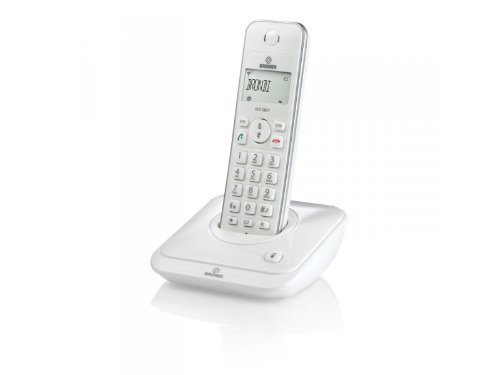
Figure 1: Brondi Sydney DECT Phone. This image shows the cordless handset resting on its charging base station.
1. Impostazione
1.1 Disimballaggio e componenti
Rimuovere con attenzione tutti gli articoli dall'imballaggio. Assicurarsi che tutti i componenti siano presenti:
- Brondi Sydney Handset
- Brondi Sydney Base Station
- Adattatore di alimentazione per stazione base
- Cavo della linea telefonica
- Rechargeable Batteries (AAA, quantity 2) (Può essere venduto separatamente)
- Manuale dell'utente (questo documento)
1.2 Installazione della batteria
Install the rechargeable batteries into the handset:
- Individuare il coperchio del vano batteria sul retro del telefono.
- Per aprirlo, far scorrere il coperchio verso il basso oppure premere il fermo.
- Inserire le due batterie ricaricabili AAA, rispettando la polarità corretta (+ e -) come indicato all'interno del vano.
- Richiudere il coperchio del vano batteria, assicurandosi che scatti saldamente in posizione.
Figure 2: Battery installation. This image illustrates the correct way to insert batteries into the handset's battery compartment.
1.3 Collegamento della stazione base
Connect the base station to power and the telephone line:
- Plug one end of the telephone line cord into the TEL LINE port on the base station.
- Collegare l'altra estremità del cavo telefonico alla presa telefonica a muro.
- Connect the power adapter to the DC IN port on the base station.
- Collega l'alimentatore a una presa elettrica standard.
- Place the handset on the base station to charge. The charging indicator on the handset or base station should illuminate. Allow at least 12-15 hours for the initial charge.
Figure 3: Base station connections. This image shows the power adapter and telephone line cord connected to the base station ports.
1.4 Handset Registration (If Needed)
Your handset is usually pre-registered to the base station. If the handset displays "Unregistered" or similar, follow these steps:
- Sulla stazione base, tieni premuto il tasto PAGE/LOCATE per circa 5 secondi finché la spia di registrazione non lampeggia.
- Sul portatile, vai a MENU, quindi seleziona REGISTRAZIONE or REGISTRARE IL PORTATILE.
- Enter the PIN (default is usually 0000 or 1234) e premere OK.
- The handset will display "Registering..." and then "Registered" upon successful completion.
2. Istruzioni per l'uso
2.1 Effettuare e ricevere chiamate
Per effettuare una chiamata:
- Premere il tasto PARLARE or VERDE pulsante.
- Componi il numero di telefono desiderato.
- Premere PARLARE again or wait for the call to connect.
Per ricevere una chiamata:
- Quando squilla il telefono, premere il tasto PARLARE or VERDE pulsante.
Per terminare una chiamata:
- Premere il tasto FINE or ROSSO button, or place the handset back on the base station.
2.2 ID chiamante
If you subscribe to Caller ID service, the caller's number and name (if available) will be displayed on the handset screen before you answer the call. You can review chiamate passate nel registro ID chiamante.
- To access the Caller ID log, press the REGISTRO CHIAMATE or CID pulsante.
- Utilizzare il SU/GIÙ arrow keys to scroll through entries.
- To call back an entry, press the PARLARE button while the entry is displayed.
2.3 Rubrica (20 voci)
Your Brondi Sydney phone can store up to 20 phonebook entries.
Per aggiungere una voce:
- Premere il tasto MENU pulsante.
- Selezionare RUBRICA TELEFONICA, Poi ADD NEW ENTRY.
- Enter the name using the alphanumeric keypad.
- Premere OK.
- Inserisci il numero di telefono.
- Premere SALVA or OK.
Per chiamare dalla rubrica:
- Premere il tasto RUBRICA TELEFONICA button or navigate via MENU.
- Utilizzare il SU/GIÙ arrow keys to find the desired entry.
- Premere il tasto PARLARE pulsante per comporre il numero.
2.4 Regolazione del volume
Durante una chiamata, premere il tasto SU/GIÙ arrow keys on the handset to adjust the earpiece volume. To adjust the ringer volume, navigate to MENU > SETTINGS > RINGER VOLUME when the phone is idle.
3. Manutenzione
3.1 Istruzioni per la pulizia
To keep your Brondi Sydney phone in good condition:
- Pulire il ricevitore e la stazione base con un panno morbido e asciutto.amp stoffa.
- Do not use harsh cleaning agents, abrasive cloths, or chemical solvents, as these can damage the surfaces.
- Ensure no liquid enters the openings of the device.
3.2 Cura della batteria
- Always use the supplied rechargeable batteries. Using non-rechargeable batteries can damage the handset.
- For optimal battery life, place the handset on the base station when not in use.
- Se il telefono non verrà utilizzato per un periodo prolungato, rimuovere le batterie per evitare perdite.
- Smaltire le vecchie batterie in modo responsabile secondo le normative locali.
3.3 Conservazione
Store the phone in a cool, dry place away from direct sunlight and extreme temperatures when not in use for long periods.
4. Risoluzione Dei Problemi
If you encounter issues with your Brondi Sydney phone, refer to the table below for common problems and solutions.
| Problema | Possibile causa | Soluzione |
|---|---|---|
| Nessun tono di linea | Il cavo della linea telefonica è scollegato. | Ensure the telephone line cord is securely plugged into the base station and the wall jack. |
| Nessun tono di linea | Base station power is off. | Check that the power adapter is securely connected to the base station and a working electrical outlet. |
| Il portatile visualizza "Non registrato" | Handset lost connection or was not registered. | Seguire i passaggi per la registrazione del telefono nella Sezione 1.4. |
| Scarsa qualità del suono / Statico | Il ricevitore è troppo lontano dalla stazione base. | Avvicinatevi alla stazione base. |
| Scarsa qualità del suono / Statico | Interferenze da altri dispositivi elettronici. | Allontanare la stazione base da altri dispositivi elettronici (ad esempio router Wi-Fi, forni a microonde). |
| Il portatile non si carica | Handset not properly seated on the base. | Ensure the handset is correctly placed on the base station and the charging contacts are clean. |
| Il portatile non si carica | Batteries are depleted or faulty. | Allow sufficient charging time (12-15 hours for initial charge). If issues persist, replace with new rechargeable AAA batteries. |
5. Specifiche
| Caratteristica | Dettaglio |
|---|---|
| Marca | Brondi |
| Modello | SIDNEY_BIANCO |
| Tipo | Telefono cordless DECT |
| ID chiamante | SÌ |
| Voci della rubrica | 20 |
| Anno del modello | 2012 |
| Dimensioni (confezione) | Dimensioni: 18.2 x 14 x 7.2 cm |
| Peso (confezione) | 479.99 grammi |
| Batterie richieste | 2 x AAA Rechargeable (Not included in package, but required for operation) |
| ASIN | B009WRN180 |
6. Garanzia e supporto
6.1 Informazioni sulla garanzia
Brondi products are covered by a limited warranty. Please refer to the warranty card included in your product packaging or visit the official Brondi websito per termini e condizioni di garanzia dettagliati. Conservare la prova d'acquisto per eventuali reclami in garanzia.
6.2 Assistenza clienti
For technical assistance, troubleshooting beyond this manual, or service inquiries, please contact Brondi customer support. Contact details can typically be found on the Brondi official websito o sulla confezione del prodotto.
- Supporto online: Visita il sito ufficiale Brondi websito.
- Supporto telefonico: Refer to your product packaging or Brondi's websito per i numeri di contatto regionali.