
1. Introduzione
This manual provides essential instructions for the proper setup, operation, and maintenance of your Plantronics CS55 Replacement Headset. The CS55 is designed to integrate with an existing Plantronics CS55 wireless headset system, serving as a direct replacement for a lost or damaged headset unit. This unit is intended to be paired with a compatible CS55 base station (sold separately or as part of a complete system).
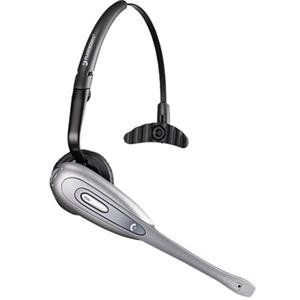
Image: The Plantronics CS55 Replacement Headset, shown from a front-side angle, highlighting its compact design and ear hook.
2. Contenuto della confezione
The Plantronics CS55 Replacement Headset package typically includes:
- Plantronics CS55 Headset Unit
- Ear hook (pre-attached or included separately for wearing options)
- Ear tips (various sizes for comfort, if applicable)
Note: This product is a replacement headset only. The CS55 base station, charging cradle, and AC power adapter are not included and are required for full functionality.
3. Configurazione e associazione
To use your new CS55 Replacement Headset, it must be paired with your existing CS55 base station. Follow these steps:
- Caricare l'auricolare: Place the new CS55 headset into the charging cradle of your CS55 base station. Ensure it is properly seated and the charging indicator light on the base (if available) confirms charging. Allow the headset to charge fully before initial use.
- Initiate Pairing on Base: Locate the pairing button on your CS55 base station. This button is typically small and recessed. Press and hold the pairing button on the base station until its indicator light begins to flash. This puts the base into pairing mode.
- Initiate Pairing on Headset: While the base station is in pairing mode, remove the fully charged headset from the charging cradle. The headset should automatically enter pairing mode. Some models may require pressing and holding a button on the headset itself to initiate pairing. Refer to your original CS55 system manual for specific headset pairing instructions if automatic pairing does not occur.
- Conferma associazione: Once the headset and base station successfully pair, the indicator lights on both devices will typically stop flashing and become solid, or turn off, indicating a successful connection. Test the connection by making a call.
If pairing fails, ensure both devices are fully charged and repeat the steps. Keep the headset close to the base during the pairing process.
4. Istruzioni per l'uso
Once paired, your CS55 Replacement Headset operates similarly to your original unit.
4.1. Indossare l'auricolare
- The headset is designed for on-ear placement. Adjust the ear hook for a comfortable and secure fit.
- Position the microphone boom approximately two finger-widths from the corner of your mouth for optimal voice clarity.
4.2. Funzioni di chiamata di base
- Risposta / chiusura delle chiamate: Premere il pulsante di controllo chiamate sull'auricolare.
- Controllo del volume: Use the volume up (+) and volume down (-) buttons on the headset to adjust listening volume.
- Disattiva audio: Press the Mute button on the headset to temporarily silence your microphone. Press it again to unmute. A tone or indicator light may confirm mute status.
4.3. Accensione/spegnimento
- To power on, press and hold the Call Control button until you hear an audible indication or see an indicator light.
- To power off, press and hold the Call Control button until you hear an audible indication or see an indicator light. Placing the headset in the charging cradle will also power it off and begin charging.
5. Manutenzione e cura
Proper care ensures the longevity and performance of your CS55 Replacement Headset.
- Pulizia: Use a soft, dry, lint-free cloth to clean the headset. For stubborn dirt, a slightly damp cloth with mild soap can be used, ensuring no moisture enters openings.
- Resistenza all'acqua: The Plantronics CS55 headset is non resistente all'acqua. Avoid exposure to liquids, moisture, and high humidity. Do not use in rain or near water sources.
- Magazzinaggio: When not in use, store the headset in its charging cradle or a cool, dry place away from direct sunlight and extreme temperatures.
- Cura della batteria: For optimal battery life, avoid fully discharging the battery frequently. Charge the headset regularly.
6. Risoluzione Dei Problemi
If you encounter issues with your CS55 Replacement Headset, try the following solutions:
- No Audio/Cannot Hear:
- Ensure the headset is properly paired with the base station.
- Check the volume levels on both the headset and your connected device/phone system.
- Verify the headset is charged.
- Microfono non funzionante:
- Check if the headset is muted. Press the Mute button to unmute.
- Ensure the microphone boom is correctly positioned.
- Impossibile associare l'auricolare:
- Ensure both the headset and base are fully charged.
- Repeat the pairing steps carefully, ensuring both devices are in pairing mode simultaneously.
- Move the headset closer to the base station during pairing.
- If possible, reset the base station (refer to your original CS55 base manual for reset procedures).
- Durata breve della batteria:
- Ensure the headset is making proper contact with the charging pins in the cradle.
- The battery may be nearing the end of its lifespan and may require replacement.
7. Specifiche
| Nome del modello | CS55 |
| Numero modello articolo | 7219503 |
| Marca | Plantronica |
| Tecnologia di connettività | Wired (for base connection/charging), Wireless |
| Tecnologia di comunicazione wireless | Bluetooth (for pairing with CS55 base) |
| Materiale | Plastica |
| Peso dell'articolo | 4 once |
| Dimensioni del prodotto (LxWxH) | 6 x 2 x 2 pollici |
| Batterie | 1 batteria non standard (obbligatoria) |
| Caratteristica speciale | Leggero |
| Tipo di controllo | Mute button, Call Control, Volume Up/Down |
| Livello di resistenza all'acqua | Non resistente all'acqua |
| Forma dell'auricolare | Sull'orecchio |
| Colore | Nero |
8. Informazioni sulla garanzia
Specific warranty details for the Plantronics CS55 Replacement Headset are not provided within this manual. For warranty terms and conditions, please refer to the original product documentation that came with your complete Plantronics CS55 system or visit the official Plantronics (now Poly) websito.
9. Informazioni di supporto
For technical support, additional product information, or to purchase accessories, please visit the official Plantronics (now Poly) support website. You may also find FAQs and troubleshooting guides there. Contact information for customer service can typically be found on the manufacturer's websito.