
Sennheiser HP-0057
Genuine Replacement Cable User Manual
For SENNHEISER HD570, HD590, HD500, HD200, HD210, HD270, HD490Live, HD490, EH2200, EH2270 Headphones
1. Prodotto finitoview
This manual provides essential information for the proper use and maintenance of your genuine replacement cable for select Sennheiser headphones. This 1-sided cable is designed to restore audio functionality to your compatible Sennheiser headphones, ensuring clear and reliable sound transmission.
Modelli compatibili:
- SENNHEISER HD570
- SENNHEISER HD590
- SENNHEISER HD500
- SENNHEISER HD200
- SENNHEISER HD210
- SENNHEISER HD270
- SENNHEISER HD490Live
- SENNHEISER HD490
- SENNHEISER EH2200
- SENNHEISER EH2270
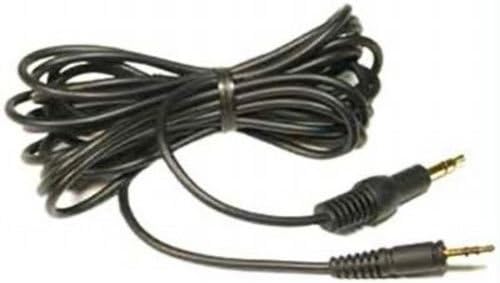
Image 1.1: The genuine replacement cable, coiled for packaging. This black cable features two 3.5mm male auxiliary connectors.
2. Configurazione e connessione
Follow these steps to properly connect your replacement cable to your Sennheiser headphones and audio source.
- Identificare i connettori: The cable has two 3.5mm male auxiliary connectors. One end is typically designed to connect to the headphone, and the other to your audio device. Ensure you identify the correct end for your specific headphone model.
- Collegamento alle cuffie: Locate the audio input port on your Sennheiser headphones. Gently insert the appropriate connector into the headphone port until it is fully seated. Do not force the connection.
- Connetti alla sorgente audio: Insert the other end of the cable into the 3.5mm audio output jack of your audio source (e.g., smartphone, computer, MP3 player).
- Prova audio: Once both ends are connected, play audio from your source to confirm proper sound transmission through your headphones.

Immagine 2.1: Un primo piano view of one of the 3.5mm male auxiliary connectors, showing its gold-plated tip and black housing.

Immagine 2.2: Un primo piano view of the second 3.5mm male auxiliary connector, similar in appearance to the first, designed for connecting to an audio device.
3. Istruzioni per l'uso
This replacement cable functions as a direct audio conduit. No specific operational steps are required beyond proper connection.
- Ensure both connectors are securely plugged in to prevent intermittent audio or signal loss.
- Evitare piegature o attorcigliamenti bruschi nel cavo, poiché nel tempo potrebbero danneggiare il cablaggio interno.
- Do not pull the cable by the wire itself when disconnecting; always grasp the connector housing.
4. Manutenzione e cura
Proper care will extend the lifespan of your replacement cable.
- Pulizia: Utilizzare un panno morbido e asciutto per pulire il cavo e i connettori. Evitare l'uso di prodotti chimici aggressivi o materiali abrasivi.
- Magazzinaggio: When not in use, coil the cable loosely. Avoid tight coiling or wrapping around sharp objects, which can stress the cable. Store in a cool, dry place away from direct sunlight and extreme temperatures.
- Gestione: Always handle the cable by its connectors, not the wire itself, when plugging or unplugging.
5. Risoluzione Dei Problemi
If you encounter issues with your replacement cable, try the following troubleshooting steps:
| Problema | Possibile causa | Soluzione |
|---|---|---|
| Nessun suono o suono intermittente | Loose connection; incorrect port; damaged cable. | Ensure both ends of the cable are fully inserted into the headphone and audio source. Try connecting to a different audio source or using a different cable to isolate the issue. Inspect the cable for visible damage. |
| Suona solo in un orecchio | Partial connection; headphone issue; cable damage. | Reseat both connectors. Test with another audio source or headphones to determine if the issue is with the cable, headphones, or audio source. |
| Audio statico o distorto | Poor connection; interference; damaged cable. | Ensure connections are secure. Move away from potential sources of electromagnetic interference. If the issue persists, the cable may be damaged. |
If troubleshooting steps do not resolve the issue, please refer to the Customer Support section.
6. Specifiche
| Caratteristica | Dettaglio |
|---|---|
| Marca | Sennheiser |
| Numero di modello | Modello HP-0057 |
| Tipo di connettore | Ausiliario |
| Tipo di cavo | AUSILIARIO |
| Dispositivi compatibili | Headphone (Sennheiser HD series listed in Product Overview) |
| Usi consigliati | Personal audio listening (music, movies, gaming) |
| Colore | Nero |
| Connector Gender | da maschio a maschio |
| Velocità di trasferimento dati | 6 Gigabits Per Second (Note: This specification seems unusual for an audio cable, but is listed in the provided data.) |
| Numero di pin | 3 |
| Dimensioni del prodotto | 6 x 2 x 4 pollici (dimensioni della confezione) |
| Peso dell'articolo | 0.81 once |
| Data prima disponibilità | 10 luglio 2012 |
7. Informazioni sulla garanzia
As a replacement part, this cable's warranty coverage may be subject to the terms and conditions of the original Sennheiser product it is intended for, or specific policies for replacement parts. Please refer to the warranty documentation provided with your original Sennheiser headphones or visit the official Sennheiser websito per informazioni dettagliate sulla garanzia.
8. Assistenza clienti
For further assistance, technical support, or inquiries regarding your genuine Sennheiser replacement cable, please contact Sennheiser customer service directly. You can typically find contact information on the official Sennheiser website or through the support section of your region's Sennheiser portal.
Risorse online:
- Official Sennheiser Websito: www.sennheiser.com
- Sennheiser Support Pages (check for your region)