
Introduzione
Grazie per l'acquistoasing the RCA 32LB45RQ 32-Inch Full 1080p 60Hz LCD HDTV. This manual provides essential information for the safe and efficient operation of your television. Please read it thoroughly before using the product and retain it for future reference.
Informazioni sulla sicurezza
Per evitare danni e garantire un funzionamento sicuro, osservare le seguenti precauzioni di sicurezza:
- Fonte di energia: Collegare il televisore solo all'alimentatore specificato.
- Ventilazione: Assicurare un'adeguata ventilazione attorno al televisore. Non ostruire le aperture di ventilazione.
- Liquidi: Keep the TV away from water and moisture. Do not place liquid-filled objects on the TV.
- Pulizia: Scollegare il televisore prima di pulirlo. Utilizzare un panno morbido e asciutto. Evitare detergenti liquidi.
- Posizionamento: Posizionare il televisore su una superficie stabile e piana oppure montarlo saldamente a una parete.
- Manutenzione: Non tentare di riparare il televisore da soli. Per qualsiasi intervento di assistenza, rivolgersi a personale qualificato.
Cosa c'è nella scatola
Verificare che tutti i componenti siano presenti:
- RCA 32LB45RQ 32-Inch LCD HDTV
- In piedi
- Telecomando
- 2 batterie AA
- Cavo di alimentazione
- Manuale dell'utente (questo documento)
Impostare
Fissaggio del supporto
To attach the included stand, carefully place the TV screen-down on a soft, clean surface to prevent scratches. Align the stand with the mounting holes on the bottom of the TV and secure it using the provided screws. Ensure the stand is firmly attached before placing the TV upright.

Davanti view of the RCA 32LB45RQ HDTV with its stand attached.
Montaggio a parete
The RCA 32LB45RQ is wall mountable. A VESA-compatible wall mount kit (sold separately) is required. Refer to the wall mount kit's instructions for proper installation. Ensure the wall can support the weight of the TV and the mount.
Collegamento delle periferiche
Your TV offers various input ports for connecting external devices:
- HDMI: Connect Blu-ray players, game consoles, cable/satellite boxes, and other HD devices. The TV has 3 HDMI ports.
- USB: Collega dispositivi di archiviazione USB per la riproduzione multimediale. La TV ha 1 porta USB.
- Componente (YPbPr): Connect older video devices using component video and stereo audio cables. The TV has 1 component input.
- VGA: Connect a computer. The TV has 1 VGA input.
- Antenna/cavo: Collegare un'antenna per le trasmissioni via etere o una connessione TV via cavo.

Posteriore view of the RCA 32LB45RQ HDTV, highlighting the various input ports for external devices.
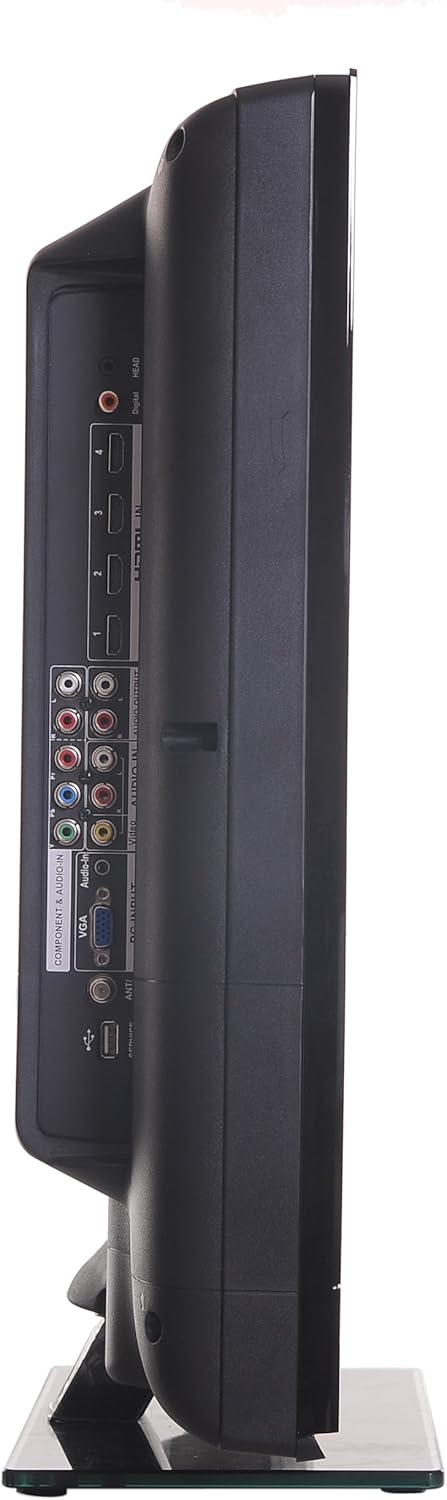
Lato view of the RCA 32LB45RQ HDTV, showing additional input ports for convenient access.
Accensione e configurazione iniziale
After connecting all desired devices and the power cord, press the power button on the TV or remote control. Follow the on-screen prompts for initial setup, including language selection, time zone, and channel scanning for over-the-air or cable channels.
Operativo
Controllo remoto finitoview
The included remote control allows you to access all TV functions. Insert the two AA batteries (included) into the remote control, observing polarity.
Funzioni di base
- Energia: Premere per accendere o spegnere il televisore.
- Volume su/giù: Regola il livello dell'audio.
- Canale su/giù: Cambia canale TV.
- Disattiva audio: Silence the TV audio.
- Ingresso: Cycle through available input sources (HDMI 1, HDMI 2, Component, VGA, TV).
Navigazione nei menu
Press the 'Menu' button on your remote to access the TV's settings. Use the arrow keys to navigate and 'OK' or 'Enter' to select options.
- Impostazioni immagine: Adjust brightness, contrast, color, tint, sharpness, and select picture modes (e.g., Standard, Dynamic, Movie).
- Impostazioni audio: Regola i bassi, gli acuti, il bilanciamento e seleziona le modalità audio (ad esempio, Standard, Musica, Film).
- Settings/Setup: Access general TV settings such as language, time, parental controls (V-Chip), and software updates.
Servizi Internet
The TV supports a built-in browser for basic internet access. Use the remote control to navigate web pagine.
Manutenzione
Pulizia dello schermo
Pulire delicatamente lo schermo con un panno morbido e privo di lanugine. Per macchie ostinate, strofinare leggermenteampen the cloth with water or a specialized screen cleaner (ensure it is safe for LCD screens) and wipe gently. Do not spray liquid directly onto the screen.
Assistenza generale
- Evitare di esporre il televisore alla luce solare diretta o a temperature estreme.
- Non posizionare oggetti pesanti sopra il televisore.
- Scollegare la TV durante i temporali o quando si prevede di non utilizzarla per lunghi periodi.
Risoluzione dei problemi
If you encounter issues with your TV, refer to the following table for common problems and solutions:
| Problema | Possibile causa/soluzione |
|---|---|
| Nessun potere | Assicurarsi che il cavo di alimentazione sia collegato saldamente al televisore e a una presa elettrica funzionante. Controllare la spia di alimentazione. |
| Nessuna immagine, ma l'audio è presente | Controllare la selezione della sorgente di ingresso. Assicurarsi che il dispositivo collegato sia acceso e stia inviando un segnale. |
| Nessun suono, ma l'immagine è presente | Controlla il livello del volume e assicurati che il televisore non sia disattivato. Verifica i collegamenti dei cavi audio per i dispositivi esterni. |
| Qualità dell'immagine scadente | Adjust picture settings (brightness, contrast, sharpness). Check antenna or cable connections. Ensure the input source is providing a high-quality signal. |
| Il telecomando non funziona | Controllare e sostituire le batterie. Assicurarsi che non vi siano ostacoli tra il telecomando e il sensore IR del televisore. |
Specifiche
Detailed technical specifications for the RCA 32LB45RQ HDTV:
| Caratteristica | Specificazione |
|---|---|
| Nome del modello | 32LB45RQ |
| Dimensioni dello schermo | 32 pollici |
| Tecnologia di visualizzazione | LCD |
| Risoluzione | 1080p (1920x1080) |
| Frequenza di aggiornamento | 60 Hz |
| Proporzioni | 16:9 |
| Rapporto di contrasto | 5000:1 |
| Tempo di risposta | 8 millisecondi |
| Tipo di sintonizzatore | ATSC, NTSC |
| Porte HDMI totali | 3 |
| Porte USB totali | 1 |
| Component Inputs | 1 |
| Ingressi VGA | 1 |
| Tecnologia di connettività | HDMI, USB |
| Servizi Internet supportati | Navigatore |
| Tipo di montaggio | Montaggio a parete |
| Colore | Nero |
| Peso dell'articolo | 17.4 libbre |
| Componenti inclusi | Supporto, televisore |
| Parental Control Technology | Chip a V |
| Anno del modello | 2017 |

Energy Guide label for the RCA 32LB45RQ HDTV, showing estimated yearly energy cost.
Garanzia e supporto
Informazioni sulla garanzia
This RCA 32LB45RQ HDTV comes with a Limited 1 year parts and labor warranty. Please retain your proof of purchase for warranty claims. For specific terms and conditions, refer to the warranty card included with your product or contact RCA customer support.
Assistenza clienti
For technical assistance, troubleshooting beyond this manual, or warranty service, please contact RCA customer support. Contact information can typically be found on the RCA official websito o sulla confezione del prodotto.