
1. Introduzione
The D-Link DGS-1500-28 SmartPro 24-Port Gigabit Switch is a high-performance Layer 3 managed switch designed for small to medium-sized businesses. It offers 24 Gigabit Ethernet ports and 4 SFP+ expansion slots, providing flexible connectivity and advanced management features. This manual provides essential information for the proper installation, configuration, operation, and maintenance of your DGS-1500-28 switch.
2. Contenuto della confezione
Verify the following items are present in your DGS-1500-28 package. If any item is missing or damaged, please contact your local D-Link reseller for assistance.
- DGS-1500-28 SmartPro 24-Port Gigabit Switch
- Cavo di alimentazione
- Rack Mount Kit (two brackets and screws)
- Piedini in gomma (per installazione desktop)
- Console Cable (RJ-45 to RS-232)
- Guida di installazione rapida
- CD-ROM (containing product documentation)
3. Descrizione fisica
3.1 Pannello frontale
The front panel of the DGS-1500-28 switch features the Gigabit Ethernet ports, SFP+ slots, and LED indicators for monitoring the switch's status and activity.
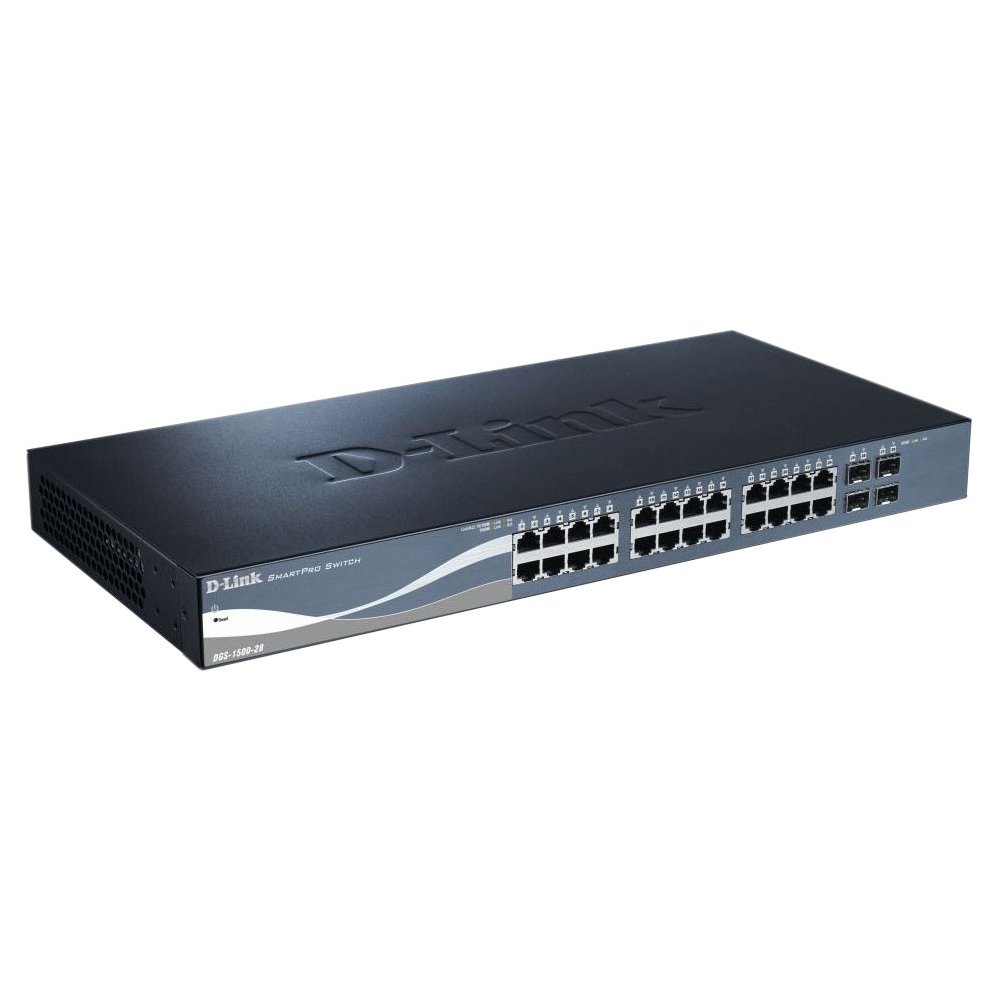
This image displays the front panel of the D-Link DGS-1500-28 switch, featuring 24 RJ-45 Gigabit Ethernet ports and LED indicators for status and activity.
- RJ-45 Ports (1-24): 10/100/1000 Mbps Gigabit Ethernet ports for connecting network devices.
- Slot SFP+ (25-28): 10 Gigabit Ethernet SFP+ ports for fiber optic connections or stacking.
- Indicatori LED:
- LED di potenza: Indica lo stato dell'alimentazione.
- LED Link/Act (per porta): Indica il collegamento di rete e l'attività dei dati.
- LED di velocità (per porta): Indicates connection speed (e.g., green for Gigabit, amber for 10/100 Mbps).
3.2 Pannello posteriore
The rear panel typically includes the power connector, grounding screw, and a console port for out-of-band management.
- Presa di alimentazione CA: Si collega al cavo di alimentazione CA fornito.
- Vite di messa a terra: Provides an optional connection for grounding the switch.
- Porta della console: RJ-45 port for connecting a console cable to a computer for command-line interface (CLI) management.
4. Installazione
4.1 Installazione desktop
- Fissare i quattro piedini in gomma alle aree incassate nella parte inferiore dell'interruttore.
- Place the switch on a sturdy, level surface that can support its weight.
- Assicurare un'adeguata ventilazione attorno all'interruttore.
4.2 Installazione su rack
- Attach the two rack-mounting brackets to the sides of the switch using the provided screws.
- Fissare lo switch in un rack standard da 19 pollici utilizzando le apposite viti per rack (non incluse).
- Ensure proper airflow and avoid placing the switch near heat sources.
4.3 Accensione dello switch
- Connect the AC power cord to the power receptacle on the rear panel of the switch.
- Collegare l'altra estremità del cavo di alimentazione a una presa di corrente adeguata.
- Il LED di alimentazione sul pannello frontale si illuminerà, indicando che lo switch è alimentato.
5. Configurazione iniziale
The DGS-1500-28 switch can be managed via a web-interfaccia utente grafica (GUI) basata su o un'interfaccia a riga di comando (CLI) tramite la porta della console.
5.1 Accesso al Webinterfaccia di gestione basata su
- Connect a computer to any of the switch's RJ-45 ports using an Ethernet cable.
- Configure your computer's IP address to be in the same subnet as the switch's default IP address (e.g., if the switch is 10.90.90.90, set your computer to 10.90.90.100).
- Aprire un web browser and enter the switch's default IP address (e.g., http://10.90.90.90) nella barra degli indirizzi.
- Enter the default username and password (refer to the Quick Installation Guide for default credentials).
- Upon successful login, you will access the switch's web interfaccia di gestione.
Nota: It is highly recommended to change the default password immediately after initial login for security purposes.
6. Funzionamento dell'interruttore
Once configured, the DGS-1500-28 operates as a network switch, forwarding data between connected devices. The LED indicators provide visual feedback on the operational status of the switch and its ports.
6.1 Port Functionality
- Porte RJ-45: Automatically detect the speed and duplex mode of connected devices (10/100/1000 Mbps).
- SFP+ Slots: Support 10 Gigabit Ethernet transceivers for high-speed uplinks or stacking. Ensure compatible SFP+ modules are used.
6.2 Funzionalità avanzate
The DGS-1500-28 series integrates advanced features to enhance network performance and management:
- Virtual Stacking: Allows up to 32 DGS-1500 series devices to be managed as a single unit with one IP address, simplifying network administration and scalability.
- Layer 3 Static Routing: Enables the switch to forward IP packets between different IP subnets based on static routes configured by the administrator. This feature is crucial for inter-VLAN routing and basic network segmentation.
7. Manutenzione
Regular maintenance ensures optimal performance and longevity of your DGS-1500-28 switch.
- Aggiornamenti del firmware: Controllare periodicamente il supporto D-Link webSito per le ultime versioni del firmware. L'aggiornamento del firmware può fornire nuove funzionalità, miglioramenti delle prestazioni e patch di sicurezza.
- Condizioni ambientali: Assicurarsi che l'interruttore funzioni entro gli intervalli di temperatura e umidità consigliati. Mantenere le aperture di ventilazione libere da ostruzioni.
- Pulizia: Utilizzare un panno morbido e asciutto per pulire l'esterno dell'interruttore. Non utilizzare detergenti liquidi o spray.
- Backup della configurazione: Regularly back up your switch configuration to an external device. This allows for quick restoration in case of a factory reset or device replacement.
8. Risoluzione Dei Problemi
This section provides solutions to common issues you might encounter with your DGS-1500-28 switch.
8.1 Il LED di alimentazione è spento
- Assicurarsi che il cavo di alimentazione sia collegato saldamente sia all'interruttore sia a una presa di corrente funzionante.
- Verificare che la presa di corrente funzioni collegandovi un altro dispositivo.
8.2 Nessun collegamento/attività su una porta
- Controllare la connessione del cavo Ethernet a entrambe le estremità. Provare un cavo diverso.
- Assicurarsi che il dispositivo collegato sia acceso e funzioni correttamente.
- Verify the port status in the switch's web interfaccia di gestione.
- Per le porte SFP+, assicurarsi che il modulo SFP+ sia inserito correttamente e compatibile.
8.3 Impossibile accedere Web Interfaccia di gestione
- Verifica che l'indirizzo IP del tuo computer si trovi nella stessa subnet dell'indirizzo IP dello switch.
- Verify the switch's IP address. If unknown, you may need to reset the switch to factory defaults (refer to the Quick Installation Guide for reset procedures).
- Assicurarsi che non vi siano conflitti di indirizzi IP sulla rete.
- Prova ad accedere all'interfaccia da un altro web browser or computer.
9. Specifiche
| Caratteristica | Descrizione |
|---|---|
| Marca | D-Link |
| Numero di modello | DGS150028 |
| Porti | 24 x 10/100/1000 Mbps RJ-45 Gigabit Ports, 4 x 10 Gigabit SFP+ Expansion Slots |
| Tipo di interfaccia | RJ45, SFP+ |
| Capacità di commutazione | Up to 128 Gbps (non-blocking) |
| Supporto a strati | Layer 3 (Static Routing) |
| Gestione | Web-based GUI, CLI, SNMP |
| Dispositivi compatibili | Desktop, Rack-mount devices |
| Peso dell'articolo | 0.01 Ounces (Note: This value may be a placeholder or incorrect. Refer to product packaging for accurate weight.) |
| Codice UPC | 790069362927 |
| ASIN | B007TL1DHM |
10. Garanzia e supporto
D-Link products are backed by a limited warranty. The specific terms and conditions of the warranty may vary by region and product. Please refer to the warranty information included with your product or visit the official D-Link website for detailed warranty statements.
For technical support, product documentation, firmware updates, and FAQs, please visit the D-Link support websito: www.dlink.com/support
You may also contact D-Link technical support directly through the contact information provided on their websito per la tua regione specifica.