
1. Introduzione
This manual provides essential instructions for the installation, operation, and maintenance of the CROUZET 88970051 Programmable Logic Controller (PLC), part of the Millenium3 CD20 series. It is intended for qualified personnel responsible for the setup and use of industrial control systems. Please read this manual thoroughly before attempting to install or operate the device.
2. Informazioni sulla sicurezza
Osservare sempre le seguenti precauzioni di sicurezza per prevenire lesioni personali e danni all'apparecchiatura:
- L'installazione e la manutenzione devono essere eseguite esclusivamente da personale qualificato e autorizzato.
- Disconnect all power sources before performing any wiring, installation, or maintenance work.
- Garantire un'adeguata messa a terra per evitare scosse elettriche.
- Verificare che il volume di fornituratage matches the device's specifications (24VDC).
- Do not operate the device in environments exceeding its specified temperature, humidity, or vibration limits.
- Protect the device from moisture, dust, and corrosive substances.
3. Prodotto finitoview
The CROUZET 88970051 is a compact and versatile Programmable Logic Controller (PLC) from the Millenium3 CD20 series, designed for various industrial automation applications. It features a robust design and integrated input/output capabilities.
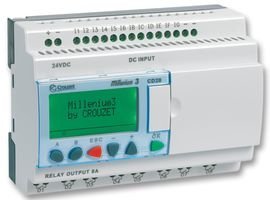
Figura 1: Fronte view of the CROUZET 88970051 Programmable Logic Controller (CD20).
This image displays the CROUZET Millenium3 CD20 controller. It features a green LCD screen for status and programming, along with four control buttons labeled 'A', 'B', 'ESC', and 'OK' for navigation and input. The top terminal block is clearly labeled 'DC INPUT' and includes connections for 24VDC power supply and digital inputs (11, 12, 13, 14, 15, 16, 18, 10, 10, 10, 10). The bottom terminal block is labeled 'RELAY OUTPUT 8A', indicating the presence of relay outputs for controlling external devices.
Caratteristiche principali:
- Controller Type: CD20
- Number of Digital Inputs: 12
- Numero di uscite digitali: 8
- Output Type: Relay (8A)
- Volume di fornituratage: 24 V CC
- Conforme alla direttiva RoHS
4. Configurazione e installazione
4.1 Montaggio
The CROUZET 88970051 is designed for DIN rail mounting within an electrical enclosure. Ensure adequate ventilation around the device to prevent overheating. Mount the controller vertically or horizontally as required, ensuring secure fastening.
4.2 Cablaggio
All wiring must comply with local and national electrical codes. Use appropriate wire gauges for power and signal connections.
- Collegamento dell'alimentazione: Connect a stable 24VDC power supply to the designated terminals on the 'DC INPUT' block. Observe polarity (+ and -).
- Ingressi digitali: Connect your sensors, switches, or other input devices to the digital input terminals (11-16, 18, 10, 10, 10, 10) on the 'DC INPUT' block. Refer to the specific wiring diagrams for your application.
- Uscite relè: Connect the loads (e.g., contactors, indicator lights) to the 'RELAY OUTPUT 8A' terminals. Each output is a relay contact, capable of switching up to 8A. Ensure the load current does not exceed this rating.
- Messa a terra: Ensure the PLC and associated equipment are properly grounded to minimize electrical noise and ensure safety.
4.3 Accensione iniziale
After completing all wiring, double-check connections for correctness and security. Apply power to the 24VDC supply. The PLC's display should illuminate, indicating successful power-up. The device will typically perform a self-test upon startup.
5. Istruzioni per l'uso
The CROUZET 88970051 (CD20) operates based on a user-defined program. Programming is typically performed using dedicated software on a computer and then transferred to the PLC. This section covers basic interaction with the device's front panel.
5.1 Controlli del pannello frontale
- Schermo LCD: Shows current status, program information, input/output states, and menu options.
- Buttons (A, B, ESC, OK):
- A / B: Used for navigating menus, adjusting values, or selecting options.
- ESC (Esc): Used to exit a menu, cancel an operation, or go back to the previous screen.
- OK: Used to confirm a selection, enter a menu, or acknowledge an action.
5.2 Esecuzione del programma
Once a program is loaded into the PLC, it will execute automatically upon power-up or when commanded to run. The display may show the program status or specific values as defined in the program. Monitor the input and output states via the display or connected indicators to verify correct operation.
5.3 Stopping and Starting
The PLC can typically be stopped or started via the front panel buttons or through the programming software. Refer to the programming software manual for detailed instructions on managing program execution modes.
6. Manutenzione
The CROUZET 88970051 is designed for minimal maintenance. Regular inspections and adherence to environmental guidelines will ensure long-term reliability.
6.1 Pulizia
Periodically clean the exterior of the PLC with a soft, dry cloth. Do not use abrasive cleaners, solvents, or excessive moisture. Ensure power is disconnected before cleaning.
6.2 Condizioni ambientali
Ensure the operating environment remains within the specified temperature and humidity ranges. Protect the device from direct sunlight, excessive heat, and vibrations. Keep the enclosure free from dust and debris.
6.3 Aggiornamenti firmware
Firmware updates, if available, should only be performed according to CROUZET's official instructions. Incorrect updates can lead to device malfunction.
7. Risoluzione Dei Problemi
This section provides guidance for common issues. For complex problems, contact CROUZET technical support.
- Nessuna alimentazione/Display spento:
- Check 24VDC power supply connections and voltage.
- Verify power supply is active.
- Inspect fuses if applicable in the power circuit.
- Input non rispondenti:
- Check wiring of input devices to the PLC.
- Verify input device functionality (e.g., sensor working).
- Ensure the program logic is correctly configured to read the inputs.
- Uscite non attivate:
- Check wiring of output loads.
- Verify load functionality (e.g., contactor coil, light bulb).
- Ensure the program logic is correctly configured to activate the outputs.
- Check if the output current exceeds the 8A relay rating.
- PLC Not Communicating:
- Verify communication cable connections.
- Check communication settings in the programming software.
- Ensure the correct drivers are installed on the computer.
8. Specifiche
| Parametro | Valore |
|---|---|
| Numero di modello | 88970051 |
| Tipo di controllore | CD20 (Millenium3 Series) |
| Ingressi digitali | 12 |
| Uscite digitali | 8 |
| Tipo di uscita | Relay (8A per output) |
| Volume di fornituratage | 24 V CC |
| Conforme alla direttiva RoHS | SÌ |
| Produttore | CROCETTA |
9. Garanzia e supporto
CROUZET products are manufactured to high-quality standards and are typically covered by a manufacturer's warranty against defects in materials and workmanship. The specific warranty period and terms may vary by region and product. Please refer to the official CROUZET websito o nella documentazione di acquisto per informazioni dettagliate sulla garanzia.
For technical assistance, troubleshooting beyond this manual, or warranty claims, please contact CROUZET customer support or your authorized distributor. Have your product model number (88970051) and serial number ready when contacting support.
CROUZET Official Websito: www.crouzet.com